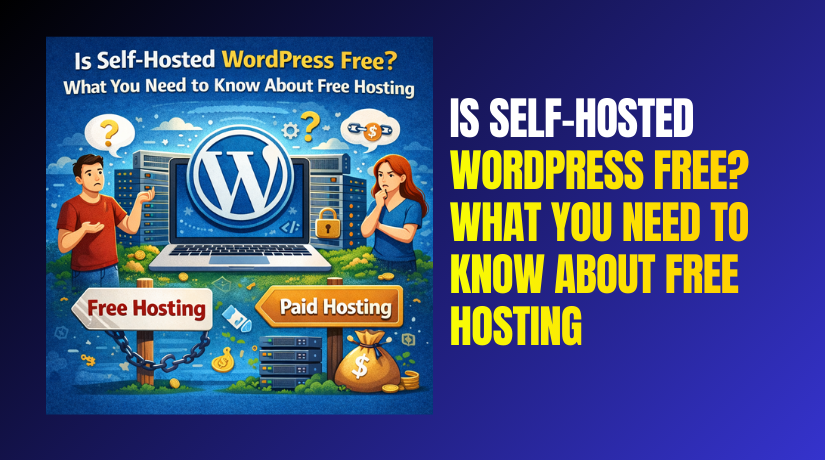
Is Self-Hosted WordPress Free? What You Need to Know About Free Hosting
Table of Contents
- Introduction
- What is Self-Hosted WordPress?
- How Does Self-Hosted WordPress Work?
- Is WordPress.org Free Without Hosting?
- How Much Does Self-Hosted WordPress Cost?
- Is Self-Hosted WordPress Cheaper Than Hosted WordPress?
- Comparing Self-Hosted WordPress and WordPress.com Pricing
- Can I Run WordPress Without Paid Hosting?
- WordPress Free Hosting Options
- Free Self-Hosted WordPress Solutions
- Free Alternatives to Paid Hosting for WordPress
- WordPress.org Free vs Paid Hosting
- WordPress Self-Hosted vs WordPress.com: Understanding the Pricing
- How to Use Self-Hosted WordPress Without Paying for Hosting
- Cheap Hosting for Self-Hosted WordPress Websites
- Conclusion
Introduction
One of the first choices you must make when creating a WordPress website is whether to utilize WordPress.com or self-hosted WordPress. But is self-hosted WordPress free? This is a common question, especially for beginners and small business owners.
Although WordPress is free in and of itself, hosting is the actual concern. Self-hosted WordPress requires you to purchase hosting services, unlike WordPress.com where hosting is included in the package. In this post, we will explore whether it’s possible to use self-hosted WordPress without paying for hosting, and if so, what your options are.
What is Self-Hosted WordPress?
Self-hosted WordPress refers to using WordPress.org software to create and manage a website. You have complete control over your website’s operation and design when you use self-hosted WordPress.
- Is WordPress.org free without hosting?
No, WordPress.org itself is free to use. It’s crucial to remember that in order to launch your website, you will require a domain name and hosting. These are additional costs that come with self-hosted WordPress.
Unlike WordPress.com, which provides an all-in-one service, self-hosted WordPress requires you to arrange your hosting. This gives you more control but also brings added responsibility. Here’s a breakdown:
- Freedom to Customize: You can install any plugin, choose your theme, and customize your site freely.
- Control Over Your Data: It’s crucial to remember that in order to launch your website, you will require a domain name and hosting.
- Scalability: As your website expands, you can simply upgrade or switch hosting plans.
How Does Self-Hosted WordPress Work?
To use self-hosted WordPress, you need three key elements:
- A Domain Name: This is your website’s URL, such as www.example.com.
- A Hosting Provider: This is where the files on your website are kept and made available to users.
- WordPress Software: The free software that you download from org to run your site.
Once you’ve obtained these, you install WordPress on your hosting account, and your website is up and running.
Is WordPress.org Free Without Hosting?
While WordPress.org itself is free, running a WordPress website requires hosting. One of the main distinctions between WordPress.com and self-hosted WordPress is this. While you can technically run WordPress on your local computer or use a free hosting service, this comes with many limitations. These options might lack the speed, security, and reliability that paid hosting provides.
Benefits of Self-Hosted WordPress
Self-hosted WordPress offers several advantages:
- Flexibility: You can alter the functionality of your website and install custom themes and plugins.
- Customization: You can edit your website’s code and design to suit your needs.
- Monetization: You have the freedom to run ads, use affiliate marketing, or sell products on your site.
You can create a website that accurately represents your vision with self-hosted WordPress. But remember, to get started, you need to choose the right hosting service.
Self-Hosted WordPress Costs
Knowing the fees associated with using self-hosted WordPress is one of the primary considerations. While WordPress.org itself is free, using it on a live website requires other services. These services are typically paid for and include:
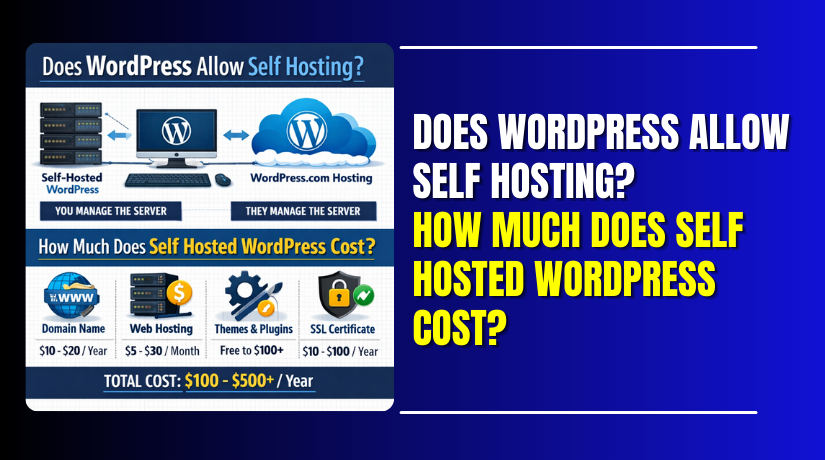
- Domain Name: This is the online address of your website, such as www.yoursite.com. Typically, domain names cost between $10 and $20 annually.
- Web Hosting: The files for your website are kept in hosting. Depending on the company and the kind of hosting, the monthly cost might vary from $3 to $30.
- Premium Themes & Plugins: Although WordPress offers free themes and plugins, you could want to spend money on premium versions to get more features. These can cost anywhere from $30 to $100 annually per theme or plugin.
The total cost of operating a self-hosted WordPress website is the sum of these expenses. However, even with these costs, it remains affordable compared to other website building platforms, and you have full control over your site’s functionality.
How Much Does Self-Hosted WordPress Cost?
The actual cost of a self-hosted WordPress site depends on several factors. The most basic costs are:
- Domain Name: $10–$20 per year.
- Web Hosting: Most entry-level shared hosting plans are around $3–$10 per month.
- SSL Certificate: Some hosts offer this for free, but others charge around $10–$100 per year.
When you add up these costs, a basic self-hosted WordPress site can cost between $50–$150 in the first year. Over time, your costs may increase depending on the scale of your site. For example, if your site grows and you need more storage or features, you may upgrade your hosting plan, which can raise your monthly fees.
- Extra Costs: For more functionality, you could also want to buy premium themes or plugins. These could add anywhere from $50 to $300 per year to your total costs, depending on what you need.
Is Self-Hosted WordPress Cheaper Than Hosted WordPress?
When comparing self-hosted WordPress to WordPress.com (hosted WordPress), there are a few key differences in pricing:
- Self-Hosted WordPress: As previously stated, you must pay for both a domain and hosting. This offers you greater customization options and complete control over your website.
- com: The free plan of WordPress.com is limited in features and customization options. If you choose the paid plans, they start at $4 per month and can go up to $45 per month, depending on the features you need.
In general, self-hosted WordPress tends to be more affordable in the long term, especially when you’re just getting started. However, the ongoing costs of premium themes, plugins, and hosting upgrades can add up as your site grows.
Comparing Self-Hosted WordPress and WordPress.com Pricing
- WordPress Self-Hosted Pricing:
- Domain: $10–$20/year
- Hosting: $3–$30/month
- Optional Premium Features: $30–$100+/year
- com Pricing:
- Free Plan: $0 (with limitations)
- Personal Plan: $4/month
- Premium Plan: $8/month
- Business Plan: $25/month
- eCommerce Plan: $45/month
The greatest flexibility and cost control are provided by self-hosted WordPress. You have the option to choose hosting according to your needs, and you can scale up or down as required.
Can I Run WordPress Without Paid Hosting?
A common question for WordPress beginners is: Can I run WordPress without paid hosting? Yes, but there are restrictions, to put it simply.
- Using Free Hosting Services: WordPress-compatible hosting services are available for free. These services typically come with restrictions on bandwidth, storage, and customization. Examples include WordPress.com’s free plan, which limits your ability to use plugins and custom themes.
- Local Hosting: You can also run WordPress on your computer for development purposes, but this is not suitable for a live website. Local hosting setups like XAMPP or WAMP allow you to experiment with WordPress without paying for hosting, but it won’t be visible to the public.
While free hosting options allow you to test WordPress or run a small site, they are generally not recommended for business or large websites due to limited features and lack of support.


WordPress Free Hosting Options
There are a few WordPress free hosting options available, but each comes with its own set of drawbacks:
- com Free Plan
- Pros: Free hosting with a WordPress-managed platform.
- Cons: Limited customization and you can’t install third-party plugins or themes.
- Storage: Only 3GB of storage is available, which can be a limitation as your site grows.
- InfinityFree
- Pros: Provides free limitless bandwidth and disc space.
- Cons: Ads displayed on your site, and no customer support. Additionally, free users do not receive SSL certificates.
- ByetHost
- Pros: MySQL databases, 1GB of storage space, and limitless bandwidth are all included in free hosting.
- Cons: Limited customer support, and the service is less reliable than paid alternatives.
- 000WebHost
- Pros: 1GB disk space and 10GB of bandwidth, ideal for small blogs or testing.
- Cons: Ads, limited features, and server downtime can be frequent.
Although these free hosting options may seem attractive, it’s crucial to consider the drawbacks of using free WordPress hosting. They usually come with significant downsides like slow speeds, lack of security, and unreliable uptime. They are best used for personal projects, testing, or learning, not for serious businesses or websites that require high performance and security.
Free Self-Hosted WordPress Solutions
If you want to run self-hosted WordPress but avoid paying for hosting, some free solutions might work for you:
- Localhost (XAMPP/WAMP)
- Pros: Completely free, no external hosting required. WordPress is compatible with personal computers.
- Cons: The site isn’t accessible to the public unless you configure additional software or hosting solutions.
- GitHub Pages
- Pros: Free hosting for static sites.
- Cons: WordPress requires a dynamic environment, so this is not a good fit for WordPress websites, which rely on databases and dynamic content.
- Cloud Hosting (Free Tiers)
- Pros: Providers like Google Cloud and Amazon Web Services offer free tiers with limited usage, perfect for small websites or testing.
- Cons: After the free usage period, charges apply. These platforms are also harder to configure for beginners.
While these free hosting solutions can work for small websites or development purposes, they still come with limitations. Free self-hosted WordPress solutions are ideal for those on a very tight budget or for experimental projects. However, they aren’t recommended for business websites that need reliable uptime, support, and security.
Free Alternatives to Paid Hosting for WordPress
While paid hosting offers reliability and robust features, some users might be looking for free alternatives to paid hosting for WordPress. Although these alternatives come with limitations, they can still be useful for small websites or personal projects. Let’s take a look at some options that provide free or affordable hosting solutions.
- Local Hosting with XAMPP/WAMP
- Pros: You can run WordPress on your own PC with these free software packages. Before launching your website, they are perfect for offline testing or development.
- Cons: Your site will only be accessible from your own computer unless you set up additional configurations, making this unsuitable for live websites.
- GitHub Pages (For Static Sites)
- Pros: For static websites, GitHub provides free hosting. It can be used to host JavaScript, HTML, and CSS files.
- Cons: WordPress requires a database and server-side scripting, making it incompatible with GitHub Pages. It’s only suitable for static sites, not WordPress.
- Cloud Hosting (Free Tiers)
- Providers like Google Cloud, Amazon Web Services (AWS), and Microsoft Azure offer free tiers with limited resources.
- Pros: Because these cloud services are scalable, you may expand them as your website expands. They offer enough resources for small websites and testing purposes.
- Cons: The free tiers usually come with strict limitations, such as storage and traffic limits. Also, these platforms may require technical expertise to set up and manage.
- InfinityFree
- Pros: Provides free unlimited disk space and bandwidth. WordPress and other CMS platforms can be installed for free.
- Cons: While free, you may encounter slow speeds, limited support, and occasional downtime. They also display ads on your site, which can affect user experience.
- AwardSpace
- Pros: Another free hosting option, offering 1GB disk space and 5GB bandwidth. It supports WordPress installations.
- Cons: The limitations in disk space and bandwidth make it less ideal for high-traffic sites. Like InfinityFree, it also comes with limited support.
You don’t need to invest any money to get started with these free WordPress hosting options. However, they come with trade-offs in terms of performance, security, and reliability. Making the switch to a premium hosting plan is typically the best option for a more serious website or business.
WordPress.org Free vs Paid Hosting
When deciding between WordPress.org free vs paid hosting, it’s important to consider your website’s needs. Here’s a comparison:
- Free Hosting:
- Pros: No cost to start, accessible for testing or small personal websites.
- Cons: Limited customization options, poor speed, lack of security, and no customer support. There may also be ads displayed on your site, which can reduce professionalism.
- Paid Hosting:
- Pros: Reliable uptime, full customization, premium support, and enhanced security. As your website expands, you may scale it.
- Cons: Monthly or yearly fees, ranging from $3 to $30 per month depending on the hosting plan.
While WordPress.org free hosting options are good for testing or personal sites, paid hosting provides the reliability and performance needed for a professional website. Paid hosting ensures your site is secure, fast, and properly supported.
WordPress Self-Hosted vs WordPress.com: Understanding the Pricing
When considering WordPress self-hosted vs WordPress.com pricing, it’s important to compare the overall costs and features:
- WordPress Self-Hosted:
- Costs: Hosting, a domain name, and any premium themes or plugins you decide to use are all paid for by you.
- Flexibility: You have full control over customization, plugins, and themes. You are free to monetize your website however you see fit.
- com:
- Costs: WordPress.com offers free plans but with limitations. The monthly cost of paid plans ranges from $4 to $45.
- Limitations: You cannot install third-party plugins or themes on the free or lower-tier plans. Additionally, you don’t have complete control over your website.
In general, self-hosted WordPress is a better choice if you need full control over your website. While WordPress.com may be a good starting point for beginners, it has more limitations, especially when it comes to customization and monetization.
How to Use Self-Hosted WordPress Without Paying for Hosting
For those looking to run self-hosted WordPress without paying for hosting, there are several methods to consider. Although there are free hosting choices, they are not appropriate for professional or large-scale websites due to their constraints. However, if you’re just starting out or testing ideas, these methods might be useful:
- Local Hosting with XAMPP/WAMP
- How it works: XAMPP or WAMP software can be used to run WordPress on your personal PC. These tools create a local server environment, allowing you to install WordPress and test your site without paying for hosting.
- Pros: You have total control over the creation of your website, and it’s free. This is an ideal option for learning and experimenting.
- Cons: The site won’t be accessible to the public unless you configure advanced settings. It’s also not practical for a live site or a website with high traffic.
- Free Cloud Hosting (Limited Resources)
- Free hosting tiers are available from a number of cloud providers, including Microsoft Azure, Google Cloud, and Amazon AWS. These platforms often have a free tier that includes limited storage and bandwidth, enough to run a small WordPress site.
- Pros: You can upgrade your plan if necessary because cloud hosting is expandable. It’s a good option for those who need more flexibility than free shared hosting provides.
- Cons: For beginners, setting up these services might be challenging. Once you exceed the free tier limits, charges will apply, making it unsuitable for long-term free hosting.
- GitHub Pages (For Static Sites)
- Static webpages can be hosted for free using GitHub Pages. However, WordPress requires a database and server-side processing, which GitHub Pages cannot provide.
- Pros: Free hosting for simple static websites.
- Cons: It doesn’t work for dynamic sites like WordPress. You’ll need to look for another solution if you want to use WordPress.
- Using Subdomains (Free Web Hosting Services)
- Some free web hosting providers offer subdomains (e.g., freehost.com) where you can host a WordPress site without paying for a domain.
- Pros: It’s completely free, and you get to use WordPress.
- Cons: The subdomain looks unprofessional, and your site may be slower and less secure. Additionally, your hosting environment is not entirely within your control.
While using self-hosted WordPress without paying for hosting is possible through free or alternative solutions, it’s essential to remember that these options come with limitations in terms of performance, security, and scalability.
Cheap Hosting for Self-Hosted WordPress Websites
For those who want to run a more professional WordPress website but keep costs low, cheap hosting for self-hosted WordPress websites is a great option. While these services are not as expensive as premium hosting, they still offer the reliability and performance needed to run a website effectively.
Here are a few inexpensive hosting choices to think about:
- 24×7 WP Support
- Pricing: Plans start at $2.25 per month.
- Features: Free domain for the first year, SSL certificate, and 24/7 support. It’s officially recommended by WordPress.
- Pros: Great for beginners, easy to set up, and offers good customer support.
- Cons: Renewal rates are higher, and some features like backups are limited in the basic plan.
- Hostinger
- Pricing: Starts at $1.99 per month.
- Features: 30GB SSD storage, free website builder, and SSL certificate included.
- Pros: Very affordable for new users and provides decent performance and security features.
- Cons: Support is limited to chat and tickets; phone support comes with higher-tier plans.
- SiteGround
- Pricing: Plans start at $2.99 per month.
- Features: Free daily backups, SSD storage, and excellent customer support.
- Pros: Known for fast customer service and great uptime. SiteGround also offers free migrations for your WordPress site.
- Cons: Higher renewal prices and resource limitations on basic plans.
- A2 Hosting
- Pricing: Starts at $1.00 per month.
- Features: Free website migration, free SSL, and 99.9% uptime.
- Pros: Fast page loading times thanks to their Turbo Servers. Good for small businesses and personal sites.
- Cons: The least expensive plan has certain restrictions, and renewal costs can be high.
These affordable hosting options provide a low-cost entry into the world of self-hosted WordPress. While they are budget-friendly, they still deliver the essential features that make running a WordPress site smooth and efficient.
Conclusion
In conclusion, self-hosted WordPress provides flexibility and control but comes with hosting costs. Although there are free hosting solutions, they frequently have security and performance issues. For a more reliable solution, cheap hosting for self-hosted WordPress websites offers a great balance of affordability and performance.
If you’re unsure about which hosting option to choose or need help with WordPress setup, WooHelpDesk is here to assist. Our knowledgeable staff can help you with the procedure and make sure your WordPress website functions properly. Contact us today for expert support on your WordPress hosting needs.