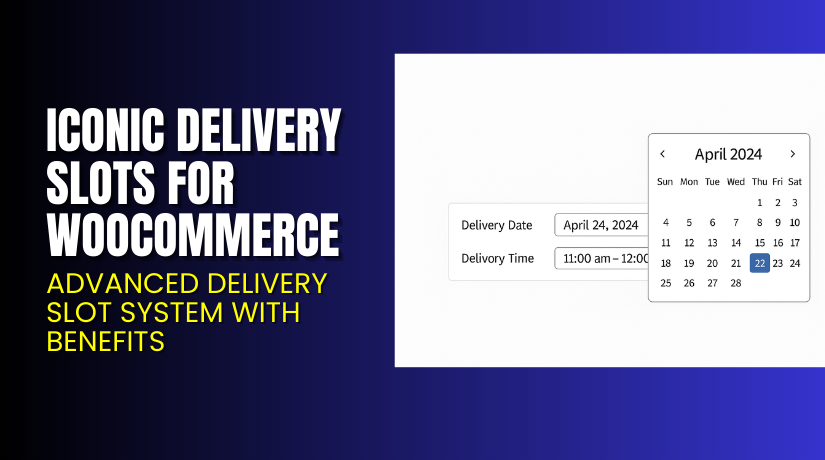
Iconic Delivery Slots for WooCommerce – Advanced Delivery Slot System with Benefits
Table of Contents
- Introduction
- What is Iconic Delivery Slots for WooCommerce?
- Features of Iconic Delivery Slots for WooCommerce
- How to Install and Configure Iconic Delivery Slots for WooCommerce
- Iconic Delivery Slots for WooCommerce – Pricing & Plans
- My Experience with Iconic Delivery Slots for WooCommerce
- Who Should Use This Plugin?
- Final Verdict
- FAQ
Introduction
Running a WooCommerce store requires handling many daily tasks. Store owners must process orders, update stock, and manage customer requests. Shipping orders on time is one more big task. Many stores struggle to offer delivery on the right day. Many customers want to choose their delivery date. But WooCommerce does not offer this feature by default. This creates delays and confusion for both customers and store owners.
Customers often send messages asking about delivery dates. This takes extra time and slows down your support team. Some orders arrive early, while others arrive late. This hurts the customer experience and reduces repeat orders. Many stores also face issues with delivery staff schedules. Without proper scheduling, orders get mixed up.
This is where a delivery scheduling plugin becomes helpful. A good delivery slot plugin allows customers to choose available dates and time slots during checkout. It reduces support requests and saves your staff many hours each week. It also improves order accuracy and customer trust.
In this article, we will explore Iconic Delivery Slots for WooCommerce, its features, setup steps, pricing, pros, cons, and more.
👉If you ever need help installing or troubleshooting any plugin, you can try our Installation & Troubleshooting Services for quick support.
What is Iconic Delivery Slots for WooCommerce?
Iconic Delivery Slots for WooCommerce is a smart delivery date and time selection plugin for WooCommerce stores. The plugin allows customers to pick their preferred delivery date and time slot during checkout. This gives customers more control and improves the shopping experience. It also helps store owners manage daily deliveries with ease.
This plugin is developed by IconicWP, a trusted WordPress plugin company. They build premium WooCommerce extensions that improve store functions. The plugin works smoothly with most themes and extensions. It offers helpful tools like custom delivery slots, holiday blocks, same-day limits, next-day cutoffs, and flexible scheduling.
The plugin is available as a Premium version only. It offers advanced delivery rules and full control over time slots. You can limit the number of orders per slot, per day, or per week. You can also set minimum delivery windows and prevent last-minute bookings.
Iconic Delivery Slots for WooCommerce is perfect for grocery stores, bakeries, restaurants, flower shops, and any business offering scheduled delivery. It reduces chaos and brings structure to your delivery workflow.
Features of Iconic Delivery Slots for WooCommerce
| Feature | Description | Why It Matters |
| Custom Delivery Dates | Allows customers to choose a delivery date at checkout. | Helps store owners reduce delivery confusion. |
| Flexible Time Slots | Create custom time slots for each day of the week. | Saves time by offering organized delivery timing. |
| Order Limits Per Slot | Limit how many orders can be placed in one slot. | Prevents overload and keeps delivery smooth. |
| Holiday and Blackout Dates | Block dates when delivery is not possible. | Avoids wrong bookings on holidays. |
| Cutoff and Shipping Limits | Set same-day or next-day delivery cutoffs. | Improves order planning and staffing. |
| Calendar Popup Option | Simple calendar interface for customers. | Improves UX and reduces confusion. |
| Delivery Fees | Add extra fees for premium delivery slots. | Increases revenue and offers priority service. |
| WooCommerce Compatibility | Works with most shipping and checkout plugins. | Reduces conflict and ensures smooth use. |
How to Install and Configure Iconic Delivery Slots for WooCommerce
- Download the plugin from the Official Purchase Page:
- Go to WordPress Dashboard → Plugins → Add New → Upload Plugin.
- Select the ZIP file and click Install Now.
- Activate the plugin once the installation completes.
- Go to WooCommerce → Delivery Slots to open the settings panel.
- Configure delivery days, time slots, blackout dates, and order limits.
- Update your checkout settings and test the full flow.
- Check if your theme or checkout plugins conflict with delivery fields.
- Run a test order to confirm the time slot displays correctly.
- Save all settings and go live.
💡 If you face any setup issues, styling problems, or conflicts, try our Installation & Troubleshooting Services for fast support.
Iconic Delivery Slots for WooCommerce – Pricing & Plans
| 1 Site | 3 Sites | 30 Sites |
| $129.00 / Year | $259.00 / Year | $799.00 / Year |
This purchase includes:
|
This purchase includes:
|
This purchase includes:
|
Buy Iconic Delivery Slots for WooCommerce Now


Purchase Here → Iconic Delivery Slots for WooCommerce
👉 Your purchase supports the plugin team and helps me create more guides and tutorials.
My Experience with Iconic Delivery Slots for WooCommerce
After testing this plugin on a live site, here is what I found.
Pros
- Simple setup with a clean settings panel.
- Very stable and works with most themes.
- Helps reduce customer delivery questions.
- Time slots improve delivery planning.
- Strong support from IconicWP.
- Good performance and no slowdowns.
Cons
- No free version to test features.
- Styling options are limited.
- Some advanced rules require time to understand.
- Not ideal for digital products or services.
Who Should Use This Plugin?
This plugin is ideal for:
- WooCommerce stores offering same-day or next-day delivery.
- Grocery stores need fixed delivery windows.
- Bakeries manage daily fresh orders.
- Meal delivery or tiffin service businesses.
- Flower shops manage timely deliveries.
- Agencies are building stores for local businesses.
- Beginners want an easy and clear delivery system.
Useful Resources
- Official Plugin Page
- Official Support Page
- Developer Documentation
- WooHelpDesk Installation & Troubleshooting Services
Final Verdict
If you need a reliable delivery date and time slot plugin for WooCommerce, Iconic Delivery Slots for WooCommerce is worth using. It works well, loads fast, and offers solid scheduling features. It reduces support tasks and helps customers feel more in control of their delivery. Use the link below to unlock full features.
👉 Buy Iconic Delivery Slots Premium Now
👉If you need help with installation or setup, try our Installation & Troubleshooting Services.
FAQ Section
Q1. Is Iconic Delivery Slots for WooCommerce compatible with all themes?
Yes. It works with most standard WooCommerce themes. Always test before going live.
Q2. Can I use both free and premium versions?
There is no free version. Only the premium version is available.
Q3. How do I get support?
You can contact IconicWP using their official support page.



