How to Use Redis in WordPress for Faster Performance (Complete Guide)
Table of Contents
- Introduction
- What Is Redis in WordPress and Why It Is Used
- Is Redis Good for WordPress and When It Makes Sense to Use It
- Benefits of Using Redis in WordPress for Better Website Speed and Stability
- How to Use Redis in WordPress for Faster Site Performance (Complete Guide)
- Common Redis Problems in WordPress and How to Fix Them Without Confusion
- Best Practices for Using Redis in WordPress for Stable Long Term Results
- Conclusion
Introduction
Website speed matters more than many WordPress users first think. A slow site can frustrate visitors very quickly. Many people leave if a page takes too long. This also affects trust, sales, and search visibility. Google also looks at page speed as one signal. That is why performance work should never be ignored. A fast site feels better, works better, and converts better. It also makes daily website management much smoother. This is where Redis for WordPress becomes very useful.
WordPress websites often load many files, scripts, and database records. Every click can trigger several background requests. These requests take time when the server works harder. The problem grows on larger or more active websites. Online stores, membership sites, and learning platforms feel this more. They show dynamic content that changes for each visitor. In such cases, normal page caching may not be enough. A smarter cache layer can improve the whole experience. That is where a WordPress Redis cache setup can help.
Many website owners also ask, Is Redis good for WordPress websites today? The answer depends on the site type and hosting setup. Still, Redis is often a strong option for busy websites. It can reduce repeated database work and improve response time. This helps both visitors and site owners at the same time. Pages can feel faster, and the dashboard can feel lighter. It is one of the useful tools in modern speed work. For many websites, it supports better WordPress performance optimization Redis strategies.
In this guide, you will learn the basics in simple words. You will understand what Redis means inside WordPress. You will also see how it supports caching and faster loading. This first part focuses on the foundation only. It explains the idea before setup or troubleshooting starts. That makes the next steps easier to understand later. If you want to learn How to use Redis in WordPress, this is the right place to start.
What Is Redis in WordPress and Why It Is Used
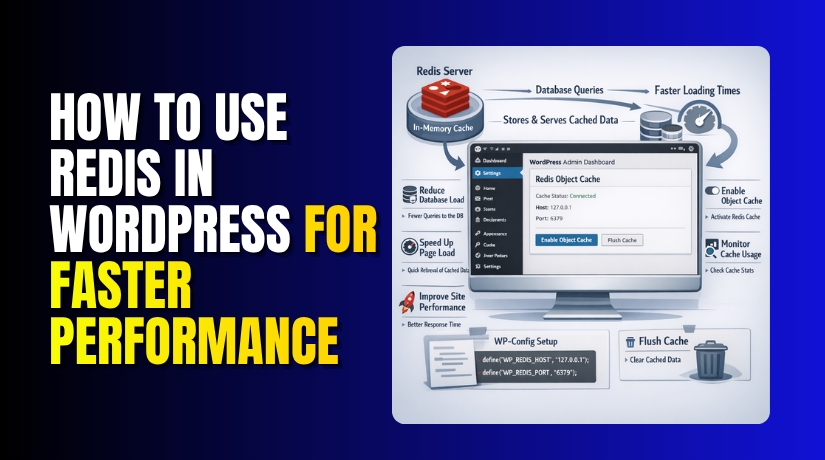
Redis is a fast tool that stores data in memory. Memory is much faster than regular database access. This helps the server return stored data more quickly. Instead of repeating the same task every time, Redis keeps useful results ready. When WordPress needs that same data again, it can call Redis first. This saves time and reduces extra work on the database. That is the basic idea behind Redis for WordPress performance.
In WordPress, Redis is mostly used for object caching. This means it stores results from repeated database queries. WordPress often asks the database for the same information. It may ask for settings, menus, users, posts, or product data. Without caching, the server repeats these tasks again and again. That creates more load and slows the response. Redis helps by saving those results in memory for reuse. That is why many users choose a Redis object cache WordPress setup.
Redis does not replace WordPress itself. It works beside WordPress as a support layer. WordPress still runs the website as usual. Redis simply helps it work faster in the background. It acts like a smart helper for repeated requests. When used correctly, it can cut down unnecessary database work. This gives the website more speed and better efficiency. That is why a WordPress Redis cache setup is popular today.
Some people think Redis is only for big websites. That is not always true. Smaller websites can also benefit in some cases. But Redis is usually more helpful on dynamic websites. These websites change content based on users or actions. Online stores, booking sites, and member dashboards are common examples. Such sites cannot rely only on basic page caching. They need better object-level caching for repeated requests. This is where Redis caching WordPress can make a clear difference.
Is Redis Good for WordPress and When It Makes Sense to Use It
Many website owners ask, “Is Redis good for WordPress websites today?” The short answer is yes in many real cases. But it is not needed for every single website. Redis works best when WordPress handles many repeated requests daily. It becomes more useful as your website grows in size. It also helps when your site shows changing content often. In those cases, a WordPress Redis cache setup can improve speed well. It can reduce delays and make the server work smarter. That is why many developers recommend Redis for WordPress performance work.
Redis is a strong choice when your website is dynamic. A dynamic website does not show the same content. It changes based on users, carts, orders, or custom actions. This means WordPress asks the database many questions often. Without caching, those repeated requests can slow everything down. Redis helps by saving useful results in memory. Then WordPress can load those results much faster later. This makes Redis caching WordPress a practical solution for active websites.
At the same time, Redis is not a magic tool. It will not fix every speed problem by itself. If your hosting is weak, Redis will not solve everything. If images are too heavy, Redis will not fix that. If too many plugins overload the site, Redis helps less. It should be part of a full speed plan. That is where WordPress performance optimization Redis becomes more meaningful. It works best with smart hosting and clean website management.
Benefits of Using Redis in WordPress for Better Website Speed and Stability
The benefits of Redis become easier to see in real use. It helps WordPress answer repeated requests much faster. It also reduces extra work on the database server. This can improve speed for both visitors and site owners. A good WordPress Redis cache setup often feels smoother overall. It supports faster browsing, better response, and more stable performance. That is why Redis for WordPress is now used on many active websites. The value is practical, not only technical.
Faster Website Loading by Reducing Repeated Database Work
One major benefit is faster website loading. WordPress often requests the same data many times daily. Without caching, those requests hit the database each time. That repeated work takes more time and server resources. Redis saves common results in memory for faster reuse. This means many requests can finish much quicker later. Pages may feel lighter and more responsive during browsing. That is one reason Redis caching WordPress helps performance so well.
Reduced Database Load for a More Efficient WordPress Website
Another major benefit is reduced database load. WordPress databases work hard on active websites every day. Repeated queries can increase load during busy traffic periods. Redis lowers that pressure by answering many repeated requests itself. This means the database gets fewer direct calls overall. Lower database load often means better site stability too. It can also help the server handle more users smoothly. That makes Redis object cache WordPress a strong performance layer.
Better Performance for WooCommerce Stores and Membership Websites
Dynamic websites benefit more because they create more repeated requests. WooCommerce stores are one clear example of this. Products, carts, customer accounts, and orders load many data points. Membership sites also load user-based content often. These actions create more database pressure than simple public pages. A WordPress Redis cache setup helps support that repeated activity. It keeps common object data available in memory. This can make stores and member areas feel much smoother.
Improved Server Response Time During Normal Traffic and Busy Hours
Redis can also improve server response time overall. When repeated tasks are handled faster, response becomes more stable. This matters during both normal days and busy periods. Traffic spikes can slow a website very quickly. Redis helps reduce that impact by cutting repeated database work. The server can answer more efficiently under pressure. This keeps the browsing experience more consistent for visitors. That is another benefit of WordPress performance optimization Redis work.
Smoother Admin Dashboard Experience for Website Owners and Editors
Redis can also improve the admin side of WordPress. Many people focus only on visitor speed first. But backend speed matters a lot for daily website work. Editors, store managers, and admins use many dashboard actions. They open settings, products, orders, menus, and reports often. These actions can feel slow on busy websites. A Redis object cache WordPress setup may help lighten that delay. It keeps repeated data ready for faster backend loading.
How to Use Redis in WordPress for Faster Site Performance (Complete Guide)
If you want better speed, you need the right setup first. How to use Redis in WordPress becomes easier when each step is clear. You should follow the process in the correct order. This helps avoid setup errors and plugin issues later. A proper WordPress Redis cache setup can reduce database load. It can also support better WordPress performance optimization Redis results. Below is the full process in a simple step-by-step format.
Step 1: Check Whether Your Hosting Provider Supports Redis for WordPress
- Check if your hosting plan supports Redis.
- Do not assume every hosting provider offers it.
- Many shared hosting plans do not include Redis.
- VPS, cloud, and managed hosting often support it.
- Open your hosting panel and check available tools.
- Look under cache, performance, or advanced settings.
- If you cannot find Redis, contact hosting support.
- Ask whether Redis is available on your current plan.
- Also ask whether object caching is allowed.
- This is the first step for Redis for WordPress.
- Without support, the plugin will not work correctly.
- This is the real starting point for Redis caching WordPress.
Step 2: Enable Redis on Your Server Before Connecting It to WordPress
- Enable Redis on the server after support is confirmed.
- Some hosts provide a one-click Redis option.
- Other hosts require manual activation by support.
- VPS users may need server-side setup.
- Redis must run properly in the background.
- WordPress cannot use Redis until it is active.
- This step builds the base for the full setup.
- A weak server setup can cause plugin errors later.
- Make sure Redis stays active after restart.
- A stable service supports Redis object cache WordPress better.
- This step creates a strong WordPress Redis cache base.
Step 3: Install a Trusted Redis Plugin Inside Your WordPress Dashboard
- Log in to your WordPress admin area.
- Go to Plugins and click Add New.
- Search for a trusted Redis plugin.
- Choose a plugin made for Redis object caching.
- Install the plugin from the dashboard.
- Activate it after the installation finishes.
- The plugin connects WordPress with the Redis service.
- It acts like a bridge between both systems.
- This method is simple for most beginners.
- It is one of the easiest ways to start.
- This step is important in How to use Redis in WordPress.
- A trusted plugin also makes future management easier.
Step 4: Connect WordPress With Redis Using the Correct Server Details
- Open the Redis plugin settings after activation.
- Some plugins connect automatically after installation.
- Other setups need manual connection details.
- Enter the Redis host if the plugin asks.
- In many cases, the host is localhost.
- You may also need to enter the port number.
- Some hosts provide a password for Redis access.
- Use only the details your host provides.
- Do not guess values from random online guides.
- Wrong details can stop the connection.
- A correct setup is required for Redis caching WordPress.
- This is where the real Redis object cache WordPress setup starts.
Step 5: Enable Object Caching So Redis Can Store Repeated WordPress Data
- Enable object caching after Redis connects successfully.
- This is the main role of Redis in WordPress.
- It stores repeated data inside memory.
- WordPress often requests the same data many times.
- Redis keeps that data ready for quick use.
- This reduces repeated database queries.
- Most Redis plugins show an enable button.
- Click it only after checking the connection.
- Object caching gives real value to Redis.
- It strengthens your WordPress Redis cache setup.
- It also supports WordPress performance optimization Redis work.
- This is why many users ask, Is Redis good for WordPress.
Step 6: Test Whether Redis Is Working Correctly on Your WordPress Website
- Test the setup after enabling the cache.
- Do not stop after plugin activation only.
- Open the Redis plugin status page first.
- Check if Redis shows as connected.
- Check if object cache shows as enabled.
- Review any status or health messages there.
- Then test key pages on your website.
- Open the homepage and important inner pages.
- Test product pages and account pages too.
- Check the admin dashboard for slow actions.
- Look for any errors or broken content.
- If everything works well, the setup is likely correct.
- This helps confirm Redis for WordPress is active properly.
Step 7: Monitor Performance After the Redis Setup Is Fully Active
- Monitor your website after Redis goes live.
- Compare site speed before and after setup.
- Watch how dynamic pages perform now.
- Check cart, account, and dashboard pages carefully.
- WooCommerce and membership sites often show bigger gains.
- Look for smoother loading and better response time.
- Keep watching for plugin or cache conflicts.
- Review performance over several days if needed.
- This helps you judge the real benefit.
- It also answers, Is Redis good for WordPress for your site.
- If your site handles repeated requests, Redis often helps.
- This is why Redis caching WordPress is popular today.
Common Redis Problems in WordPress and How to Fix Them Without Confusion
A Redis setup can improve speed, but small issues can appear. These issues are usually easy to fix with the right checks. Most problems happen because of wrong settings or weak hosting support. Sometimes a plugin conflict also causes trouble. That does not mean Redis for WordPress is a bad idea. It only means the setup needs a careful review. Once fixed, your WordPress Redis cache can work smoothly again. This section explains the most common problems in simple words.
Redis Not Connecting to WordPress and What You Should Check First
One common problem is a failed Redis connection. The plugin may show that Redis is unreachable or inactive. This usually means WordPress cannot find the Redis service. First, check whether Redis is enabled on the server. If the service is off, WordPress cannot connect at all. Next, check the Redis host and port details carefully. A wrong value can stop the connection immediately. Some hosts also use custom settings for Redis access. Use only the values given by your host. This is one of the first checks in How to use Redis in WordPress safely.
You should also ask your host whether Redis is active now. Some hosting plans support Redis, but it is not enabled yet. In other cases, the plan may not allow Redis at all. That is why server support matters so much here. If Redis is not available, the plugin cannot help. A correct server setup is the base of Redis caching WordPress. Once the service runs properly, connection problems often disappear.


Object Cache Not Enabling Properly and How to Solve It Safely
Sometimes Redis connects, but object cache is not enabled. The plugin may show a connected status but no active object cache. This problem usually comes from missing cache files or permissions. Some plugins need to create an object-cache.php file automatically. If WordPress cannot write that file, activation may fail. File permission issues can also block the process. A plugin conflict may cause the same result too. This can affect your Redis object cache WordPress setup badly.
Start by checking the plugin status page clearly. Then confirm whether the needed object cache file exists. If the file is missing, the plugin may need help creating it. Some hosts block file changes under strict rules. In that case, a manual check may be needed. Also make sure no other cache plugin controls the same object cache layer. Two tools trying the same job can create confusion. A clean setup supports better WordPress performance optimization Redis results.
Website Issues After Enabling Redis and How to Fix Them Carefully
Some users see problems after enabling Redis. A page may load incorrectly or show old data. In some cases, the dashboard may feel unstable too. This often happens when old cache layers remain active. It can also happen when settings are not fully correct. Redis itself is usually not the real problem. The issue is often with setup order or cache conflict. That is why Is Redis good for WordPress depending on correct use. A wrong setup can cause trouble, but a correct one works well.
The first fix is clearing all cache layers fully. Clear Redis cache, page cache, and browser cache together. Then test the website again on key pages. Also check whether another plugin manages object caching already. If yes, disable overlapping cache features first. Next, review the Redis plugin settings for wrong values. Small mistakes in the host or port can affect stability. A clean and simple setup is best for Redis for WordPress. It keeps your WordPress Redis cache more stable over time.
Redis Cache Not Clearing Correctly and How to Handle Stale Data
Another common issue is stale cached data. This means Redis serves old data after site changes. You may update content, but old results still appear. This can confuse website owners and visitors. The problem usually comes from cache not clearing at the right time. Some plugins handle this well, while others need manual help. This does not mean Redis caching WordPress is failing completely. It only means cache clearing needs better handling.
Start by using the plugin cache flush option. Most Redis plugins offer a clear or flush button. Use it after major updates or test changes. Then check whether the website shows fresh content correctly. If stale data returns often, review plugin compatibility again. Some themes and plugins cache data in different ways. Too many cache layers can make updates harder to manage. A simple setup supports better Redis object cache WordPress performance. It also keeps website updates more reliable.
Plugin Conflict With Redis Setup and What to Do Next
Plugin conflict is another real issue in WordPress. Some caching or optimization plugins may overlap with Redis settings. They may try to control the same cache layer together. This can create errors, stale content, or broken performance. It may also make troubleshooting much harder later. This is why clean setup choices matter a lot. A simple WordPress Redis cache plan is easier to manage. It also supports safer WordPress performance optimization Redis work.
If you suspect a conflict, test plugins one by one. Disable the most likely cache or performance plugin first. Then check if the Redis setup becomes stable again. You should also avoid stacking too many optimization tools together. More tools do not always mean more speed. In many cases, they only create more confusion. A controlled setup is better for Redis for WordPress long term. Keep only the tools your website truly needs.
Wrong Redis Host or Port Settings and Why Small Errors Matter
Small setting errors can cause large connection problems. A wrong host or port is one clear example. Redis needs correct values to respond properly. If the plugin points to the wrong location, it fails. Some hosts use localhost, while others use a custom address. The same applies to port numbers in some setups. Even a small mistake can stop the service connection. That affects How to use Redis in WordPress from the very beginning.
Always copy the Redis details exactly as given by your host. Do not use example values from random websites. Your server setup may be different from theirs. If your host gives a password, enter that too. Missing security details can block access as well. Once the correct values are added, test the connection again. This often fixes the problem very quickly. Correct values are essential for stable Redis caching WordPress use.
Best Practices for Using Redis in WordPress for Stable Long Term Results
A Redis setup works best when it stays simple and clean. You should not treat Redis as a one-click magic fix. It works best as part of a full performance plan. Good hosting, careful plugin use, and regular testing all matter. These best practices help your cache stay useful and stable. They also help you avoid common Redis issues later. A smart WordPress Redis cache setup is easier to trust. That is how Redis for WordPress delivers better long term value.
Use Redis With Page Caching for Better Overall WordPress Speed
Redis and page caching can work very well together. They do different jobs inside your speed setup. Page caching serves saved full pages for quick loading. Redis stores repeated objects and query results in memory. Together, they support both static and dynamic website areas. This creates a stronger speed layer across the website. That is why Redis caching WordPress is often paired with page caching. The two methods support different performance needs well.
Keep Your Cache Setup Simple So It Stays Easy to Manage
A simple cache setup is usually the best setup. Many website owners install too many speed plugins together. They hope more tools will create more speed. In reality, that often creates conflicts and extra work. Too many layers can confuse the server and WordPress. It can also make troubleshooting harder later. A simple WordPress Redis cache setup is easier to test and maintain. That makes Redis for WordPress more useful in daily use.
Clear Redis Cache Only When Needed to Avoid Unwanted Performance Issues
Cache clearing is useful, but too much flushing is not ideal. Redis works best when cached data stays useful for reuse. If you clear it too often, benefits drop quickly. The website must rebuild cached data again and again. That creates more work for the server. So you should clear cache only when truly needed. This helps protect the value of your Redis object cache WordPress setup. It also keeps Redis caching WordPress more efficient.
Monitor Performance After Setup to Know Whether Redis Helps Your Website
You should always test and monitor after setup. Do not assume Redis helps every website equally. Some sites show large gains, while others show smaller changes. That depends on traffic, hosting, and site type. Dynamic websites often benefit the most from Redis. This is why many users ask, Is Redis good for WordPress for all sites. The best answer comes from testing your own website. Monitoring shows the real value of your WordPress Redis cache setup.
Keep Plugins, Themes, and PHP Updated for Better Redis Compatibility
Updates matter for speed and stability. Old plugins or themes can create cache conflicts. An old PHP version can also affect performance badly. Redis works better in a healthy website environment. That means your main software should stay updated. This reduces conflict risk and improves plugin compatibility. It also supports a cleaner Redis for WordPress setup overall. Stable websites get better value from Redis caching WordPress.
Avoid Too Many Caching Layers That Can Hurt WordPress Stability
Many users think more caching always means more speed. That idea is not always true in WordPress. Too many caching layers can create serious confusion. One plugin may store one version of data. Another plugin may keep a different version ready. That leads to stale pages or update delays. It can also cause debugging headaches during site issues. So keep your WordPress Redis cache setup controlled and clear.
Conclusion
Redis can be a very useful speed tool for WordPress. It helps reduce repeated database work and supports faster response. This is especially true on dynamic and busy websites. Stores, membership sites, and custom platforms often benefit most. At the same time, Redis works best with correct setup. Hosting support, plugin choice, and careful testing all matter. A strong WordPress Redis cache setup can improve both front end and admin speed. That is why Redis for WordPress is now part of many performance plans.
If you were asking Is Redis good for WordPress, the answer is often yes. But it is best when your site truly needs it. Small static sites may not need Redis right away. Active websites usually gain more from it. The key is using Redis in the right way. Once you understand How to use Redis in WordPress, the process feels much easier. A clean setup brings better speed, lower load, and smoother daily use.
If you want help with Redis for WordPress, WooHelpDesk can help. Their team can check your hosting, plugin setup, and cache issues. They can also help improve your WordPress Redis cache safely. If your website has slow pages, stale cache, or setup confusion, expert support can save time. For reliable help with Redis object cache WordPress setup and full WordPress performance optimization Redis work, visit WooHelpDesk.