How to Use Price By Country for WooCommerce
Table of Contents
- Introduction
- What Price By Country for WooCommerce Plugin Does
- How to Set Up the Plugin – Step-by-Step Guide
- When & Why This Plugin Is a Smart Investment
- Who Should Use This Plugin?
- Why Is It Worth It?
- Conclusion
Introduction
Selling online comes with many challenges. One of the biggest is pricing. If you own a WooCommerce store, you probably deal with clients from many nations. Costs, taxes, and market circumstances vary by nation. Charging the same price to everyone can hurt your profits or scare customers away.
That’s where country-based pricing comes in. It allows you to charge different prices depending on where your customer lives. The Price By Country for WooCommerce plugin helps you do this easily.
Suppose you sell a product in the United States for $30. Your expenses can be higher in the United Kingdom. With this plugin, you can charge $35 to U.K. customers without changing the base price for others.
This is helpful for many reasons:
- Taxes and duties vary by country.
- Some areas may have higher shipping prices.
- Certain markets are able to pay more.
- You may want to offer discounts in certain countries.
- Each region may have varying amounts of competition for your goods.
Country-based pricing gives you full control. You decide what each country sees and pays. The plugin updates prices based on the shopper’s location. It’s a fantastic method to increase profits and maintain competitiveness.
Many WooCommerce store owners use this approach to grow sales globally. It removes the need to create different stores or use complex tools. Instead, you use one plugin to handle it all from your main site.
The best part? It runs smoothly behind the scenes without any extra steps. Customers see the price that matches their country automatically. No need to ask them to switch anything.
What Price By Country for WooCommerce Plugin Does
The Price By Country for WooCommerce plugin helps you set different prices for different countries. It’s a smart tool for store owners who sell products worldwide. This plugin gives you the power to adjust pricing without creating separate stores.
It works by detecting the shopper’s country. Then it automatically shows the correct price for that country. Everything runs in the background. The customer doesn’t need to do anything.
Let’s examine the key functions and characteristics.
Set Pricing by Country
You can show different prices based on where the customer is from. The plugin lets you:
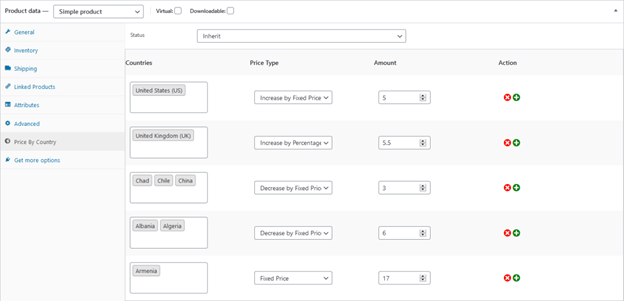
- Increase or decrease prices by a fixed amount
- Adjust prices by a percentage
- Set a completely new fixed price
You now have complete control over each customer’s payment amount.
Create Rules at Product, Category, or Global Level
Three methods exist for implementing country-based pricing:
- Product-Level Pricing
- Set different prices for each product
- Works for both simple and variable products
- You can make rules for each variation if needed
- Category-Level Pricing
- Set rules that apply to all products in a category
- Saves time when you want to adjust many products at once
- Global Pricing Rules
- Apply country-based pricing across your whole store
- Good for quick changes that affect all products
Each rule lets you choose countries, set the price type, and define the amount.
Real-Time Pricing Based on Location
When the customer visits your site, the plugin checks their location. It can detect the country in three ways:
- By IP address using WooCommerce geolocation
- By the billing address at checkout
- By the shipping address during purchase
Prices are updated in real-time. If a customer changes their billing country, the price changes instantly. This ensures transparency and avoids surprises at checkout.
Choose Rule Behavior for Each Product
You can control how each product handles pricing rules:
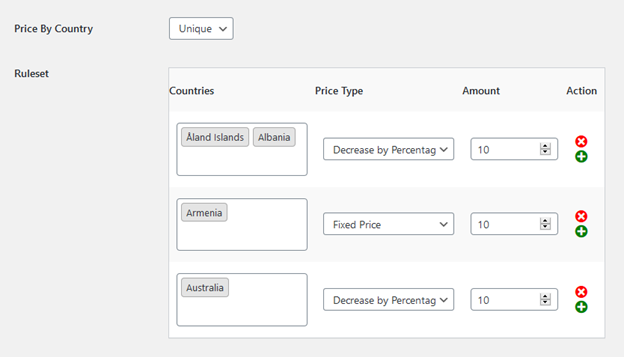
- Unique – Uses its own rule set
- Inherit – Follows category or global rules
- Disable – Turns off country-based pricing for that product
This setup gives you flexibility for custom pricing strategies.
How to Set Up the Plugin – Step-by-Step Guide
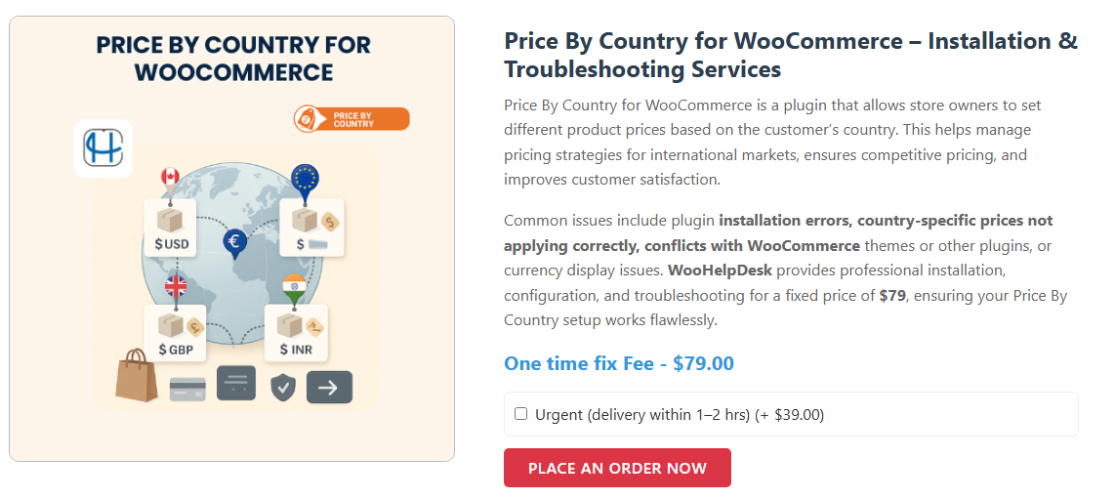
Setting up the Price By Country for WooCommerce plugin is easy. You don’t need technical skills or a developer. You can begin using it immediately because this section will walk you through each step.
Step 1: Install and Activate the Plugin
Download the plugin first from the WooCommerce website. The file will be in the .zip format.
Now, install it by following these steps:
- Go to your WordPress dashboard
- Click on Plugins > Add New
- Click the Upload Plugin button
- Upload the .zip file you downloaded
- Click Install Now, then Activate
Once activated, you’ll see a new menu named Price By Country in your dashboard.
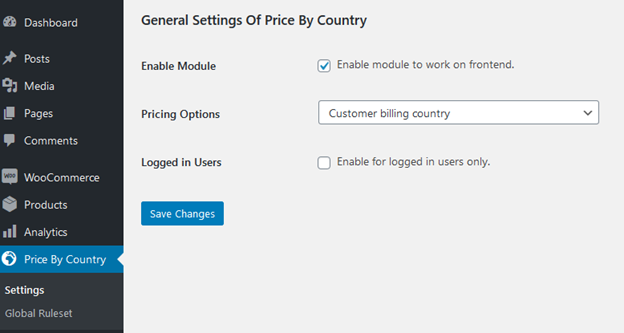
Step 2: Enable the Plugin on the Frontend
Go to the Price By Country settings. You’ll find two tabs:
- General Settings
- Global Ruleset
In the General Settings tab:
- Enable the module so that pricing updates on the store frontend
- You can also choose to apply pricing only for logged-in users (optional)
This means visitors will see the right prices based on their country.
Step 3: Choose How to Detect the Customer’s Location


The plugin lets you choose how to detect the customer’s country:
- IP Address (uses WooCommerce’s built-in geolocation)
- Billing Address
- Shipping Address
Most stores use IP detection for automatic price display. However, you are free to mix and combine according to your needs.
Step 4: Create Country-Based Pricing Rules
You can now create pricing rules for different levels:
- Product-Level Pricing
Go to the product you want to edit:
- Scroll to the Product Data section
- Click the Price By Country tab
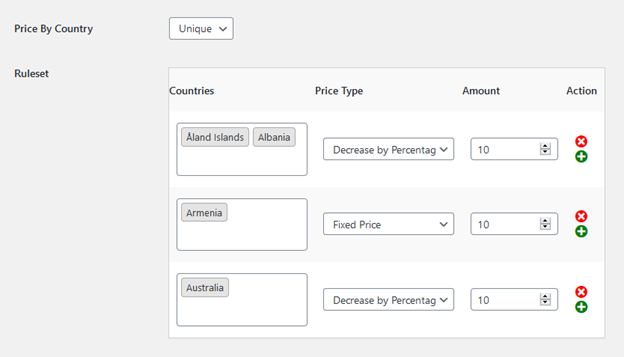
- Choose rule status: Unique, Inherit, or Disable
- Select the country
- Set the price adjustment type:
- Fixed price
- Increase or decrease by amount
- Increase or decrease by percentage
- Enter the amount and save
For variable products, each variation has its pricing settings.

- Category-Level Pricing
To apply pricing by category:
- Go to Products > Categories
- Choose a category and click Edit
- Scroll to the Price By Country section
- Set rule status and pricing details
- Save changes
This helps when you sell similar products in bulk.
- Global Pricing Rules
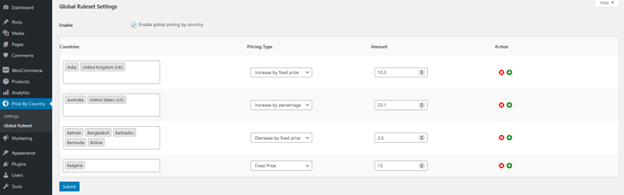
To apply pricing store-wide:
- Go to the Global Ruleset tab under Price By Country
- Click Add New Rule
- Select one or more countries
- Choose the pricing type
- Set the amount
- Save the rule
This is useful for stores with a global strategy.
Step 5: Test Your Store’s Pricing Behavior
Once your rules are in place, test them:
- Visit your store using a VPN or country switcher
- Add a product to the cart
- Try changing the billing or shipping country
- Watch the price update automatically
This ensures everything is working before launch.
When & Why This Plugin Is a Smart Investment
The Price By Country for WooCommerce plugin isn’t just a nice-to-have. For many store owners, it’s a must-have tool. If you sell to customers in more than one country, this plugin can save time and boost profits.
For companies that wish to have more control over international pricing, it’s ideal. One flat price doesn’t always work in international markets. This plugin solves that problem quickly and without hassle.
Who Should Use This Plugin?
This plugin is ideal for:
- Online stores selling products internationally
- Businesses dealing with variable shipping or supply costs
- Stores that want to offer special discounts in specific countries
- Brands facing strong competition in certain markets
- Shops looking for WooCommerce pricing by location without coding
This plugin can help you develop more quickly if you belong to any of these categories.
Why Is It Worth It?
Let’s look at why it’s a smart choice for store owners.
- Increases Profit Margins
You can charge more in countries where costs are higher. Or reduce prices where you face tough competition.
- Improves User Experience
Customers see the right price right away. No confusion or surprise at checkout.
- Saves Time
Global and category rules make it fast to apply changes. You don’t have to edit every product manually.
- Flexible and Easy to Use
You control every price rule. Set it once, and it works in the background.
- Integrates Smoothly with WooCommerce
No extra tools or platforms needed. It works with your existing store setup.
The Price By Country for WooCommerce plugin helps you stay competitive across markets. It’s simple, smart, and gives you better control over your pricing strategy. If you want to scale your store globally, this plugin is a reliable and affordable solution.
Conclusion
Setting the right price for each country is key to selling globally. The Price By Country for WooCommerce plugin makes this easy for any store owner. It gives you full control over pricing based on location. You can adjust prices, create rules, and serve international customers with confidence. It saves time, increases profits, and improves the shopping experience.
This plugin can help you achieve your objectives whether you’re just getting started or expanding quickly. It’s simple to use, works with WooCommerce, and gives you the flexibility you need.
Need help setting it up or customizing your WooCommerce store? WooHelpDesk is here to help. Our team offers expert WooCommerce and WordPress support whenever you need it.
📞 Call us at +1 888 602 0119 (US & Canada) for fast, friendly support.
Let’s make your store ready for the world—one country at a time.



