
How to Streamline Marketplace Selling with Multichannel for WooCommerce
Table of Contents
- Introduction & What the Plugin Does
- Multichannel for WooCommerce Features & Functionalities
- Marketplace-Specific Integration Details
- Step-by-Step Setup Guide for How to Set Up Multichannel for WooCommerce
- Conclusion
Introduction & What the Plugin Does
Selling on just one platform limits your store’s growth. Today, customers shop across marketplaces like Amazon, eBay, Walmart, and Etsy. Separately managing each platform can be stressful and time-consuming. You have to update products, manage orders, and track stock on all sites. This creates confusion, delays, and errors.
That’s where Multichannel for WooCommerce helps. It brings all your sales channels into one place. It links your WooCommerce store to Etsy, Walmart, eBay, and Amazon. There’s no need to move between platforms. You can control everything from your WooCommerce dashboard.
The plugin is built by CedCommerce, a trusted name in eCommerce tools. It’s made for sellers who want to grow fast without adding more work. Whether you’re new or experienced, it makes multichannel selling with WooCommerce simple and stress-free.
With this plugin, you can:
- Sync product listings across multiple platforms.
- Inventory may be tracked and managed centrally.
- Handle every order that comes in from your WooCommerce store.
- Add price markups for each channel.
- Control everything from a single, clean dashboard.
It’s perfect for sellers looking to:
- Expand reach on major marketplaces.
- Save time by avoiding manual updates.
- Prevent overselling or stock errors.
- Centralize order processing and fulfillment.
The plugin supports:
- WooCommerce Amazon integration for global Amazon marketplaces.
- WooCommerce eBay integration with support for eBay policies.
- WooCommerce Walmart integration for the US market.
- WooCommerce Etsy integration with product import/export support.
Managing everything from one system gives you more control. It reduces errors and boosts efficiency. Instead of handling chores, you may concentrate on expanding your store.
The plugin also supports multi-account setups. That means you can connect multiple seller accounts for each marketplace. This is helpful for agencies or larger stores.
In short, Multichannel for WooCommerce is the smart way to scale. It’s not just a plugin—it’s your central command center for marketplace selling. Whether you sell on one platform or all four, this tool keeps everything connected, updated, and organized.
Multichannel for WooCommerce Features & Functionalities
The Multichannel for WooCommerce plugin offers a wide range of features to make selling on multiple platforms easy. This application streamlines the entire selling procedure, regardless of whether you’re selling on Etsy, Walmart, eBay, or Amazon. Below is a summary of its primary attributes and capabilities.
Single Dashboard Management
Managing multiple marketplaces can be overwhelming. But with this plugin, everything is controlled from your WooCommerce dashboard. You can:
- View all your marketplace listings in one place.
- Manage orders, inventory, and product details across all channels.
- By managing everything from a single system, you can save time.
This unified dashboard eliminates the need to jump between different platforms. Instead of handling each marketplace independently, it enables you to concentrate on expanding your company.
Real-Time Product & Inventory Sync
Keeping your product information consistent across multiple platforms is vital. The plugin allows you to automatically synchronize your:
- Product listings, including titles, prices, images, and descriptions.
- Inventory levels to avoid overselling or stockouts.
You don’t have to update each marketplace manually. Your product details will always be current on all platforms thanks to the real-time syncing feature. This reduces mistakes and prevents costly errors.
Order Management
Handling orders from multiple marketplaces can get confusing. The Multichannel for WooCommerce plugin streamlines the order management process. You can:
- Automatically fetch orders from all your linked marketplaces.
- Manage all orders from your WooCommerce dashboard.
- Update order statuses and track shipments without leaving WooCommerce.
This feature helps you keep track of your entire order history and provides a centralized order management system for better control and faster fulfillment.
Bulk Product Upload & Update
When you’re managing multiple products, bulk uploads and edits are crucial. The plugin allows you to:
- Products can be uploaded in bulk to Etsy, Walmart, eBay, and Amazon.
- Update product details (like price, inventory, and descriptions) in bulk across all platforms.
You can save hours of manual labor with this feature. You can easily manage large product catalogs without the hassle of updating each marketplace individually.
Custom Templates & Category Mapping
Each marketplace has its own listing requirements. To help you meet these needs, the plugin lets you create:
- Custom templates for each marketplace.
- To allocate products to the appropriate categories on each platform, use category mapping.
This feature makes the listing process quicker and ensures your products appear in the right sections. It also helps avoid errors when uploading listings.
Pricing Markups
Every marketplace has different fees and commissions. The plugin allows you to:
- Set a fixed or percentage markup on products for each platform.
- Control how your prices are displayed on Amazon, eBay, Walmart, and Etsy.
This helps you maintain profitability across different marketplaces, without having to calculate fees manually.
Automation (Crons)
Many processes are automated by the plugin, saving you time and effort. Cron jobs can be configured to:
- Update product inventory and order statuses automatically.
- Sync product listings across platforms.
- Fetch orders and update tracking information without any effort.
Your time is freed up by this degree of automation, so you can concentrate on expanding your company.
Marketplace-Specific Integration Details
The Multichannel for WooCommerce plugin connects your store to major marketplaces. Each platform has its own setup, features, and selling process. This plugin gives you full control over each channel from your WooCommerce dashboard.
Let’s explore how the plugin works with Amazon, eBay, Walmart, and Etsy.
Amazon Integration
Amazon is a global marketplace with millions of buyers. This plugin makes your WooCommerce Amazon integration fast and smooth. It allows you to:
- List items from several Amazon regions.
- Sync product data using ASINs or SKUs.
- Automatically update prices, stock, and product details.
- Import Amazon orders into WooCommerce.
- Use Amazon FBA, MCF, and other fulfillment options.
You can also set pricing rules and stock limits for your Amazon listings.
eBay Integration
eBay has strict rules and category setups. This plugin helps you manage eBay easily from WooCommerce. With WooCommerce eBay integration, you can:
- Connect to eBay in the US, UK, and other regions.
- Use eBay business policies (shipping, return, payment).
- Set price markups and maximum stock limits.
- Sync orders, listings, and tracking data.
- Auto-import categories and assign them to WooCommerce products.
It also lets you bulk update listings and relist products quickly.
Walmart Integration
One of the biggest internet retailers in the United States is Walmart. The plugin supports WooCommerce Walmart integration with these key features:
- Link Walmart US to your WooCommerce store.
- Synchronize product data, stock levels, and prices automatically.
- Create shipping templates and category mappings.
- Fetch Walmart orders into WooCommerce.
- Avoid overselling with accurate stock syncing.
You can manage Walmart-specific settings like fulfillment options and markup rules.
Etsy Integration
Etsy is ideal for handmade and unique items. With WooCommerce Etsy integration, you can:
- Import and export product listings.
- Map Etsy categories and use custom templates.
- Sync product translations and manufacturing details.
- Auto-fetch Etsy orders and customer info.
- Track shipping and update order statuses easily.
This gives you full control over your Etsy store from WooCommerce.
Step-by-Step Setup Guide for How to Set Up Multichannel for WooCommerce
Setting up the Multichannel for WooCommerce plugin is easy. But each marketplace has its own steps. Below is a full guide to help you connect and configure Amazon, eBay, Walmart, and Etsy successfully.


Step 1: Install the Plugin and Choose a Plan
Installing the plugin from the WooCommerce marketplace is the first step.
- Log in to your WooCommerce admin dashboard.
- Go to Plugins → Add New.
- Search for Multichannel by CedCommerce.
- Click Install Now and then Activate.
- A new menu item called CedCommerce will appear.
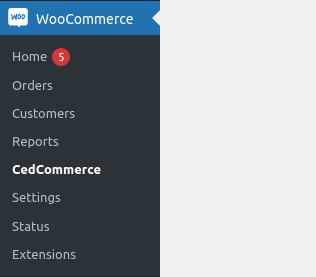
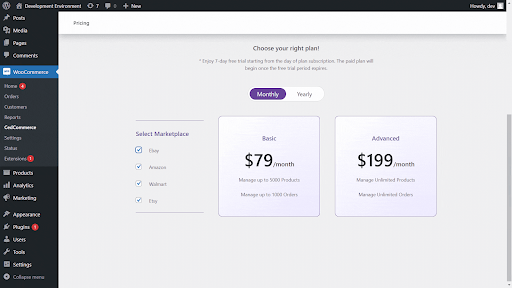
Next, choose your subscription plan:
- Go to the Pricing tab inside the plugin.
- Select a plan (monthly or yearly).
- Complete checkout. A free 7-day trial is available.
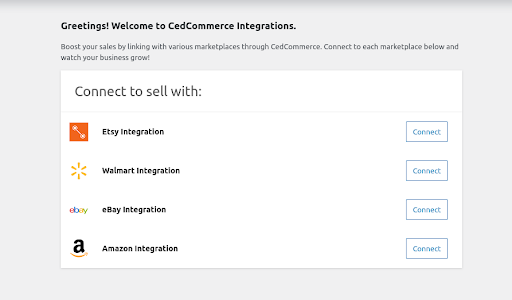
After payment, you’ll see marketplace options to connect.
Step 2: Connect Your Amazon Account
To connect Amazon:
- Click Connect under the Amazon logo.
- Enter your Amazon Seller Central email and select your region.
- Sign in and approve access.
- You’ll be redirected back to WooCommerce with a success message.
- Click Verify and Continue.
Next, set up Global Options:
- Map attributes like title, SKU, brand, price, and quantity.
- These are used to create listings automatically.
Set General Settings:
- Define stock limits (e.g., only sell 10 units).
- Set price markup as fixed or percentage.
Enable automation options:
- Sync stock and prices automatically.
- Auto-fetch orders to WooCommerce.
- Sync existing Amazon products by SKU.
Step 3: Connect Your eBay Account
To link eBay:
- Click Connect under eBay.
- Enter your registered eBay email and store location.
- Log in and allow permissions.
- Click Verify and Continue after success.
Set up Global Options:
- Add brand name, title, SKU, dispatch time, and listing duration.
In General Settings, configure:
- Maximum stock levels (to avoid eBay limits).
- Price markup (increase or decrease).
- Description templates (optional).
- Business policies:
- Shipping
- Payment
- Returns
Enable automation settings:
- Auto-sync stock and prices.
- Sync eBay orders to WooCommerce.
- Link existing eBay listings using SKUs.
Step 4: Connect Your Walmart Account
To connect Walmart:
- Click Connect under Walmart.
- Enter your Client ID and Client Secret Key.
- You’ll find these in your Walmart Seller Center under API Key Management.
- Choose CedCommerce as the solution provider and grant permissions.
- Enter credentials and click Connect.
Once connected, set up:
- Global Options: Add SKU, title, price, stock.
- General Settings:
- Set price markups.
- Auto-sync orders, prices, and inventory.
- Sync existing products from Walmart.
Finish by saving all settings.
Step 5: Connect Your Etsy Shop
To link your Etsy store:
- Click Connect under Etsy.
- Enter your Etsy shop name, then click Connect Etsy.
- Log in to Etsy and allow permissions.
- You’ll return to WooCommerce with a success message.
- Click Verify and Continue.
Configure Global Options:
- Set product listing type, shipping profile, who made it, and supply type.
- Add manufacturing year or select “Made to Order.”
In General Settings, enable:
- Auto inventory and order updates via schedulers.
Set Product Import Settings:
- Choose which products to import (draft, published, etc.).
- Sync Etsy listings with WooCommerce by SKU or listing ID.
Set Order Import Settings:
- Import order statuses like pending, processing, completed.
- Auto-create WooCommerce customers for Etsy buyers.
- Auto-update tracking information.
Step 6: Final Dashboard & Templates
Once all accounts are connected:
- Go to the Overview section.
- View total products and orders per marketplace.
- Use the Templates section to:
- Map WooCommerce categories to marketplace categories.
- Create multiple templates for different types of products.
- Assign product-specific attributes.
Use Bulk Actions to:
- Upload, update, or remove listings.
- Sync inventory and prices in batches.
- Unlink products from channels if needed.
Tips for a Smooth Setup
- Use SKUs consistently across all platforms.
- Start with a small product batch to test syncing.
- Use automation (crons) to avoid manual updates.
- Monitor feeds and error logs for syncing issues.
Affordable Pricing Plans
The plugin’s pricing is adjustable to accommodate varying business sizes. It has strong characteristics and is made to be reasonably priced. Plans start at just $9/month with no hidden charges.
- Monthly and yearly subscriptions available.
- 7-day free trial before you commit.
- Cancel anytime, without hassle.
- Free onboarding included in all plans.
Because of this, both novice and seasoned vendors can use it.
Reliable Support and Services
The plugin comes with 24/7 customer support from CedCommerce. Their team is known for fast responses and friendly help. You’ll also get:
- Step-by-step onboarding assistance.
- Help with channel setup and first-time configuration.
- Custom solutions if your store needs extra features.
CedCommerce is a certified WooCommerce Agency Partner, Amazon Software Partner, and eBay Silver Solution Provider. That means their tools meet top standards for marketplace integration.
All data is handled securely using TLS 1.3 and AES-256 encryption. Your product and customer data stays protected at every step.
Why This Plugin Adds Value
This plugin saves hours of work every week. It reduces errors, boosts accuracy, and helps you scale faster. It improves the intelligence and efficiency of your store by centrally managing everything.
You can:
- Avoid overselling and stock mistakes.
- Speed up order processing across all channels.
- Increase reach by listing on more marketplaces.
- Grow revenue without adding extra staff or tools.
Multichannel for WooCommerce is more than just a plugin. It’s a smart tool to help your business grow across platforms—without the usual stress.
Conclusion
Selling on multiple marketplaces doesn’t have to be hard. With Multichannel for WooCommerce, you can manage Amazon, eBay, Walmart, and Etsy from one place. It saves time, reduces errors, and helps grow your store faster. Whether you’re a beginner or experienced seller, this plugin gives you full control.
Need help setting it up? Or facing WooCommerce or WordPress issues?
👉 WooHelpDesk is here for you.
We offer expert support for:
- WooCommerce troubleshooting
- WordPress setup and optimization
- Plugin configuration and custom guidance
Contact us today and simplify your eCommerce journey!



