How to Spot a Scammer on PayPal: Easy Warning Signs to Stay Safe
Table of Contents
- Introduction
- What is a PayPal Scam?
- How to Spot a PayPal Scammer: Common Red Flags Explained
- How to Protect Yourself from PayPal Scams: Essential Steps
- What to Do if You’ve Been Scammed on PayPal: Immediate Actions to Take
- Conclusion
Introduction
PayPal is one of the most widely used payment platforms, providing a convenient and secure way to send and receive money globally. Whether you’re buying products, selling goods, or making payments, PayPal offers several benefits, including ease of use and buyer protection. However, the platform’s popularity also makes it a prime target for scammers. As a user, it’s crucial to understand the risks and learn how to spot a scammer before falling victim to fraud.
In this guide, we will walk you through the various types of PayPal scams, common warning signs, and tips on how to protect yourself from scammers. By staying informed and taking precautionary steps, you can enjoy PayPal’s services while minimizing the risk of falling for a scam. Keep reading to learn the essential tips for spotting PayPal scammers and protecting your transactions.
What is a PayPal Scam?
PayPal scams are fraudulent activities where scammers exploit the platform to steal money or personal information. Scammers often pose as legitimate buyers or sellers, tricking users into making fraudulent payments, providing sensitive details, or sending goods. Recognizing a scam quickly can save you from financial losses. PayPal scams can happen to anyone, whether you’re buying or selling. They are common because PayPal is widely used across the globe, and scammers target its large user base.
Types of PayPal Scams: How to Spot Each One Easily
PayPal scams can take many forms, and each one targets users differently. Scammers adapt their tactics to exploit PayPal’s system and take advantage of unsuspecting buyers or sellers. Knowing these scams will help you recognize them before it’s too late.
#1 PayPal Fake Payment Scam
The PayPal fake payment scam is one of the most common scams. In this scam, the scammer sends you a fake payment confirmation email claiming that they’ve paid for the product or service. The email will appear to come from PayPal and look legitimate, but it’s actually a fraudulent message. After you ship the product or deliver the service, the scammer will contact you, claiming they never received their payment. By the time you realize the payment was fake, it’s too late.
How to Spot It
- Check the payment status in your PayPal account.
- Never rely on email confirmations alone.
- Look for any inconsistencies in the email, like spelling errors or strange links.
#2 PayPal Buyer-Seller Scam
In this scam, the scammer poses as a buyer or seller, making you believe they’ve made a legitimate purchase. If you’re selling, the scammer may claim they’ve paid, and then file a chargeback, taking the product without paying. If you’re buying, the scammer may take your payment and never send the product. It’s important to always verify payments before shipping goods.
How to Spot It
- Always use PayPal’s Goods and Services option for protection.
- Verify that the payment has cleared in your PayPal account before proceeding.
- Be cautious of buyers or sellers who create urgency or ask for alternative payment methods.
#3 Overpayment Scam
Scammers may overpay for an item or service and ask you to send the extra money back. After you send the refund, they reverse the original payment, claiming it was a mistake. This leaves you out of pocket and without the product or service. They might do this by using stolen credit card information, which can lead to chargebacks.
How to Spot It
- Be wary of large or unusual payments.
- Never send money back to the buyer until you’ve confirmed the payment has cleared.
- Check the payer’s PayPal account for inconsistencies before proceeding.
#4 PayPal Phishing Scam
PayPal phishing scams occur when scammers impersonate PayPal and send fake emails or texts asking you to verify your account or provide personal information. These emails often contain fake links that direct you to a fraudulent website that looks like PayPal’s login page. If you enter your login details on these sites, scammers can steal your account information and gain unauthorized access to your PayPal.
How to Spot It
- Always verify the sender’s email address.
- Do not click on links in unsolicited emails or messages.
- Log into PayPal directly by typing “www.paypal.com” in your browser’s address bar, instead of using email links.
#5 Fake Refund Requests Scam
This scam targets both buyers and sellers. After receiving a product or service, the buyer claims they didn’t receive it or that it was damaged, then demands a refund. Since PayPal protects buyers, this can lead to a chargeback, even if the buyer has received the product. Sellers can be especially vulnerable to this scam if they ship items before verifying the payment.
How to Spot It
- Always keep track of shipment tracking numbers.
- Insist on photo evidence of the alleged damage or missing product.
- Only issue refunds through PayPal’s platform to ensure protection.
#6 PayPal Account Hijacking Scam
Scammers may attempt to hijack your PayPal account by obtaining your login credentials through phishing or data breaches. Once they have access to your account, they can withdraw funds, make unauthorized purchases, or change your account details. This type of scam can lead to a significant loss of money, especially if the hacker can also access your linked bank accounts or credit cards.
How to Spot It
- Enable two-factor authentication to add an extra layer of security.
- Regularly check your PayPal transaction history for any unauthorized activity.
- Change your password if you notice any suspicious activity in your account.
#7 Fake Item or Service Offers Scam
Scammers may set up fake online stores or listings for items or services that do not exist. They might use PayPal to receive payments for these non-existent items. Once the scammer receives your payment, they disappear without delivering anything. This scam can affect both buyers and sellers who deal with products that are not physically present, such as digital goods or services.
How to Spot It
- Check for a valid contact number, address, and social media presence for the seller.
- Look for reviews or complaints about the store or item.
- Use PayPal’s Buyer Protection if you’re making a purchase from an unfamiliar source.
#8 PayPal Friends and Family Scam
This scam happens when a buyer or seller asks you to use PayPal’s “Friends and Family” option to make a payment, instead of the “Goods and Services” option. The “Friends and Family” option doesn’t offer the same protection as the Goods and Services option, making it easy for scammers to take advantage of you. Once the money is sent, there’s little recourse for the victim.
How to Spot It
- Never use “Friends and Family” for commercial transactions.
- Always choose “Goods and Services” to protect both the buyer and the seller.
- If a buyer or seller asks you to use “Friends and Family,” that’s a major red flag.
How to Spot a PayPal Scammer: Common Red Flags Explained
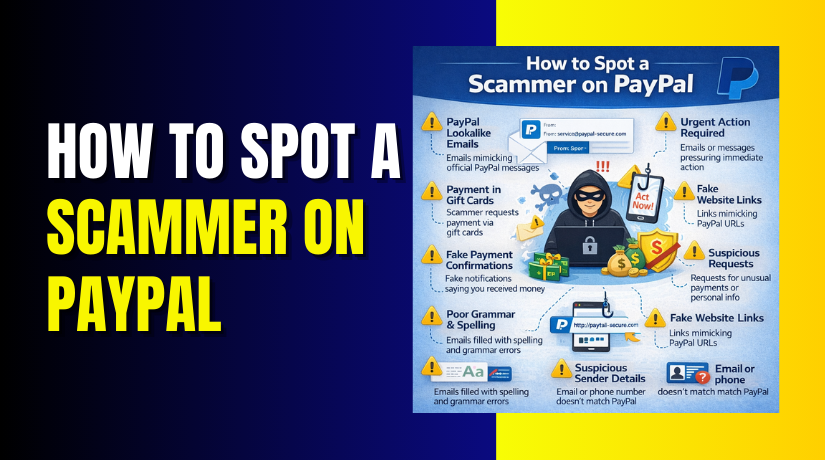
Recognizing the signs of a PayPal scam is crucial to protecting yourself. Scammers use various tactics to deceive you into sending money or providing sensitive information. Below are some key indicators that can help you spot a scammer and avoid falling victim to fraudulent activity.
- Unsolicited Payments or Refund Requests
One of the most common PayPal scam warning signs is receiving an unsolicited payment or refund request. Scammers often send small payments to get your attention and then ask for a refund or a larger sum. Always verify any unexpected payments or refund requests before acting on them. Legitimate transactions typically involve clear communication and agreement on both sides.
- Pressure to Act Quickly or Urgently
Scammers create a false sense of urgency to get you to make quick decisions. For example, they may claim that you need to send money immediately to secure an offer or avoid losing an opportunity. This tactic is designed to get you to act without thinking. If someone is pressuring you to make a payment quickly, it’s a major red flag. Always take your time to verify the legitimacy of the transaction.
- Suspicious Email Addresses or Links
PayPal scammers often use phishing emails that appear to come from PayPal but are not. These emails often contain fake links that lead to fraudulent websites designed to steal your login details. If an email looks suspicious, don’t click on any links. Always check the sender’s email address carefully and hover over any links to ensure they direct you to the official PayPal website. Legitimate PayPal emails will never ask for personal information through email.
- Requests for Payment Outside PayPal
A common scam involves scammers asking you to complete transactions outside of PayPal’s platform, such as via wire transfer or gift cards. These methods bypass PayPal’s buyer protection and leave you vulnerable to fraud. PayPal’s terms and conditions clearly state that payments for goods or services should always be made through the platform to ensure security. If someone insists on using an alternative method of payment, it’s likely a scam.
- Inconsistent or Missing Information
Scammers often provide vague or inconsistent information about their identity, shipping address, or transaction details. Be wary of transactions where the buyer or seller provides incomplete or conflicting information. If you notice that something doesn’t seem right, such as a mismatch between the shipping address and the buyer’s account, investigate further before proceeding.
- Incomplete or Generic Communication
Scammers often avoid providing full contact details or specific information about the transaction. Communication from scammers may be vague or overly generic. For instance, a buyer might refuse to provide details about the product they want to purchase or might avoid answering direct questions about their identity. Always ensure that you have clear and detailed communication before proceeding with a transaction.
- Abnormally High Payments or Overpayments
Another common PayPal scam warning sign is receiving an unusually high payment for a low-value product or service. In many cases, the scammer will overpay and ask for the difference to be refunded. This type of scam is designed to trick you into sending money back to the scammer. If a payment seems too high for the item or service you’re selling, it’s best to question the legitimacy of the transaction.
- Fake PayPal Payment Confirmations
Scammers often send fake PayPal payment confirmations to trick you into thinking you’ve received a legitimate payment. These fake emails may look similar to the real PayPal notifications, but they contain subtle errors or inconsistencies. If you receive an email claiming that a payment has been made, always log into your PayPal account directly (not through a link in the email) to check the transaction status. Never trust email notifications alone.
- Mismatched Shipping Address
If the buyer’s shipping address seems suspicious or mismatches the information in their PayPal account, this is a strong indicator that something isn’t right. Scammers may use stolen or fake addresses to receive goods and services. Before shipping anything, always verify the shipping address through PayPal’s system to ensure it’s correct.
- Buyer Requests for Personal or Sensitive Information
PayPal will never ask you for personal information like your password or credit card number via email, phone, or text message. Scammers often pose as PayPal representatives, requesting sensitive information under the guise of “account verification” or “payment processing.” If anyone asks for this type of information, it’s a scam. Report any suspicious activity immediately.
How to Protect Yourself from PayPal Scams: Essential Steps
Protecting yourself from PayPal scams is crucial to safeguarding your finances and personal information. By following a few simple steps, you can minimize the risk of falling victim to fraudulent activities on PayPal. Let’s explore the most effective ways to keep your PayPal account safe.
Enable Two-Factor Authentication (2FA) for Extra Security


Two-factor authentication (2FA) is one of the most effective ways to add an extra layer of protection to your PayPal account. With 2FA, even if someone has your password, they won’t be able to access your account without a second form of verification, such as a code sent to your phone. This small change can greatly improve your account’s security and make it harder for scammers to compromise your information. Always enable 2FA as an added measure against PayPal fake payment scams and other fraudulent activities.
Use PayPal’s Goods and Services Option for Transactions
When making payments, always use PayPal’s “Goods and Services” option. This option ensures you are covered by PayPal’s Buyer Protection, which helps resolve disputes if you don’t receive an item or if it differs significantly from the seller’s description. If you use “Friends & Family” for a commercial transaction, you won’t be covered by PayPal’s protection policies, leaving you vulnerable to scams. Always choose “Goods and Services” when buying or selling to benefit from PayPal scam protection tips.
Regularly Monitor Your PayPal Account for Suspicious Activity
Keep an eye on your PayPal account and transaction history. Regularly check for unauthorized transactions or unfamiliar activity. If you notice anything suspicious, report it to PayPal immediately. Set up transaction alerts to notify you every time a payment is made. This way, you can act quickly if someone tries to scam you by making a fraudulent payment or unauthorized charge. Monitoring your account will help you spot potential scams early.
Be Careful with Payment Requests and Unsolicited Emails
Scammers often send unsolicited emails claiming to be from PayPal, urging you to click on a link or provide sensitive information. Always verify the authenticity of any email or message claiming to be from PayPal. Legitimate emails from PayPal will always include your name and have the official PayPal email address (not a generic one). If you’re unsure, log in to your PayPal account directly and check for any updates or messages. Never click on suspicious links, as they might lead to phishing sites designed to steal your information.
Verify the Seller or Buyer’s Identity Before Transacting
Whether you’re buying or selling, always verify the identity of the other party. Look for reviews, ratings, or previous transaction history, especially for sellers. If the seller is new or has no reviews, be cautious. Similarly, when selling, always make sure that the buyer’s PayPal account is verified. Unverified accounts can be a sign of a scam, so it’s essential to confirm the other party’s legitimacy before proceeding with any transactions.
Avoid Sharing Sensitive Information with Anyone
Be cautious when sharing personal or financial information. Never share your PayPal password, credit card details, or any other sensitive information with anyone, even if they claim to be from PayPal. PayPal will never ask for this information via email or over the phone. If someone requests it, it’s likely a scam. Always handle your PayPal credentials securely, and don’t share them with others.
Report Suspicious Transactions Immediately
If you suspect you’ve encountered a PayPal scam, report it as soon as possible. Use PayPal’s Resolution Center to file a dispute or report unauthorized transactions. PayPal has dedicated support to investigate suspicious activity, and the sooner you report it, the better your chances of resolving the issue. Taking prompt action helps protect you and other users from falling victim to similar scams.
What to Do if You’ve Been Scammed on PayPal: Immediate Actions to Take
If you suspect you’ve been scammed on PayPal, taking quick action is essential to limit the damage. The faster you respond, the higher the chances of resolving the issue and protecting your account. Scammers can cause significant financial loss and even identity theft if left unchecked, so it’s crucial to act immediately.
Contact PayPal Immediately to Report the Scam
The first thing you should do is contact PayPal’s support team to report the scam. PayPal has a Resolution Center that allows you to report unauthorized transactions. They have dedicated staff who can help you investigate the issue and, in some cases, reverse the transaction. To report a scam, go to your PayPal account, click on “Resolution Center,” and open a case to dispute the transaction. Be sure to provide all relevant details, such as the transaction ID and any communication you had with the scammer.
Contact Your Bank or Credit Card Issuer
If the scam involved linking your PayPal account with your credit card or bank account, you should notify your bank immediately. Many banks offer fraud protection services that can help reverse unauthorized payments or freeze your accounts to prevent further theft. If the scammer used your bank account for payment, your bank might assist in recovering the funds. It’s always wise to take this step in tandem with reporting the scam to PayPal.
Secure Your PayPal Account
Once you’ve reported the scam, the next step is to secure your PayPal account. Change your password immediately to something strong and unique. Enable two-factor authentication (2FA) on your account to add an extra layer of security. This requires you to enter a code sent to your mobile phone whenever you log in. Regularly review your transaction history to spot any other unauthorized activity and report it to PayPal.
Gather Evidence and Document Everything
Document everything related to the scam, including all emails, transaction receipts, and messages between you and the scammer. Take screenshots of any suspicious communications and transactions. This documentation can be vital in supporting your case with PayPal or your bank. Having evidence helps establish that the transaction was fraudulent, which may improve your chances of getting your money back.
File a Claim or Dispute With PayPal
If the scam involves a product or service you did not receive, file a claim through PayPal’s Resolution Center. PayPal allows you to file a dispute if the goods or services you purchased do not meet expectations or were never delivered. PayPal will investigate the case, and depending on their findings, you may be entitled to a full or partial refund.
Prevent Future Scams by Reviewing Security Settings
Once the situation is resolved, take steps to prevent future scams. Regularly monitor your PayPal transactions and review your account settings. Set up transaction alerts to notify you of any unusual activity. Avoid making transactions with unverified accounts and always check for red flags like suspicious emails or requests for payment outside PayPal. Using PayPal’s built-in fraud protection features, such as buyer and seller protection, can further secure your account.
Report the Scam to Authorities (If Necessary)
In some cases, you may need to report the scam to the authorities, especially if it involves identity theft or a large sum of money. Local authorities, as well as the Federal Trade Commission (FTC), handle consumer fraud cases. Filing a police report can be crucial if you want to press charges or take further legal action.
Conclusion
Dealing with a PayPal scam can be overwhelming, but the key to minimizing damage lies in quick action and awareness. Understanding the common warning signs of PayPal scams, such as fake payments, unsolicited requests, or overpayment schemes, is the first step to staying protected. By using PayPal’s buyer and seller protection features, verifying transactions, and securing your account with strong passwords and two-factor authentication, you can significantly reduce your chances of falling victim to scams.
No one is completely immune to scams, but being proactive in monitoring your account and reporting suspicious activities can save you from long-term financial consequences. Keep an eye on your PayPal transactions, review your account settings regularly, and always remain cautious of unsolicited offers or requests.
Need help with your PayPal account security? Contact us today at WooHelpDesk or call us toll-free at +1 888 602 0119 for support.