How to Setup Bulk Discounts for WooCommerce
Table of Contents
- Introduction
- Why Use Bulk Discounts?
- What is Bulk Discounts for WooCommerce?
- Feature Overview of Bulk Discounts for WooCommerce
- In-Depth Breakdown of Discount Rule Types
- How to Install and Set Up the Plugin
- User Experience and Real-World Use Cases
- Conclusion
Introduction
Offering discounts is one of the best ways to increase sales. Online shoppers often expect deals, especially when buying in bulk. That’s where the Bulk Discounts for WooCommerce plugin comes in.
This plugin helps you create smart discount offers. Discounts can be applied according to a variety of factors, including user roles, product kinds, and quantity. Regardless of whether you manage a wholesale or retail business, this tool increases conversions.
Why Use Bulk Discounts?
Bulk discounting is important for WooCommerce store owners in the U.S. It encourages customers to buy more by offering value-based pricing. It enhances average order value and customer loyalty when configured properly.
This plugin is ideal for:
- Online stores selling products in large quantities
- B2B and wholesale WooCommerce businesses
- Retailers offering tiered or cart-based discounts
It gives store owners the flexibility to set custom discount rules that match different buying behaviors.
What is Bulk Discounts for WooCommerce?
Bulk Discounts for WooCommerce is a complete discount rules plugin. You may create a variety of discounts with it. These guidelines may be based on cart total, user roles, product category, or quantity.
Complex discount arrangements are made simple with the plugin. Writing code is not required. You may create dynamic offers that boost your earnings with a few clicks.
It’s known as a reliable WooCommerce bulk discount plugin for modern store needs.
Feature Overview of Bulk Discounts for WooCommerce
The Bulk Discounts for WooCommerce plugin offers a wide set of features. Each feature is designed to help store owners run smart discount campaigns. To use these settings, you don’t need to know how to code. Everything is managed through a simple interface inside your WooCommerce admin panel.
Here are the main features explained in detail:
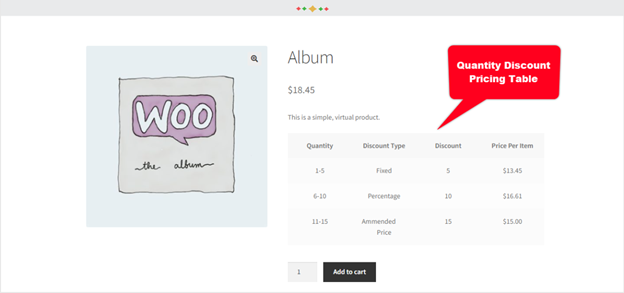
Quantity Discounts / Tiered Pricing
This feature lets you set up pricing based on quantity. You can give customers lower prices when they buy more. It’s also known as WooCommerce tiered pricing.
For example:
- Buy 1–5 units: no discount
- Buy 6–10 units: 10% off
- Buy 11+ units: 20% off
You can apply these discounts to:
- Selected products
- Entire product categories
- Specific user roles or guests
Discounts can be:
- Fixed amount
- Percentage-based
- Custom discounted price
This is perfect for bulk orders or wholesale deals.
Buy X, Get X
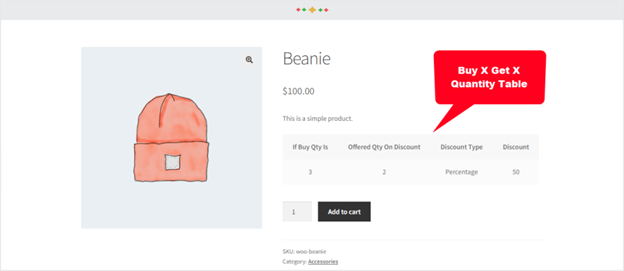
This rule allows you to offer discounts on the same product. If a customer buys a certain number, they get more of that product at a discount. It’s also known as a WooCommerce buy one get one free plugin, but more flexible.
For example:
- Buy 2 T-shirts, get 1 more at 50% off
You can set the number of required items and the discount. The same rule can apply to more than one product.
Buy X, Get Y
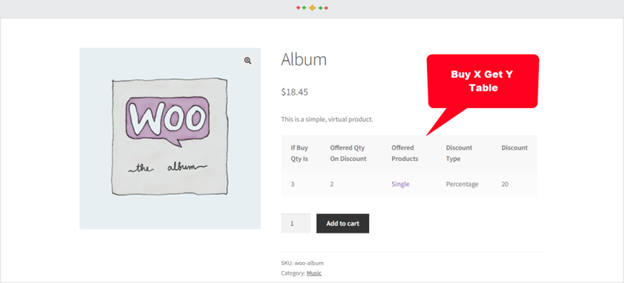
A discount on an alternative product is offered via this option. When a user buys item X, they get item Y at a reduced price. It’s great for cross-selling or combo deals.
For example:
- Buy a laptop, get a mouse at 30% off
This rule helps you sell related products together.
Free Gift Products
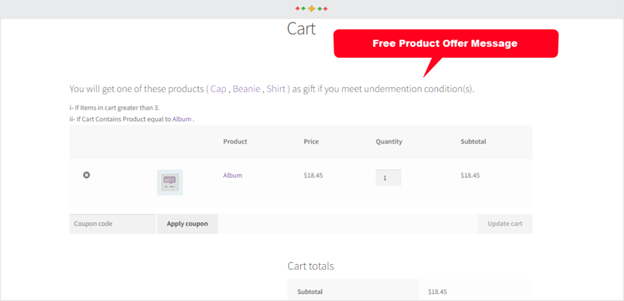
You can offer free gifts when customers meet certain conditions. These are added on the cart or checkout page.
Conditions can include:
- Cart total
- Cart subtotal
- Use of a coupon
- Having specific products in the cart
- Products from a selected category
To unlock the reward, every need must be fulfilled.
Flat Discounts
You can apply a flat discount to:
- The whole store
- Specific products
- Entire categories
These discounts can be:
- Fixed price reductions
- Percentage discounts
- Custom discount values
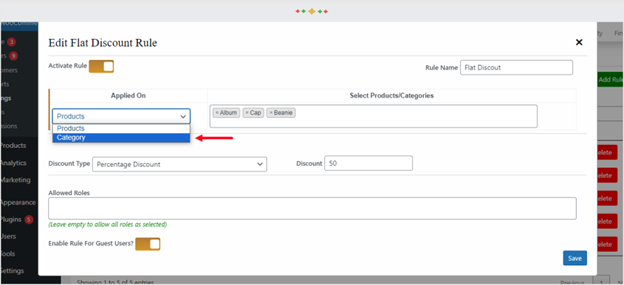
Additionally, you can restrict them to specific user roles or visitors.
Each discount type supports multiple conditions. You can target products, categories, or user roles.
These features make the plugin a powerful WooCommerce discount rules plugin. It supports flexible pricing for both retail and wholesale businesses.
In-Depth Breakdown of Discount Rule Types
The Bulk Discounts for WooCommerce plugin offers powerful rule types. Each rule type helps create offers that increase sales and customer value. You can mix these rules for flexible pricing strategies.
Here’s a closer look at each discount rule.
- Quantity-Based Discounts (Tiered Pricing)
Discounts are applied according to the quantity of items purchased using this criteria. The better the deal, the more a customer purchases. It’s perfect for stores selling in volume.
You can set:
- Fixed discounts
- Percentage discounts
- Custom price offers
You can apply rules to:
- Specific products
- Product categories
- Selected user roles or guest users
For example:
- Buy 1–5 mugs – no discount
- Buy 6–10 mugs – 10% off
- Buy 11+ mugs – 15% off
This helps increase average order value and rewards larger purchases. It’s a must-have feature for WooCommerce quantity discounts and tiered pricing.
- Buy X, Get X at Discount
This rule gives a discount on the same product. When customers buy a certain number, they get more of the same at a lower price.
You can define:
- How many products are needed to qualify
- The discount on the extra product(s)
This works well for BOGO-style deals. It’s often called a WooCommerce buy one get one free plugin, but with more control.
For example:
- Buy 2 socks, get 1 more at 50% off
- Buy 5 pens, get 2 free
It’s great for fast-moving consumer goods or everyday items.
- Buy X, Get Y at Discount
This rule lets customers get one product at a discount when they buy another. It’s ideal for cross-selling and combo offers.


Use this rule to:
- Encourage bundled purchases
- Offer a related item at a discount
You can:
- Set the main item (X) and the discounted item (Y)
- Choose the discount type and amount
For example:
- Buy a jacket, get gloves at 30% off
- Buy 3 books, get a notebook free
This rule works well for WooCommerce dynamic pricing strategies.
- Gift Products Based on Cart Conditions
This rule lets you offer a free product when customers meet certain cart rules. These gifts can be added on the cart or checkout page.
Conditions include:
- Cart total or subtotal
- Use of a specific coupon
- Products or categories in the cart
You can set multiple conditions. All must be true for the gift to apply.
For example:
- Spend $100 or more and get a free tote bag
- Use coupon “SUMMER25” and get a free keychain
This works great for promotions, giveaways, and customer rewards. It’s a popular option for a WooCommerce free gift plugin setup.
- Flat Discounts
You can apply a set percentage or amount of discount using this rule. You can apply it to:
- The entire store
- Specific products
- Specific categories
You can also restrict it to:
- Logged-in users
- Guest users
- User roles like wholesalers
For example:
- 15% off all T-shirts this week
- $10 off any electronics purchase over $100
Flat discounts are simple but effective. They are perfect for seasonal sales or quick promotions.
How to Install and Set Up the Plugin
Setting up Bulk Discounts for WooCommerce is simple and beginner-friendly. It only takes a few steps to install the plugin and define discount rules. Here’s how you can set everything up with ease.
Step 1: Download and Install the Plugin
Download the plugin’s.zip file from your WooCommerce account after making a purchase. To install, take these actions:
- Log in to your WordPress dashboard
- Go to Plugins > Add New
- Click the Upload Plugin button
- Choose the .zip file and click Install Now
- After installation, click Activate
Your plugin is now ready to use.
Step 2: Access the Plugin Settings
Once the plugin is active, go to the settings panel:
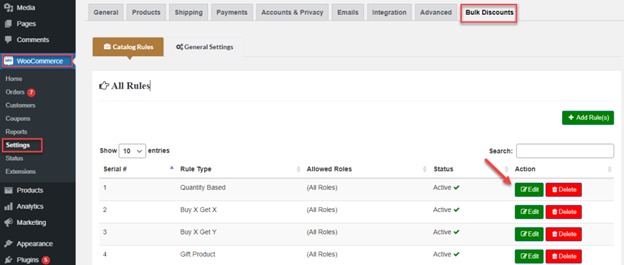
- Navigate to WooCommerce > Settings > Bulk Discounts
Here, you’ll find different tabs:
- Catalog Rules
- General Settings
- Table Settings
Each tab allows you to control different features of the plugin.
Step 3: Create a New Discount Rule
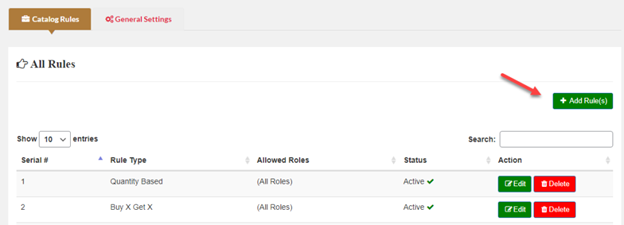
Under the Catalog Rules tab, you can create your first rule:
- Click on Add Rule(s)
- Choose the discount type (Quantity, Buy X Get X, etc.)
- Set the rule title and status (active or inactive)
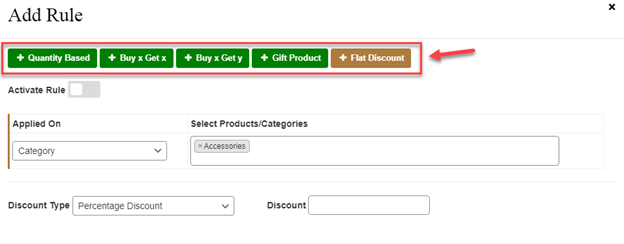
Now you can define the rule conditions.
You’ll be able to:
- Choose products or categories the rule applies to
- Set the minimum quantity for discounts
- Select the discount type: fixed, percentage, or custom price
- Restrict the rule to specific user roles or allow guest users
You can also create multiple rules and run them at the same time.
Step 4: Customize the Discount Table Display
Go to the General Settings tab to change how the discount table looks:
- Decide which product pages should display the pricing table.
- Customize colors, labels, and table position
Use the Table Settings tab to:
- Show or hide columns
- Change text for headings or notes
This makes your discount offers clear and engaging to customers.
User Experience and Real-World Use Cases
The Bulk Discounts for WooCommerce plugin doesn’t just add discounts. It also improves how customers interact with your store. More sales and repeat business are the results of an improved user experience.
Display Discounts Clearly on Product Pages
The plugin shows a pricing table on each product page. This table explains what discounts are available and how to get them. Customers can easily see:
- How many things must they purchase
- How much will they save
- When a gift apply
Clear pricing helps build trust and increases cart value. You can change the design and wording in the plugin settings.
Best Use Cases for Bulk Discounts
This plugin works well in many store types. It can be applied to pricing strategies for both retail and wholesale. Here are some common ways to use it:
- B2B stores: Offer custom prices to specific user roles
- Retail stores: Run buy-one-get-one deals and seasonal discounts
- Bundle deals: Pair related products using buy X, get Y rules
- Free gift promotions: Reward customers who spend over a certain amount
You can also combine rules for more advanced strategies.
Optimize for Role-Based Pricing
With WooCommerce role-based pricing, you can offer special discounts to wholesalers or loyal customers. This keeps regular customers happy while rewarding bulk buyers.
You can:
- Assign distinct costs to various user roles.
- Hide or show offers to guest users
- Build loyalty without using coupons
Improve Checkout Experience
The plugin works best on the checkout page. Some themes may not show discounts clearly in the cart. But at checkout, discounts are always applied correctly.
Tip: Add a message on the cart page if needed. Let customers know that discounts will show at checkout.
Conclusion
Offering smart, flexible discounts is key to growing your WooCommerce store. The Bulk Discounts for WooCommerce plugin makes it easy to set up custom pricing, boost sales, and improve the shopping experience. Whether you’re selling to regular buyers or wholesale clients, this plugin covers it all.
Need help setting it up or customizing your store’s pricing rules? WooHelpDesk is here for you. Our experts can assist with setup, strategy, or support anytime.
📞 Call us now at +1 888 602 0119 (US & Canada) or visit WooHelpDesk.com to get started today!



