How to Connect or Set Up WooPayments Step by Step?
Table of Contents
- Introduction
- What is WooPayments?
- What are the Key Features of WooPayments?
- What are the Benefits of Using WooPayments?
- What are the Different Payment Methods Supported by WooPayments?
- How to Connect or Set Up WooPayments Step by Step?
- Final Verdict
Introduction
WooPayments is a powerful payment solution designed specifically for WooCommerce. It allows merchants to accept payments directly on their WooCommerce stores with ease. Integrating WooPayments into your store is straightforward and offers various benefits. With WooPayments, you can manage payments and transactions seamlessly without relying on third-party payment gateways. This guide will take you through the process of setting up WooPayments, explaining its key features, benefits, and how to use it effectively.
What is WooPayments?
WooPayments is a payment processing system developed by WooCommerce. It is designed to work directly within the WooCommerce platform, enabling merchants to accept payments for products and services online. WooPayments is built to integrate seamlessly with WooCommerce, making it a convenient choice for store owners.
It offers a secure and efficient way to handle customer transactions directly on your WooCommerce store. WooPayments supports a variety of payment methods, including credit and debit cards, and simplifies the payment process by managing all transactions within the WooCommerce interface. With WooPayments, you can handle everything from payment processing to refunds, all in one place.
Unlike third-party payment gateways that require external services and setup, WooPayments keeps everything in-house. This allows you to have full control over your store’s payment system while maintaining a secure and smooth transaction process for customers.
What are the Key Features of WooPayments?
WooPayments offers a range of features designed to make payment processing easy, secure, and efficient. Here are the key features of WooPayments:
1. Seamless Integration
- WooPayments integrates directly with WooCommerce, no third-party plugins needed.
- The setup process is smooth and easy to follow.
- Manage all payment tasks within the WooCommerce dashboard.
- Automatic updates ensure your payment system remains secure and current.
- Everything is in one platform for easier management.
2. Multiple Payment Methods
- Accept major credit/debit cards with WooPayments support.
- Enable Apple Pay for fast, secure payments from iPhone users.
- Google Pay is also supported for easy Android payments.
- WooPayments supports local payment methods like SEPA for global use.
- Developers can add more custom payment methods as needed.
3. Secure Transactions
- WooPayments follows PCI DSS compliance standards for security.
- Transactions are encrypted using SSL certificates for protection.
- Card details are tokenized to improve transaction security.
- Fraud protection tools are included to flag suspicious activities.
- Two-factor authentication adds extra security for administrators.
4. Refund Management
- Process full or partial refunds directly from the dashboard.
- Automated notifications are sent to customers after refunds.
- Refund tracking is seamless for easier management.
- Refund requests are resolved quickly for customer satisfaction.
- WooPayments handles all refund-related accounting automatically.
5. Real-Time Reporting
- Access real-time data on successful and failed transactions.
- Get detailed reports on sales by product and payment method.
- View customer purchase data to help improve strategies.
- Export reports in CSV format for accounting or analysis.
- Create custom reports to track specific performance metrics.
What are the Benefits of Using WooPayments?
Using WooPayments for your WooCommerce store offers numerous benefits. It can enhance the overall functionality of your site and improve the customer experience. Here are some of the key benefits of WooPayments:
1. Streamlined Payment Processing
- WooPayments integrates directly with WooCommerce, simplifying payment processing.
- No need for third-party payment providers or extra fees.
- Payments are processed smoothly within your WooCommerce store.
- Reduce complications by keeping everything within the WooCommerce dashboard.
- Easy payment management without switching between multiple platforms.
2. Improved User Experience
- WooPayments ensures a seamless and secure checkout experience for customers.
- Simplifies payment methods, reducing friction in the purchase process.
- A smooth transaction process encourages customers to complete purchases.
- Provides customers with familiar, trusted payment methods like credit cards.
- Improved user experience increases conversion rates and customer satisfaction.
3. Centralized Management
- WooPayments consolidates all payment and transaction data in WooCommerce.
- Manage all payment tasks from one centralized dashboard.
- View real-time reports of transactions, refunds, and sales.
- Easy tracking of payment status, including pending and completed transactions.
- Reduces complexity by having all data in one place.
4. No Transaction Fees for WooCommerce Stores
- WooPayments doesn’t charge extra transaction fees like many other gateways.
- Save money by avoiding third-party processing fees.
- Enjoy competitive pricing without hidden transaction charges.
- Helps keep your profit margins higher compared to external gateways.
- No additional fees on payments, keeping costs predictable.
5. Built for WooCommerce
- WooPayments is developed by the same team behind WooCommerce.
- Tailored specifically for WooCommerce stores, ensuring seamless integration.
- Provides features designed to meet WooCommerce store owners’ needs.
- Integrates smoothly with WooCommerce’s core functions and extensions.
- Built-in compatibility with WooCommerce updates and plugins.
What are the Different Payment Methods Supported by WooPayments?
WooPayments supports a variety of payment methods that can meet the diverse needs of your customers. Here’s a breakdown of the supported payment methods:
1. Credit and Debit Cards
- WooPayments supports major credit and debit card payments worldwide.
- Accept payments from Visa, MasterCard, American Express, and Discover.
- Customers can make payments directly on your WooCommerce store.
- Secure card processing with encryption ensures customer data safety.
- WooPayments simplifies the card payment process, ensuring fast transactions.
2. Apple Pay
- WooPayments integrates Apple Pay for fast, contactless payments.
- Ideal for customers using iPhones, iPads, and Macs for shopping.
- Customers can complete their purchases with a single touch.
- Apple Pay is convenient, reducing checkout time and improving user experience.
- Transactions are secure, with tokenized data to protect customer details.
3. Google Pay
- WooPayments allows integration with Google Pay for seamless transactions.
- Google Pay is supported on both mobile and desktop devices.
- It simplifies the checkout process, speeding up transactions for users.
- Google Pay helps increase conversion rates with its easy-to-use interface.
- WooPayments ensures secure processing through Google Pay’s encryption methods.
4. Local Payment Methods
- WooPayments supports various local payment methods like SEPA, ideal for European stores.
- It also works with popular local methods in regions like Asia or Latin America.
- Customers can pay with their preferred local options for convenience.
- Local payments can increase global reach by catering to diverse customer needs.
- WooPayments automatically supports regional payment gateways, ensuring broader reach.
5. Manual Payments
- WooPayments also supports manual payment methods like cash on delivery.
- You can easily manage offline payments, allowing flexibility for your customers.
- Offer bank transfers or checks as payment options if needed.
- Great for stores that wish to provide non-digital payment options.
- Manual payments can be tracked directly through the WooCommerce dashboard.
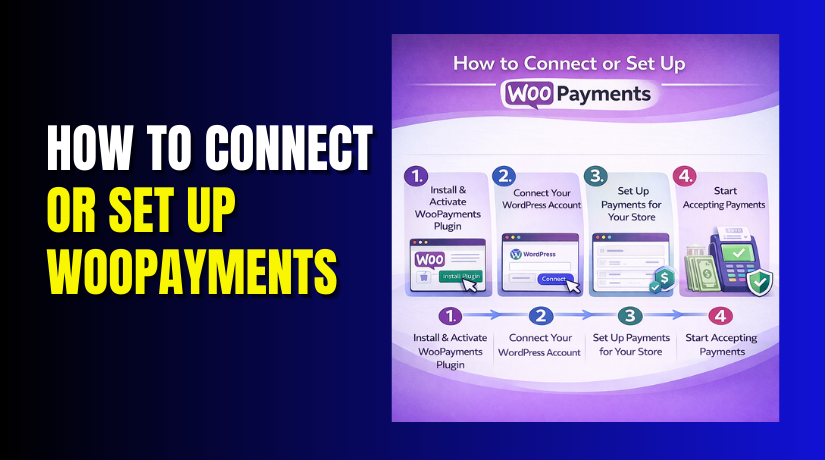
How to Connect or Set Up WooPayments Step by Step?
Setting up WooPayments on your WooCommerce store is simple. Here’s a step-by-step guide to connect and set up WooPayments:
Step 1: Install WooPayments Plugin
Dashboard → Plugins → Add New → Search for WooPayments
- Navigate to the WordPress dashboard and go to Plugins
- Click on Add New and search for the “WooPayments” plugin.
- Install and activate the plugin from the WordPress repository.
- After activation, go to WooCommerce settings to configure the plugin.
- The WooPayments setup wizard will guide you through the setup process.
Step 2: Connect Your WooCommerce Store to WooPayments
WooCommerce → Settings → Payments → Select WooPayments → Set Up


- Once the plugin is activated, go to WooCommerce > Settings > Payments.
- Select “WooPayments” from the payment methods list.
- Click on the “Set up” button to begin connecting your store.
- Follow the on-screen instructions to link your WooCommerce store to WooPayments.
- Provide the necessary business details and banking information.
Step 3: Configure Payment Methods
Settings → Payment Methods → Enable/Disable Payment Methods → Review & Save
- Choose which payment methods you want to enable (credit/debit cards, Apple Pay, etc.).
- Enable or disable specific payment methods based on your business needs.
- For Apple Pay and Google Pay, ensure the correct settings are selected.
- Set up any additional payment options, such as manual payments or bank transfers.
- Review and confirm all payment method settings before saving.
Step 4: Test the Payment System
Test → Sandbox → Test Transaction → Verify Payment Methods
- Once setup is complete, test the payment system using a sandbox environment.
- Complete a test transaction to ensure payments are processed correctly.
- Verify that the payment methods you selected are working smoothly.
- Check the payment status in the WooCommerce dashboard to confirm successful transactions.
- Make sure customers can easily select their preferred payment method during checkout.
Step 5: Go Live and Start Accepting Payments
Enable Live Payment Gateway → Start Accepting Payments → Monitor Transactions
- After testing, enable the live payment gateway option.
- Start accepting real payments from customers via WooPayments.
- Monitor transactions and keep track of payments using WooCommerce reports.
- If needed, adjust payment settings based on customer feedback and store performance.
- Keep your WooPayments settings updated to ensure smooth operation.
Final Verdict
WooPayments is a powerful payment solution built specifically for WooCommerce. It streamlines the payment process, offering a secure, efficient, and seamless experience for both store owners and customers.
With a range of supported payment methods, including credit cards, Apple Pay, Google Pay, and more, WooPayments ensures flexibility and convenience. Setting it up is easy, and it integrates seamlessly with your WooCommerce store, allowing you to manage payments, refunds, and transactions directly from your dashboard.
By using WooPayments, you can enhance the user experience, save on transaction fees, and simplify your payment system, all within the WooCommerce ecosystem. Whether you’re setting it up for the first time or looking to switch payment gateways, WooPayments is a great choice for store owners seeking a reliable, built-in payment solution.
Have questions before starting with WooCommerce & WordPress? Get support here at WooHelpDesk.