How to Set Up Recurring Payments on WordPress?
Table of Contents
- Introduction
- What Are Recurring Payments?
- What Are The Benefits Of Recurring Payments?
- How To Set Up Recurring Payments On WordPress Step By Step?
- What Are The Top 3 Best Plugins To Set Up Recurring Payment On WordPress?
- Final Verdict
Introduction
Recurring revenue is the fastest way to stabilize online income. Many WordPress site owners still rely on one-time sales. That creates random revenue and unpredictable monthly cash flow. When you set up recurring payments WordPress, you reduce income gaps. You also create a smoother customer journey for long-term buyers. This guide explains WordPress recurring payments in simple steps. It also shows how to accept recurring payments on WordPress safely.
Recurring payments work for many WordPress business models today. You can sell memberships, services, courses, and maintenance plans. You can sell digital downloads using monthly access subscriptions. You can sell donations that renew automatically every month. You can also sell product refills using a subscription schedule. These are all forms of WordPress subscription payments. The main goal is simple and powerful for growth.
This guide is designed for ranking and clarity. Each part covers one major section in detail. You will learn core concepts first, then implementation steps. You will also learn plugin options and decision factors. You will avoid common mistakes that break recurring billing setups. You will understand security, renewals, cancellations, and failed payment handling. You will also learn how to reduce churn with smart settings.
What Are Recurring Payments?
Recurring payments are automatic charges collected on a fixed schedule. The schedule can be weekly, monthly, quarterly, or yearly. The customer approves the recurring plan during the first checkout. After that, future charges happen automatically, without a new checkout. This is the foundation of WordPress subscription payments.
Recurring payments are used in subscription and membership models. They are also used in retainers and automated donations. They can also support payment plans for high-ticket offers. Payment plans charge a fixed amount for a fixed period. Subscriptions often continue until the customer cancels. Both models can be created on WordPress using plugins.
Key Terms For WordPress Recurring Payments
Recurring billing becomes easy when you know key terms. These terms appear in every plugin and gateway setup. Understanding them prevents wrong settings and customer confusion. It also helps you compare plugin features more accurately.
- Billing cycle is the time between charges, like monthly or yearly.
- Renewal date is the exact day the next charge will occur.
- Trial period is a free or discounted access time before charging.
- Signup fee is a one-time fee added to the first payment.
- Proration adjusts charges when customers upgrade mid-cycle.
- Dunning is the retry process after failed recurring payments.
- Grace period is extra access time after payment failure.
- Cancellation ends renewals and may keep access until the period ends.
What Are The Benefits Of Recurring Payments?
Recurring billing is not only about getting paid monthly. It is also about building a stable business system. When you set up recurring payments WordPress, you improve cash flow planning. You also reduce admin work and late payment stress. You create a smoother experience for customers every month. These benefits make WordPress recurring payments worth using.
1. Predictable Monthly Revenue
- You know expected income before the month even starts.
- You can plan expenses without guessing next month’s sales.
- You reduce revenue ups and downs across slow seasons.
- You build a stable base, even when traffic drops.
2. Better Cash Flow And Budget Control
- Recurring payments improve consistent money movement into your account.
- You can pay tools, staff, and bills on time.
- You reduce cash problems caused by delayed client invoices.
- You can reinvest profits into growth and improvements faster.
3. Reduced Manual Invoicing And Follow-Ups
- You stop sending invoices and reminders again and again.
- You reduce the time spent chasing late payments.
- You reduce errors caused by manual billing steps.
- You have free time for marketing and customer support improvements.
4. Higher Customer Lifetime Value
- Subscribers often stay longer than one-time buyers.
- Repeat billing increases total revenue from one customer.
- You can upsell add-ons to existing subscribers easily.
- Loyal subscribers become strong brand promoters over time.
5. Better Customer Convenience And Experience
- Customers do not need to re-enter payment details repeatedly.
- Renewals happen without extra steps and extra checkout friction.
- Customers keep access without interruption when payments succeed.
- Customers feel confident with clear billing and control options.
6. Stronger Business Forecasting And Planning
- You can predict revenue using active subscription counts easily.
- You can forecast growth using churn and new signups.
- You can plan staffing based on stable monthly income.
- You can plan inventory using subscription demand patterns too.
7. Easier Scaling With Systems And Automation
- Automation reduces workload even when customers increase rapidly.
- You can manage subscriptions without hiring too early.
- You can deliver digital access without manual approvals daily.
- You can scale services using structured plan boundaries clearly.
8. Lower Risk Of Late Payments And Missed Payments
- Scheduled billing reduces delays from busy customers and clients.
- Automatic retries recover payments when cards fail temporarily.
- Reminders reduce renewals lost due to forgotten card updates.
- You reduce unpaid service delivery and billing disputes often.
9. Better Retention Through Structured Plans
- Plans make customers feel committed to long-term value.
- Recurring access builds habits around your content or service.
- Ongoing delivery keeps customers engaged and reduces drop-offs.
- Clear plan benefits reduce cancellations and refund demands.
10. More Reliable Membership And Access Control
- Subscription payments can control access based on payment status.
- Active subscribers get instant access to protected content areas.
- Failed payments can pause access without manual admin actions.
- Renewal success restores access without support requests quickly.
11. Stronger Brand Trust And Professional Image
- Automatic billing looks more professional than manual payment requests.
- Clean receipts and invoices build trust with customers quickly.
- Predictable billing terms reduce chargebacks and disputes often.
- Clear customer dashboards reduce support requests and confusion.
12. Better Marketing Data And Decision Making
- Subscription metrics show what offers keep customers longer.
- You can test pricing and measure churn changes quickly.
- You can track conversion rate for each subscription plan.
- You can improve onboarding using subscriber behavior patterns.
How To Set Up Recurring Payments On WordPress Step By Step?
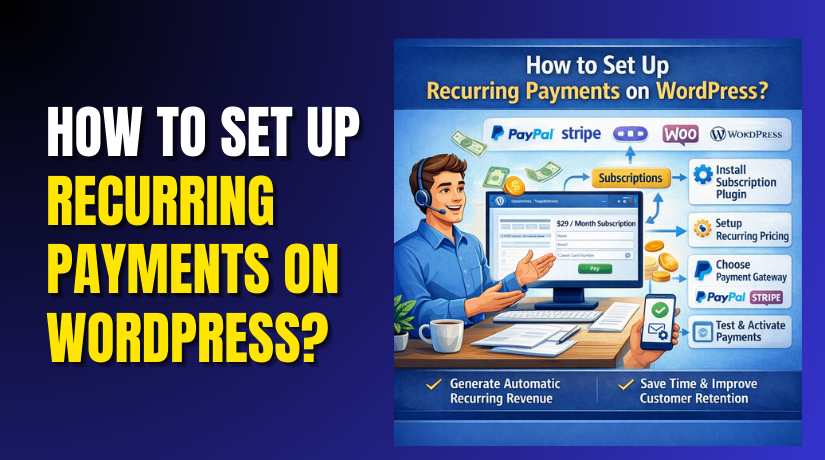
Below is a clean step-by-step flow to set up recurring payments WordPress. Under each step, you will see an arrow path for where to click. Each step also supports WordPress recurring payments and WordPress subscription payments setup.
Step 1: Decide Your Subscription Plan And Billing Rules
WordPress Dashboard → Notes/Plan Sheet → Subscription Rules
- Decide what you will sell as a recurring offer first.
- Choose if it is a membership, service, course, or donation.
- Select a billing cycle like monthly, yearly, or quarterly options.
- Decide if you will offer a free trial for new signups.
- Decide if you will charge a signup fee for onboarding.
- Decide cancellation rules and refund rules for transparency.
- Decide grace period rules for failed payment situations too.
Step 2: Confirm Your Payment Gateway Supports Subscriptions
Payment Gateway Account → Settings → Subscription Features
- Confirm the gateway supports token-based recurring charges properly.
- Confirm it supports webhooks for renewal success and failures.
- Confirm your country and currency are supported by that gateway.
- Confirm payout schedule and verification requirements before setup.
- Confirm it supports strong authentication where required by region.
Step 3: Install A WordPress Recurring Payment Plugin
WordPress Dashboard → Plugins → Add New → Install → Activate
- Choose the plugin based on what you are selling monthly.
- Use a subscription plugin for products and recurring ecommerce sales.
- Use a membership plugin for gated content and premium access.
- Use a form plugin for simple recurring services and retainers.
- Use a donation plugin for recurring donations and pledges.
Step 4: Configure Payment Gateway Inside The Plugin
WordPress Dashboard → Plugin Settings → Payments → Add Gateway
- Connect Stripe, PayPal, or another supported gateway provider.
- Paste API keys or connect accounts using official onboarding steps.
- Enable webhook setup inside the gateway for subscription events.
- Turn on test mode first to avoid real charges while testing.
- Save settings and confirm no warning errors are visible.
Step 5: Create Your Recurring Product Or Subscription Plan
WordPress Dashboard → Products/Plans → Add New → Subscription
- Add a plan name that clearly explains monthly value fast.
- Set price, billing interval, and renewal behavior clearly.
- Add a trial period only if it matches your business model.
- Add signup fee only if onboarding effort is involved.
- Write a plan description explaining what is included each month.
- Add feature list to reduce confusion and refund requests.
- Publish the plan and confirm it appears on the site.
Step 6: Set Subscription Access And Customer Account Control
WordPress Dashboard → Plugin Settings → Access Rules → Save
- Connect plan status with access permissions for members.
- Ensure active status gives access without any interruptions.
- Ensure failed payment starts grace period if you want.
- Ensure cancelled plans remove access based on your policy rules.
- Add a customer dashboard so users can update card details.
- Add cancellation option so users can manage subscriptions easily.
Step 7: Configure Failed Payment Retries And Reminder Emails
WordPress Dashboard → Plugin Settings → Billing Rules → Dunning
- Enable automatic retry rules for failed card renewals.
- Set a retry schedule like 1 day, 3 day, then 7 day attempts.
- Enable email reminders asking users to update payment methods.
- Include account link in emails for fast card update action.
- Set final cancellation rule when retries fail repeatedly.
Step 8: Test Everything In Sandbox Mode Before Going Live
Plugin Settings → Payments → Test Mode → Run Test Checkout
- Create a test subscription and complete checkout using a test card.
- Confirm order email and subscription email are received properly.
- Confirm the subscription shows active status inside the dashboard.
- Simulate renewal payment and check status updates via webhooks.
- Simulate failed payment and check retry rules and emails.
- Test cancellation and confirm access changes as expected.
Step 9: Switch To Live Mode And Launch The Subscription Plan
Plugin Settings → Payments → Live Mode → Save → Publish Pages
- Turn off test mode and enable live gateway connection.
- Run one small live test transaction for final confirmation.
- Confirm live webhooks are enabled and receive events properly.
- Ensure checkout loads fast and has no caching problems.
- Publish subscription pages and start marketing your plans.
Step 10: Monitor Renewals And Fix Issues Early
WordPress Dashboard → WooCommerce/Plugin → Subscriptions → Reports
- Check renewal success rate every week for stability.
- Track failed payments and improve retries if needed.
- Track cancellations and update plan value messaging for retention.
- Keep plugin and gateway updates on a safe schedule.
- Use backups and staging site before making major changes.
What Are The Top 3 Best Plugins To Set Up Recurring Payment On WordPress?
Choosing the right plugin decides how smooth billing feels. A good WordPress recurring payment plugin reduces failed renewals and churn. It also makes WordPress subscription payments easier to manage daily. Below are three strong options for most business models. Each plugin fits a different recurring payments use case.
1. WooCommerce Subscriptions
This plugin is best for WooCommerce based recurring sales. It is ideal for products, refills, and subscription boxes. It also works for membership-like access using WooCommerce flows. Many store owners use it for reliable recurring checkout.
Key Features
1) Subscription Products With Flexible Renewals
- You can create monthly, yearly, or custom billing cycles easily.
- You can sell “subscribe and save” style products for repeat orders.
- You can set renewal dates that match your fulfillment schedules.
- You can control whether renewals run until cancellation or end.
- You can set sign-up fees when onboarding costs are involved.
- You can add free trials to improve conversions for new buyers.
2) Plan Switching With Upgrades, Downgrades, And Proration
- Customers can move from Basic to Pro without a new checkout.
- Proration can adjust billing when a plan changes mid-cycle.
- Upgrades can charge the difference instantly or next renewal.
- Downgrades can apply on the next cycle to avoid refund confusion.
- This reduces support tickets during plan switching requests.
- It also improves customer satisfaction with clear billing logic.
3) Automatic Renewals With Supported Payment Gateways
- Automatic renewals remove manual invoices and follow-ups.
- Payments can charge automatically on the renewal schedule.
- Subscription-ready gateways store tokens, not card numbers.
- This keeps recurring billing secure and compliant for customers.
- Renewals can also be set to manual if your business needs.
- Gateway support must be verified before launching subscriptions.
4) Subscription Management Inside Customer Account
- Customers can view their next renewal date and plan status.
- Customers can update payment methods without contacting support.
- Customers can change address details for shipping subscriptions.
- Customers can manage cancellations based on your store policy.
- Self-service reduces admin work and saves support time.
- It also improves trust by giving users full billing visibility.
5) Renewal Reminders, Payment Retries, And Failed Payment Handling
- Renewal reminders reduce surprise charges and disputes.
- Failed payment retries recover renewals from temporary declines.
- Dunning emails ask customers to update expired card details.
- Grace periods can keep access active during short failures.
- Better failure handling reduces churn and keeps revenue stable.
- It also reduces refund requests caused by access interruptions.
6) Coupons And Discounts For Subscription Retention
- You can apply coupons to first payment or recurring renewals.
- You can create “new subscriber” offers for faster conversions.
- You can create retention offers for customers planning cancellation.
- Discounts can improve lifetime value and reduce churn rates.
- You can run winback deals for customers who previously cancelled.
- You should test coupon rules to avoid discount stacking problems.
Pros
1) Everything Stays Inside WooCommerce
- Orders, renewals, refunds, and emails stay in one system.
- Your team does not need multiple dashboards for subscriptions.
- Reporting remains centralized for store performance tracking.
- Customer support becomes easier with full order history visibility.
2) Strong Fit For Stores With Shipping And Fulfillment
- It supports recurring shipping schedules and address management.
- It works well for refills, subscription boxes, and repeat deliveries.
- It reduces repeat checkout friction for returning subscribers.
- It supports customer self-management for delivery changes too.
3) Scales Better For Large Subscription Stores
- It can handle many active subscribers with stable workflows.
- Renewals and status changes stay organized in WooCommerce tables.
- It supports advanced subscription models as your store grows.
- It works well when combined with solid hosting and caching rules.
4) Flexible Enough For Simple Or Advanced Subscription Models
- You can sell one plan or many plans with upgrades.
- You can use trials, signup fees, coupons, and proration tools.
- You can offer manual renewals or auto renewals based billing.
- It supports many subscription use cases without custom coding.
Cons
1) Paid Plugin With Yearly Renewal Cost
- Your yearly software budget increases because it is premium.
- You may also need paid extensions for extra subscription features.
- Renewals matter because updates fix gateway compatibility issues.
- Skipping renewals can increase security and billing risk later.
2) Setup Can Feel Complex For Beginners
- Subscription settings include many options and rule choices.
- Wrong settings can cause billing confusion and customer disputes.
- You must test checkout, renewals, and cancellation carefully.
- You also must test failed payments and retry flows properly.
3) Gateway Compatibility Can Limit Certain Features
- Not every gateway supports subscriptions and token billing.
- Some gateways support recurring, but not all features equally.
- Webhooks must be configured correctly for reliable status updates.
- You must confirm compatibility before you launch paid plans.
Download Link: WooCommerce Subscriptions
2. MemberPress
MemberPress is best for paid memberships and gated content. It is built for access control and member management. It works well for courses, communities, and premium content libraries. It is a strong choice for WordPress subscription payments without ecommerce complexity.
Key Features


1) Membership Levels With Recurring Billing Rules
- You can create multiple membership tiers with different pricing.
- You can set monthly, yearly, or custom billing intervals.
- You can control whether plans renew until cancellation or end.
- You can offer free trials to reduce signup hesitation.
- You can add signup fees to cover onboarding and setup effort.
- This makes it easy to set up recurring payments on WordPress.
2) Powerful Content Protection Rules And Automation
- You can protect content using categories, tags, and pages.
- You can protect downloads and files using membership rules.
- Access updates automatically when a renewal succeeds or fails.
- Failed payments can trigger grace periods based on your settings.
- Cancellations can remove access instantly or after the paid term.
- This reduces disputes because access matches payment status always.
3) Member Account Pages With Self-Service Controls
- Members can view billing history and membership status anytime.
- Members can see renewal dates, invoices, and payment details.
- Members can update cards without contacting your support team.
- Members can upgrade or downgrade plans if you allow it.
- Members can cancel memberships without confusion and delays.
- Self-service reduces tickets and improves retention and trust.
4) Coupons, Trials, And Signup Fees For Better Conversions
- Coupons help you run limited offers and seasonal campaigns.
- Trials help users test value before committing long term.
- Signup fees cover onboarding calls, setup work, or extra support.
- These tools help improve conversions when used with clarity.
- They also help control low-quality signups and refund issues.
- You should always show terms near checkout for transparency.
5) Automated Emails For Renewals And Failed Payments
- Renewal emails confirm payments and reduce customer anxiety.
- Reminder emails reduce surprise charges and dispute complaints.
- Failed payment emails help users update cards before cancellation.
- Better email flows reduce churn caused by missed renewals.
- Clear email templates reduce support tickets and billing confusion.
- Email deliverability matters for stable subscription management.
6) Reporting For Revenue, Members, And Churn Tracking
- Reports show how many active members you have right now.
- Revenue reports help you track monthly recurring income trends.
- Churn insights show where cancellations happen most often.
- These insights help you improve pricing and membership value.
- Tracking also helps you test new offers and messaging changes.
- Good reporting improves long-term growth and retention decisions.
Pros
1) Best-In-Class Access Control And Rule Engine
- You can lock content with very specific membership conditions.
- You can protect content by category, tag, page, or custom rule.
- You can automate access changes based on payment status.
- This is perfect for content businesses and paid communities.
2) Clean Member Experience With Self-Service Tools
- Members can manage billing without support intervention.
- This reduces workload for your admin and support team.
- It improves customer confidence because control is visible.
- It also reduces cancellations caused by frustration and delays.
3) Faster Membership Setup Than Ecommerce Subscriptions
- You do not need products, shipping, or inventory management.
- You can launch membership plans without a product catalog.
- The setup is simpler when your only goal is access billing.
- This is ideal for creators and service portals launching fast.
4) Great Fit For Selling Access And Recurring Value
- It works best when you sell content, community, or resources.
- It supports recurring payments without store-style complexity.
- It fits premium libraries, portals, and membership programs well.
- It supports WordPress recurring payments with strong control.
Cons
1) Paid Plugin With Ongoing Licensing And Updates
- You must plan yearly renewals for updates and support access.
- Renewals matter because updates fix security and compatibility issues.
- Budgeting is important for long-term subscription business stability.
- Skipping renewals can increase risk during WordPress updates later.
2) Not Ideal For Shipping-Based Subscription Stores
- It is not designed for product fulfillment and shipping rules.
- If you sell refills and boxes, WooCommerce Subscriptions fits better.
- Ecommerce subscriptions need product renewals and order workflows.
- MemberPress is better for access billing, not physical deliveries.
3) Advanced Rules Need Careful Planning And Testing
- Wrong rules can block access for paying customers quickly.
- Overlapping rules can create confusion during upgrades and downgrades.
- You must test renewals, failures, and cancellations fully.
- A staging site helps you avoid breaking access to live users.
Download Link: MemberPress
3. WP Simple Pay
WP Simple Pay is ideal for simple recurring billing forms. It uses Stripe as the payment engine for subscriptions. It is great for retainers, maintenance plans, and simple subscription offers. It is also easier than full ecommerce setups for many sites.
Key Features
1) Stripe Powered Recurring Payment Forms Anywhere
- You can create recurring forms and place them on any page.
- You can use blocks, shortcodes, or embed options as needed.
- You can build a clean subscription checkout without store pages.
- This is perfect for simple funnels and service landing pages.
- You can keep one clear call-to-action for higher conversions.
- It supports WordPress recurring payments with fewer moving parts.
2) Subscriptions, Trials, And Setup Fees In One Form
- You can set monthly or yearly recurring billing inside form settings.
- You can add a free trial to reduce risk for new buyers.
- Trials help conversions when value needs proof first.
- You can add setup fees to cover onboarding and initial work.
- Setup fees are useful for retainers and service plan onboarding.
- These controls help structure WordPress subscription payments clearly.
3) Multiple Payment Options Like Cards And Supported Wallets
- Customers can pay with cards using a trusted Stripe flow.
- Some wallets may be available depending on Stripe configuration.
- Faster payment options reduce checkout abandonment on mobile.
- Convenience improves customer satisfaction and repeat renewals.
- It also reduces support requests about payment difficulties.
- Payment method flexibility helps global buyers in many markets.
4) Receipt Emails And Payment Confirmation Settings
- Automatic receipts reduce disputes and “I did not pay” claims.
- Payment confirmations improve trust and reduce customer anxiety.
- You can customize email messaging for clarity and branding.
- You can include renewal and cancellation instructions in emails.
- Clear emails reduce tickets and prevent refund misunderstandings.
- Good emails improve retention for recurring billing customers.
5) Webhook Support For Reliable Subscription Status Tracking
- Webhooks update your payment status in real time.
- Successful renewals can be tracked without manual checking.
- Failed payments can trigger reminders and follow-up actions.
- This improves reliability for how to accept recurring payments on WordPress.
- Webhooks also help reduce access issues in connected systems.
- Proper webhook setup is critical for long-term subscription stability.
6) Works Best With Landing Pages And Service Funnels
- It fits marketing pages built for conversion and lead capture.
- You can create one page per plan and reduce user confusion.
- You can add testimonials, FAQs, and trust blocks above the form.
- This helps visitors understand value before starting checkout.
- Funnels improve signups when your offer needs explanation first.
- It suits agencies selling monthly plans and care packages well.
Pros
1) Very Fast To Launch Recurring Billing On WordPress
- You can launch subscriptions without building a full store.
- You avoid product catalog setup, shipping rules, and store pages.
- This saves time and reduces configuration mistakes at launch.
- It helps you start collecting recurring revenue sooner.
2) Clean Stripe Checkout With Strong Security
- Stripe handles tokenization and recurring payment processing safely.
- The checkout experience feels modern and trustworthy for customers.
- Secure payment flows reduce chargebacks and fraud risk issues.
- Stripe also provides strong logs for troubleshooting renewals.
3) Perfect For Service Businesses And Agencies
- It fits retainers, support plans, and monthly website care packages.
- You can bill clients monthly without chasing invoices repeatedly.
- It supports simple plan pages that convert well on mobile.
- It works well for recurring consulting and maintenance services.
4) Lower Complexity Than Ecommerce Subscription Tools
- You manage fewer settings and fewer store components.
- This reduces the risk of breaking checkout during updates.
- Beginners can set up recurring billing without heavy learning time.
- Most sites can go live with fewer steps and fewer plugins.
Cons
1) Strong Dependence On Stripe Availability In Your Region
- If Stripe is not available, you may need another solution.
- Some countries have limited Stripe features or payout options.
- Regional restrictions can affect onboarding and verification steps.
- This can limit adoption for global or local business requirements.
2) Not Built For Shipping Subscriptions Or Product Catalog Stores
- It does not manage recurring product orders with shipping workflows.
- It does not replace ecommerce subscription systems for stores.
- For refills and subscription boxes, WooCommerce Subscriptions fits better.
- Ecommerce needs inventory, fulfillment, and order-based renewals handling.
3) Subscription Management Is Simpler Than Membership Platforms
- It focuses on payments, not deep content access rules.
- It does not offer strong membership restriction features natively.
- If you need protected content, MemberPress fits better.
- For complex member tiers, access rules need separate tools.
Download Link: WP Simple Pay
Final Verdict
Recurring billing is one of the best ways to build stable income. When you set up recurring payments WordPress, you reduce revenue ups and downs. You also save time because invoices and follow-ups become automatic. Customers like subscriptions because access stays active and simple. Businesses like subscriptions because income becomes predictable and scalable. The best results come from choosing the right plugin and testing renewals.
The best plugin depends on what you sell and how you deliver value. If you sell physical or digital products with renewals, use WooCommerce Subscriptions. If you sell gated content, courses, or a premium community, use MemberPress. If you sell services, retainers, or simple subscription offers, use WP Simple Pay. Keep plans simple, show renewal terms clearly, and use retries for failed payments. This is the safest way to run WordPress recurring payments long term.
Have questions before starting with WooCommerce & WordPress? Get support here at WooHelpDesk.