
How to Set up Product Dynamic Pricing and Discounts for WooCommerce
Table of Contents
- Introduction
- Benefits of Using the Plugin
- Key Features of the Plugin
- Step-by-Step Setup Guide
- Conclusion
Introduction
Running an online store today needs more than just good products. Shoppers expect deals, discounts, and special offers. Store owners need tools that can handle these expectations smartly. This is where dynamic pricing comes in.
Dynamic pricing lets you offer flexible prices based on conditions. These may include order quantity, customer type, or cart value. It’s a great way to boost sales without changing your entire store pricing.
Product Dynamic Pricing and Discounts for WooCommerce is a powerful plugin built by Addify and available on WooCommerce.com. This plugin helps WooCommerce store owners set smart pricing rules without coding.
It’s ideal for businesses selling in bulk, wholesale, or offering role-based prices. Even regular stores offering seasonal or loyalty-based deals can benefit from it.
In this post, we’ll explain what this plugin does. We’ll show its benefits, features, and how to set it up. You’ll also see real-life use cases to help you get started.
Whether you run a small store or a growing B2B business, this guide is for you.
Benefits of Using the Plugin
This plugin offers many useful benefits. It helps store owners sell more while managing pricing with ease.
Here’s what makes it a smart choice:
- Wholesale & B2B support: Offer lower prices to wholesale or bulk buyers.
- Boost sales with tiers: Give discounts as customers buy more items.
- VIP or loyal customers: Reward repeat buyers with special pricing.
- BOGO and gifts: Give free items to encourage higher orders.
- Targeted promotions: Set pricing for specific user roles only.
- Clear pricing display: Show customers how discounts work right on product pages.
It’s not just about discounts. It’s about offering the right deal to the right person at the right time. This creates better shopping experiences and helps you sell more with less effort.
Key Features of the Plugin
The Product Dynamic Pricing and Discounts for WooCommerce plugin is packed with powerful features. It allows you to create pricing and discount rules without using any code. These features are flexible and easy to apply. Let’s take a closer look at what this plugin offers.
Role-Based Pricing
You can set different prices for different user roles. This is perfect for stores that sell to both retail and wholesale customers.
For example:
- Retail customers pay $25 for a product.
- Wholesale buyers pay $20 for the same item.
You can also apply special prices to individual users. This makes the pricing highly flexible and personal.
Tiered Quantity-Based Pricing
The plugin allows you to set discounts based on quantity. This is useful for encouraging bulk purchases.
Here’s how it works:
- Buy 1–9 units → $20 each
- Buy 10–49 units → $18 each
- Buy 50+ units → $15 each
Customers can see these price breaks in a table on the product page. This makes it clear and encourages them to buy more.
Multiple Pricing Adjustments
You can set different types of price changes. These include:
- Fixed price
- Fixed discount
- Percentage discount
- Fixed increase
- Percentage increase
This gives you the freedom to create smart and profitable pricing strategies.
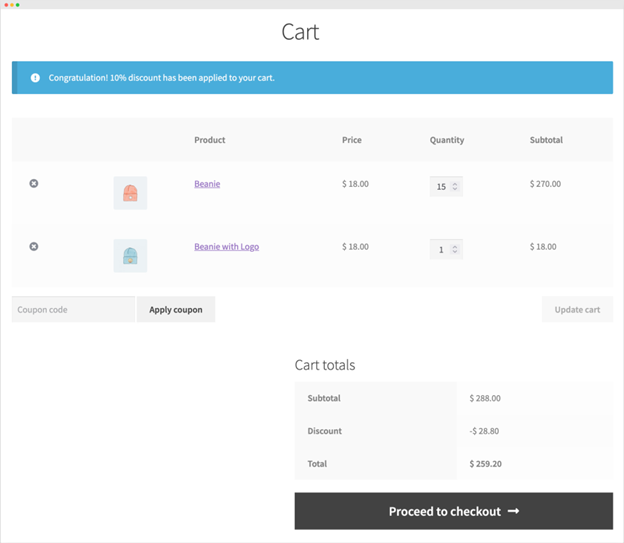
Cart-Level Discounts
You can offer discounts based on what’s in the cart. These rules apply when certain conditions are met. For example:
- 10% off when cart total is over $200
- $20 off if more than 5 items are added
You can apply these rules to all users or selected roles.

Free Gifts and BOGO Deals
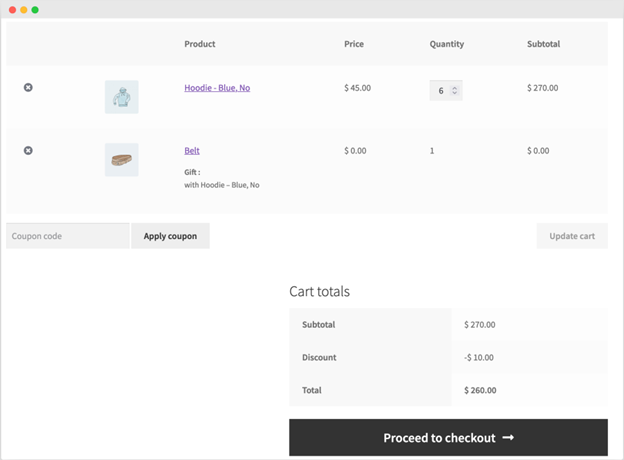
The plugin supports free product offers and BOGO (Buy One Get One) deals.
Examples:
- Buy 2 hoodies, get a free cap
- Buy any 5 items from the T-shirt category and get a belt
You can set multiple levels of gift offers. The plugin adds the gift to the cart automatically when rules are met.
Pricing Table Display
Customers can view discount offers through pricing tables. You can choose between vertical or horizontal layouts. This makes it easy to show tiered prices directly on the product page.
It helps shoppers understand how much they’ll save, which can boost conversions.
Custom Discount Messages
You can add messages to promote discounts and gifts. These can appear on:
- Product pages
- Cart pages
- Before or after a discount is applied
You can also show a success message when a gift is added to the cart. This keeps customers informed and improves the shopping experience.

Rule Priorities and Scheduling
If you have multiple pricing rules, you can set which one applies first. This avoids conflicts between similar discounts. You can also schedule rules to run during specific dates or days.
This is perfect for weekend deals, holiday sales, or flash offers.


Step-by-Step Setup Guide
Setting up the Product Dynamic Pricing and Discounts for WooCommerce plugin is easy. You don’t need to write any code or hire a developer. Just follow these simple steps, and you’ll have flexible pricing rules running on your store in no time.
Step 1: Install the Plugin
First, purchase the plugin from WooCommerce.com. Once downloaded, go to your WordPress dashboard.
Here’s how to install:
- Go to Plugins > Add New
- Click Upload Plugin
- Choose the ZIP file you downloaded
- Click Install Now
- Then click Activate
After activation, you’ll see the plugin settings in your WooCommerce menu.
Step 2: Create Product Pricing Rules
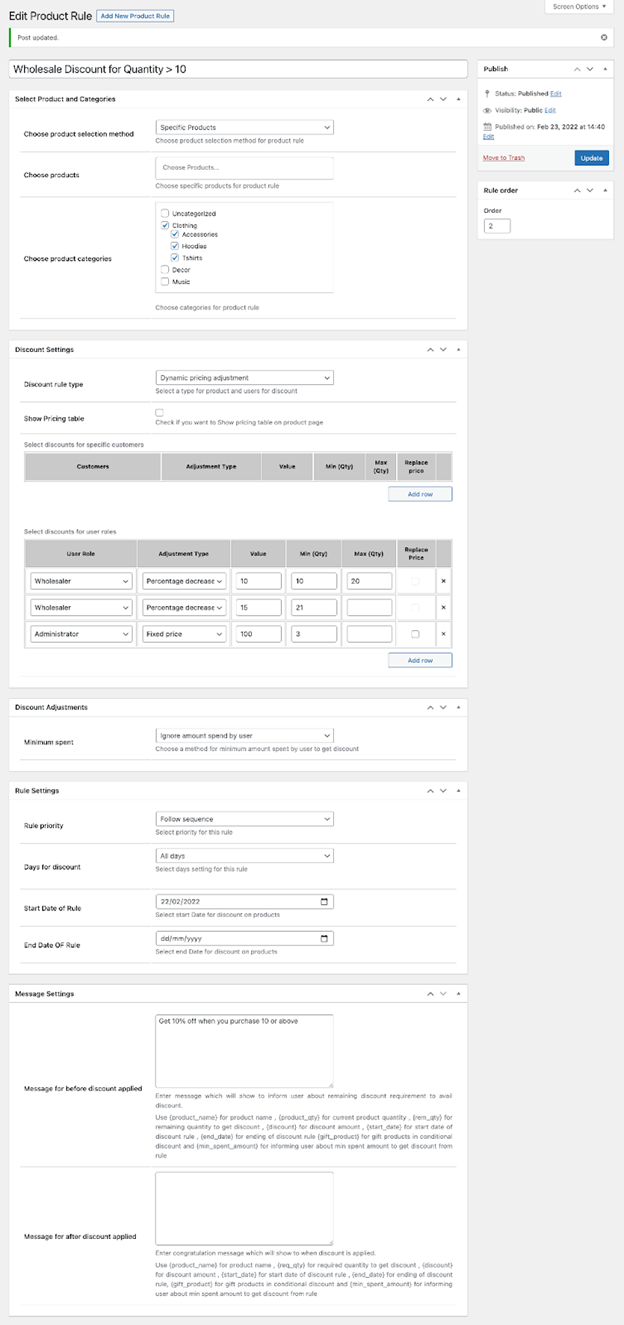
Now you can set pricing rules for your products. These rules can target all users, user roles, or specific customers.
Here’s what you can do:
- Select the product or category
- Choose who the rule applies to (guest, customer, wholesale, etc.)
- Set the price type (fixed price or discount)
- Define quantity ranges if needed (tiered pricing)
For example:
- Buy 1–9: $25 each
- Buy 10–19: $22 each
- Buy 20+: $20 each
This setup works great for wholesale and bulk pricing.
Step 3: Add Cart-Level Discount Rules
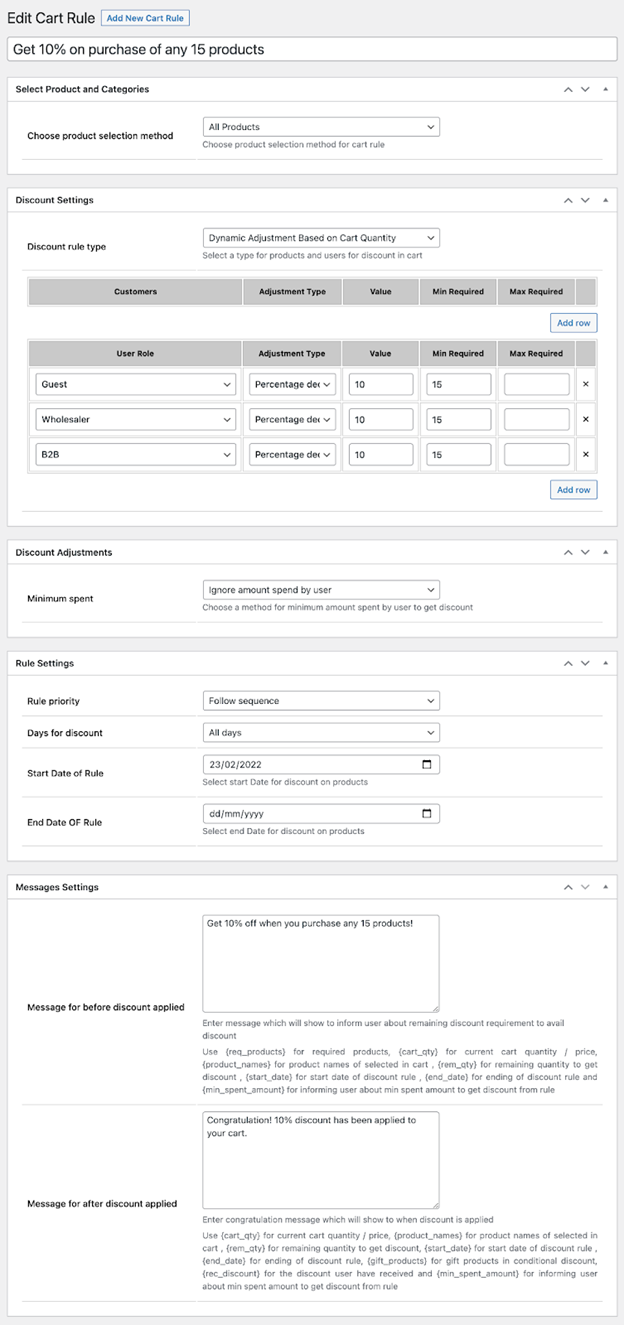
Cart discounts help increase order value. You can apply these based on cart totals, number of items, or customer types.
To set up:
- Go to Cart Discount Rules
- Choose conditions like:
- Cart total above $200
- More than 5 items in cart
- Logged-in users only
- Choose the discount type (percentage or fixed amount)
This rule applies automatically when conditions are met.
Step 4: Add Free Gifts and BOGO Deals
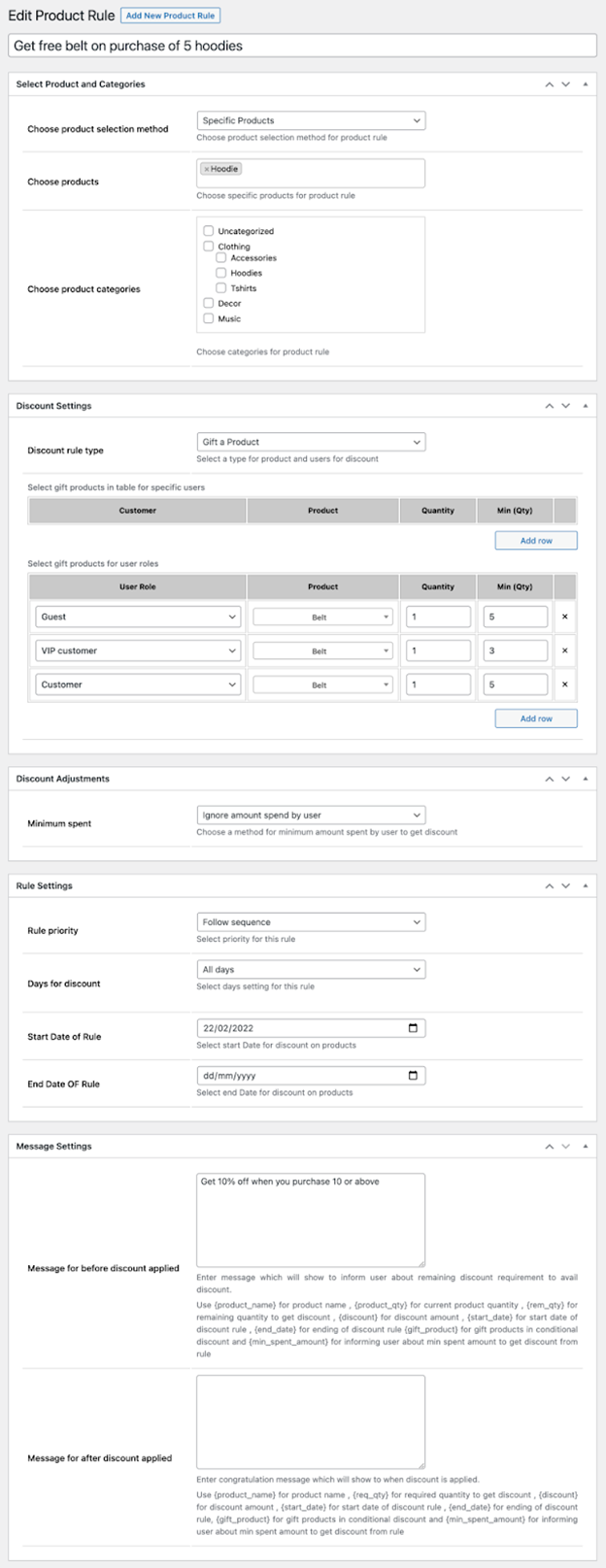
Gift rules make shopping more fun. You can offer free items when customers buy selected products or meet certain conditions.
To set this up:
- Go to Gift Rules
- Choose the condition:
- Buy X, get Y free
- Buy from specific category
- Spend above certain amount
- Select the gift product
- The plugin will auto-add the gift to the cart
You can also create layered deals like:
- Buy 2 = 1 gift
- Buy 4 = 2 gifts
Step 5: Customize Pricing Tables and Messages
You can show pricing tables on product pages. These help users understand how much they save by buying more.
To customize:
- Choose table layout (vertical or horizontal)
- Set where to display it (above or below price)
- Add messages like:
- “Buy 3 more to get a free gift”
- “Get 10% off when you buy 10 items”
This builds trust and encourages more sales.
Step 6: Set Rule Priorities
If more than one rule applies, you can set which rule should take effect.
For example:
- If a user qualifies for two discounts, you decide which applies first
- You can also prioritize between product-level and cart-level discounts
This helps avoid confusion and keeps pricing clear.
Real-World Use Cases
This plugin works well for many store types. It’s especially helpful for stores that sell to both retail and wholesale buyers. Below are some real-world use cases to inspire your pricing strategy.
- Wholesale Pricing by Quantity
A wholesaler wants to offer discounts based on order size:
- 1–9 units = $25 each
- 10–49 units = $22 each
- 50+ units = $19 each
This encourages buyers to purchase more and save more.
- Role-Based Discounts
A store sells to both B2B and B2C customers.
- B2C buyers see normal prices
- B2B buyers get special discounts on selected products
Each group sees its pricing based on its login role.
- VIP or Loyalty Discounts
Long-time customers get better deals.
- If a user has spent over $1,000 in total, they receive 10% off on future orders.
- Cart-Level Deals
You want to increase your average cart value:
- Offer $20 off when the cart total is above $300
- Give 10% off when users buy more than 5 items
- Buy One, Get One Free
- Buy 2 hoodies → Get 1 cap free
- Buy any 4 T-shirts → Get a free belt
These deals help move inventory and increase sales.
Conclusion
Smart pricing is no longer optional—it’s essential for online success. The Product Dynamic Pricing and Discounts for WooCommerce plugin gives you the tools to offer the right deal at the right time.
Whether you run a wholesale store or just want to boost sales, this plugin can help.
Need help setting it up or want expert advice?
👉 Contact WooHelpDesk, 📞 Call us now at +1 888 602 0119 (US & Canada) for fast, friendly Woo support.
Let’s make your pricing work harder—so you don’t have to.



