Does Veeqo Work with WooCommerce? Complete Integration Guide
Table of Contents
- Introduction
- What is Veeqo in WooCommerce?
- What are the Key Features, Pros and Cons of Veeqo?
- Does Veeqo Work with WooCommerce?
- How to Integrate Veeqo with WooCommerce?
- Final Verdict
Introduction
Managing an online store across multiple sales channels is complex. You might sell on Amazon, eBay, and your own WooCommerce site. Orders come from everywhere. Inventory needs constant updating. Shipping labels require separate logins.
This chaos costs time and money. It leads to overselling. It frustrates customers. It limits growth.
Veeqo promises to solve these problems. It is an inventory and order management system designed for multi-channel sellers. It centralizes operations. It syncs inventory automatically. It streamlines shipping.
But the first question every WooCommerce owner asks is simple. Does Veeqo work with my store?
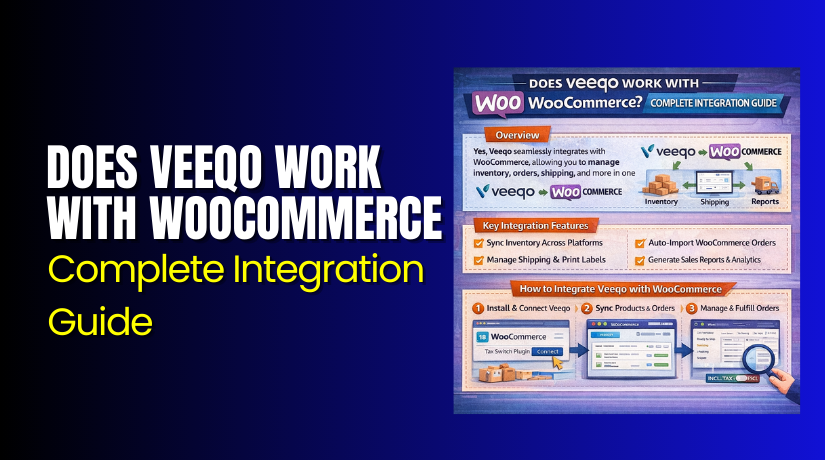
The answer is a definitive yes. Veeqo integrates directly with WooCommerce . This integration allows you to sync orders, products, and inventory between your WooCommerce store and Veeqo’s centralized dashboard.
This guide covers everything you need to know. You will learn what Veeqo is and what it offers. You will understand its key features, pros, and cons. You will get clear confirmation that Veeqo works with WooCommerce. You will follow step-by-step integration instructions.
By the end, you will know whether Veeqo is the right solution for your WooCommerce business.
What is Veeqo in WooCommerce?
Veeqo is a cloud-based inventory and order management software designed for ecommerce businesses selling on multiple channels. It was founded in 2013 and is now owned by Amazon. Despite the Amazon ownership, Veeqo works with multiple sales channels beyond Amazon, including Shopify, eBay, and WooCommerce.
Veeqo serves as a central hub for your entire ecommerce operation. It connects to your sales channels, warehouses, and shipping carriers. All orders flow into one dashboard. Inventory updates automatically across every channel. Shipping labels print in batches.
For WooCommerce users specifically, Veeqo acts as a bridge between your WordPress store and the rest of your sales ecosystem. It ensures your WooCommerce inventory stays synchronized with what you sell on other platforms.
Who Uses Veeqo?
Veeqo serves businesses of all sizes, from small startups to large enterprises. It is particularly valuable for:
- Multi-channel sellers managing WooCommerce alongside Amazon, eBay, and Shopify
- High-volume merchants processing hundreds or thousands of orders monthly
- Businesses with multiple warehouses needing centralized inventory visibility
- Companies wanting to streamline shipping with discounted carrier rates
Key Capabilities
Centralized Dashboard provides a single view of orders, inventory, shipping, and key performance indicators across all sales channels. You see everything in one place without logging into multiple systems.
Inventory Management tracks stock levels in real-time across all locations and sales channels. When a product sells on WooCommerce, inventory updates automatically on Amazon. This prevents overselling.
Order Management consolidates orders from all channels into one platform. You can print pick lists, packing slips, and invoices in batches. Fulfillment becomes faster and more accurate.
Shipping Management compares rates across carriers like USPS, UPS, DHL, and FedEx . You print labels directly from Veeqo and track shipments automatically.
Reporting and Analytics provides insights into sales, profitability, inventory performance, and other metrics . Data-driven decisions become possible.
What are the Key Features, Pros and Cons of Veeqo?
Key Features of Veeqo
- Multi-Channel Order Management: Veeqo pulls orders from all connected sales channels into one central dashboard. You see WooCommerce orders alongside Amazon, eBay, and Shopify orders. Filters help you focus on specific channels or statuses.
- Real-Time Inventory Synchronization: When you sell a product on any channel, inventory updates everywhere instantly. This prevents the dreaded “oversold” scenario where you sell items you no longer have.
- Shipping Integration with Discounted Rates: Veeqo connects directly with major carriers including USPS, UPS, DHL, FedEx, and Royal Mail. You access pre-negotiated discounted rates and print labels in bulk.
- Warehouse Management Features: For businesses with physical inventory, Veeqo offers bin location tracking. You can organize your warehouse and guide pickers to the right spots. This speeds up fulfillment and reduces errors.
- Purchase Order Management: Create and manage purchase orders to replenish stock. Track incoming inventory and update expected arrival dates.
- Automation Rules: Set up workflow automations for inventory alerts, order processing, and fulfillment. For example, automatically tag orders over $100 for priority handling.
- Reporting and Analytics: Access in-depth reports on sales, profitability, inventory performance, and other metrics. Export data for accounting or detailed analysis .
- Mobile App: Manage orders and inventory on the go with Veeqo’s mobile app for iOS and Android . Pick, pack, and ship from anywhere.
- API and Integrations: Connect Veeqo with accounting software like QuickBooks and Xero. Use Zapier for custom workflows. The open API allows developers to build custom integrations.
- 3PL Integrations: Connect with third-party logistics providers for outsourced fulfillment. Veeqo integrates with over 20 3PLs via CartRover.
Pros of Veeqo
- Centralized Operations: Everything in one place saves enormous time. Users no longer jump between Amazon Seller Central, WooCommerce admin, and eBay. One dashboard controls it all.
- Prevents Overselling: Real-time inventory sync across channels is the primary reason merchants choose Veeqo. You never sell a product you cannot ship.
- Saves Time on Shipping: Bulk label printing and automated carrier selection streamline fulfillment. One user reported cutting daily order processing time significantly.
- User-Friendly Interface: Multiple reviewers praise Veeqo’s intuitive design. The learning curve is manageable, even for non-technical users.
- Excellent Multi-Channel Support: Works seamlessly with major platforms including WooCommerce, Amazon, eBay, and Shopify. This flexibility is ideal for diversifying sales channels.
- Free Plan Available: The free tier is genuinely useful for growing businesses. You get core features without monthly costs.
- Good Value for Money: Compared to competitors, Veeqo offers strong features at competitive prices. The free plan makes it accessible to startups.
- Strong Customer Support: Many users report positive experiences with Veeqo’s support team. Help documentation is comprehensive.
- Regular Updates: The development team actively releases new features and improvements. Recent updates include TikTok Shop integration and enhanced usability.
- Scalability: The cloud-based solution grows with your business. Start free, upgrade to Priority when you need dedicated support.
Cons of Veeqo
- Steep Initial Setup for Large Inventories: Some reviewers note that importing huge product catalogs takes significant time. This is true for any inventory system, but worth planning for.
- Occasional Bugs and Glitches: A few users report occasional technical issues. Most are resolved through updates or support.
- WooCommerce Integration Previously Had Limitations: Some older reviews mention issues with specific WooCommerce features. However, the integration has matured significantly and is now out of beta.
- Wholesale Features Limited: One reviewer noted that wholesale-specific functionality needs improvement. Custom fields for B2B customers are not as robust as some competitors.
- No Support for All Shipping Carriers: While Veeqo supports major carriers, some regional carriers may not be available. Check your preferred carrier before committing.
- Amazon Prime Orders Can Be Clunky: A 2018 review mentioned difficulties with bulk shipping Amazon Prime orders. This may have improved, but worth investigating for heavy Amazon sellers.
- Free Plan Has Inventory Limits: The free plan includes inventory features but may have fair usage policy restrictions. High-volume sellers may need the Priority plan.
- No Built-In Post-Purchase Upsells: One user noted inability to add post-purchase items to orders, causing missed shipping opportunities.
- Learning Curve for Advanced Features: While basic functions are easy, mastering automation rules and advanced reporting takes time.
- Account Freezes and Support Issues: A single highly negative review described poor treatment and software problems. However, the vendor response disputed these claims, and the vast majority of reviews are positive.
Does Veeqo Work with WooCommerce?
Yes, absolutely. Veeqo works seamlessly with WooCommerce.
Multiple sources confirm this integration. The official Veeqo changelog announced in February 2025 that the WooCommerce integration moved out of beta and became available to all sellers. This was a significant milestone, marking the integration as stable and fully supported.
The Veeqo Unboxed Spring ’25 webinar recap also highlighted the WooCommerce integration as a key new feature. It enables seamless connection with full order sync and inventory management across all channels.


Software Advice lists WooCommerce as one of Veeqo’s verified integrations. Multiple user reviews mention using Veeqo with WooCommerce successfully.
What the Integration Does?
When you connect Veeqo to your WooCommerce store, several things happen:
- Order Sync: Every new order from your WooCommerce store appears automatically in your Veeqo dashboard. You can view, process, and ship them alongside orders from other channels.
- Inventory Sync: Product quantities update in real-time between WooCommerce and Veeqo. If you sell the same product on Amazon, inventory syncs across both platforms.
- Product Data Sync: Product details like titles, SKUs, and prices sync from WooCommerce to Veeqo. This ensures consistency across your operations.
- Shipping Integration: You can fulfill WooCommerce orders using Veeqo’s shipping tools. Print labels, track shipments, and send tracking information back to WooCommerce.
- Stock Level Updates: When you fulfill orders through Veeqo, stock levels decrease in WooCommerce automatically. No manual adjustments needed.
How to Integrate Veeqo with WooCommerce?
Integrating Veeqo with your WooCommerce store is straightforward. Follow these steps carefully.
Before starting, ensure you have:
- An active Veeqo account (free or paid)
- A working WooCommerce store
- Administrator access to your WordPress site
- SSL certificate installed on your site (for secure connections)
Step 1: Create Your Veeqo Account
Veeqo Website → Sign Up
- Go to veeqo.com
- Click the “Sign Up” or “Get Started” button
- Choose your plan (Free or Priority)
- Enter your business details and email address
- Create a strong password
- Verify your email address
- Complete your account setup
Step 2: Access Integrations in Veeqo
Veeqo Dashboard → Settings → Marketplace and eCommerce Integrations
- Log in to your Veeqo account
- Click on Settings in the left menu
- Select “Marketplace and eCommerce Integrations”
- Browse the list of available integrations
- Find and select “WooCommerce”
Step 3: Initiate the Connection
WooCommerce Integration Page → Connect
- Click the “Connect” or “Add Store” button for WooCommerce
- Veeqo will provide connection instructions
- You may see a setup wizard guiding you through the process
Step 4: Install the Veeqo Bridge Plugin
WordPress Dashboard → Plugins → Add New
- Log in to your WordPress admin dashboard
- Go to Plugins → Add New
- Search for “Veeqo for WooCommerce”
- Find the plugin developed by Veeqo
- Click “Install Now”
- Click “Activate” after installation completes
Step 5: Configure the Bridge Plugin
WordPress Dashboard → WooCommerce → Settings → Veeqo (or new menu item)
- Look for a new Veeqo menu item or tab in WooCommerce settings
- Open the Veeqo configuration page
- You will see connection instructions and API credentials
- Copy the connection key or URL provided by Veeqo
- Paste it into the appropriate field
- Save settings
Step 6: Complete Authorization
Back to Veeqo Dashboard → Enter Store Details
- Return to your Veeqo account
- Enter your store name and URL
- Paste any required authorization codes
- Click “Connect” or “Authorize”
- Wait for confirmation that connection succeeded
Step 7: Configure Sync Settings
Veeqo Dashboard → Connected Stores → WooCommerce → Settings
- After successful connection, configure your sync preferences:
- Choose whether to import existing orders
- Set inventory sync frequency
- Configure how often products update
- Set order status mapping (e.g., which WooCommerce status equals “shipped”)
- Review all options carefully
- Save your settings
Step 8: Test the Integration
Your WooCommerce Store → Place Test Order
- Place a test order on your WooCommerce store
- Check Veeqo dashboard for the new order
- Verify order details appear correctly
- Update inventory in Veeqo and confirm WooCommerce reflects changes
- Test shipping label creation and tracking sync
Final Verdict
Does Veeqo work with WooCommerce? Yes, completely and officially. The integration is fully mature, out of beta, and actively maintained. WooCommerce users can connect their stores to Veeqo and enjoy all the benefits of centralized order management, real-time inventory sync, and streamlined shipping .
Veeqo is an excellent choice for WooCommerce store owners who sell on multiple channels. The free plan is remarkably generous, offering core features that many competitors charge for. Real-time inventory synchronization prevents costly overselling. Centralized order management saves hours of manual work. Discounted shipping rates reduce fulfillment costs.
The integration process is straightforward. Install the bridge plugin, connect via the Veeqo dashboard, configure your sync settings, and start processing orders. Support is available if you encounter issues.
However, Veeqo may not suit every business. If you sell exclusively on WooCommerce with no plans to expand to other channels, a simpler inventory plugin might suffice. If you have complex wholesale requirements, you may need more specialized tools. And while most reviews are positive, occasional bugs and integration limitations exist.
For the vast majority of multi-channel sellers, Veeqo delivers exceptional value. It transforms chaos into order. It turns manual processes into automated workflows. It gives you time to focus on growing your business rather than managing operations.
Start with the free plan today. Connect your WooCommerce store. Experience the difference centralized management makes. Your future self will thank you.
Have questions before starting with WooCommerce & WordPress? Get support here at WooHelpDesk.