How to Integrate Printify with WooCommerce and Check Compatibility?
Table of Contents
- Introduction
- What is Printify?
- How does Printify work?
- What Are The Key Features of Printify?
- What Are The Benefits of Integrating Printify with WooCommerce?
- Is Printify Compatible with WooCommerce?
- How Does the Integration Work?
- How to Integrate Printify with WooCommerce Step by Step?
- What Are The Common Issues with Printify and WooCommerce Integration?
- Final Verdict
Introduction
The eCommerce landscape is evolving, and print-on-demand (POD) services are becoming a popular business model. One of the top platforms for print-on-demand is Printify. It allows store owners to sell custom-designed products without managing inventory or production.
Integrating Printify with WooCommerce gives you an efficient way to manage your online store, automate order fulfillment, & offer a wide range of customizable products.
In this guide, we’ll walk you through the entire Printify WooCommerce integration process, explore its features, and ensure that you understand the compatibility of the two platforms.
Whether you are just starting out or want to enhance your existing WooCommerce store, this guide will help you get the most out of Printify WooCommerce compatibility.
This guide will cover the Printify WooCommerce integration process in detail. You’ll learn how to connect Printify to WooCommerce, check for compatibility, and optimize your store to sell print-on-demand products. We will also walk through troubleshooting tips for any issues during integration.
- Detailed steps on how to integrate Printify with WooCommerce.
- Key benefits and features of Printify for WooCommerce stores.
- Best practices for managing your print-on-demand products and orders.
What is Printify?
Printify is a leading print-on-demand service that enables entrepreneurs to sell custom-designed products online without managing inventory or handling shipping. Printify works with a network of print providers to fulfill orders based on customer demand.
With integration into eCommerce platforms like WooCommerce, Printify automates the entire fulfillment process, allowing store owners to focus on creating unique designs and marketing their products.
The platform offers a broad range of products that can be customized with your artwork, including t-shirts, mugs, phone cases, posters, and much more. When you make a sale, Printify takes care of the production, printing, packaging, and shipping directly to the customer.
- On-demand production for custom products. No need for upfront inventory or manual order handling. Printify only prints products when orders are made.
- Global network of print providers for faster fulfillment. Printify partners with print shops worldwide to ensure quick and quality production.
- Integration with multiple eCommerce platforms, including WooCommerce. Printify integrates easily with WooCommerce, automating order fulfillment and simplifying the store management process.
Download Link: Printify for WooCommerce
How does Printify work?
Printify connects to your WooCommerce store via an app or plugin. Once connected, Printify automatically syncs your products and order data.
When a customer places an order in your WooCommerce store, Printify fulfills the order on-demand. This eliminates manual intervention and simplifies the entire process, from product creation to order fulfillment.
- Choose from over 250+ products to sell. From apparel to accessories, Printify offers diverse product options for your store.
- Customizable products using your designs. Upload your artwork to create one-of-a-kind products for your customers.
- Printify handles everything from printing to shipping. Focus on marketing and growing your business while Printify manages fulfillment.
What Are The Key Features of Printify?
Printify offers several features that make it a versatile and efficient platform for print-on-demand businesses. These features simplify the process of creating, managing, and fulfilling orders for custom products.
Below are some of the key features that WooCommerce store owners will find beneficial:
1. Wide Product Selection
Printify offers over 250 products that can be customized with your designs. The product catalog includes clothing, accessories, home goods, and more, giving WooCommerce store owners a wide variety of items to sell.
- Large variety of products, including t-shirts, mugs, and phone cases. The product selection allows store owners to offer a diverse catalog.
- Products in multiple sizes, colors, and materials. This ensures that you can appeal to a wide audience with different preferences.
- Quality print providers to ensure great product results. Printify partners with high-quality print shops to ensure your designs are accurately printed.
2. Easy Integration with WooCommerce
Printify seamlessly integrates with WooCommerce via a simple plugin installation. Once integrated, you can add your custom products to your WooCommerce store, sync your inventory, and automate order fulfillment.
- Quick integration with WooCommerce via a free plugin. Set up Printify quickly to start selling custom products.
- Automatic syncing of product and order data between Printify and WooCommerce. The integration streamlines product management and order fulfillment.
- Supports automatic order processing for ease of operation. Once a customer places an order, Printify automatically handles the fulfillment.
3. Print-on-Demand Fulfillment
With Printify’s print-on-demand service, you never have to worry about inventory management. Products are printed and shipped only when customers place an order.
- No upfront costs or inventory management required. You only pay for the products when orders are placed, reducing financial risks.
- Products are printed and shipped directly to the customer. Printify handles the production and shipping process on your behalf.
- Flexible fulfillment with print providers in different regions. You can choose print providers based on their location to optimize shipping times.
4. Custom Branding
Printify allows you to add custom branding to your products and packaging, which enhances your store’s identity and makes your products feel more professional.
- Personalized packing slips and labels for a branded experience. Custom packaging can help elevate your brand and make the unboxing experience memorable.
- Logo placement on products and packaging. Brand consistency is key to building customer loyalty, and Printify supports this with logo options.
- Custom packing options to create a unique experience. Printify lets you choose your packaging style to match your store’s identity.
What Are The Benefits of Integrating Printify with WooCommerce?
Integrating Printify with WooCommerce unlocks many advantages for eCommerce store owners, especially for those using the print-on-demand model. The integration streamlines the process, automating key aspects of product fulfillment, order processing, and shipping.
By connecting Printify to your WooCommerce store, you eliminate the need for managing physical inventory and production, allowing you to focus on running and growing your business. Below are the major benefits of integrating Printify with WooCommerce:
1. Automation of Order Fulfillment
- Orders are automatically forwarded to Printify for production. This removes the need for manual intervention, speeding up the fulfillment process.
- Printify takes care of printing, packaging, and shipping directly to customers. Printify manages all logistical aspects, including production and shipping, allowing you to focus on marketing and sales.
- You can track order status directly from your WooCommerce dashboard. Integration provides real-time updates on order status, keeping both store owners and customers informed.
2. Expand Your Product Catalog Without Inventory Risks
- Sell a wide range of customizable products without managing stock. You don’t need to worry about inventory costs or storage space.
- Add products to your WooCommerce store effortlessly. Printify’s easy integration allows you to list new products quickly and effortlessly.
- Avoid the risk of overstocking by using a print-on-demand model. Since products are only produced when an order is placed, you won’t need to worry about unsold inventory.
3. Custom Branding Opportunities
- Personalize your products with your brand’s logo and design. Brand your products, such as t-shirts, mugs, and posters, with your custom designs.
- Customize the packaging and packing slips with your logo and message. Add a personal touch to each order, strengthening customer loyalty.
- Create a cohesive and professional brand identity with custom branding. Consistent branding across products and packaging helps increase customer trust.
4. Access to Global Print Providers for Faster Fulfillment
- Select print providers from different regions for faster delivery. Print providers located closer to your customers can help reduce shipping times and costs.
- Global fulfillment options allow you to expand to international markets. Printify’s network of print providers lets you offer products to customers worldwide, expanding your business reach.
- Save on shipping costs by selecting regional fulfillment centers. By choosing a local print provider, you can reduce shipping fees for your customers.
5. Simplify Store Management with Automatic Product Syncing
- Automatically sync products, pricing, and inventory between WooCommerce and Printify. Product updates in Printify are immediately reflected in your WooCommerce store.
- No need for manual updates, reducing errors and saving time. The sync ensures that product information is consistent across platforms without requiring constant monitoring.
- Ensure product availability is up to date in WooCommerce. Printify automatically adjusts inventory levels based on orders, keeping WooCommerce stock levels accurate.
Is Printify Compatible with WooCommerce?
Yes, Printify is compatible with WooCommerce, and it integrates seamlessly to streamline your print-on-demand business. Setting up Printify WooCommerce integration is straightforward and doesn’t require technical expertise.
The integration works by installing the Printify for WooCommerce plugin, which allows the platform to sync product data, customer orders, and fulfillment requests. Printify also provides easy-to-follow instructions for connecting your store, ensuring a hassle-free experience for store owners.
How Does the Integration Work?
After you install the Printify WooCommerce plugin, the connection is established between WooCommerce and Printify. From there, you can choose products to add to your store directly from Printify, and those products will be synced with your WooCommerce store.


Any orders placed on your WooCommerce store will be sent to Printify for production and fulfillment.
- Install the Printify plugin for WooCommerce to enable the integration. The plugin connects WooCommerce to Printify’s vast product catalog.
- Sync products directly from Printify to WooCommerce. Explanation: Product details, such as descriptions and pricing, are automatically updated in WooCommerce.
- Orders placed on WooCommerce are automatically sent to Printify for fulfillment. The integration ensures that all orders are processed by Printify without manual intervention.
Compatibility Considerations
The Printify WooCommerce integration is compatible with most WooCommerce themes and setups. However, it’s important to ensure that your WooCommerce store is running the latest version of WordPress and WooCommerce to avoid any compatibility issues.
Additionally, Printify works best when you use WooCommerce with a well-optimized hosting plan to ensure fast order processing and minimal downtime.
- Ensure your WooCommerce store is running the latest versions. Keeping WooCommerce up to date reduces compatibility issues with Printify.
- Choose a reliable WooCommerce hosting provider for optimal performance. A fast, reliable host ensures smooth integration and timely order fulfillment.
- Check for conflicts with other plugins before activating Printify. Some plugins may affect the functionality of Printify, so it’s important to test the integration before going live.
How to Integrate Printify with WooCommerce Step by Step?
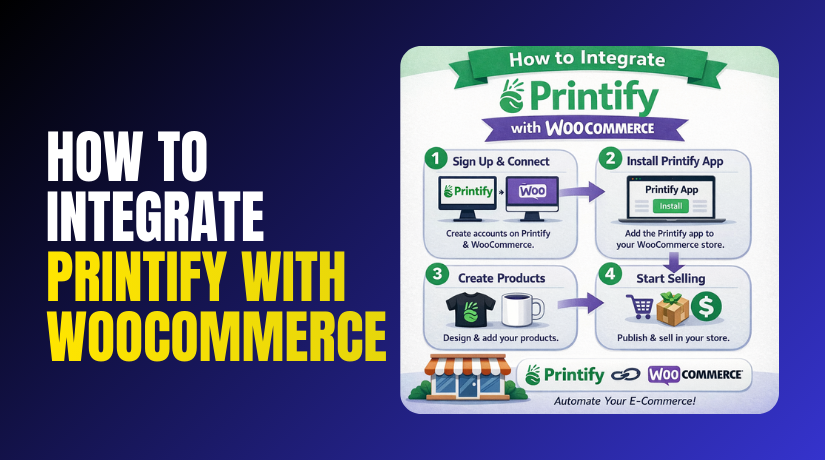
Integrating Printify with WooCommerce allows you to set up your print-on-demand business with ease. This step-by-step guide walks you through the entire process of connecting Printify to WooCommerce, ensuring smooth product syncing, order fulfillment, and customer management.
The process is simple, but it requires following the steps carefully to avoid issues with product listings or order fulfillment.
Step 1: Install the Printify for WooCommerce Plugin
WordPress Dashboard → Plugins → Add New → Search for “Printify” → Install → Activate
- Go to your WordPress Dashboard and navigate to Plugins → Add New. This is where you can search and install new plugins.
- Search for “Printify” in the search bar. The official Printify plugin is free and easy to find.
- Click “Install” and then activate the plugin. Activating the plugin ensures the integration between WooCommerce and Printify.
- Ensure the plugin is installed and updated regularly for smooth operation. Keeping the plugin up to date ensures compatibility with WooCommerce updates.
Step 2: Connect Printify to Your WooCommerce Store
WordPress Dashboard → Printify Plugin → Account → Connect WooCommerce
- Log into your Printify account through the plugin settings in WooCommerce. Use your Printify credentials to authenticate the connection.
- Click “Connect” next to the WooCommerce option in your Printify account. This will link your Printify account with your WooCommerce store.
- Complete the authorization process to allow WooCommerce to sync with Printify. This step ensures that Printify can access product data from WooCommerce for fulfillment.
- Check that Printify confirms the connection was successful. A confirmation message ensures the plugin is working correctly.
Step 3: Sync Products from Printify to WooCommerce
Printify Account → Product Catalog → Customize Product → Add to WooCommerce
- Browse through Printify’s product catalog and choose the products you want to sell. You can choose from over 250+ customizable products.
- Customize the products with your design and artwork using Printify’s tools. Printify allows you to upload your designs directly onto the products.
- Click “Add to Store” to push the product to your WooCommerce store. This automatically creates a product listing in your WooCommerce store.
- Verify that the product appears in your WooCommerce store under the Products section. The product should now be visible in WooCommerce and available for customers to purchase.
Step 4: Set Up Product Pricing and Shipping Options
WooCommerce → Products → Product Edit Page → Set Price and Shipping
- Set retail pricing for each product based on your desired margin. Use Printify’s pricing as a guide and adjust according to your target profit.
- Enable shipping methods and set shipping rates for different regions. Configure shipping zones and rates based on customer locations.
- Ensure that Printify’s shipping rates are integrated correctly with your store. Printify’s shipping rates should reflect in your WooCommerce checkout process.
- Check your pricing and shipping settings by doing a test order. Testing ensures everything is set up correctly for live orders.
Step 5: Test Your Store’s Printify Integration
WooCommerce → Product Page → Add to Cart → Checkout → Order Sent to Printify
- Place a sample order to check if the integration works smoothly. This tests whether WooCommerce and Printify sync correctly.
- Verify that the order is forwarded to Printify for fulfillment. The order should automatically be processed by Printify.
- Confirm that shipping and product information are correct in both WooCommerce and Printify. Accurate details will ensure a smooth order process and avoid confusion.
- Check that the customer receives an order confirmation email and shipping details. Automated emails should be sent to customers confirming their order status.
Step 6: Set Up Order Fulfillment Notifications
WooCommerce → Settings → Emails → Set Up Notifications
- Set up email notifications to be alerted when orders are shipped by Printify. This keeps you updated on order status and helps you provide tracking information.
- Enable WooCommerce email notifications to keep customers informed. Keep your customers in the loop regarding their order status, including shipment and delivery updates.
- Test email notifications to ensure that they work properly for both customers and admins. Test to confirm that both you and your customers receive the correct notifications.
What Are The Common Issues with Printify and WooCommerce Integration?
While Printify WooCommerce integration is generally seamless, there are some common issues that you might face. These include product syncing errors, incorrect shipping rates, and payment gateway mismatches.
By understanding potential issues and knowing how to resolve them, you can minimize disruptions and maintain a smooth operation.
- Check for syncing issues if products don’t appear in WooCommerce. Sometimes products may not sync if the connection between Printify and WooCommerce is not properly established.
- Ensure that the shipping rates are accurate and match Printify’s settings. Incorrect shipping rates can cause confusion during checkout.
- Verify payment gateways and currency settings to avoid payment issues. Make sure the payment gateway you use is compatible with your WooCommerce store.
Final Verdict
Integrating Printify with WooCommerce offers a seamless and efficient way to run your print-on-demand business. By connecting Printify’s vast product catalog with your WooCommerce store, you eliminate the need for inventory management, production, and shipping. This allows you to focus on growing your business, marketing, and customer service while Printify handles the fulfillment process.
The integration provides significant benefits, including automating the order fulfillment process, offering customizable products, and expanding your catalog without taking on the risks of unsold inventory.
Printify’s ability to sync products and orders between WooCommerce and Printify simplifies store management. It also offers global fulfillment, custom branding opportunities, and streamlined product creation, making it a great choice for eCommerce store owners.
However, like any integration, it is important to follow the setup instructions carefully and test everything before launching your store. Printify WooCommerce compatibility is generally smooth, but minor issues can arise with syncing, shipping rates, or product variations. Always test the entire flow, from product selection to order fulfillment, to ensure a smooth operation.
Have questions before starting with WooCommerce & WordPress? Get support here at WooHelpDesk.