How to Fix Add to Cart Button Missing in WooCommerce (Step-by-Step Guide)
Table of Contents
- Introduction
- Before You Start: Confirm The Exact Problem Before You Change Anything
- Quick Checklist To Restore The Add To Cart Button Fast
- Common Reasons The Add To Cart Button Disappears On Shop And Product Pages
- Add to Cart Button Missing in WooCommerce (Step-By-Step Fixes)
- How To Prevent This Issue In The Future With Simple Store Practices
- Conclusion
Introduction
The Add To Cart button helps shoppers buy products quickly. When it disappears, your store loses sales and trust. Many store owners face the add to cart button missing in woocommerce issues. It can happen after an update, theme change, or plugin setup. Sometimes the button loads but becomes hidden by styling. In other cases, WooCommerce stops showing it due to settings. This guide helps you understand the issue clearly. You will learn the quickest checks before deeper fixes. You will also see what details matter for fast results.
Before You Start: Confirm The Exact Problem Before You Change Anything
First, check where the issue is happening on your site. Open the shop page and confirm the button is missing. Then open a single product page and test again. You must confirm if the woocommerce add to cart button not showing everywhere. Next, check if the issue affects all products or only some. Test a simple product and then test a variable product. If one works, the problem may be product related. If both fail, it may be theme or plugin related.
Now test in an incognito window for a clean view. This helps rule out saved browser data issues. Clear your browser cache and reload the affected pages. Also clear your website cache if you use a cache plugin. If you use a CDN, clear that cache too. Many times the add to cart button not visible woocommerce issue is caching.
After that, note what changed recently on your website. Did you update WooCommerce, your theme, or any plugin? Did you add custom CSS or a page builder template? Write down the last three changes you made recently. This small step saves time during troubleshooting. It also helps you spot the real cause faster. When you track changes, you can fix the add to cart button missing woocommerce issues easily.
Quick Checklist To Restore The Add To Cart Button Fast
Start with quick checks that fix most store issues. These steps help when the add to cart button missing in woocommerce appears suddenly. Follow the checklist in order for faster results. Stop when the button returns on your pages.
Step 1: Update WooCommerce, Your Theme, And Plugins Safely
Go to Dashboard and open Updates section carefully. Update WooCommerce first, then update your active theme. Update plugins last to reduce conflict risk. Old files often cause woocommerce add to cart button not showing issues. After updates, reload the shop and product pages again.
Step 2: Disable Caching And Minification For Quick Testing
Open your cache plugin settings and pause optimization features. Turn off CSS minify, JS minify, and combine options. Clear the cache after disabling these settings. Many times add to cart button not visible woocommerce happens due to broken scripts. Test the product page again and check if the button returns.
Step 3: Switch To Storefront Theme To Confirm A Theme Issue
Go to Appearance and open the Themes screen now. Install Storefront theme if it is not installed. Activate Storefront theme and check the product page again. If the button returns, your theme caused the missing button. This is a strong clue to fix add to cart button missing woocommerce faster.
Step 4: Disable All Plugins Except WooCommerce To Find Conflicts
Go to Plugins and deactivate all plugins at once. Keep WooCommerce active and test your product pages. If the button appears, a plugin conflict caused the issue. Reactivate plugins one by one until the issue returns. This method isolates why woocommerce add to cart button not showing happens.
Step 5: Check Product Stock Status And Visibility Settings Quickly
Open a product in your dashboard and check stock status. If it is out of stock, the button may change or hide. Confirm catalog visibility is set to Shop and search. Also confirm the product status is Published, not Draft. These checks often solve add to cart button missing in woocommerce for specific products.
Step 6: Confirm Product Type Is Correct For Normal Purchasing
Open Product Data and confirm product type is correct. Simple and Variable products show add to cart normally. External products may show a different button or link. If product type is wrong, the button may look missing. Fixing product type can fix add to cart button missing woocommerce quickly.
Step 7: Check If Catalog Mode Or Quote Mode Is Enabled
Look for catalog mode settings in your theme panel. Also check plugins related to quotes or price hiding. These tools can hide purchase buttons for all visitors. Disable catalog mode and refresh the product page again. This is a common cause of add to cart button not visible woocommerce issues.
Step 8: Resave Permalinks Once To Refresh WooCommerce Links
Go to Settings and open the Permalinks screen now. Click Save Changes without changing anything on the page. This refreshes rewrite rules and fixes URL related problems. Then reload your shop and product pages again. It can resolve woocommerce add to cart button not showing in rare cases.
Common Reasons The Add To Cart Button Disappears On Shop And Product Pages
The missing button usually comes from one clear cause. It may happen after updates, layout edits, or plugin changes. Check where it fails first, then match the cause below. This makes add to cart button missing in woocommerce easier to fix.


Theme Or Template Override Problems That Remove WooCommerce Cart Output
Themes control how WooCommerce pages display key purchase elements. Some themes use old template override files in a WooCommerce folder. After updates, those files can break the cart area output. This often causes woocommerce add to cart button not showing on product pages.
Custom product loops can also skip WooCommerce add to cart functions. Then your shop grid shows images and titles only. Some themes remove WooCommerce hooks for styling purposes. If hooks are removed, the button cannot render correctly. In many cases, the button is not broken, it is missing from the template. This is why theme testing helps fix add to cart button missing woocommerce quickly.
Plugin Conflicts Or Shopping Disabled By Catalog And Quote Features
Some plugins are made to hide prices and cart buttons. Catalog mode and quote request plugins are the most common. They may hide the button for all users or selected roles. This can look like add to cart button not visible woocommerce across the site. Role based pricing tools can also block buying for guests.
Page builder product widgets can display products without purchase buttons. This happens when the widget is built for catalogs only. Plugin rules can also hide the button by category or tag. That is why the button may disappear for some products only.
Product Setup Makes The Item Not Purchasable
Out of stock products may hide or change the cart button. Missing prices can make the product not purchasable. External products show a different button than normal products. Hidden visibility settings can remove buy options from catalog pages. These are common reasons behind fix add to cart button missing woocommerce requests.
CSS Or JavaScript Is Hiding Or Breaking The Button
Custom CSS can hide the button using display none rules. Broken scripts can stop WooCommerce add to cart features loading. Minify and combine settings can break script order on pages. This often happens after speed plugin changes or theme styling edits. When scripts fail, the button may load but stay unusable.
Add to Cart Button Missing in WooCommerce (Step-By-Step Fixes)
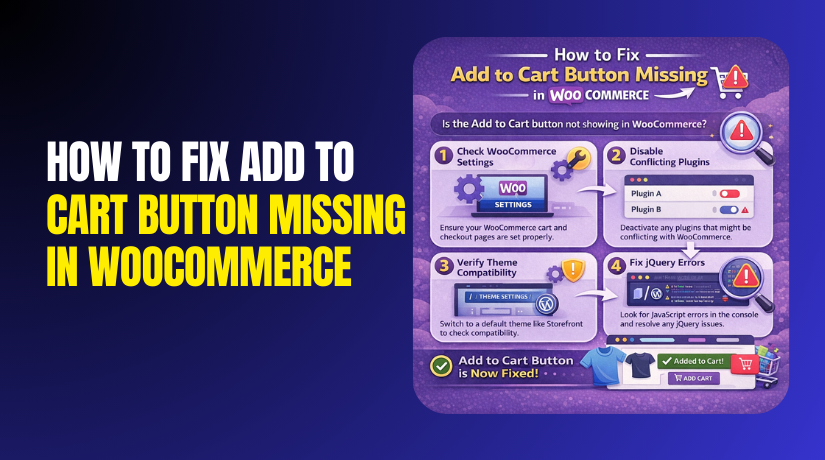
Fix 1: Check WooCommerce Settings That Control Buying
- Open WordPress Dashboard and go to WooCommerce Settings.
- Check that Cart and Checkout pages are set correctly.
- Make sure no setting is disabling buying actions on shop pages.
- Refresh your pages after saving settings. This helps when add to cart button missing in woocommerce starts suddenly.
Fix 2: Check Product Price, Stock, And Visibility
- Open the product that has the issue in dashboard. Make sure the product is Published and has a price.
- Check stock status and confirm it is In stock.
- Set catalog visibility to Shop and search for normal display. These points often fix woocommerce add to cart button not showing for some products.
Fix 3: Disable Catalog Mode Or Quote Plugins
- Check your theme panel for catalog mode options first.
- Then check plugins that hide price or add quote buttons.
- Disable those options and clear cache after changes.
- Test as a logged out user also for better results. This usually solves add to cart button not visible woocommerce storewide.
Fix 4: Test Theme Issue Using Storefront Theme
- Install and activate Storefront theme for quick testing.
- Open the product page and check if the button returns.
- If it returns, your theme is causing the issue. Switch back and plan theme template fixes later.
- This is the fastest way to fix add to cart button missing woocommerce.
Fix 5: Clear Cache And Turn Off Minify For Testing
- Clear browser cache, plugin cache, and CDN cache if used.
- Disable CSS and JS minify settings for quick testing.
- Reload the page and check if scripts load properly.
- Many times speed settings cause woocommerce add to cart button not showing issues.
Fix 6: Find Plugin Conflict In A Clean Way
- Deactivate all plugins except WooCommerce for a test.
- If the button returns, enable plugins one by one. The plugin that breaks the button is the main cause.
- Remove it or change its settings to allow buying. This step often fixes add to cart button missing in woocommerce fully.
How To Prevent This Issue In The Future With Simple Store Practices
Keep WooCommerce, your theme, and plugins updated regularly. Update in a controlled order to reduce conflict risks. Use staging to test updates before your live store changes. Avoid heavy template overrides unless you truly need them. Use a child theme for safe layout adjustments and edits. Keep a short change log after every big site update. Note the date, plugin changes, and theme adjustments clearly.
Limit plugins that change cart, pricing, and purchase rules together. Too many cart control plugins create hidden rule conflicts. Keep speed plugins settings stable after your store works fine. When you change speed settings, test add to cart functions first. Clear cache after every change, then test in incognito mode. If you do custom CSS, comment and label your rules clearly. This helps you find issues fast when add to cart button missing in woocommerce appears again. Regular backups also protect you from bad updates. A clean restore can save hours in urgent cases.
Conclusion
When the cart button disappears, focus on fast, safe checks first. Start with store settings, product rules, and cache testing. Then confirm if the issue is theme, plugin, or scripts. Most cases of woocommerce add to cart button not showing come from overrides, conflicts, or hidden rules. Use the step order above to isolate the exact cause. Do not change many things at the same time. Make one change, then test, then move forward. This keeps your store stable during troubleshooting.
If you still see add to cart button not visible woocommerce, the issue may be deeper. It may need template repairs, hook restore, or conflict cleanup. If you want expert help, WooHelpDesk can fix it safely. WooHelpDesk can troubleshoot, restore the button, and prevent repeat issues.
