How to Create and Set Up a Contact Page in WordPress
Table of Contents
- Introduction
- Why a WordPress Contact Page is Important for Your Website
- Benefits of Having a Contact Page on a WordPress Website
- Prerequisites Before Setting Up Your Contact Page On WordPress
- How to Setting Up a Contact Page on WordPress (Step-by-Step Guide)
- Conclusion
Introduction
A contact page is an essential element of any WordPress site. It allows visitors to get in touch with you directly. This page helps in building trust with your audience, providing a means for communication. Without it, users may feel disconnected from your site. This guide will walk you through how to add a contact form in WordPress, customize it to fit your needs, and troubleshoot common issues.
What Is a Contact Page on WordPress?
A contact page on WordPress is a dedicated page that includes a form and other contact information. It allows visitors to reach you directly without navigating through other pages of your website. This page typically includes fields such as name, email, and message, enabling visitors to send inquiries or feedback easily. The page can also display additional information such as phone numbers, office hours, and even a map showing your business location.
Creating a contact page in WordPress is a simple process. You can use plugins that streamline the process and make it user-friendly. Adding a contact form to your WordPress page allows you to stay organized and manage communication efficiently. Whether you are running a blog, an online store, or a business site, a well-designed WordPress contact page setup is crucial for maintaining effective communication with your visitors.
Why a WordPress Contact Page is Important for Your Website
Builds Trust and Credibility
A WordPress contact page shows your visitors that you’re approachable and open to communication. By providing an easy way for people to reach out, you demonstrate transparency and reliability. Visitors are more likely to trust a site that offers clear contact information. Whether it’s a simple form or a direct email address, having a contact page builds confidence in your brand.
Facilitates Direct Communication with Visitors
The contact form plugin in WordPress allows visitors to directly communicate with you. This eliminates the need for visitors to search through your site for an email address or phone number. It ensures that you won’t miss any important inquiries or feedback. Whether it’s a customer support question or a partnership request, having a contact page simplifies the process.
Enhances User Experience
A WordPress contact page setup provides an essential resource for users. It creates a seamless experience where visitors can quickly find the information they need to contact you. Whether you’re offering product support, responding to a query, or getting feedback, having a dedicated page makes your site more user-friendly. A well-organized page helps improve the overall user experience, encouraging more engagement.
Helps with Lead Generation
A contact page is not only for communication but also for lead generation. By offering a customizable WordPress contact form, you can gather valuable information from potential clients or customers. This helps you build a database of leads that can be followed up with marketing or sales emails. It’s a crucial tool for growing your business and staying connected with interested users.
Improves SEO and Online Presence
Google values sites that make it easy for visitors to reach out. A contact us page in WordPress can help improve your site’s SEO by including important information like your physical address, phone number, and email. Additionally, if you include a map or social media links, it boosts your visibility online. This information signals to search engines that your site is credible and reliable, potentially improving your rankings.
Reduces Spam and Inappropriate Messages
Using a contact form plugin in WordPress helps filter out spam and inappropriate messages. Many contact forms come with CAPTCHA or other anti-spam features. These features ensure that only legitimate inquiries make it to your inbox. Without these protections, your site could become overwhelmed with unwanted messages, which could lead to security issues and a cluttered inbox.
Acts as a Customer Support Tool
For businesses, a contact page serves as an essential tool for customer support. It’s a centralized place where customers can ask questions, report issues, or request help. A WordPress contact form customization allows you to design forms specific to your business needs, such as service inquiries, support tickets, or feedback forms. This feature can enhance customer satisfaction and loyalty by providing a direct way to assist them.
Benefits of Having a Contact Page on a WordPress Website
Improved User Engagement
A WordPress contact page plays a vital role in engaging visitors. It allows users to reach out directly with any questions, feedback, or inquiries. By providing a simple form, you’re giving your audience a channel to connect with you. This fosters better communication and increases interaction on your site, which can lead to more returning visitors.
Increased Customer Trust
Having a contact page demonstrates professionalism and transparency. When visitors can easily find your contact details, they’re more likely to trust you. It’s a key component in building trust with your audience, especially for businesses. Visitors feel more comfortable when they know how to reach out for support, increasing their confidence in your brand.
Better Lead Generation
A contact form plugin in WordPress is a great tool for lead generation. By asking visitors to submit their contact details or inquiries, you’re collecting valuable information. You can use this data to follow up on leads, convert inquiries into sales, and engage potential clients. It’s a crucial tool for growing your business by attracting and retaining customers.
Enhanced User Experience
A WordPress contact page setup improves the overall user experience by making it easy for visitors to get in touch. Whether it’s for customer service, general inquiries, or feedback, your contact page offers a direct path for communication. A well-designed contact page adds convenience, saving users time and making your site more user-friendly.
SEO Benefits
Adding a contact us page in WordPress can also improve your site’s SEO. Search engines value sites that are easy to navigate and provide clear contact information. By including your business details, such as address, phone number, and email, your site becomes more accessible to search engines and users. This can help improve your rankings and visibility in search results.
Prerequisites Before Setting Up Your Contact Page On WordPress
WordPress Installation
Before setting up your contact page, ensure that WordPress is installed and functioning properly. You’ll need access to the WordPress dashboard, where you’ll be adding and customizing your pages. If you haven’t set up WordPress yet, be sure to complete the installation and ensure your website is up and running smoothly.
Choosing a Contact Form Plugin


The next step is selecting a contact form plugin for WordPress. Popular options like WPForms, Contact Form 7, and Ninja Forms are easy to use and highly customizable. Choose a plugin that fits your website’s needs, whether you need a simple form or something more complex with custom fields and integrations. Make sure the plugin you select is compatible with your theme and other plugins to avoid conflicts.
Basic WordPress Knowledge
While WordPress is user-friendly, some basic knowledge is necessary for setting up your contact page. Familiarity with adding new pages, installing plugins, and using the block editor will make the process smoother. If you’re new to WordPress, consider taking a brief tutorial to understand the basics of page creation and plugin installation.
Contact Information
Prepare your contact information before setting up the page. This includes deciding what information you want to display alongside the contact form. Typically, businesses include their physical address, phone number, and email address. You may also want to add social media links or a map of your location, depending on your needs.
Security Considerations
When creating a WordPress contact form, ensure that it’s secure to prevent spam and malicious attacks. Choose a plugin that offers built-in security features like CAPTCHA, reCAPTCHA, or Akismet. These features help prevent bots from submitting spam through your contact form and ensure your site remains safe.
How to Setting Up a Contact Page on WordPress (Step-by-Step Guide)
Step 1: Create a New Page
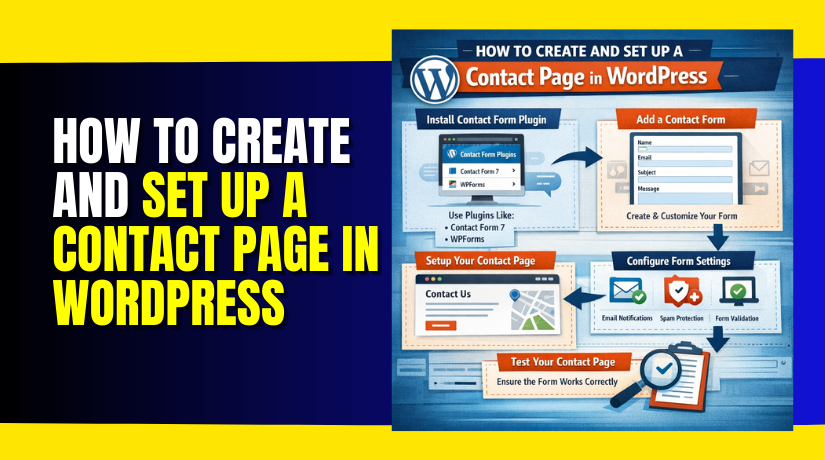
The first step in setting up a WordPress contact page is to create a new page.
- From your WordPress dashboard, navigate to Pages > Add New.
- Title the page something simple, like “Contact Us” or “Get in Touch.”
- This title will appear at the top of the page and should be clear and inviting to your visitors.
- After adding the title, click Publish to create the page.
Step 2: Install and Activate a Contact Form Plugin
- To add a contact form to your WordPress page, you need a contact form plugin.
- Some popular plugins are WPForms, Contact Form 7, and Ninja Forms.
- To install one, go to your WordPress dashboard, then click Plugins > Add New.
- Search for the plugin by name and click Install Now, then activate the plugin.
- These plugins offer easy-to-use drag-and-drop form builders, so you don’t need any coding experience.
Step 3: Configure the Contact Form
- Once the plugin is activated, you can begin configuring your WordPress contact form customization.
- Most contact form plugins provide default fields like name, email, and message, but you can add more fields as needed.
- For example, if you want to ask for a phone number or company name, you can add those fields easily in the form builder.
Make sure to set up email notifications so that you get notified when someone submits the form. You can also customize the confirmation message users see after they submit the form. This will reassure them that their message has been received.
Step 4: Embed the Contact Form on Your Contact Page
- Once your form is ready, it’s time to add it to the page you created.
- Most contact form plugins provide a shortcode that you can use to embed the form.
- To do this, simply go to the page you created earlier, click Edit, and paste the shortcode where you want the form to appear.
For example, with WPForms, the shortcode will look something like this: [wpforms id=”123″]. After pasting the shortcode, click Update to save the changes. When you visit the page, the contact form will be displayed.
Step 5: Customize Your Page Layout
Now that the form is embedded, you can customize the page layout to make it visually appealing and user-friendly. You can use the WordPress block editor or a page builder like Elementor to arrange the form and add extra information.
Consider adding additional sections like your business’s physical address, phone number, and operating hours. If relevant, you may want to include a map showing your location or links to your social media profiles. These additions make your contact page more informative and accessible to visitors.
Common Issues and Troubleshooting When Setting Up a Contact Page in WordPress
Form Submission Issues
One of the most common issues with WordPress contact forms is when the form doesn’t submit properly. This can happen for several reasons, such as incorrect settings or plugin conflicts. If users aren’t able to submit the form, first check the form settings to ensure that the email notifications are set up correctly. Also, make sure that the contact form plugin is compatible with your WordPress version and theme.
Email Notifications Not Received
Another frequent problem is when form submissions don’t trigger email notifications. This issue may arise due to incorrect email settings or email servers blocking the messages. To resolve this, check the plugin’s email settings to make sure the correct “from” address is used. You can also install an SMTP plugin (like WP Mail SMTP) to ensure your emails are sent and received correctly.
Form Spam
Spam can be a big problem for contact forms. Fortunately, most contact form plugins for WordPress have built-in anti-spam features like CAPTCHA or reCAPTCHA. Enabling these features can prevent bots from submitting fake messages. Additionally, plugins like Akismet can help filter out spam messages, keeping your inbox clean and secure.
Plugin Compatibility Issues
Sometimes, other plugins on your WordPress site can conflict with the contact form plugin. This can cause the form to not display properly or even break the functionality entirely. If you suspect a conflict, try deactivating other plugins one by one and testing the contact form after each deactivation. This can help you identify the source of the conflict. Alternatively, try using a different contact form plugin if the issue persists.
Conclusion
In conclusion, setting up a WordPress contact page is a simple yet essential step for any website. It fosters communication, builds trust, and enhances user experience. By following the steps in this guide, you can easily create a contact page, customize your form, and troubleshoot common issues that may arise.
A well-structured contact page not only serves your users but also helps in generating leads and improving your SEO. Whether you’re running a personal blog or a business, having a contact page is a key element for success online. It ensures that your visitors can reach you, ask questions, and engage with your content.
If you’re looking for expert assistance with setting up or managing your WordPress contact page, WooHelpDesk is here to help. Our team of professionals can assist you with customizing your contact form, resolving technical issues, and ensuring your website is optimized for user engagement. Contact us today for seamless WordPress support and solutions!