How to Calculate Shipping Costs in WooCommerce: Formulas and Best Practices?
Table of Contents
- Introduction
- What Shipping Cost in WooCommerce Means?
- What are the Key Features of Adding Shipping Cost in WooCommerce?
- What are the Benefits of Adding Shipping Cost in WooCommerce?
- What are the Factors Impacting Shipping Rates for WooCommerce?
- What are the Shipping Strategy Types used in WooCommerce Stores?
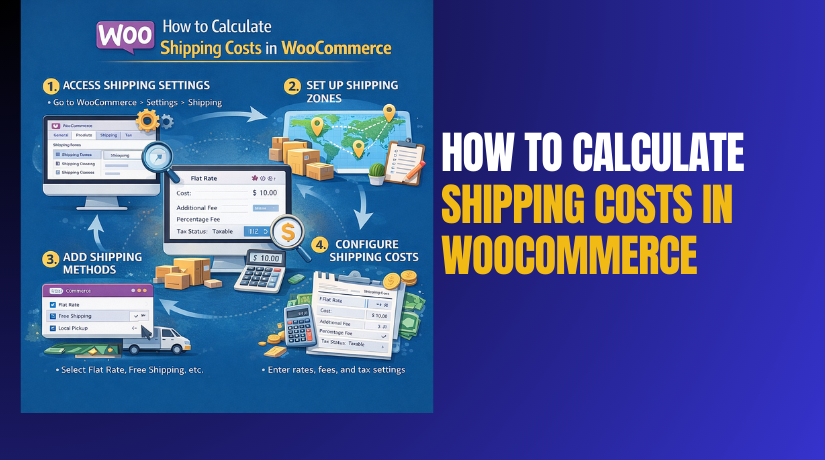
- How to Calculate Shipping Cost in WooCommerce?
- How to Determine How Much to Charge for Shipping?
- What is the Formula for Calculating Shipping Costs in WooCommerce?
- How To Setup WooCommerce Shipping Rates Step by Step?
- Final Verdict
Introduction
Shipping decides whether a customer completes checkout or abandons cart. Even a good product fails when shipping feels unclear. That is why WooCommerce shipping cost setup must be planned. You must price shipping to cover costs and stay competitive. You must also keep rules simple for customers to understand.
Shipping cost is not just a checkout fee for customers. Shipping cost affects profit, refunds, and customer satisfaction strongly. Undercharging shipping quietly destroys margins on many orders. Overcharging shipping kills conversion rate and increases abandoned carts. Clear shipping rules reduce support tickets and delivery complaints later. Accurate shipping rules improve delivery promises and build customer trust.
This guide shows how to calculate shipping in WooCommerce correctly. You will learn the best WooCommerce shipping formula patterns for stores. You will also learn how to determine WooCommerce shipping cost confidently.
We will cover practical steps and real best practices. We will also cover clear formulas for common store situations. This approach helps you build stable WooCommerce shipping rates setup fast.
What Shipping Cost in WooCommerce Means?
Shipping cost in WooCommerce is the fee charged for delivery. It appears at checkout after address and shipping method selection. This cost can be fixed, variable, or condition-based. It can depend on location, weight, quantity, or cart subtotal. It can also depend on shipping classes and product types.
WooCommerce uses zones, methods, and rates to calculate fees. Your job is to configure those rules for your store. When customers see shipping early, they buy more confidently. When customers see shipping late, they abandon carts more often. Shipping cost must cover carrier fees and packaging expenses too. Shipping cost must also cover handling time and label costs.
- Shipping cost is the delivery fee added during WooCommerce checkout.
- Shipping cost can change based on zones, methods, and conditions.
- Shipping cost can include packing, handling, and carrier label expenses.
- Shipping cost can be free when rules meet your offer threshold.
Shipping method is the option like flat rate or free shipping. Shipping cost is the number attached to that chosen method. You can have one method with multiple rates and rules. You can also have multiple methods under one zone. Your setup should match customer expectations in each region.
What are the Key Features of Adding Shipping Cost in WooCommerce?
WooCommerce shipping is built around zones and methods. Zones control which regions get which shipping options. Methods control how shipping is calculated within each zone. Rates define the exact fees customers will pay at checkout. You can build simple rules or advanced rules using plugins.
These features support accurate WooCommerce shipping cost control. They also support flexible WooCommerce shipping rates set up for growth.
1. Shipping Zones for location-based pricing
- You can create zones for countries, states, cities, or postcodes.
- You can prioritize zones by order for matching customer addresses.
- You can create a catch-all zone for every other location.
2. Shipping Methods for different charging models
- The flat rate method supports fixed fees and rule-based adjustments.
- The free shipping method supports thresholds and coupon-based shipping offers.
- Local pickup supports zero delivery cost for nearby customers.
3. Shipping Classes for product-based cost differences
- You can assign shipping classes for heavy, bulky, or fragile items.
- You can add class costs inside flat rate settings per zone.
- You can mix classes in a cart and control how costs combine.
4. Conditional logic using plugins for advanced rules
- You can set rules based on weight, quantity, or cart subtotal.
- You can set rules based on shipping destination distance ranges.
- You can set rules based on product categories and customer roles.
5. Tax handling for shipping costs
- You can enable shipping tax based on your tax configuration.
- You can set shipping tax classes or inherit product tax classes.
- You can show shipping tax clearly during checkout summaries.
What are the Benefits of Adding Shipping Cost in WooCommerce?
Charging shipping correctly protects profit and improves store operations. It also helps customers understand total cost before paying. Good shipping fees reduce delivery surprises and refund requests. They also help you control carrier costs during peak seasons. A strong WooCommerce shipping formula improves planning for growth. Clear shipping fees also support accurate product pricing strategy.
1. Protects profit margins across all order sizes
- You avoid losing money on heavy or distant delivery orders.
Accurate pricing covers carrier fees, packaging, and handling time. - You can separate product price from delivery fee clearly.
Separate fees help pricing feel fair and transparent. - You can adjust shipping without changing product prices often.
Carrier rates change, so flexible shipping fees help stability.
2. Improves checkout clarity and reduces abandoned carts
- Customers trust checkout more when shipping is clear early.
Clear totals reduce uncertainty and reduce checkout hesitation. - Customers abandon carts less when shipping matches expectations.
Unexpected fees are a top reason for cart abandonment. - Customers compare shipping options and choose what fits budgets.
Options increase conversion by meeting different delivery needs.
3. Helps you offer free shipping strategically
- You can set free shipping thresholds to increase average order value.
Customers add more items to unlock free delivery offers. - You can limit free shipping to profitable zones only.
Zone control prevents losses in expensive delivery regions. - You can use coupons to run short free shipping promotions.
Coupons help marketing campaigns and protect margins by limits.
4. Reduces support workload and delivery complaints
- Customers understand delivery cost and timeline before paying.
Clarity reduces “where is my order” contacts later. - Customers see pickup options and choose faster local collection.
Pickup reduces shipping delays and improves fulfillment efficiency. - Customers see consistent rules and fewer errors during checkout.
Fewer errors reduce payment failures and customer frustration.
5. Improves reporting and cost forecasting for operations
- You can track shipping revenue and compare it with carrier costs.
Comparison shows profit leakage and supports better rate tuning. - You can forecast packing workload using shipping method selections.
Method choices show delivery demand by region and speed. - You can plan better for peak seasons and carrier price spikes.
Stable formulas protect margins during high-demand shipping periods.
What are the Factors Impacting Shipping Rates for WooCommerce?
Shipping rates change based on real costs and business decisions. You must understand these factors before you determine WooCommerce shipping cost. If you ignore one factor, your WooCommerce shipping cost becomes unstable. If you plan each factor, your WooCommerce shipping rates setup becomes predictable. Use the list below as your pricing foundation.
1. Shipping destination and delivery zone distance
- Farther zones usually cost more because carriers charge by distance.
Distance affects fuel, transit time, and carrier network fees. - Remote areas often include extra surcharges and longer delivery routes.
Carriers add remote fees for low volume and hard access regions. - International shipping adds customs steps and tracking cost increases.
Cross-border delivery includes duties, paperwork, and risk costs.
2. Product weight and volumetric weight rules
- Heavier products cost more because rates rise with weight slabs.
Carriers price by weight brackets and add handling charges. - Bulky boxes can cost more due to dimensional weight pricing.
Dimensional pricing uses box size when it exceeds weight value. - Wrong weights in WooCommerce create wrong checkout rates quickly.
Incorrect weights can cause losses or angry customers later.
3. Package size, packaging material, and handling needs
- Larger boxes increase shipping price even when products are light.
Bigger boxes increase dimensional weight and carrier space use. - Fragile packaging increases cost due to extra materials and time.
Bubble wrap, foam, and double boxing raise packing costs. - Special handling adds cost for batteries, liquids, and glass items.
Some items need hazard labels and special carrier rules.
4. Shipping speed and service level selection
- Express shipping costs more because carriers prioritize transit.
Priority handling and faster routes increase carrier pricing. - Standard shipping costs less but may have longer delivery windows.
Standard services use normal routes and lower urgency levels. - Same-day or local delivery needs separate pricing and drivers.
Local delivery adds route planning and driver labor costs.
5. Carrier pricing, surcharges, and seasonal adjustments
- Carrier base rates change yearly and sometimes mid-season too.
Carriers adjust rates for fuel, labor, and network demand. - Fuel surcharges can change weekly and affect final shipping cost.
Fuel pricing is volatile and carriers pass changes to stores. - Peak season surcharges increase costs during holidays and sales events.
Carriers raise prices when volume is high and capacity tight.
6. Order value, free shipping threshold, and promotions
- Free shipping threshold changes how customers build their carts.
Many customers add items to unlock free shipping benefits. - Coupons can reduce shipping cost and affect profit on small orders.
Promotions can create losses if minimums are not enforced. - Flat shipping fees can be unfair for very low and very high orders.
One flat fee can overcharge some and undercharge others.
7. Product shipping classes and mixed-cart behavior
- Shipping classes let you charge more for heavy and bulky products.
Classes help you match real shipping cost per product type. - Mixed carts can combine class costs and raise totals unexpectedly.
Class combining rules must be tested for fair totals. - Category-based shipping rules can help pricing feel more logical.
Categories group similar items with similar delivery costs.
8. Returns, failed deliveries, and damage risk costs
- Return shipping costs should be planned for high return categories.
Clothing and size based items may need a return pricing buffer. - Failed delivery attempts can create extra carrier charges sometimes.
Address errors and missed deliveries can trigger surcharge fees. - Damage risk adds hidden costs for fragile and high value items.
You may need insurance, better packaging, and stronger boxes.
What are the Shipping Strategy Types used in WooCommerce Stores?
You can choose different strategies based on your brand and margins. Each strategy can use a different WooCommerce shipping formula. Each strategy affects conversion rate and profitability differently.
1. Flat rate shipping strategy
- You charge one fixed amount for a specific zone or method.
Flat rates are simple and reduce confusion at checkout. - You can use shipping classes to add extra cost for bulky items.
Class costs keep flat rates profitable for special products. - You can set different flat rates for different zones and regions.
Zone pricing matches real delivery cost differences.
2. Free shipping threshold strategy
- You offer free shipping above a cart amount threshold.
Thresholds increase average order value and conversion. - You can limit free shipping to profitable zones only.
Zone limits prevent losses in expensive regions. - You can combine free shipping with flat rate as a fallback option.
Fallback keeps checkout working when threshold is not met.
3. Real-time carrier rates strategy
- Rates are calculated using carrier APIs and customer address details.
Real-time rates reflect actual carrier pricing for that order. - You reduce profit leakage from undercharging shipping on heavy items.
API rates are accurate when product weights are correct. - You may need paid plugins and accounts for live rate access.
Carrier integrations often require subscriptions or API keys.
4. Table rate shipping strategy
- Rates change based on weight, subtotal, item count, or destination.
Table rules match many business models and carrier slabs. - You can create clear tiers like 0–1kg and 1–3kg pricing.
Tiers make totals feel fair and predictable for customers. - You can control complex rules without changing product prices often.
Table rate lets you tune shipping without editing products.
How to Calculate Shipping Cost in WooCommerce?
To calculate shipping in WooCommerce, you must pick a pricing method. You must also convert real carrier costs into simple checkout rules. The best method depends on your products and delivery regions. You can start simple and improve rules after data grows. The steps below help you build accurate WooCommerce shipping cost rules.
Step 1: Create shipping zones based on your delivery regions
Zones decide which shipping methods appear for each customer address. You should build zones using your top delivery locations first. You should also add one fallback zone for all other places.
WordPress Dashboard → WooCommerce → Settings → Shipping → Shipping zones
- Create a zone for your main service area locations.
Main zones cover most orders and reduce pricing mistakes early. - Add states, cities, or postcodes to match that zone precisely.
Precise matching prevents expensive zones using cheap rates. - Create a rest of the world zone as a safe fallback option.
Fallback prevents checkout errors for unmatched addresses.
Step 2: Add shipping methods inside each zone
Methods are the choices customers select at checkout. Each zone can have different methods and different pricing. This is the base of WooCommerce shipping rates setup.
WordPress Dashboard → WooCommerce → Settings → Shipping → Shipping zones → Edit zone → Add shipping method
- Add Flat rate method for predictable shipping fee control.
Flat rate is simple and works for most early stores. - Add Free shipping method if you plan a threshold offer.
Free shipping increases AOV when thresholds are set correctly. - Add Local pickup method if you support local customer collection.
Pickup reduces shipping load and improves local conversion.
Step 3: Decide your shipping pricing model for each zone
The pricing model decides how the rate is calculated at checkout. It can be flat, tiered, real-time, or class based. Your choice becomes your main WooCommerce shipping formula.
- Use a flat rate when costs are stable for that zone.
Stable costs make a single fee fair and predictable. - Use tiered rates when weight and size vary a lot.
Tiered rules reduce loss on heavy and bulky items. - Use real-time rates when you ship many weights and regions.
Live rates match carrier pricing closely when data is accurate. - Use the free shipping threshold to push higher cart values.
Threshold offers increase order value and reduce abandoned carts.
How to Determine How Much to Charge for Shipping?
To determine WooCommerce shipping cost, you must cover real costs. You must also keep checkout pricing acceptable for your market. The right shipping charge balances profit and conversion.
Step 1: Calculate your true shipping cost per order
True shipping cost includes carrier fee plus your packaging expense. It also includes handling labor and label printing expenses. This gives you a safe baseline for your shipping fee.
- Add carrier cost from invoices or rate cards for that zone.
Carrier cost is the largest part of shipping pricing usually. - Add packaging materials cost per average order.
Boxes, tape, fillers, and labels add real expense always. - Add handling time cost as labor cost per order.
Packing time is paid time and must be priced in. - Add a damage buffer for fragile categories and high value items.
Buffer protects profit when replacements and returns happen.
Step 2: Choose your pricing approach for customers
You can charge exact cost, partial cost, or full markup cost. This choice depends on your margin strategy and competition.
- Charge exact cost when customers accept transparent shipping pricing.
Exact cost feels fair but can reduce conversion sometimes. - Subsidize shipping when product margins are high enough.
Subsidy improves conversion and keeps shipping feeling low. - Mark up shipping when packing effort is high for your products.
Markup protects time and complexity for bulky orders. - Use the free shipping threshold when AOV growth is your priority.
Thresholds encourage add-ons and reduce cart abandonment.
Step 3: Test your shipping price against competitors
Competitor pricing influences customer expectations strongly. You should compare shipping total cost with similar product stores. You should also consider delivery speed differences.
- Check competitor shipping fees for similar products and order values.
Similar products create direct buyer comparisons in checkout. - Compare delivery speed and tracking quality between your offer and theirs.
Faster shipping can justify higher fees for many customers. - Adjust your rate if your shipping feels too high at checkout.
Small changes can reduce abandonment and increase conversion.
What is the Formula for Calculating Shipping Costs in WooCommerce?
A shipping formula is a simple way to make rates consistent. It also helps you tune pricing without guessing. You can use one formula across zones or multiple formulas. Below are the most useful WooCommerce shipping formula options.
Formula 1: Flat rate shipping formula
This works best when shipping costs are stable in a zone. It is also best when product weights do not vary much.
- Shipping fee equals base shipping cost plus handling cost.
Base cost covers carrier charges and handling covers packing work. - Add packaging cost into the flat fee for stable margins.
Packaging is consistent, so it fits well inside flat rates. - Add class cost for heavy and bulky products when needed.
Class costs prevent loss when flat fees are too low.
Flat Rate Shipping = Carrier Average Cost + Packaging Cost + Handling Cost
Formula 2: Weight based tier shipping formula
This is best when your product weights vary a lot. It matches carrier slab pricing patterns more closely.
- Create weight slabs like 0–1kg, 1–3kg, 3–5kg ranges.
Slabs keep shipping fair for light and heavy orders. - Assign a shipping fee to each slab based on carrier pricing.
Match slabs to invoices so you avoid undercharging. - Add a small handling fee to each slab for labor recovery.
Handling fee ensures each order covers packing time cost.
Tier Shipping = Weight Slab Rate + Handling Fee


Formula 3: Order value based shipping formula
This supports marketing and conversion strategy strongly. It works well for stores with stable product margins.
- Charge shipping for low cart values to protect small order margins.
Small orders often cost more to ship relative to item value. - Reduce shipping or offer free shipping for higher cart values.
Higher cart values can subsidize shipping more easily. - Set a clear free shipping threshold for simple checkout decisions.
Clear thresholds encourage customers to add more items.
Shipping Fee = Base Fee For Low AOV, Free Over Threshold
Formula 4: Per item shipping formula
This works when each item adds a predictable packing cost. It is useful for small products with similar size and weight.
- Set a base shipping fee for the first item shipped.
Base fee covers label cost and basic packaging materials. - Add a per item fee for each extra item in the cart.
Extra items increase weight and packing materials slightly. - Add a maximum cap to prevent unreasonable shipping totals.
Caps protect conversion and reduce shipping sticker shock.
Shipping Fee = Base Fee + Per Item Fee × Item Count
How To Setup WooCommerce Shipping Rates Step by Step?
A correct WooCommerce shipping rates setup makes checkout stable and predictable. You should configure zones first, then methods, then rates. You should also test each zone using real addresses. Use the steps below to keep everything clean and organized.
Step 1: Create shipping zones for each region you serve
Zones control which methods customers can see at checkout. You should create zones based on your most common delivery locations. You should also add a fallback zone for every other location.
WordPress Dashboard → WooCommerce → Settings → Shipping → Shipping zones → Add zone
- Create a zone for your top selling country or state first.
Starting with top locations prevents pricing mistakes for most orders. - Add specific states, cities, or postcodes for accurate matching.
Accurate matching prevents cheap rates showing for costly areas. - Create a zone called Rest of World as a safe fallback.
Fallback zones prevent checkout failures for unmatched addresses.
Step 2: Add shipping methods inside each zone
Methods decide how customers will pay for delivery. Each zone can have different methods based on carrier availability. Each method can also have different fees and rules.
WordPress Dashboard → WooCommerce → Settings → Shipping → Shipping zones → Edit zone → Add shipping method
- Add Flat rate method for controlled and predictable shipping charges.
Flat rate works well when average costs are stable in a zone. - Add Free shipping method if you offer threshold based shipping deals.
Threshold shipping increases cart value and improves conversion. - Add Local pickup method if you allow pickup at your location.
Pickup lowers shipping workload and improves local sales.
Step 3: Configure flat rate shipping cost correctly
A flat rate is not always one fixed price forever. You can tune it using classes and handling fees. You can also set different rates per zone.
WordPress Dashboard → WooCommerce → Settings → Shipping → Shipping zones → Edit zone → Flat rate → Edit
- Set a base flat rate using your carrier average cost.
Average cost from invoices prevents undercharging and losses. - Add a handling fee to cover packing labor and label cost.
Handling protects margins and covers time spent on fulfillment. - Use shipping class costs for bulky and heavy product categories.
Class cost ensures special items do not eat your profit. - Choose the correct calculation method for mixed shipping classes.
Class combining rules affect totals when the cart has mixed items.
Step 4: Add shipping classes for products with higher delivery cost
Shipping classes help you charge extra for heavy and fragile products. They also help you avoid one flat rate hurting your margins.
WordPress Dashboard → WooCommerce → Settings → Shipping → Shipping classes → Add shipping class
WordPress Dashboard → Products → Edit Product → Shipping → Shipping class
- Create classes like Heavy, Bulky, Fragile, or Oversized.
Clear class names help your team assign products correctly. - Assign classes to products that cause higher carrier invoices.
Correct assignment ensures checkout rates match real costs. - Add class costs inside the flat rate method for each zone.
Class cost adds extra fee when those products are in cart.
Step 5: Set free shipping rules without losing profit
Free shipping can increase conversions but can reduce margins fast. You must set thresholds based on average shipping cost and margins. You must also control which zones can use free shipping.
WordPress Dashboard → WooCommerce → Settings → Shipping → Shipping zones → Edit zone → Add shipping method → Free shipping
- Set free shipping requirement as minimum order amount.
Minimum amount helps recover shipping through higher cart value. - Use coupon requirements when running short marketing promotions.
Coupons control exposure and prevent free shipping abuse. - Limit free shipping to profitable zones with predictable costs.
Some zones have high carrier rates and should be excluded. - Keep flat rate as fallback when free shipping conditions fail.
Fallback prevents checkout confusion and keeps methods available.
Step 6: Use table rate shipping when flat rate is not enough
Table rate shipping is best when costs vary by weight or subtotal. It helps you build tiers that match carrier slab pricing. This is a practical method to calculate shipping in WooCommerce reliably.
WordPress Dashboard → Plugins → Add New → Search “Table Rate Shipping” → Install → Activate
WordPress Dashboard → WooCommerce → Settings → Shipping → Table rates
- Create weight tiers like 0–1kg, 1–3kg, 3–5kg slabs.
Tiers match carrier slabs and reduce undercharging risk. - Create subtotal tiers like under 50, 50 to 100, above 100.
Subtotal tiers support marketing goals and margin protection. - Add zone based table rules to keep rates fair by location.
Zone based tables reflect distance and surcharge differences. - Add handling fee to each rule to cover packing work.
Handling fees protect fulfillment costs across all orders.
Step 7: Add real-time carrier rates when you need accuracy
Real-time rates are best for stores shipping many sizes and distances. They reduce losses from guessing rates. They also improve trust by showing carrier labeled options.
WordPress Dashboard → Plugins → Add New → Search carrier plugin → Install → Activate
WordPress Dashboard → WooCommerce → Settings → Shipping → Carrier integration
- Connect the carrier account and add API credentials correctly.
API credentials allow rate fetching based on address and package. - Confirm product weights and dimensions are accurate in WooCommerce.
Wrong data causes wrong rates and customer complaints later. - Enable fallback method when API fails or returns errors.
Fallback prevents checkout blocks during API downtime. - Test live rates using real addresses from multiple zones.
Real tests confirm rates appear correctly for all customers.
Step 8: Test shipping cost calculations before going live
Testing prevents checkout failures and pricing surprises for customers. You should test multiple addresses and multiple cart sizes. You should test both logged and guest checkouts for consistency.
Website Frontend → Shop → Add products → Cart → Checkout
Direct URL test → /cart → /checkout
- Test each zone with a real address and postcode example.
Address tests confirm zone matching and correct method display. - Test light cart and heavy cart to confirm rate fairness.
Mixed carts reveal class and tier calculation problems early. - Test free shipping threshold by adding items to reach the minimum.
Threshold tests confirm the offer triggers at correct value. - Test mobile checkout to confirm shipping method selection works.
Mobile issues can hide shipping options and reduce conversion.
Final Verdict
A strong WooCommerce shipping cost strategy protects profit and conversion. You should Calculate shipping in WooCommerce using real carrier data first. You should choose a clear pricing model that fits your products. You should build zones and methods for clean WooCommerce shipping rates setup. You should use shipping classes when delivery cost differs by product type. You should apply a simple WooCommerce shipping formula for stable pricing. You should also review invoices and adjust rates every quarter.
When done correctly, you can determine WooCommerce shipping cost confidently. Your store will feel fair, clear, and trustworthy at checkout.
Have questions before starting with WooCommerce & WordPress? Get support here at WooHelpDesk.