How to Become a WordPress Developer: Skills, Coding, and Roadmap
Table of Contents
- Introduction
- Who Is a WordPress Developer and What Do They Actually Do?
- WordPress Developer Skills You Must Learn First
- Does a WordPress Developer Need Coding Skills?
- What You Can Do Without Coding as a Developer
- Limits of No-Code WordPress Development
- WordPress Programming Language: What You Need to Learn and Why
- PHP for WordPress Development: The Most Important Coding Skill
- WordPress Developer Roadmap: A Clear Learning Path
- Final Checklist: What to Learn Before You Apply for WordPress Work
- Final Verdict
Introduction
WordPress powers many small and mid-size business websites in the USA. Many owners want fast updates without high developer costs. This creates steady demand for website builders and developers. If you enjoy building websites, this path fits well. Step-by-step instructions for becoming a WordPress developer are provided in this guide. You will learn the needed skills and the right learning order. A degree in computer science is not required to begin. You need practice, clear goals, and simple learning habits. Many people start from basic site editing and grow fast. You can work in-house, as a freelancer, or with an agency. You can also focus on one area and specialize later. If you are a wordpress developer for beginners, start small and stay consistent. Start with one simple site and improve it weekly.
Who Is a WordPress Developer and What Do They Actually Do?
Using WordPress tools, a WordPress developer creates and enhances websites. They create layouts, set site structure, and manage features. They also fix errors, improve speed, and keep sites secure. Some developers only build pages and setup plugins. Others write code and build custom features for clients. Your role depends on your skill level and job type. In the USA, many clients want clean design and fast loading pages. They also want smooth checkout and simple contact forms. A developer makes sure everything works without surprises.
Common tasks a WordPress developer handles:
- Install WordPress and configure key settings for the site.
- Choose themes, set designs, and adjust menus and pages.
- Add plugins for SEO, security, forms, and performance.
- Fix common issues like broken layouts or plugin conflicts.
- Use image optimization and caching to increase the speed of your website.
- Keep WordPress core, themes, and plugins up to date.
These tasks are part of daily WordPress developer skills growth. Many beginners worry about coding from day one. But growth can start with strong fundamentals first. You can begin with site building and basic edits. Later, you can learn coding for deeper work. For beginners, this is the practical approach. Long-term professional development is also supported by it.
A WordPress developer may work in different ways:
- Freelancer working with small local USA businesses.
- Agency developer building many client sites each month.
- In-house developer supporting one company website daily.
Each role helps you learn faster through real project work. You will discover the abilities needed for positions as a WordPress developer here. Additionally, you will discover the abilities required to work as a WordPress developer. You’ll understand exactly what abilities I need to work as a WordPress developer.
WordPress Developer Skills You Must Learn First
Strong wordpress developer skills start with the right foundation first. Many beginners jump into themes and plugins too fast. That causes errors and creates confusion later. Learn core basics first, then build real project habits. This section covers the skills required for wordpress developer roles today. It also addresses the abilities required to work as a WordPress developer. Start here if you’re wondering what abilities are required to work as a WordPress developer. Focus on skills that help you build and support sites. These skills also help you handle USA client needs. Clients want clean pages, fast speed, and safe updates.
-
WordPress Fundamentals You Must Know
You have to comprehend WordPress’s internal workings. Learn the dashboard and how every setting affects the site. Understand the difference between custom menus, posts, and pages. Learn how categories and tags help with blog structure. Understand themes and how they control the site design. Understand plugins and how they add features and tools. Learn widgets and block editor basics for layout building. Learn user roles, like Admin, Editor, and Author access. This helps you secure the site and prevent mistakes. Learn media handling for images, videos, and file sizes. Learn permalink settings and why they matter for SEO.
Key WordPress basics you should learn early:
- Dashboard navigation and site settings control.
- Posts, pages, categories, tags, and menu building.
- Theme install, customization, and child theme purpose.
- Plugin install, updates, and conflict checking steps.
- User roles, basic security settings, and access control.
-
Technical and Practical Skills for Real Projects
A developer must work like a builder and a tester. Discover how to set up a practice site locally. Use a staging site before changing a live website. This reduces risk and protects business revenue. Learn how to take full backups before big updates. When something goes wrong, learn how to restore backups. Discover the fundamentals of resolving theme and plugin conflicts. Learn how to check browser console and error screens. Learn how to test forms, checkout, and mobile layouts. Study speed fundamentals such as image compression and caching. Learn how to use a simple checklist after updates. These habits make you reliable and trusted.
Practical skills you should practice weekly:
- Establish a staging area and securely test updates.
- Backup, restore, and verify the site loads correctly.
- Debug common issues using step-by-step checking.
- Improve speed by reducing heavy images and scripts.
- Test the website on desktop, tablet, and mobile devices.
-
Communication and Client Skills for the USA Market
Technical proficiency is insufficient for stable employment. Clients want clear updates and simple explanations always. Learn to ask smart questions before starting any task. Learn to write short reports on changes you made. Learn to set clear timelines and avoid vague promises. Learn to explain limits and risks before major changes. Learn to document login details and update schedules properly. Learn to guide clients on simple site usage tasks. These soft skills help you keep clients longer. They also help you get more referrals in the USA.
Client-ready skills to build from day one:
- Ask goals, target users, and needed site features.
- Confirm scope, timeline, and success result clearly.
- Share progress updates in short and clear messages.
- Explain issues in simple words, without confusing terms.
- After delivery, provide alternatives for support and future steps.
Does a WordPress Developer Need Coding Skills?
Many beginners ask one common question before starting this career. Does a wordpress developer need coding skills for real projects today? The honest answer depends on your goals and work type. Some developers build websites using tools and ready templates. Other developers build custom features and solve deep issues. Both roles can be valid in the USA market. But the required skill level will change with each role. You can start without code and still build useful sites. You can also earn income by building simple business websites. But to grow faster, coding will help you long term. This also answers another common question. Do you need coding for wordpress to build and support sites? You can start without code, but you cannot ignore it forever.
Here is a simple way to understand the difference. No-code work helps you build and launch websites quickly. Code-based work helps you customize and scale websites safely. A WordPress developer often moves between both over time. You can begin with no-code builds to gain confidence. Then you can learn coding to unlock better jobs.
Coding becomes important when you need control and flexibility. It helps you fix problems that plugins cannot solve. It also helps you keep the site fast and secure. It helps you create features that match client needs exactly.
You may need coding for tasks like these:
- Build custom templates that match a unique page layout.
- Adjust theme functions without breaking future updates.
- Fix conflicts caused by plugin scripts and theme code.
- Add custom checkout changes for WooCommerce stores.
- Improve speed by removing unused code and heavy scripts.
If you want to work on advanced sites, learn coding slowly. Start with small edits, then move to bigger projects. This keeps learning simple and stress free.
What You Can Do Without Coding as a Developer
Many beginners think coding is required from day one. That is not true for most starting tasks. You can build many websites using themes and plugins today. You can create pages using block editor and page builders. You can setup forms, SEO tools, and security plugins easily. You can launch blogs, service sites, and small online stores. For this reason, a lot of people begin by building websites. This path works well for a wordpress developer for beginners. It also helps you practice real client work early.
Here are common tasks you can do without code:
- Build pages with blocks and reusable patterns.
- Setup menus, headers, footers, and site navigation.
- Install plugins for forms, SEO, caching, and backups.
- Customize design using theme settings and style options.
- Create landing pages for services, events, and local offers.
This also connects with another common question from beginners. Is it possible to create a WordPress website in real life without knowing how to code? Yes, you can build many sites without code. But you must know the limits of this approach.
Limits of No-Code WordPress Development
No-code tools are great, but they have clear limits. You may face design limits with some themes and builders. You may rely too much on many plugins for small needs. An excessive number of plugins might slow down the website and increase dangers. Some plugins can break after major WordPress updates. You may also struggle with custom features and complex logic. For example, custom membership rules may need coding support. Custom search filters often need code and database planning. Advanced performance work also needs code knowledge often.
A smart approach is to start no-code and grow into code. That is the best path for steady skill growth. It also prepares you for the next learning step. You will now study the fundamentals of the WordPress programming language. You will also learn why php for wordpress development matters most.
WordPress Programming Language: What You Need to Learn and Why
Many beginners ask about the wordpress programming language used in development. WordPress does not use one single language only. It runs like a system with several parts working together. Each part supports a different job inside your website. When you understand these parts, learning becomes much easier. You also avoid random learning that wastes time.
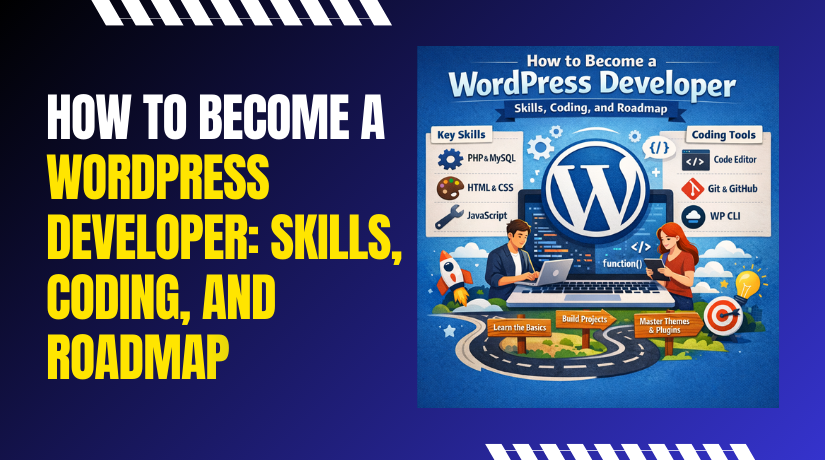
PHP is the primary server-side language used by WordPress. It also uses HTML to create page structure and content blocks. It uses CSS to style the layout, colors, and spacing. It uses JavaScript for actions and interactive elements. MySQL is also used by WordPress to store settings and content. It is not necessary for you to become an expert on day one. But you should know what each language controls. This helps you debug issues faster and work with confidence.
Here is what each language does in simple terms:
- HTML builds the page structure and content layout.
- CSS controls design, spacing, fonts, and responsive styling.
- JavaScript adds clicks, sliders, popups, and dynamic updates.
- PHP powers WordPress logic, templates, and plugin behavior.
- MySQL stores posts, pages, users, and site settings.
Learn them in order if you want to become a proficient developer. Start with HTML and CSS for basic control. Add JavaScript when you need interactive behavior. After that, concentrate on PHP for actual WordPress development. This approach supports real client work in the USA. Clients expect smooth design and stable site function.
PHP for WordPress Development: The Most Important Coding Skill
If you learn only one coding skill for WordPress, learn PHP. php for wordpress development is the main engine behind WordPress. It controls how pages load and how features behave. Themes use PHP to display content and layouts. Plugins use PHP to add tools and custom functions. WordPress core also uses PHP to run key processes. This is why PHP matters for long term growth.
PHP helps you move from basic site building to real development. It lets you customize templates beyond theme settings. It lets you add functions without relying on heavy plugins. It also helps you fix issues faster and safer. When something breaks, PHP knowledge gives you control. It enables you to comprehend why the problem occurred. It also helps you apply a clean fix.


Here are common WordPress tasks where PHP helps a lot:
- Create custom templates for pages, posts, and archives.
- Build child theme changes that survive theme updates.
- Add custom fields output in the right page locations.
- Use hooks to change behavior without editing core files.
- Create simple plugins for small custom site features.
- Customize WooCommerce actions, emails, and checkout flow.
Beginners often fear PHP because it sounds complex. However, you can pick it up gradually. Start by reading theme files and following function names. Learn how templates pull titles, content, and images. Learn how WordPress uses hooks for safe changes. Practice simple edits in a local test site first. Always avoid editing core WordPress files directly. That keeps your work safe and update friendly.
You may still ask again, does a wordpress developer need coding skills. You can start without coding, as explained earlier. But PHP makes you more valuable and more flexible. It opens better work options and higher pricing later. It also helps you handle larger client needs in the USA.
WordPress Developer Roadmap: A Clear Learning Path
A clear wordpress developer roadmap helps you learn without confusion. Many beginners learn random topics and lose motivation quickly. A roadmap gives you the right order and steady progress. It also answers how to become a wordpress developer in a practical way. Follow these stages and build real skills with practice. If you are a wordpress developer for beginners, start slow and stay consistent. Your goal is progress, not perfection from day one. Each stage below builds on the stage before it.
Stage 1: Learn WordPress Basics the Right Way
Start by using WordPress like a normal site owner. Learn the dashboard and settings that control your website. Create pages, blog posts, and menus without stress. Learn the block editor and build clean page sections. Learn how media works and upload images the right way. Learn how permalinks affect SEO and clean URLs. Learn user roles and why access control matters.
At this stage, focus on foundation and simple site builds. You are building early wordpress developer skills through practice.
Simple practice tasks for Stage 1:
- Install WordPress and change the main site settings.
- Create five pages with clear menus and proper links.
- Build a blog post and assign categories and tags.
- Add a contact form and test email delivery.
- Create a footer with basic links and social icons.
Stage 2: Build Websites Without Code First
Now build full websites without writing any code. This stage proves you can deliver real results. It also helps you learn layouts, spacing, and user flow. Use a trusted theme and avoid too many add-ons. Build a small business site with service pages. Build a portfolio site with project sections and galleries. Build a simple blog with a clean category structure.
This stage answers a key beginner question clearly. can you build a wordpress website without coding for real clients. Yes, you can build many useful sites this way. You will also learn the limits of no-code tools. Those limits will guide your next learning steps.
Recommended build goals for this stage:
- Build 2 demo sites for different business types.
- Keep design simple and easy for USA visitors.
- Ensure mobile layouts look clean and readable.
- Add basic SEO plugin setup and sitemap creation.
- Add caching and image compression for faster loading.
Stage 3: Learn Coding Foundations That Matter
Once you can build sites, start learning coding basics. Avoid attempting to learn everything in a single week. Learn only what helps you control the website better. Learn HTML first for structure and clean markup. Learn CSS next for design control and responsive layout. Learn basic JavaScript for simple front end actions. Learn how to use browser inspect tools for quick fixes.
This stage connects to a common doubt many beginners have. do you need coding for wordpress when you want better control. For serious development work, yes, coding helps a lot. You may start without code, but you should grow into it.
Weekly coding habits that work well:
- Practice small HTML and CSS edits on a test site.
- Fix spacing, button styles, and mobile layout issues.
- Learn basic JavaScript for toggles and simple events.
- Read theme files and understand what each file does.
- Use a staging site for every practice change.
Stage 4: Learn Theme Development Basics
Now move from theme user to theme customizer. Learn what a child theme is and why it matters. A child theme protects your changes during theme updates. Learn template basics like header, footer, and single pages. Learn the WordPress template hierarchy in a simple way. Learn how WordPress decides which template file to load. Learn how to register menus and widget areas safely. Learn how to add custom styles without breaking the theme.
This stage improves real wordpress developer skills quickly. It also prepares you for client projects with unique design needs.
Theme development practice goals:
- Create a child theme and change global fonts safely.
- Customize header layout and improve navigation usability.
- Adjust blog layout and add a clean sidebar section.
- Build a custom page template for a landing page.
- Improve mobile spacing and button sizes for touch users.
Stage 5: Learn Plugin Development Basics
Plugins help you add features without changing the theme. If you depend on many plugins, your site can slow down. A small custom plugin can replace several heavy plugins sometimes. Learn the basic plugin structure and how it loads. Learn how hooks work for safe behavior changes. Learn actions and filters with simple examples and testing. Learn shortcodes and how they display custom content. Learn admin settings pages for basic client controls.
This stage depends heavily on php for wordpress development skills. PHP is the core language for plugins and theme functions.
Plugin learning practice goals:
- Create a simple plugin for a custom shortcode.
- Add a settings field and store the saved value.
- Use hooks to change content output safely.
- Add a basic security check for form submissions.
- Keep code clean and avoid editing core WordPress files.
Stage 6: Become USA Market Ready with Real Skills
This phase is all about long-term support, quality, and trust. USA clients value speed, uptime, and clear communication. Learn performance basics like caching, minifying, and image formats. Learn security basics like strong logins and safe permissions. Learn backups, updates, and safe staging workflows. Learn basic SEO structure like headings and clean URLs. Learn accessibility basics for readable contrast and simple navigation. Learn WooCommerce basics if you want better job options.
This stage also answers a key question in a practical way. Does a wordpress developer need coding skills for advanced work? To handle bigger clients, yes, coding helps a lot. But your workflow and support skills matter too.
Skills that prepare you for employment in the United States:
- Speed tuning using caching and clean plugin choices.
- Security setup with safe roles and update planning.
- Clear reporting, timelines, and issue explanation style.
- Strong testing steps for checkout, forms, and mobile.
- Maintenance offers that keep clients happy and stable.
By following this wordpress developer roadmap, you learn in the right order. You also build proof of work through demo projects.
Final Checklist: What to Learn Before You Apply for WordPress Work
Before you apply for work, check your readiness first. This checklist keeps your progress clear and focused. It also confirms you have key wordpress developer skills for real projects. If you wonder, what skills do you need to be a wordpress developer, use this list. If you ask, what skills do i need to become a wordpress developer, review it weekly.
Core skills you should have before taking paid work:
- Build a full site using WordPress settings and blocks.
- Install themes, configure plugins, and avoid plugin overload.
- Create clean menus, pages, blog structure, and helpful navigation.
- Setup basic SEO, caching, backups, and update routines.
- Test mobile layouts and fix spacing and button issues.
- Troubleshoot plugin conflicts using step by step checking.
- Use staging before changes and protect live websites always.
If you plan to take bigger projects, add coding skills too. Learn the wordpress programming language stack at a basic level. Know what HTML, CSS, and JavaScript control in the site. Learn php for wordpress development to handle custom changes. This also answers a common question for beginners. Does advanced work require coding knowledge for a WordPress developer? Coding is not required for every task, but it helps. It improves control, quality, and long term growth.
Final Verdict
Now you have a clear path and a simple plan. Follow the wordpress developer roadmap and avoid random learning. Start with one demo site and improve it every week. Add one new skill, then test it on your site. This is the best way to learn how to become a wordpress developer.
If you need help while building your first projects, WooHelpDesk can help. We share practical guides for setup, fixes, and performance. We also help with WordPress and WooCommerce support needs. Visit WooHelpDesk to learn faster and build with confidence.