Headless WordPress vs Traditional WordPress: Key Differences Explained
Table of Contents
- Introduction
- What is Headless WordPress
- Understanding Traditional WordPress
- Headless WordPress vs Traditional WordPress: A Comparison
- How to Choose Between Headless and Traditional WordPress
- Benefits of Headless WordPress
- Headless WordPress Pros and Cons
- When to Use Headless WordPress
- Conclusion
Introduction
WordPress is one of the most used website platforms today. It helps you create pages, publish blogs, and manage media easily. Many business owners like it because it feels simple and reliable. Most WordPress sites run in a classic setup called Traditional WordPress. In that setup, WordPress manages content and also shows it. Your theme controls design, layout, and page display inside WordPress.
Now, many brands want faster sites and more freedom. They also want the same content on many platforms. This is where Headless WordPress becomes a strong option. When people compare Headless WordPress vs Traditional WordPress, they usually focus on structure. They want to know how content is stored and delivered. They also want to know who controls the front-end experience.
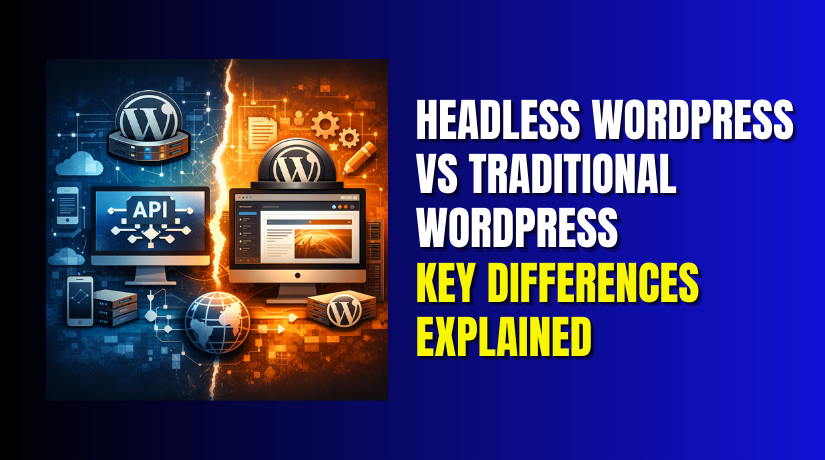
The difference between Headless and Traditional WordPress starts with separation. Traditional WordPress keeps the backend and frontend together. Headless WordPress separates content management from content display. WordPress stays as the admin and content hub. A different system handles the site’s visual front end. This change can affect speed, security, and development workflow.
What is Headless WordPress
What is Headless WordPress in simple and practical words? It is WordPress used only for managing content in the dashboard. WordPress stores posts, pages, images, and custom fields as usual. But WordPress does not control how that content looks. The “head” means the theme layer that shows content to visitors. In a headless setup, that theme layer is not used.
Instead, content is sent to a separate front end using APIs. Most projects use the WordPress REST API for content delivery. Some teams use GraphQL with tools like WPGraphQL. The front end requests data and renders it on screen. This front end can be built with React or Next.js. It can also be built with Vue, Nuxt, or other tools. This workflow is the core of Headless WordPress development today.
So, why use Headless WordPress for a new website or app? The biggest reason is flexibility with design and performance. Developers can build the UI without theme limits and hacks. They can also improve loading speed with modern rendering methods. Another reason is multi-channel publishing from one content source. One WordPress backend can power a website and a mobile app. It can also feed content to kiosks, screens, and other systems. These are common benefits of Headless WordPress for growing brands.
Still, headless is not always the easiest path. You may need extra work for previews and forms. You may need custom solutions for menus and search too. This is why teams later evaluate Headless WordPress pros and cons carefully. But as a foundation, headless is simply this idea. WordPress manages content, while another app displays it. That is the key shift when comparing Headless and traditional setups.
Understanding Traditional WordPress
Traditional WordPress is the classic way most sites run today. It uses one system to manage content and display pages. The WordPress admin stores posts, pages, and media files. The theme then renders that content for visitors on the site. Plugins add features like forms, SEO, caching, and security tools.
This setup is often called “monolithic” for a simple reason. The backend and frontend stay tightly connected in one platform. When you publish content, it shows through the same WordPress theme. When you change design, you edit theme files and settings. This makes Traditional WordPress simple for most small websites. It also works well for blogs, service sites, and basic stores.
Many users like this approach because it feels direct. You install WordPress, choose a theme, and start building pages. You can also use page builders to speed up design work. You can manage everything from one dashboard with fewer tools. This is why Traditional WordPress stays popular for beginners.
Headless WordPress vs Traditional WordPress: A Comparison
When comparing Headless WordPress vs Traditional WordPress, the biggest change is structure. Traditional WordPress combines content and presentation in one place. Headless WordPress separates content storage from content display. WordPress becomes the backend content hub, not the front end.
In Traditional WordPress, the theme controls what users see. In headless, a separate app controls the display layer. That app pulls content using an API and shows it. This is the key difference between Headless and Traditional WordPress in real use.
The workflow also changes for teams and developers. Traditional WordPress lets you build pages inside WordPress itself. Headless projects require building the front end separately. That is why Headless WordPress development needs more planning. Developers manage routing, templates, and data fetching outside WordPress.
Performance is another major difference you will notice quickly. Traditional WordPress can be fast with strong caching and hosting. But it can slow down with heavy themes and many plugins. Headless sites can be faster due to modern front-end frameworks. Many teams choose headless for speed and smoother UX. This is one of the top benefits of Headless WordPress in practice.
Security also differs between these two setups. Traditional WordPress exposes the site and admin on the same stack. Headless can reduce risk on the front end surface. The WordPress admin can be locked down behind extra security. Still, WordPress must be protected in both approaches.
How to Choose Between Headless and Traditional WordPress
The choice depends on project goals and team skills. In Traditional WordPress vs Headless WordPress, simplicity is a big factor. Traditional WordPress is easier to set up and manage daily. It works well for small teams without developer support. You can use themes and plugins for most features quickly.
Headless offers more freedom, but it adds complexity too. You get more control over design and performance tuning. You can publish content to multiple platforms from one backend. This makes headless great for apps and large ecosystems. That is often the main reason people ask why use Headless WordPress.
At the same time, headless can increase development workload. You may need custom builds for previews and editor tools. You may also need extra services for search and forms. These points are part of Headless WordPress pros and cons. Traditional WordPress has pros and cons as well. It is easier, but it can become slower at scale. It can also feel limited for advanced front-end experiences.
So, the difference between Headless and Traditional WordPress is not only technical. It is also about workflow, cost, and long-term maintenance. Traditional fits faster launches with simple needs. Headless fits modern products that need flexible front ends.
Benefits of Headless WordPress
Many teams choose headless because it changes how content is delivered. WordPress stays as the content hub for editors and admins. The front end is built separately with modern web tools. This setup is the main idea behind Headless WordPress development today. It also explains why many compare Headless WordPress vs Traditional WordPress for performance.
One key benefit is front-end freedom and better user experience. Developers can use React, Next.js, or any preferred stack. They are not limited by theme structure or builder limits. This is a strong reason people ask why use Headless WordPress. It supports modern UI patterns with clean and fast design.
Another big benefit is speed and smoother page loading. Headless front ends can use caching and smart rendering. They can also serve pages through a CDN more easily. This can reduce load time and improve user satisfaction. These points are common benefits of Headless WordPress for brands.


Headless can also help when you publish to many platforms. One WordPress backend can feed several front ends at once. For example, the same content can power:
- A main website and a mobile app together
- A customer portal and a help center site
- Digital screens, kiosks, and other display platforms
- Multiple brands or regions with shared content rules
This is a key difference between Headless and Traditional WordPress. Traditional WordPress is mostly built for one website front end. Headless supports multi-channel delivery without duplicating content.
Security can also improve in some setups with headless. The public site may not expose WordPress theme files directly. The backend can be locked behind added protection and access rules. This does not remove security needs, but it can reduce risk. Many teams consider this when comparing Traditional WordPress vs Headless WordPress.
Scalability is another strong benefit for growing businesses. You can scale the front end and backend in different ways. You can also upgrade the UI without changing the CMS. This gives more flexibility during product growth and redesigns.
Headless WordPress Pros and Cons
Before choosing headless, it helps to weigh trade-offs carefully. A clear view of Headless WordPress pros and cons saves time later. Headless can deliver amazing results, but it needs planning. It also needs stronger development skills in most projects.
Pros of Headless WordPress
Headless can be a smart choice for many modern websites. The biggest pros usually connect to speed and flexibility. Here are key pros that teams often value:
- More front-end freedom with modern frameworks
- Faster pages with better caching and CDN delivery
- Easier multi-platform publishing from one WordPress backend
- Better scalability for large traffic and complex user flows
- Safer public surface when WordPress is more hidden
These pros explain the growing demand for headless builds. They also explain why use Headless WordPress for product-led sites. Many brands want fast pages and strong design control. They also want content to work beyond a single website.
Cons of Headless WordPress
Headless is not always the easiest option for small teams. Some features that feel simple in WordPress need custom work. This is the most important part of Headless WordPress pros and cons. Here are common cons you should know early:
- More complex setup than traditional themes
- Higher build cost due to custom front-end work
- Preview and editing may need extra tooling
- Plugins may not work the same way as before
- Ongoing updates need developer support more often
These cons are not deal breakers for every project. But they do matter for budget and timelines. This is why many teams still choose classic WordPress. In Headless WordPress vs Traditional WordPress, traditional often wins for speed. It is faster to launch and easier for non-technical owners.
Still, headless can be the best option for the right goal. If your site needs modern UI and multi-channel output, it fits well. If you need a simple site with plugins, traditional can fit better. The difference between Headless and Traditional WordPress is mainly control. Traditional keeps control inside WordPress themes and plugins. Headless moves that control to the custom front end layer.
When to Use Headless WordPress
Headless is not for every website, but it fits many cases. It works best when you need a custom front end experience. It also fits when you want content on many platforms. This is where Headless WordPress development brings strong value.
Choose headless when your website needs modern design and fast loads. You can build the front end using React or Next.js. You can also use other stacks based on your team skills. This is often a top reason for why use Headless WordPress today.
Headless is also useful when you publish content beyond one website. In a headless setup, WordPress becomes a content engine only. The content can then feed many channels using APIs. This highlights the difference between Headless and Traditional WordPress clearly. Traditional WordPress is mostly tied to a single theme front end.
Headless can be a great fit in these real situations:
- You need one backend for website and mobile app content
- You want multiple sites using one shared content library
- You need a fast marketing site with modern UI control
- You run a large brand with high traffic and scaling needs
- You want content for kiosks, screens, or custom web apps
It is also a good choice for teams with developer support. Headless projects need coding for routing, rendering, and integrations. That is why Headless WordPress pros and cons should be reviewed early.
If you run a simple blog or small business site, traditional may fit better. It can be easier to launch with themes and plugins. It also gives quick editing and preview features by default. This is why people still compare Headless WordPress vs Traditional WordPress often. The best choice depends on goals, budget, and team skills.
Conclusion
Now you know what headless and traditional WordPress really mean. You also learned the key difference between Headless and Traditional WordPress. Traditional WordPress keeps content and design in one system. Headless separates them for speed and flexibility. The benefits of Headless WordPress are strong for modern platforms. It supports custom UI, faster delivery, and multi-channel publishing. Still, Headless WordPress pros and cons must be weighed carefully. If you need quick setup, traditional can be easier. If you need modern scale, headless can be a smart choice. When planning Headless WordPress vs Traditional WordPress, focus on your real needs first. If you need expert help with setup or migration, contact WooHelpDesk. WooHelpDesk can help you choose the right approach and build it.