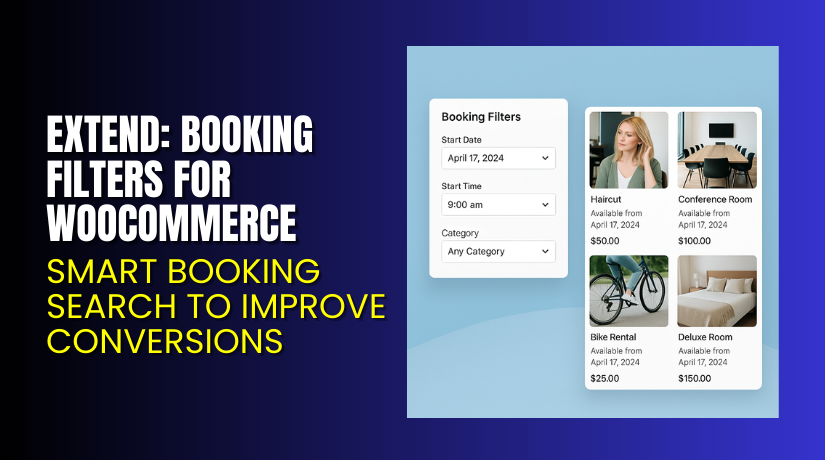
Extend: Booking Filters for WooCommerce – Smart Booking Search to Improve Conversions
Table of Contents
- Introduction
- What is Extend – Booking Filters for WooCommerce?
- Features of Extend – Booking Filters for WooCommerce
- How to Install and Configure Extend – Booking Filters for WooCommerce
- Pricing & Plans
- My Experience with Extend – Booking Filters for WooCommerce
- Who Should Use This Plugin?
- Final Verdict
- FAQ Section
Introduction
Running a WooCommerce store is not easy today. Store owners deal with many tasks every day. They manage orders, products, customer messages, payments, and bookings. When you sell bookable services, the challenges become even bigger. Customers need simple ways to search and find available dates. They need clear filters to choose time slots, durations, or service types. But most stores do not offer smooth booking filters by default. This leads to confusion, and many visitors leave the site.
A complex booking system can increase support requests. Customers may ask about dates, timings, or prices, even when the details are already on the site. This creates extra work for store owners. It also increases the chances of mistakes or missed bookings. Without a proper filter system, customers spend too much time searching. Slow search leads to fewer conversions and lost revenue.
This is where Extend – Booking Filters for WooCommerce becomes useful. It gives your store a clean and fast booking filter system. It helps customers find bookable products faster. It reduces confusion and improves your booking flow. In this article, we will explore this plugin, its features, setup, pricing, pros, cons, and more.
👉 If you ever need help installing or troubleshooting any extension, please try our Installation & Troubleshooting Services.
What is Extend – Booking Filters for WooCommerce?
Extend – Booking Filters for WooCommerce is a simple yet powerful plugin that improves booking search on WooCommerce sites. It allows customers to filter bookable products using clear and easy filter options. These filters include dates, duration, time slots, product type, and other booking details. The plugin is designed for WooCommerce stores that use bookable products like appointments, classes, rentals, and events.
It is developed by the WooCommerce team and follows the same coding standards as other official WooCommerce extensions. The plugin is stable, light, and safe for all store sizes. It helps store owners offer a better booking experience without custom coding. You can add filters anywhere using shortcodes or block widgets.
Customers can filter results in real time. They can choose dates and see available slots instantly. They can compare booking options without reloading pages. This improves user experience and increases booking conversions.
It is available in a premium version through the WooCommerce marketplace. The plugin receives regular updates and has reliable support.
Official Plugin Page:
Features of Extend – Booking Filters for WooCommerce
| Feature | Description | Why It Matters |
| Date Range Filter | Let’s customers select a start and end date easily. | Helps customers find available slots fast. |
| Time Slot Filter | Shows available time slots for bookable products. | Saves time by showing only valid options. |
| Duration Filter | Let’s customers filter based on booking duration. | Improves user experience for rentals and services. |
| Product Type Filter | Filters products based on booking types. | Helps customers choose the right service quickly. |
| Real-Time Results | Updates results without a full page reload. | Increases conversions and reduces frustration. |
| Flexible Display Options | Add filters using blocks or shortcodes. | Offers full control over page design. |
How to Install and Configure Extend – Booking Filters for WooCommerce
- Download the plugin from Buy Extend – Booking Filters for WooCommerce Premium Now (add your affiliate link).
- Go to WordPress Dashboard → Plugins → Add New → Upload Plugin.
- Upload the ZIP file and click Install Now.
- After installation, click Activate.
- Go to WooCommerce → Settings → Bookings Filters.
- Enable filters and choose the filter options you want to show.
- Add the filter block or shortcode to your booking pages.
- Test the filter with your theme and booking setup.
If the filter appears broken, conflicts with a theme, or does not show results, review your booking product settings.
💡 If you face any configuration or compatibility issues, try our Installation & Troubleshooting Services for expert support.
Extend – Booking Filters for WooCommerce – Pricing & Plans
| Monthly | Annualy |
| $99 | $8.25 |
Subscription includes
|
Subscription includes
|
Buy Extend – Booking Filters for WooCommerce Now


Purchase Here → Buy Extend – Booking Filters for WooCommerce Premium Now
💡 Your purchase supports the development team and helps me create more helpful tutorials.
My Experience with Extend – Booking Filters for WooCommerce
Pros
- Very easy to install and configure
- Clean filter design with smooth user flow
- Works well with WooCommerce Bookings
- Real-time results improve booking speed
- Reduces booking support queries
- Stable and backed by the WooCommerce team
- Regular updates and strong documentation
Cons
- No free version available
- Styling options are limited
- Works best only with WooCommerce Bookings
- Some themes may need minor CSS adjustments
Who Should Use This Plugin?
- WooCommerce store owners selling bookable services
- Agencies managing booking websites for clients
- Beginners who want simple booking filters
- Rental businesses with fixed durations
- Tutors, clinics, or event organizers needing a clear booking search
- Larger stores that want faster booking performance
Useful Resources
- Official Plugin Page
- Official Plugin Support Page
- Developer Documentation
- WooHelpDesk Installation & Troubleshooting Services
Final Verdict
If you want to offer a clear and simple booking search on your WooCommerce store, Extend – Booking Filters for WooCommerce is a great choice. It improves user experience and helps customers find available services quickly. The plugin is stable, fast, and backed by WooCommerce, making it a reliable tool for any booking website.
Use the link below to get started and unlock all premium features today.
👉 Buy Extend – Booking Filters for WooCommerce Premium Now
💡 Need help installing or fixing the plugin? Try our Installation & Troubleshooting Services.
FAQ Section
Q1. Is Extend – Booking Filters for WooCommerce compatible with all WooCommerce themes?
Yes, it works with most standard WooCommerce themes. Always test on staging.
Q2. Can I use both free and premium versions?
No, only the premium version is available.
Q3. How do I get support?
You can contact the official team using the WooCommerce Support Page.



