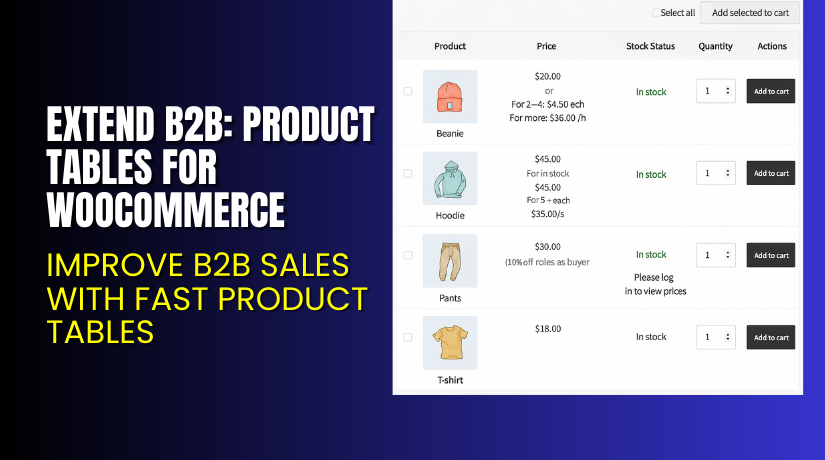
Extend B2B: Product Tables for WooCommerce – Improve B2B Sales with Fast Product Tables
Table of Contents
- Introduction
- What is Extend B2B – Product Tables for WooCommerce?
- Features of Extend B2B – Product Tables for WooCommerce
- How to Install and Configure Extend B2B – Product Tables for WooCommerce
- Extend B2B – Product Tables for WooCommerce – Pricing & Plans
- My Experience with Extend B2B – Product Tables for WooCommerce
- Who Should Use This Plugin?
- Final Verdict
- FAQ Section
Introduction
Running a WooCommerce store is not always simple. Store owners handle many tasks each day. Product management, bulk updates, and order flow often take long hours. Many stores also manage large catalogs with hundreds of items. This makes the shopping process slow for buyers. They scroll through many pages before finding the right product. This leads to lower sales and a weak user experience.
B2B stores face even bigger issues. Buyers want quick ordering. They want all products in one place. They expect fast search, bulk add-to-cart functions, and clear product tables. Without these features, buyers feel frustrated. They leave the website or delay their order.
This is why many WooCommerce stores look for a simple solution. They want a plugin that shows products in clean tables. They want filters, search, quick add options, and a smooth checkout process. A structured product table helps users order in minutes. It also reduces admin work and improves store conversions.
In this article, we will explore Extend B2B – Product Tables for WooCommerce, its features, installation steps, pricing, pros and cons, and how it compares to other tools. This guide will help you decide if this plugin is right for your B2B or B2C store.
👉 If you ever need help installing or troubleshooting any plugin or extension, you can try our Installation & Troubleshooting Services.
What is Extend B2B – Product Tables for WooCommerce?
Extend B2B – Product Tables for WooCommerce is a smart ordering plugin that displays your products in a clean and simple table layout. It helps users browse multiple items on a single page. It also offers fast search, category filters, and bulk actions. This plugin is made for B2B stores, wholesale shops, and any business that manages large product lists.
The plugin is developed by WooCommerce / Automattic partners and is available on the official WooCommerce marketplace. It helps store owners offer a faster buying experience. Buyers can add many items to the cart in one click. This saves time and increases order value. It also improves the workflow of sales teams and bulk buyers.
The plugin supports both free and paid features. The premium version gives advanced table layouts, filters, and better design options. It also offers priority updates and support.
Official Plugin Page:
Features of Extend B2B – Product Tables for WooCommerce
| Feature | Description | Why It Matters |
| Fast Product Tables | Shows products in a clean and structured table layout. | Helps buyers scan many items quickly. |
| Bulk Add-to-Cart | Let’s users add multiple items at once. | Saves time and boosts bulk ordering. |
| Advanced Search & Filters | Users can search by name, SKU, category, or tags. | Makes product discovery simple and fast. |
| Custom Columns | Add or remove columns like price, SKU, stock, or variations. | Gives full control over product display. |
| Responsive Layout | Tables look clean on mobile, tablet, and desktop. | Improves user experience on all devices. |
| AJAX Loading | Updates tables without page reload. | Offers smooth and fast browsing. |
| Variation Support | Shows variable products in tables with dropdown options. | Helps B2B customers order variants faster. |
How to Install and Configure Extend B2B – Product Tables for WooCommerce
- Download the plugin from the link.
- Go to your WordPress Dashboard → Plugins → Add New → Upload Plugin.
- Install and activate the plugin after upload.
- Go to WooCommerce → Settings → Product Tables.
- Enable the table layout for the pages you want.
- Set the columns you want to display, such as price, SKU, stock, and quantity.
- Enable bulk add-to-cart and AJAX features.
- Test the plugin with your theme and other extensions.
💡 If you face any configuration or compatibility problems, you can use our Installation & Troubleshooting Services.
Extend B2B: Product Tables for WooCommerce – Pricing & Plans
| Monthly | Annualy |
| $4.09 | $49 |
Subscription includes
|
Subscription includes
|
Buy Extend B2B – Product Tables for WooCommerce Now
Purchase Here → Buy Extend B2B – Product Tables for WooCommerce Premium Now


💡 Your purchase supports the development team and helps me create more tutorials.
My Experience with Extend B2B – Product Tables for WooCommerce
After testing the plugin on a real WooCommerce store, here is what I found:
Pros
- Simple setup and clean interface
- Very fast product loading
- Works smoothly with large catalogs
- Bulk add-to-cart works very well
- Strong search and filter functions
- Great for wholesale and B2B customers
- Stable performance with most themes
Cons
- Limited styling in the free version
- Price may feel high for small stores
- Some themes need minor CSS adjustments
- Product table design could offer more layouts
Who Should Use This Plugin?
This plugin is a great choice for:
- WooCommerce store owners who want fast bulk ordering
- B2B stores with large product lists
- Wholesale and distributor websites
- Agencies managing many client stores
- Beginners who want a simple yet strong solution
Useful Resources
- Official Plugin Page
- Official Plugin Support Page
- Developer Documentation
- WooHelpDesk Installation & Troubleshooting Services
Final Verdict
If you want a reliable and smooth B2B ordering system, Extend B2B – Product Tables for WooCommerce is a great choice. It speeds up product browsing and improves user experience. It also helps buyers place larger orders in less time. The plugin is stable, easy to use, and offers strong features for both small and large stores.
Use the link below to start using the premium features today.
👉 Buy Extend B2B – Product Tables for WooCommerce Premium Now
💡 Need help installing or fixing it? Try our Installation & Troubleshooting Services.
FAQ Section
Q1. Is Extend B2B – Product Tables for WooCommerce compatible with all themes?
Yes, it works with most WooCommerce themes. Always test before going live.
Q2. Can I use both free and premium versions?
No. You must deactivate the free version before installing the premium.
Q3. How do I get support?
You can contact the official team using the Support Page.



