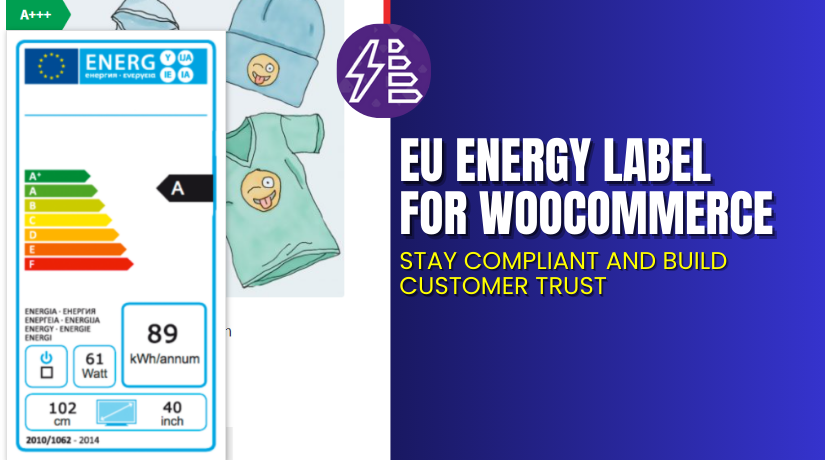
EU Energy Label for WooCommerce – Stay Compliant and Build Customer Trust
Table of Contents
- Introduction
- What is EU Energy Label for WooCommerce?
- Key Features of EU Energy Label for WooCommerce
- How to Install and Configure the Plugin
- Pricing & Plans
- My Experience with the Plugin
- Who Should Use This Plugin?
- Final Verdict
- FAQ
Introduction
Running a WooCommerce store in the EU comes with strict legal responsibilities. If you sell products like appliances, electronics, or lighting, you are required to display EU energy labels. These labels show customers how energy efficient your products are.
Ignoring this law can lead to penalties. It can also reduce customer trust in your store. Customers today are more eco-conscious. They want to make informed decisions before buying.
That’s where EU Energy Label for WooCommerce helps. This plugin lets you display official energy labels on both product and shop pages. It supports both old and new label formats.
In this guide, you’ll learn everything about this plugin — features, setup, pricing, pros, cons, and more.
Need help with installation? Try our Installation & Troubleshooting Services.
What is EU Energy Label for WooCommerce?
EU Energy Label for WooCommerce is a plugin developed by TheCodeFish. It allows you to add official EU-compliant energy labels to your products.
These labels help buyers compare energy usage before they buy. It’s a legal must-have for:
- Refrigerators
- Dishwashers
- Washing machines
- Air conditioners
- Monitors
- TVs
- Other energy-related products
The plugin makes it easy to select label formats. You can also customize the display and use tooltip previews. It helps your WooCommerce store stay compliant and professional.
Official Website: thecodefish.com
Plugin Documentation: View Docs
Support Page: Get Help
Key Features of EU Energy Label for WooCommerce
| Feature | Description | Why It Matters |
| Official Label Templates | Use updated or legacy EU energy labels. | Ensure legal compliance in the EU region. |
| Display Labels on All Pages | Add labels on product, category, and shop pages. | Improves transparency at all buyer touchpoints. |
| Tooltip Support | Show label preview when hovering over icons. | Keeps pages clean but informative. |
| Global or Per-Product Settings | Control label placement globally or product-specific. | Provides flexibility and control. |
| Custom Image Uploads | Use your own images or designs as tooltips. | Adds branding or detailed instructions. |
| Theme Compatibility | Works with major WooCommerce themes and builders. | No layout breaks or display issues. |
| Translation Ready | Comes with POT file for language translation. | Useful for multilingual stores in Europe. |
How to Install and Configure the Plugin
To install and use EU Energy Label for WooCommerce, follow these steps:
- Purchase the plugin from WooCommerce Marketplace.
- Download the ZIP file.
- Go to WordPress → Plugins → Add New → Upload Plugin.
- Install and activate the plugin.
- Navigate to WooCommerce → Settings → EU Energy Label.
From there, you can:
- Enable label display on shop, archive, and product pages.
- Set tooltip behavior and label position.
- Choose between single label or dual label layouts.
- Upload custom label images if required.
Assign Labels to Products
To assign a label to a product:
- Edit the product in WooCommerce.
- Open the EU Energy Label tab.
- Enable the label and select the format.
- Choose the correct category or energy rating.
- Optionally upload a custom image.
The label will now display on your product page and shop archive.
Need assistance? Hire our team at WooHelpDesk.
Pricing & Plans
| Plan | Price (USD) | Includes |
| 1-Year Plan | $29/year | Full plugin + updates + support |
| Monthly Plan | $2.42/month (billed annually) | All features included |
The plugin comes with:
- Regular updates
- One year of support
- 30-day money-back guarantee
There is no free version. However, the premium plan offers excellent value for any EU-based store.
Buy EU Energy Label for WooCommerce
Want to stay compliant and build buyer trust?
✅ Buy EU Energy Label Plugin Now
Your purchase supports the developers and allows us to offer more guides like this.


My Experience with the Plugin
I tested this plugin on an online store selling household appliances. It worked smoothly with no compatibility issues.
Pros:
- Easy to install and configure
- Looks clean and professional on the front-end
- Supports both old and new EU energy formats
- Tooltip feature is user-friendly
- Works with Divi, Flatsome, Porto, and more
Cons:
- Custom image upload requires manual sizing
- Basic tooltip design – no rich media support
- Limited advanced styling options
Overall, the plugin does what it promises. It’s lightweight, efficient, and ideal for WooCommerce compliance needs.
Who Should Use This Plugin?
This plugin is ideal for:
- Appliance and electronics stores selling EU-regulated products
- Retailers of lighting, HVAC, or audio-video gear
- Dropshipping stores selling imported energy products
- Agencies managing EU-based WooCommerce shops
- Store owners needing legal compliance with minimal effort
If you fall under EU energy labeling regulations, this tool will save you hours.
Useful Resources
Here are the most important links related to this plugin:
Final Verdict
The EU Energy Label for WooCommerce plugin makes regulatory compliance easy. If your store sells energy-consuming products in the EU, this is the solution you need.
You can display energy labels across all store pages. You can also customize label positions and add tooltip previews. It works well with most themes and is fully translation-ready.
At just $29 per year, the plugin is affordable and effective. It protects your store from legal issues and helps customers make smarter choices.
Need help setting it up? Use our WooHelpDesk Installation Services.
FAQ
Q1. What is an EU Energy Label?
It is a legal label showing energy usage for appliances and electronics sold in the EU.
Q2. Does this plugin support tooltip previews?
Yes. You can enable tooltips that show the full label on hover.
Q3. Can I use custom label images?
Yes. You can upload your own images per product or globally.
Q4. Is it compatible with multilingual websites?
Yes. It includes a POT file and works with WPML and Polylang.
Q5. Where do labels show up on my site?
They appear on product pages, shop archives, and optionally in tooltips.



