eMart for WooCommerce – Feature-Packed Theme for Electronics Retailers
Table of Contents
- Introduction
- What is eMart – Electronics Store WooCommerce Theme?
- Features of eMart – Electronics Store WooCommerce Theme
- How to Install and Configure eMart – Electronics Store WooCommerce Theme
- Pricing & Plans
- My Experience with eMart – Electronics Store WooCommerce Theme
- Who Should Use This Theme?
- Final Verdict
- FAQ
Introduction
Running a WooCommerce store can feel overwhelming at times. You need to manage products, design, payments, shipping, and countless plugins. Each extension promises growth, but not all deliver consistent performance or compatibility. Many store owners face slow loading times, cluttered designs, and complex layouts that confuse shoppers. Others struggle to create a professional look that builds trust and drives sales.
That’s where eMart – Electronics Store WooCommerce Theme becomes essential. It helps business owners simplify store setup while maintaining a clean, fast, and professional appearance. With eMart, you can display products beautifully, manage inventory easily, and provide a seamless shopping experience.
In this article, we’ll explore eMart, its powerful features, simple installation process, pricing details, and a quick comparison with alternatives. You’ll also learn about its pros and cons to help decide if it’s the right choice for your WooCommerce store.
Note: If you ever need help installing or troubleshooting any Theme or extension, please try our Installation & Troubleshooting Services.
What is eMart – Electronics Store WooCommerce Theme?
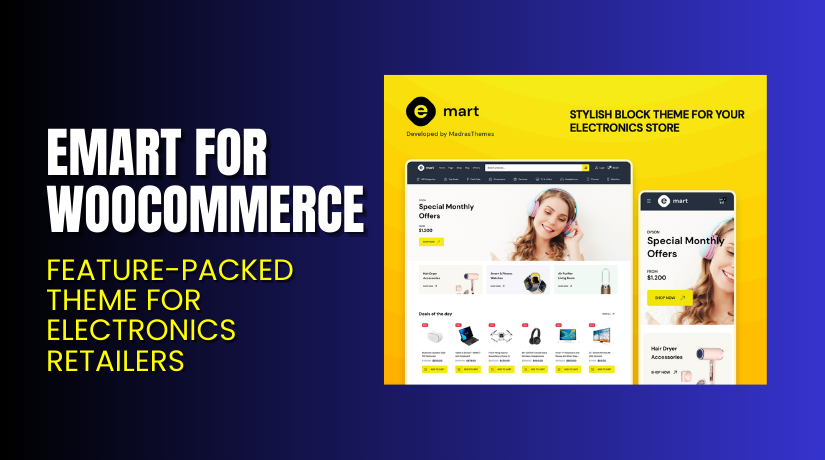
eMart – Electronics Store WooCommerce Theme is a premium WordPress theme built for online electronic stores and digital product sellers. It helps users create professional, responsive, and fast-loading eCommerce websites using WooCommerce. The theme is designed for all types of tech stores, including gadgets, accessories, laptops, and smart devices.
eMart includes multiple pre-built homepage layouts that make setup quick and simple. You can easily customize every section using Elementor or Gutenberg blocks without touching code. The theme supports advanced WooCommerce features such as product filters, quick view, AJAX cart, wishlist, and product comparison.
It also comes with beautiful product page designs, smart navigation menus, and mobile-friendly layouts. The built-in Mega Menu and advanced search make it easy for users to find products. eMart integrates seamlessly with YITH WooCommerce Wishlist, Mailchimp, and Contact Form 7.
This theme is developed by MadrasThemes, a trusted developer known for creating fast and optimized WooCommerce themes. It’s available in both free and premium versions with regular updates and full documentation.
Features of eMart – Electronics Store WooCommerce Theme
#1 Responsive and Modern Design
eMart offers a clean and modern design optimized for all devices. The theme automatically adjusts layouts for mobile, tablet, and desktop screens. Every section looks neat, with clear visuals and smooth navigation.
Why It Matters:
Helps store owners provide a perfect shopping experience on every device. A responsive design builds trust and improves customer satisfaction.
#2 Advanced Product Filtering System
eMart includes smart filtering options like brand, price, ratings, and categories. Customers can find the exact products they want faster. The filters update results instantly without reloading the page.
Why It Matters:
Saves time by helping shoppers quickly locate what they need. This reduces frustration and encourages more purchases.
#3 Optimized for Speed and SEO
The theme is built with lightweight code and follows SEO best practices. It loads quickly, ensuring smooth performance even with many products. eMart also supports schema markup for better visibility in search results.
Why It Matters:
Improves conversions, SEO, and user experience by offering faster load times. Higher ranking and better usability attract more traffic and boost sales.


How to Install and Configure eMart – Electronics Store WooCommerce Theme
- Download the theme from Buy Now.
- Go to your WordPress Dashboard → Appearance → Themes → Add New → Upload Theme.
- Click Install Now, then activate the theme after installation.
- Open Appearance → Customize → eMart Settings → Configure basic options.
- Test the theme to ensure it works well with your plugins and extensions.
Note: If you face any configuration or compatibility issues, you can try our EMart – Installation & Troubleshooting Services.
eMart – Pricing & Plans
The eMart – Electronics Store WooCommerce Theme costs $59 for a 1-year license. Access to all current prices are listed below for your reference.
| Free | Annual All-Access | Lifetime All-Access |
| $0 | $99/year | $199 One-Time |
|
|
|
Buy eMart – Electronics Store WooCommerce Theme Now
Purchase Here: Buy Now
Note: Your purchase supports the development team and helps me create more tutorials like this.
My Experience with eMart – Electronics Store WooCommerce Theme
After testing eMart – Electronics Store WooCommerce Theme on a live WooCommerce site, here’s what I found:
Pros
- Easy setup: The installation was simple, and the demo import worked smoothly.
- Clean design: The layout is modern, ideal for showcasing electronics products.
- Fast loading speed: The theme is lightweight and optimized for performance.
- Mobile-friendly: It looks great on phones, tablets, and desktops.
- Compatible with popular plugins: Works well with Elementor, WPBakery, and WooCommerce extensions.
- Flexible homepage options: You can choose from multiple homepage layouts.
- Good customer support: The support team responded quickly and was very helpful.
- Well-documented: Clear instructions helped me customize the theme easily.
Cons
- Premium cost: The price may be higher for small startups.
- Limited color presets: Only a few predefined color combinations are available.
- Few header styles: Customizing header layouts feels slightly restricted.
- Needs extra plugins: Some advanced features require third-party add-ons.
- Learning curve: New users might need time to explore all options.
Who Should Use This Theme?
- Ideal for electronics sellers who want a clean, fast, and modern store.
- Perfect for agencies needing quick setup and flexible customization options.
- Beginners who want a simple yet powerful solution. Easy to install, no coding required, and ready with one-click demo import.
Useful Resources
- Official Theme Page
- Official Theme Support Page
- Developer Documentation
- EMart – Installation & Troubleshooting Services
Final Verdict
If you’re searching for a dependable WooCommerce theme that performs smoothly, eMart – Electronics Store WooCommerce Theme is a great option. It offers a clean layout, fast performance, and professional design tailored for online electronics stores. You can easily customize every element without coding and create a store that looks modern and works perfectly on all devices.
eMart is lightweight and SEO-optimized, helping your site load quickly and rank higher. Its integration with WooCommerce ensures seamless shopping experiences—from browsing to checkout. Whether you sell gadgets, computers, or accessories, eMart provides everything needed to manage your store efficiently.
If you want a powerful, easy-to-use, and responsive WooCommerce theme, eMart is definitely worth trying.
Buy eMart – Electronics Store WooCommerce Theme Premium Now
Note: Need help installing or fixing it? Try our EMart – Installation & Troubleshooting Services.
FAQ
Is eMart – Electronics Store WooCommerce Theme compatible with all WooCommerce themes?
Yes, eMart works with most WooCommerce themes. It ensures smooth setup and consistent design. However, it’s best to test before going live to confirm there are no layout or compatibility issues with your current theme.
Can I use both free and premium versions?
No, you cannot use both versions together. Deactivate the free version before installing the premium one. This helps prevent file conflicts and improves performance. Always back up your site before upgrading for safe installation.
How do I get support?
You can contact the official support team anytime. Visit the Theme Support Page to submit a ticket or check documentation. The team provides quick help for setup, updates, and troubleshooting.