Does WordPress Allow Self Hosting? How Much Does Self Hosted WordPress Cost?
Table of Contents
- Introduction
- Does WordPress Allow Self Hosting and What It Really Means
- Can WordPress Be Self Hosted? What You Need to Self-Host
- Is WordPress Free When Self Hosted? What’s Free vs What You Pay For
- How Much Does Self Hosted WordPress Cost? The Real Cost Breakdown
- WordPress Hosting Cost (Monthly or Annual)
- How Much Does Self Hosted WordPress Cost? The Real Cost Breakdown
- Example Budgets to Understand Self Hosted WordPress Cost Clearly
- Conclusion
Introduction
Many beginners ask about self hosted WordPress cost before starting. They also wonder if WordPress is free for self-hosting. These questions are common when you plan a new website. Self-hosted WordPress means you run WordPress on your own hosting. You pick the hosting company, then install WordPress there. You control the site files, themes, and plugin choices. You also control updates, backups, and security settings. This guide keeps things simple and easy to follow. First, you will learn if WordPress supports self-hosting.
Does WordPress Allow Self Hosting and What It Really Means
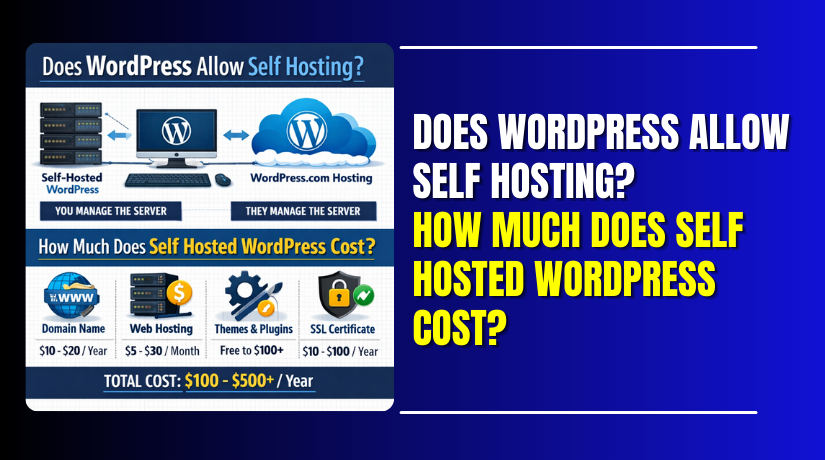
Yes, does WordPress allow self hosting has a clear answer. WordPress allows self-hosting because the software is open-source. That means you can install it on your own server. You can also install it on normal web hosting plans. Most people do this using WordPress.org software. WordPress.org is the place to get the WordPress software. WordPress.com is a hosted platform that runs WordPress for you. With WordPress.com, hosting is part of the service plan. With self-hosting, you bring your own hosting account instead.
Here is the simple difference you should remember:
- org gives the software for self-hosting on your host.
- com is a hosted service with limits by plan.
- Self-hosting gives more control over themes and plugins.
- Self-hosting lets you manage speed, backups, and security settings.
So, self-hosting is not a special permission or hidden feature. It is a normal and supported way to use WordPress. It is also the most flexible setup for long-term growth.
Can WordPress Be Self Hosted? What You Need to Self-Host
Yes, can WordPress be self hosted is a simple yes. Self-hosting means you install WordPress directly on your hosting account. To start, you need a domain name for your website. Next, you need web hosting to store site files safely. Most hosts offer a one-click WordPress installer in panels today. You can also install it manually using a download and FTP. After install, you log in to the WordPress dashboard securely. From there, you choose a theme and add needed plugins. You should also enable HTTPS using an SSL certificate first. Many hosts include SSL for free, but not all plans. Your WordPress hosting cost depends on speed, support, and limits. Cheaper plans work for small sites with low traffic usually. Stronger plans help stores and busy blogs load faster daily. These choices shape your self hosted WordPress cost over time. Before you begin, keep these essentials ready on your desk today.
- Domain name connected to your site address in DNS settings.
- Hosting plan with enough storage and bandwidth for your traffic.
- Admin email you can access for logins and alerts anytime.
- Basic security plan for updates, backups, and strong passwords always.
- A simple launch checklist for pages, menus, and settings too.
Is WordPress Free When Self Hosted? What’s Free vs What You Pay For
Now, is WordPress free when self hosted needs context too. The WordPress software is free to download and use forever. You do not pay WordPress to install it on hosting. But you pay for services that make the site run. These required services include a domain and a hosting plan. Optional costs include premium themes, plugins, and paid support later. Free tools can work well, if your site stays simple. Paid tools help when you need stronger security or features. Here is what is free, and what usually costs money.
- WordPress core files, updates, and basic site tools for everyone.
- Many free themes and plugins from the official directory too.
- Domain registration and renewals, each year you own it online.
- Hosting fees, which make up most ongoing costs each month.
- Premium themes or plugins, when free options feel limited sometimes.
- Maintenance help, if you want experts handling updates for you.
How Much Does Self Hosted WordPress Cost? The Real Cost Breakdown
People often ask, how much does self hosted WordPress cost in real life. The honest answer depends on your setup and your goals. WordPress itself is free, but hosting services are not. Your required basics usually include a domain and hosting. Most sites also need an SSL certificate for secure browsing. These three items build the foundation of your budget. When you price them right, you avoid surprise bills later. This section explains each required cost in a simple way. It also helps you understand where most money usually goes.
Domain Name Cost (Annual)
A domain is your website address, like yourbrand.com or mysite.net. You register it through a domain provider or your host. This is usually paid once per year, then renewed yearly. Some providers offer discounts for the first year only. Renewal pricing is often higher than the first purchase price. You should always check the renewal rate before buying today. You can also buy multiple years upfront for stable ownership. If you stop renewing, someone else can register your domain later. That can cause brand and trust issues for your visitors.
Domain cost can change based on these factors:
- Extension choice, like .com, .net, or .org options.
- Premium domains, which cost more due to high demand.
- Privacy add-ons, if your provider charges for privacy.
WordPress Hosting Cost (Monthly or Annual)
Hosting is where your WordPress site files live online. This is the biggest part of WordPress hosting cost over time. Hosting plans vary because each plan has different limits. Some plans allow one site, others allow many sites. Some plans offer more speed, better support, and stronger security. Your choice directly impacts your self hosted WordPress cost overall. Cheaper hosting can work, but it may have limits. Slow servers can cause poor speed and user drop-offs. Limited support can delay fixes during urgent site problems.
Hosting pricing is mainly affected by these items:
- Storage space for uploads, images, and site backups.
- Bandwidth limits for traffic and page load requests.
- Server speed and caching features for better performance.
- Support level, like chat support or managed support help.
- Extra tools like backups, staging, and malware scanning too.
SSL Certificate Cost (Usually Free, Sometimes Paid)
SSL enables HTTPS and keeps visitor data more secure. It also builds trust because browsers show secure connection signs. Many hosting plans include a free SSL certificate now. Some hosts activate it with one click inside the panel. In other cases, you may need to install it manually. Paid SSL is less common for basic websites today. It may be used for advanced validation or business needs. Still, for most sites, free SSL is enough. Always confirm SSL is included before buying hosting. This helps keep your required costs under control.
How Much Does Self Hosted WordPress Cost? The Real Cost Breakdown
After basics, your budget depends on what your site needs. These costs are optional, but most sites use them. They can improve design, speed, security, and daily management. They also shape the long-term self hosted WordPress cost for owners. You can start small, then upgrade when your site grows. This section explains the most common optional costs clearly. It also helps you decide what is worth paying for.
Themes Cost: Free vs Premium and When Premium Helps
A theme controls your website design and layout structure. You can use a free theme and launch quickly today. Free themes can look good and stay lightweight too. But some free themes have limited layout and style options. Premium themes often include more templates and design controls. They may also include support and updates from the theme team. A good premium theme can save time during setup. It can also reduce the need for many design plugins.
Premium themes may be worth it when you need:
- Ready-made layouts for services, landing pages, or portfolios.
- Better design controls without heavy page builder tools.
- Faster support when something breaks after updates.
- Built-in features like headers, footers, and blog styling options.
Plugins Cost: Free vs Premium and Common Paid Needs


Plugins add features to your WordPress site without coding work. Many free plugins solve basic needs very well. You can find free plugins for forms, SEO, and caching. But premium plugins often offer stronger features and better support. They also may include advanced settings for growing websites. Paid plugins can increase WordPress hosting cost needs too. This happens when plugins add heavy scripts or more database load. So, choose plugins carefully and avoid installing too many.
Common plugin areas where paid tools are often used:
- Security tools for firewall rules and malware scanning features.
- Backup tools for scheduled backups and easy restore options.
- Performance tools for caching, image compression, and speed tuning.
- Ecommerce add-ons for payments, shipping, and product tools.
- Form tools for advanced fields, spam control, and email flows.
Maintenance and Support Cost: DIY vs Paid Help
You can run a WordPress site by doing everything yourself. That includes updates, backups, speed checks, and security steps. This DIY approach saves money, but it needs time weekly. Paid support helps when you want fewer risks and faster fixes. Support plans often cover updates, backups, and security monitoring. They may also include uptime checks and quick issue handling. If your site earns money, paid support can be safer. It reduces downtime and keeps the site stable after updates.
If you want expert help, consider support from teams like WooHelpDesk for WordPress and WooCommerce needs.
Example Budgets to Understand Self Hosted WordPress Cost Clearly
You may still wonder, how much does self hosted WordPress cost overall. The easiest way is to see simple budget examples. These examples show how costs change with site needs. They also show how WordPress hosting cost affects your total budget. Remember, these are common ranges, not fixed prices. Your final cost depends on your hosting choice and tools. Use these examples to plan a realistic starting budget. Then upgrade only when your site needs more features.
Starter Site Budget (Basic Website or Blog)
A starter site needs the basics to go live smoothly. You can use a free theme and a few free plugins. You can also keep your design simple and clean. This keeps the early self hosted WordPress cost low and stable. You mainly pay for domain and hosting services each year. SSL is often included, so it may not add cost. This setup works well for personal blogs and small sites. It also works for simple service pages with few updates.
Starter budget usually includes:
- Domain registration and renewal for your site name.
- Basic hosting plan with one-click WordPress installation support.
- Free SSL, plus basic security and backup options if included.
- Free theme and a few trusted free plugins for core needs.
Growing Site Budget (Better Speed, Stronger Security)
A growing site needs better speed and safer protection. More visitors mean more load on the server daily. You may upgrade hosting for faster servers and better support. This is where WordPress hosting cost can increase over time. You may also add premium tools for backups and security. A premium theme may help you build pages faster too. This setup works for businesses that update content often. It also fits sites that collect leads using advanced forms.
Growing budget often adds:
- Better hosting plan with improved speed and resource limits.
- Paid backup tool with quick restore and schedule options.
- Security plugin with firewall rules and scanning features.
- Premium theme or builder tools for flexible page layouts.
Online Store Budget (More Features and Tools)
An online store needs more resources and more tools. Product pages, carts, and checkout add extra load. Payment and shipping tools can add more plugin needs. You may also need email tools for order updates. For stores, hosting quality matters more than ever. Slow checkout can reduce sales and trust quickly. So the store setup can raise your total self hosted WordPress cost. This is normal because ecommerce needs more stability and security.
Store budget often includes:
- Strong hosting plan to handle checkout and customer traffic.
- Premium ecommerce plugins for payments, shipping, and tax tools.
- Security and backups with frequent scans and restore features.
- Performance tools for caching and image optimization improvements.
Conclusion
Self-hosting gives you full control over your WordPress website. You choose the host, the theme, and every plugin. That freedom helps you build a site that fits your needs. But it also means you manage costs like domain and hosting. So, is WordPress free when self hosted? The software is free. The services that run it are not free. Your total cost depends on hosting level and extra tools. Start with basics and keep your setup clean. Upgrade only when you need more speed or features. This approach keeps your budget stable and predictable. If you want help with setup, speed, or security, WooHelpDesk can assist you.