Do You Need Hosting for WordPress? Using Your Own Hosting Explained
Table of Contents
- Introduction
- Quick WordPress Basics: WordPress.com vs WordPress.org
- WordPress.com: Hosting Is Included
- WordPress.org: You Bring Hosting
- Do You Need Hosting for WordPress? The Real Answer
- Can You Run WordPress Without Hosting? What “Without Hosting” Really Means
- WordPress Hosting vs Web Hosting: What’s the Difference?
- Using Your Own Hosting With WordPress: How It Works
- Can Shared Hosting Run WordPress? What to Expect
- Managed WordPress Hosting vs Shared Hosting: Which One Fits Your Site?
- How to Host a WordPress Website: Step-by-Step Overview
- How to Install WordPress on Web Hosting: Two Common Methods
- Final Decision Guide: Which Setup Should You Choose?
- Conclusion
Introduction
Many beginners ask, do I need hosting for WordPress before launching. Asking this question early on is a wise move. Hosting affects your site speed, security, and overall control. It also decides how much setup work you must handle. Many users think WordPress works like social media accounts. However, websites require a home on the internet. Hosting can help with that. So yes, many people wonder, does WordPress require web hosting. The answer depends on which WordPress version you choose. Making the choice is easy once you comprehend that distinction. This guide explains it in a clear, practical way. It also assists you in avoiding later, expensive errors.
Quick WordPress Basics: WordPress.com vs WordPress.org
There are two primary possibilities in WordPress, and they function differently. This is why many users get confused early. One option includes hosting as part of the service. The other option gives you full control, but needs hosting. This is the key difference in wordpress.com vs wordpress.org hosting.
WordPress.com: Hosting Is Included
WordPress.com is in charge of managing the hosted platform. You rapidly begin developing your website after creating an account. You do not need to buy hosting separately first. Your website files stay on their servers from day one. This makes setup easier for beginners and small projects.
This option is helpful if you want these benefits:
- Quick setup with less technical steps
- Updates, hosting, and basic security are taken care of for you.
- A simple dashboard for publishing content
WordPress.org: You Bring Hosting
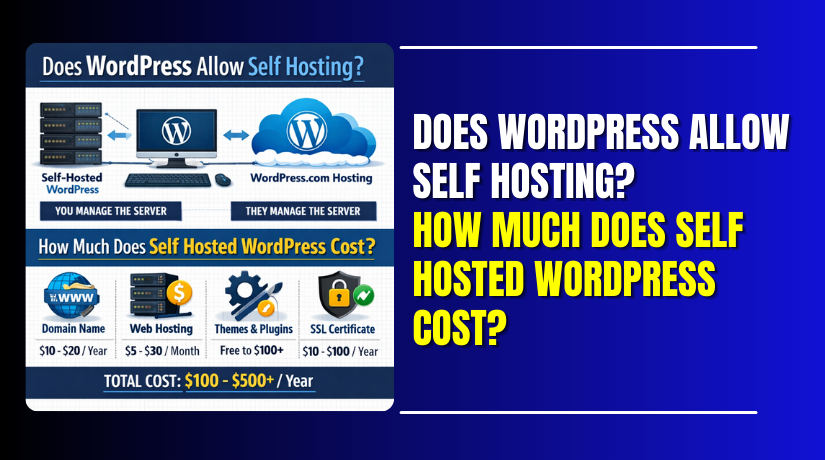
WordPress.org provides the WordPress software you install yourself. This is where self hosted WordPress meaning becomes important. Self-hosted means you install WordPress on a hosting server you choose. So yes, wordpress.org hosting required if you want this option. You can pick shared hosting, managed hosting, or other plans. You also control themes, plugins, and site performance settings.
This option fits you if you want:
- Complete command over features and design
- Better flexibility for business and WooCommerce growth
- Freedom to move hosts when you want
Do You Need Hosting for WordPress? The Real Answer
Many people still ask, do i need hosting for WordPress to start. The real answer depends on which WordPress type you choose. WordPress can work in two different ways online. One option comes with hosting already built in. The other option needs a hosting plan you manage. This is why people also ask, does wordpress require web hosting. The truth is simple once you match it to your setup.
If you choose WordPress.com, hosting is already included for you. Your site lives on their servers from the beginning. You do not buy separate hosting to publish online. This works well for small sites and basic blogging goals. You concentrate less on setup work and more on writing.
If you choose WordPress.org, hosting is required to go live. The reason for this is that WordPress is installed on a web server. The hosting business you choose provides that server. So yes, wordpress.org hosting required for self-hosted websites. Additionally, it provides you with improved long-term control and greater freedom.
Many users ask, is WordPress hosting necessary if they already have hosting. If you use WordPress.org, any compatible hosting works fine. You can choose regular web hosting, as long as it supports WordPress needs. A unique “WordPress-only” plan is not always necessary.
Here is the easiest way to decide quickly:
- Choose WordPress.com if you want hosting included and simple setup.
- Choose WordPress.org if you want control and better growth options.
- Use your own hosting if you need plugins and full features.
So, hosting is not always required in every case. But it is required for WordPress.org sites. This makes your choice clear and confident.
Can You Run WordPress Without Hosting? What “Without Hosting” Really Means
Many beginners ask, can i run WordPress without hosting to save money. Yes, but only in certain circumstances. You can run WordPress without hosting when you do not need it online. This usually means your site is not public yet. It is either offline or hosted inside another platform. This is why people also ask, does WordPress require web hosting to function. WordPress software can run without web hosting, but a live site cannot.
Local Installation: Practice Without Going Live
A local install means WordPress runs on your computer. It is like a private test site for learning. You can build pages, test plugins, and try new themes safely. No one else can visit that site through the internet. It is great for practice and planning before launch.
Local setup works best for these goals:
- Learning WordPress dashboards and settings
- Testing themes and plugins without any risk
- Building a demo site before moving it online
Temporary or Free Options: Why They’re Limited
Some users try free hosting or temporary subdomain setups. These options can work for basic testing and simple blogs. However, they frequently have stringent restrictions and unspoken issues. You may face slow speed, low storage, and fewer controls. Some plans may also show ads on your pages. These issues can hurt trust and brand value.
Free or limited options often cause these problems:
- Weak speed during busy traffic hours
- Limits on plugins, themes, and custom changes
- Hard upgrades when your site starts growing
So, can I run WordPress without hosting is possible for testing. But a public website needs hosting to stay online. If your goal is business growth, hosting becomes necessary quickly.
Domain + Hosting: Do You Need Both to Launch?
Do I need a name and hosting for WordPress? is a question that many beginners ask. For new site owners, this is a frequent source of confusion. A domain and hosting do different jobs for your website. Your domain is your site address people type in. Your hosting is where your site files live online. Together, they make your website accessible.
This can be easily understood by comparing it to a housing system. The home where everything is kept is called hosting. The domain is the street address people use to find it. Pages cannot be stored without hosting. Without a domain, people need a long server link. That looks unprofessional and hard to remember.
You can still start without buying both on day one. Many hosting providers offer a temporary domain for setup. This helps you install WordPress and build your pages first. Afterwards, you may always link your own unique domain. This is useful when you are still planning your brand name.
Here are common launch options used by beginners:
- Buy hosting first, then use a temporary domain for setup
- Purchase hosting and a domain together for a quicker launch.
- Buy a domain separately, then connect it to your host
In most real projects, you will want both eventually. A custom domain builds trust and looks more professional. Hosting gives your WordPress site a stable home online. So, do I need a domain and hosting for WordPress depends on your goal. If you want a public site with your brand name, you need both. If you only want testing, you can start with less.
WordPress Hosting vs Web Hosting: What’s the Difference?
Many beginners get stuck on hosting type names quickly. They see “web hosting” and also “WordPress hosting” everywhere. This creates confusion when choosing the right plan. The core idea is simple for most website owners. The key differences between web hosting and WordPress hosting are tools and focus. A general service for a variety of website types is web hosting. WordPress hosting is tuned for WordPress sites from the start.
So, can I use regular web hosting for WordPress without issues? Yes, you can in many cases. WordPress runs well on most standard hosting plans today. You just need the basic server support and enough resources. This is why many beginners start with shared web hosting. It keeps costs low while learning WordPress basics.
WordPress hosting usually includes extra WordPress-friendly features. These tools save time for beginners and busy store owners. Many hosts add one-click installs and WordPress updates support. Some plans include better caching for speed and stability. Many also provide WordPress-trained support teams for quick help.
Here is what regular web hosting often includes:
- Hosting for many site types, not just WordPress
- Basic email accounts and standard control panel tools
- Simple server resources for small to medium sites
Here is what WordPress hosting often adds:
- WordPress setup tools and auto updates support
- Better speed settings tuned for WordPress performance
- Support teams that understand WordPress problems faster
So, is WordPress hosting necessary for every WordPress website? Not always. Many sites run fine on regular web hosting plans. WordPress hosting becomes helpful when you want easier management. It also helps when your site grows and needs more speed. Your comfort level and financial situation will determine the best option.
Using Your Own Hosting With WordPress: How It Works
Can I use my own hosting with WordPress? is a common question from website owners. Yes, you can choose your own hosting provider easily. This is most common with WordPress.org websites. Your hosting account gives you server space and tools. WordPress then installs inside that hosting space like an app. You control files, database, and website settings from there. This setup gives more freedom for growth and features. It also supports WooCommerce stores and business sites better.
You can make use of any hosting plan you already have. Many people also ask, can i use regular web hosting for WordPress. Regular hosting can work if it meets WordPress needs. You need modern PHP, a database, and enough storage. Most USA hosting providers support these basics today.
Can Shared Hosting Run WordPress? What to Expect
Many beginners want the cheapest option to start. So they ask, can shared hosting run WordPress without issues. Many small websites can use shared hosting to run WordPress. It means many sites share one server together. This keeps pricing low and setup easy for beginners. It works best when traffic is still small and stable.
When Shared Hosting Is Enough


Shared hosting is enough for many early-stage websites. It works well when your site is not heavy. It also fits simple blogs, service sites, and small portfolios. You can start fast without high monthly costs.
Shared hosting works best for these cases:
- New blogs with low traffic and simple content
- Websites for small businesses with simple forms and pages
- Small WooCommerce testing stores with few products
When Shared Hosting Struggles
As your website expands, shared hosting may have difficulties. You may face slow speed during peak hours. Server response times may also be slowed by heavy plugins. WooCommerce stores often need more resources for smooth checkout. Visitors may abandon your website soon if it loads poorly.
Common warning signs include:
- Dashboard feels slow and takes longer to load
- Checkout pages’ lag during payments and order placement
- Website speed drops during traffic spikes or promotions
Managed WordPress Hosting vs Shared Hosting: Which One Fits Your Site?
Many users compare managed WordPress hosting vs shared hosting before buying. The difference is mainly support, speed tools, and maintenance effort. Shared hosting is cheaper but needs more self-management. Managed hosting costs more but reduces your workload. It also focuses on WordPress performance and safety.
Many times, managed WordPress hosting comes with useful built-in features. These features can save time for busy site owners. You may get auto updates, daily backups, and easy staging. Many plans also add stronger security and server caching. Support teams also know WordPress issues in detail.
Shared hosting is still fine if you like DIY control. It works when you can handle updates and backups yourself. It is also a good learning choice for beginners. But if your site earns money, managed hosting can help. It reduces downtime risk and improves overall stability.
Use this simple guide to decide faster:
- For simple, low-cost websites, go with shared hosting.
- Choose managed hosting for stores and higher traffic sites
- If you want to do less computer work, go for managed hosting.
How to Host a WordPress Website: Step-by-Step Overview
Follow these instructions if you’re wondering how to host a WordPress website. This process works for WordPress.org and self-hosted setups. It also fits users asking, can i use my own hosting with wordpress. Every step is straightforward, understandable, and simple to follow.
Step 1: Pick the Right Hosting Plan
Select a plan based on the size and objectives of your site. Shared hosting is fine for small starter websites. If you expect growth, choose better resources early. Can I use standard web hosting for WordPress? is a common question. Yes, if it supports WordPress requirements.
Use this quick guide while choosing:
- Shared hosting for blogs and small business websites
- Managed hosting for stores, speed, and less tech work
- Better plans for high traffic and heavy plugins
Step 2: Buy Hosting and Create Your Account
Sign up with your hosting provider and create an account. After signup, open your hosting dashboard or control panel. Most hosts provide cPanel or a custom panel. This panel is where you manage your website settings.
Step 3: Add or Connect Your Domain
Now link your hosting account to your domain. Point it to your host if you already have a domain. Use a temporary domain if you don’t already have one. This also answers do i need a domain and hosting for wordpress. A domain helps for a proper public launch.
To connect the domain, follow these common steps:
- Copy your hosting nameservers from the host dashboard
- Paste them inside your domain DNS settings
- Wait for DNS to update, usually within 1 to 24 hours
Step 4: Turn On SSL for HTTPS
SSL protects your website and visitor data during browsing. Most USA hosting providers offer free SSL using Let’s Encrypt. Enable SSL from your hosting control panel settings. After that, your site should load with HTTPS.
Step 5: Create a Database If Required
Some hosts create the database automatically during installation. Other hosts need you to create it manually first. You create a database, a user, and assign permissions. This is required for WordPress to store content properly.
Step 6: Install WordPress on Your Hosting
Install WordPress on your hosting account now. This step connects your site files with the database. Most beginners use a one-click installer for speed. Manual setup also works if you want full control. This ties closely to how to install wordpress on web hosting.
Step 7: Set Admin Login and Basic Site Settings
Set a strong admin username and password for safety. Make use of a secure email that you can access at all times. Then set your site title, tagline, and time zone settings. Choose a clean theme that matches your site goal.
Step 8: Do Final Security and Backup Setup
Before you publish, set basic protection and backups. This keeps your site safe from simple attacks and mistakes. When feasible, allow auto updates and have a backup plan.
Use this final checklist before going live:
- Confirm SSL is active and pages load with HTTPS
- Install a backup tool or enable host backups
- Set auto updates for WordPress core and plugins
- Remove unused themes and plugins to reduce risks
Once these steps are done, your site is ready. You can start building pages and publishing content confidently.
How to Install WordPress on Web Hosting: Two Common Methods
Many beginners ask, how to install wordpress on web hosting correctly. Most hosting providers make this process very simple now. You can install WordPress using an automatic installer tool. You can also install it manually for full control. Both methods work well when steps are followed carefully. Select the approach that best suits your schedule and degree of comfort.
Method 1: One-Click Install Using Host Installer
This method is the easiest option for most beginners. Your host installs WordPress files and creates the database. Only a few basic site details need to be entered. This method is common on many USA hosting dashboards. When I can use standard site hosting for WordPress, it also functions.
Follow these one-click install steps:
- Log in to your hosting dashboard or cPanel account
- Find the WordPress installer or “Website” install section
- Choose the domain on which WordPress will be deployed.
- Choose HTTPS if your SSL is already active
- Enter site name, admin username, and strong password
- Add admin email for password reset and alerts
- Click install and wait for confirmation message
After install, test your site login and homepage quickly. Open the admin panel and check basic settings once.
Method 2: Manual Install for Full Control
Manual install takes more steps but gives complete control. It is helpful when auto installers fail or cause issues. It also helps advanced users handle custom server setups. You still need hosting because WordPress must live online.
Follow these manual install steps:
- Download the latest WordPress zip file from WordPress.org
- Use FTP access or launch your hosting file manager.
- Upload WordPress files inside your domain public folder
- Create a MySQL database inside your hosting control panel
- Create a database user and assign full permissions
- Find wp-config-sample.php and rename it to wp-config.php
- Add database name, user, password, and host inside that file
- Visit your domain and start the WordPress setup wizard
- Choose site name, admin user, password, and email
- Finish setup and log in to your WordPress dashboard
After setup, enable SSL and set your site URL to HTTPS. Then install a backup tool and basic security plugin.
Both methods achieve the same final result. One-click is faster for beginners and small sites. Manual install is best for control and troubleshooting needs.
Final Decision Guide: Which Setup Should You Choose?
Many beginners still ask, do i need hosting for wordpress to start. The best choice depends on your site goals and control needs. If you want the simplest path, WordPress.com is easier. Hosting is included, and setup stays quick and guided. This works well for basic blogs and small personal sites.
If you want full control, choose WordPress.org with your host. This is the main difference in wordpress.com vs wordpress.org hosting. With WordPress.org, you can add any theme and plugin freely. You can also run WooCommerce and grow without limits. This is why wordpress.org hosting required for business websites.
Use this quick guide to decide faster:
- Choose WordPress.com if you want hosting included and simple steps.
- Choose WordPress.org if you want freedom and full site control.
- Choose shared hosting for low budget and small traffic websites.
- Choose managed hosting if you want better speed and support.
Conclusion
So, is wordpress hosting necessary in every case? Not always. It depends on the WordPress version you choose today. If you want help choosing the right plan, WooHelpDesk can help. We guide you with setup, speed, security, and smooth installs. Reach out anytime and build your site with confidence.