WordPress vs WooCommerce: Differences, Uses, and Cost Explained
Table of Contents
- Introduction
- What WordPress Is and What You Can Build With It Easily
- What WooCommerce Is and How It Changes WordPress Into a Store
- WordPress vs WooCommerce: The Real Differences That Matter
- When WordPress Alone Is the Better Choice
- When WooCommerce Is the Better Choice
- Cost Explained: WordPress Website Costs vs WooCommerce Store Costs
- Real-World Budget Examples for USA Businesses
- How to Choose Between WordPress and WooCommerce
- Common Mistakes to Avoid When Choosing
- Conclusion
Introduction
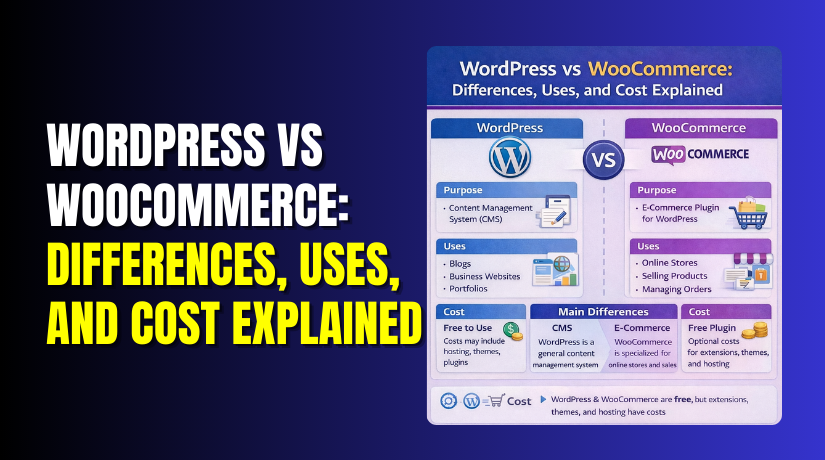
When people compare WordPress vs WooCommerce, they often mix them up. WordPress is a website platform that helps you build pages. WooCommerce is a tool that adds an online store to WordPress. So this comparison is not platform versus platform in reality. It is more like “website vs online store features.” You can run a full WordPress website without WooCommerce installed. But WooCommerce cannot run without a WordPress website behind it. This guide will explain the difference in a simple way. You will also understand which one fits your goal better. If you only need content, WordPress is usually enough. If you want to sell products, WooCommerce becomes useful fast.
What WordPress Is and What You Can Build With It Easily
WordPress is a content management system, often called a CMS. It helps you create and manage website content easily. You can publish pages, blogs, and media without coding skills. Many USA businesses use WordPress for brand and lead sites. WordPress works best when your main goal is content. It also supports themes and plugins for extra site features. You can build many website types using WordPress alone, like these:
- Business websites for local services and contact leads
- Blogs for traffic, SEO growth, and helpful guides
- Portfolio websites for creators, agencies, and freelancers
- Landing pages for ads, offers, and email signups
WordPress can also add forms, chat, and booking features. You do not need a cart or checkout for that.
What WooCommerce Is and How It Changes WordPress Into a Store
WooCommerce is an eCommerce plugin made for WordPress websites. It turns your WordPress site into a full online store. After setup, you can add products and accept customer orders. WooCommerce adds store tools that WordPress does not include. It helps you handle sales, payments, shipping, and order updates. For USA stores, this supports common selling needs and workflows. WooCommerce adds key store features like these:
- Product pages with prices, variations, and stock control
- Cart and checkout pages for smooth buying steps
- Order management for refunds, status, and customer notes
- Shipping settings for rates, zones, and packing rules
- Tax options for store rules and location-based selling
If your site needs checkout, WooCommerce is the right add-on. If not, WordPress alone stays lighter and simpler.
WordPress vs WooCommerce: The Real Differences That Matter
The WordPress vs WooCommerce debate becomes simple when you compare goals. WordPress helps you publish content and build a website. WooCommerce adds selling features that a website cannot do alone. Both can work together on one site without conflict. But they serve different needs and require different care. If your plan is selling, WooCommerce changes everything fast. If your plan is content, WordPress stays cleaner and lighter.
1 Purpose and Core Goal
WordPress is made for websites that share information or generate leads. It focuses on pages, posts, media, and site navigation. A WordPress site can rank well and build trust. It works great for local services and content marketing. WooCommerce is built for selling products on your own website. It focuses on checkout, payments, orders, and customers. It turns your site into a store with selling flow.
- Choose WordPress when your goal is content and leads.
- Choose WooCommerce when your goal is sales and orders.
2 Features You Get Out of the Box
WordPress gives you core website tools from the start. You get pages, blog posts, and menu controls quickly. You also get categories, tags, and media upload options. You can add forms, galleries, and SEO tools with plugins. WooCommerce adds store tools that WordPress does not include. You get products, product categories, and product attributes. You also get cart, checkout, and order tracking features. You can manage stock, coupons, and shipping settings too.
Here is the simple split for features:
- WordPress: content, pages, blogs, and media management.
- WooCommerce: products, cart, checkout, and order handling.
3 Setup Complexity and Learning Curve
A WordPress website setup is usually quick and simple. You pick hosting, install WordPress, and choose a theme. Then you create pages and publish your first content. Most beginners can learn this in a short time. A WooCommerce store setup needs more planning and more steps. You must add products, set prices, and choose payment methods. You must also set shipping rules and tax settings carefully. You may also need extra plugins for store features.
WooCommerce setup often includes these extra tasks:
- Payment setup and account verification steps
- Shipping zones, rates, and delivery rule settings
- Tax rules based on product type and buyer location
- Checkout testing to avoid errors and failed payments
4 Performance and Hosting Needs
A WordPress site can run well on basic hosting plans. It mainly loads pages, images, and blog content for visitors. The database stays smaller in many content-only sites. WooCommerce needs more server power in most cases. It loads product pages, cart pages, and checkout processes often. It also stores customer data and order records in the database. That increases load and slows sites without proper setup.
To keep a WooCommerce store fast, you usually need:
- Better hosting with more resources and strong caching
- Image optimization for product photos and thumbnails
- Fewer heavy plugins that add slow scripts
- A clean theme designed for WooCommerce stores
5 Security and Maintenance Effort
WordPress security is important for every site owner. You must update WordPress, themes, and plugins regularly. You should also use backups and strong admin passwords. For content-only sites, risk can still exist and grow. WooCommerce adds more responsibility due to store data. Your store handles orders, customer details, and payment flow steps. That makes security and updates even more important. You also must keep checkout pages safe and working.
Good store maintenance should include these habits:
- Weekly updates for WordPress and WooCommerce components
- Daily backups if you get regular store orders
- Security plugins and firewall rules when needed
- Strong admin access and limited user permissions
6 Scalability and Growth
WordPress scales well for blogs and business sites. You can publish more content and add more pages easily. You can also expand with plugins as your needs grow. WooCommerce can scale too, but it needs stronger planning. More products and more orders increase database load quickly. More traffic also increases checkout and cart load spikes. As the store grows, you may need better hosting. You may also need speed work and database cleanup.
WooCommerce growth often needs these upgrades over time:
- Strong hosting or managed WooCommerce hosting plans
- Better caching and performance tuning for store pages
- Reliable payment and shipping plugins with fewer conflicts
- Regular audits for slow plugins and heavy scripts
In short, WordPress vs WooCommerce is about your business goal. WordPress builds a website and supports content growth. WooCommerce builds a store and supports real product selling. If you choose based on goals, you avoid future rebuild work.
When WordPress Alone Is the Better Choice
Many people compare WordPress vs WooCommerce without a clear goal. If you are not selling online, WordPress alone is often best. It keeps your site simple, fast, and easy to manage. You can still build a strong brand and get leads. You can also grow traffic with blog content and SEO. This works well for many USA service businesses and creators.
WordPress alone is a smart choice when your site needs these goals:
- Share information, publish blogs, and build topical authority.
- Collect leads through contact forms and call buttons.
- Promote services, packages, or offers without online checkout.
- Build trust using reviews, case studies, and portfolio pages.
WordPress also works great for local businesses in the USA. Think of plumbers, HVAC, lawyers, and consultants. These businesses often need calls, forms, and bookings. They do not always need a product cart and checkout. You can still add useful features with plugins. You can add appointment bookings, chat support, and email signups. You can also create landing pages for ads and campaigns. This keeps your marketing flexible and easy to test.
Here are common WordPress-only website examples that perform well:
- A blog that earns traffic through helpful guides.
- A business website that focuses on calls and inquiries.
- A portfolio site that shows work and gets new clients.
- A one-page site for ads and lead capture.
If you want content growth first, WordPress is enough. You can always add WooCommerce later when needed.
When WooCommerce Is the Better Choice
If you want to sell products online, WooCommerce is a strong option. It turns your WordPress site into a full store system. This is where WordPress vs WooCommerce becomes a business decision. WordPress builds the site foundation and content structure. WooCommerce adds the selling tools that customers expect.
WooCommerce is the better choice when you need these store needs:
- Sell physical products with shipping and tracking needs.
- Sell digital products like files, templates, or downloads.
- Offer product options like size, color, or bundled items.
- Manage stock, orders, coupons, and customer accounts.
Many USA store owners like WooCommerce for control. You control the design, checkout flow, and product pages fully. You also control your data and store rules better. You can optimize product SEO using strong on-page content. You can also run ads and track conversion changes easily. This works well for brands that want long-term growth.
WooCommerce fits well for these real store scenarios:
- A boutique store selling apparel and accessories online.
- A home goods brand selling products across multiple states.
- A local business adding online orders for pickup.
- A digital creator selling courses, files, or design assets.
WooCommerce also supports growth with store extensions when needed. You can add better shipping tools, tax help, and payment options. You can also connect email marketing tools and CRM systems. But keep your setup clean and avoid plugin overload. A simple store often performs better than a complex one.
If selling is your main goal, WooCommerce is the right add-on. It makes WordPress a complete eCommerce platform for real sales.
Cost Explained: WordPress Website Costs vs WooCommerce Store Costs
When people search WordPress vs WooCommerce, cost is a big reason. Many assume WordPress is free and that is all. WordPress software is free to use, yes. But a real website still has running costs. A WooCommerce store also has extra cost layers. Those costs come from selling features and store needs. The total cost depends on your goals and your setup choices. Let’s break it down in a clear and simple way.


1 WordPress Cost Building Blocks
A WordPress website cost usually comes from basic website needs. These costs can stay low for simple business sites. They can rise when you add premium tools and support. Most USA websites pay for the same core items.
Here are the common WordPress cost building blocks:
- Domain name: This is your website address and brand name.
- Web hosting: This keeps your site online for visitors.
- SSL certificate: This enables HTTPS and keeps browsing secure.
- Theme: Free themes work, but premium themes add features.
- Plugins: Many are free, but advanced tools may cost.
- Email service: Some businesses pay for branded email accounts.
- Maintenance: Updates, backups, and security checks need time.
You can build a WordPress site with a small budget. But your time also has value and cost. If you want faster launch, you may hire help. That is where setup and support costs start. A well-managed WordPress site usually stays stable longer. It also reduces risk of errors and downtime.
2 WooCommerce Additional Cost Layers
WooCommerce adds eCommerce tools, and that adds more costs. The WooCommerce plugin itself is free to install. But a store has extra needs that a normal site does not. These extra needs create new cost areas.
Here are the most common WooCommerce cost layers:
- Payment provider fees: These apply per transaction and payout.
- Store extensions: Shipping, taxes, and checkout tools may cost.
- Store theme: Many stores use a WooCommerce-ready theme.
- More hosting power: Stores need stronger hosting for speed.
- Security focus: Stores need tighter protection and monitoring.
- Ongoing store care: Orders and checkout must work every day.
Payment fees are not “WooCommerce fees” in most cases. They come from the payment processor you use. Every WooCommerce payment gateway has its own fee rules. Fees can depend on card type, refunds, and chargebacks. This is a key cost difference for store owners. You should plan for fees as a normal selling expense.
Also, store extensions can become a major cost area. Many stores need extra features beyond the basics. For example, advanced shipping rules may need a plugin. Some tax setups can also need a dedicated tool. Subscription selling often needs an add-on too. The more features you add, the more cost increases.
3 Cost Factors That Change the Total
Two WordPress sites can have very different costs. Two WooCommerce stores can also vary a lot in cost. The main reason is complexity and scale. A small store and a large store need different resources. A simple site and a custom site also differ greatly.
These factors often change your total cost over time:
- Number of pages and content volume on your site
- Number of products and variations in your store
- Traffic level from SEO, ads, and social sources
- Plugin count and how heavy each plugin is
- Theme quality and how much design customization you need
- Shipping rules, tax rules, and payment method requirements
- Integrations with tools like CRM, email, or inventory systems
A store also needs more testing and upkeep than a basic site. Checkout errors can reduce sales and trust quickly. Slow product pages can drop conversions from ads. That is why stores often invest more in hosting and speed. This is an important point in WordPress vs WooCommerce cost planning.
If your goal is content and leads, WordPress stays affordable. If your goal is selling, WooCommerce needs extra budget planning. The good news is you can start small and grow. You can add store features only when you truly need them. This keeps your cost under control and your site easier to manage.
Real-World Budget Examples for USA Businesses
Cost depends on your goals, store size, and feature needs. Use these examples as simple planning guidance for the USA market. These are not fixed prices for every project. They show what usually changes the budget over time. This also makes the WordPress vs WooCommerce choice easier.
Starter setup: Simple site or small starter store
This fits bloggers, local services, and small product catalogs. You pay for domain, hosting, and a clean theme. You may use a few key plugins for forms and SEO. If you add WooCommerce, keep products and plugins limited. This keeps speed stable and setup time lower.
Growing store: More products, more traffic, and more tools
This fits stores that start getting regular orders each week. You may upgrade hosting for better speed and stability. You may add paid extensions for shipping and store features. You may also add email marketing and abandoned cart tools. You will also spend more time on updates and testing.
Custom store: Advanced features and deeper brand control
This fits stores needing special checkout rules and integrations. You may need custom design and development work too. You may need stronger hosting and performance tuning often. You may also need advanced security, backups, and monitoring. This level is common for scaling brands and busy stores.
How to Choose Between WordPress and WooCommerce
Choosing between WordPress vs WooCommerce starts with one question. Do you need a checkout on your website right now? If not, WordPress alone is often the best start. If yes, WooCommerce gives you selling tools and store control. Use these quick checks to decide.
- Are you selling products today or soon?
- Do you need cart and checkout on your own site?
- Do you want full control over design and SEO pages?
- Can you manage updates, backups, and security every month?
If most answers are “no,” start with WordPress. If most answers are “yes,” use WooCommerce with WordPress.
Common Mistakes to Avoid When Choosing
Many site owners pick the wrong setup due to confusion. They search “WordPress vs WooCommerce” and assume both are similar. That leads to wasted time, slow sites, and poor results. Avoid these mistakes to make a smarter long-term choice.
Choosing WooCommerce when you only need a brochure website
Some businesses only need services, pages, and a contact form. Adding WooCommerce adds extra load and store screens unnecessarily. It also adds more updates and more risk of conflicts. Use WooCommerce only when you need online selling features.
Underestimating maintenance for an online store
Stores are not “set and forget” websites in real life. You must update WordPress, WooCommerce, and your plugins often. You must test checkout after key updates as well. A broken checkout can stop sales within minutes. Plan time or support for regular maintenance.
Installing too many plugins and slowing down the website
Too many plugins can hurt speed and stability quickly. Some plugins load scripts on every page and add bloat. This is worse for stores with product pages and checkout. Keep plugins minimal and choose trusted, lightweight options. Remove plugins you do not use anymore.
Ignoring security basics like backups and strong admin access
Security issues can hit any WordPress site at any time. Stores face higher risk because they handle customer accounts. Use strong passwords and limit admin users and permissions. Keep backups ready and test restore steps sometimes. Use SSL and keep login pages protected.
Not planning payments, shipping rules, and taxes early
WooCommerce needs clear rules for selling and delivery. You must pick a reliable WooCommerce payment gateway early. You must also plan shipping zones and delivery options clearly. Tax rules can vary by location and product type. Planning early prevents checkout issues later.
Conclusion
The WordPress vs WooCommerce choice depends on your main goal. WordPress is best for content, branding, and lead generation. WooCommerce is best for selling products with full store control. If you need setup help, both WooHelpDesk and 24x7wpsupport can support you. For store setup, speed fixes, or checkout issues, contact WooHelpDesk for expert help.