WordPress vs Hostinger: What’s the Difference and Which One Is Right for You?
Table of Contents
- Introduction
- What is WordPress?
- What are the Key Features, Pros and Cons of WordPress?
- What is Hostinger?
- What are the Key Features, Pros and Cons of Hostinger?
- Which is Better: WordPress or Hostinger?
- Final Verdict
Introduction
You have decided to build a website. That is exciting. But almost immediately, you encounter confusion. People talk about WordPress. They talk about Hostinger. Are they the same? Do you need both? Which one should you choose?
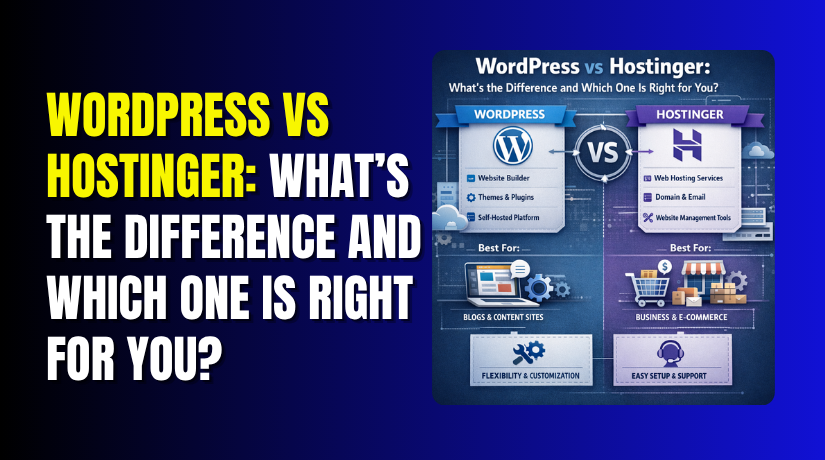
This confusion is understandable because the comparison seems unfair at first glance. It is like comparing a car engine to a gas station. They are different things that work together.
WordPress is software. It is the content management system (CMS) that powers over 43% of all websites. It provides the tools to create pages, write posts, manage media, and customize your site’s design. It is free, open-source, and runs on a web server.
Hostinger is a web hosting company. It provides the servers where your WordPress software lives. When someone visits your website, they are connecting to Hostinger’s servers to access your WordPress files. Hostinger also offers its own website builder, which is a completely different product from WordPress.
This guide clears up the confusion. You will learn what WordPress is, including the important distinction between WordPress.com and WordPress.org. You will understand what Hostinger offers as both a hosting provider and a website builder platform.
By the end, you will know exactly which combination is right for your specific needs.
What is WordPress?
WordPress is an open-source content management system (CMS) that allows you to create, manage, and publish content on the internet. It started as a blogging platform in 2003 and has evolved into a complete website-building system powering millions of sites worldwide.
This is the most important concept to understand. There are two versions of WordPress, and they are very different.
WordPress.org (Self-Hosted WordPress): This is the free, open-source software you download and install on your own web hosting. You own everything. You have complete control over code, themes, and plugins. You are responsible for security, updates, and backups. This version offers unlimited flexibility and is what most people mean when they say “WordPress”.
WordPress.com (Hosted WordPress): This is a commercial service from Automattic that hosts your site for you. You sign up, choose a plan, and start building. They handle hosting, security, and updates. However, free and lower-tier plans have significant limitations on customization, monetization, and plugin usage.
WordPress provides the tools to build virtually any type of website. Its core functionality includes:
- Page and Post Creation: Write and format content using the block editor
- Media Management: Upload and organize images, videos, and documents
- Theme System: Change your site’s appearance with thousands of design options
- Plugin Architecture: Add functionality like contact forms, SEO tools, e-commerce, and more
- User Management: Control who can access and edit your site
- SEO Foundation: Clean code and customizable URLs help search engines find you
What are the Key Features, Pros and Cons of WordPress?
Key Features of WordPress
- Massive Theme Library: Thousands of free and premium themes exist for every industry. You can change your site’s entire look with a few clicks.
- Extensive Plugin Ecosystem: Over 60,000 free plugins add virtually any functionality. SEO tools, e-commerce, contact forms, security, backups, and more are available.
- Full SEO Control: With plugins like Yoast SEO or Rank Math, you can optimize every aspect of your site for search engines. Control meta descriptions, titles, sitemaps, and schema markup.
- E-commerce Ready: WooCommerce transforms WordPress into a powerful online store. Sell physical products, digital downloads, services, and subscriptions with complete control over payment gateways and shipping.
- User Management: Built-in roles let you manage contributors, editors, and administrators effectively. Perfect for teams and multi-author sites.
- Multilingual Support: WordPress works in dozens of languages, and plugins like WPML make creating multilingual sites achievable.
- Developer Friendly: Clean code, hooks, filters, and extensive APIs make WordPress highly customizable for developers.
Pros of WordPress
- Complete Ownership and Control: You own your content and your platform. No one can shut down your site arbitrarily. You can move it anywhere, anytime.
- Unlimited Customization: With themes and plugins, you can build almost anything. No platform-imposed limits on functionality.
- Massive Community: Millions of users mean endless tutorials, forums, and expert help available for free. When you have questions, answers are everywhere.
- Scalability: WordPress handles everything from small blogs to enterprise sites with millions of visitors. You start small and grow infinitely.
- Cost-Effective Long Term: The software is free. You only pay for hosting, domain, and optional premium tools. Over time, this is often cheaper than proprietary website builders.
- SEO Advantages: WordPress sites consistently outrank competitors because of superior SEO tools and control.
Cons of WordPress
- Security Responsibility: As the most popular CMS, WordPress attracts hackers. You must keep everything updated and follow security best practices. This is manageable but requires attention.
- Learning Curve: Beginners may find WordPress overwhelming at first. The dashboard has many options, and mastering advanced features takes time.
- Ongoing Maintenance: Updates for core, themes, and plugins require regular attention. Neglecting updates risks security and compatibility.
- Plugin Conflicts: Sometimes plugins conflict with each other. Troubleshooting requires patience and technical understanding.
- True Costs Add Up: While software is free, quality hosting, premium themes, and essential plugins cost money. Budget accordingly.
- Self-Hosted Requires Technical Setup: You must find and purchase hosting, install WordPress, and configure settings before writing your first post.
What is Hostinger?
Hostinger is a web hosting provider founded in 2004 that offers a range of hosting services to over 2 million website owners worldwide. It is known for its affordable pricing, user-friendly custom control panel (hPanel), and strong performance optimizations.
Hostinger primarily provides the infrastructure where websites live. When you purchase a hosting plan, you are renting space on their servers. They ensure your website files are accessible to visitors 24/7.
Beyond traditional hosting, Hostinger also offers its own Hostinger Website Builder. This is a separate product from WordPress—a drag-and-drop, AI-powered tool for building sites without any technical knowledge.


What Hostinger Offers?
Hostinger provides multiple types of hosting services:
- Shared Web Hosting: Affordable entry-level plans where your site shares server resources with others. Perfect for beginners and small sites.
- Cloud Hosting: More powerful and scalable hosting with dedicated resources. Recommended for growing sites and businesses.
- WordPress Hosting: Optimized specifically for WordPress with pre-installed performance plugins, staging tools, and enhanced security. Hostinger is officially recommended by WordPress.org.
- VPS Hosting: Virtual private servers for developers needing maximum control and resources.
Hostinger Website Builder
This is a proprietary, all-in-one website builder that competes with platforms like Wix and Squarespace. It features:
- AI-Powered Tools: Generate content, layouts, and even entire sites using artificial intelligence
- Drag-and-Drop Interface: Build pages visually without coding
- Built-in Marketing Tools: SEO recommendations, email marketing integration, and analytics
- E-commerce Features: Sell products directly through the builder
What are the Key Features, Pros and Cons of Hostinger?
Key Features of Hostinger
- LiteSpeed Web Server Technology. Hostinger uses LiteSpeed servers, which are significantly faster than traditional Apache servers. Combined with LiteSpeed Cache for WordPress, this delivers exceptional performance and loading speeds.
- Custom hPanel Control Panel. Instead of the traditional cPanel, Hostinger developed its own intuitive dashboard. hPanel makes managing your website, domains, emails, and databases simple and clean.
- Free Domain and SSL. Long-term plans include a free domain name for the first year. All plans include unlimited free SSL certificates to encrypt traffic and build trust with visitors.
- Free Website Migration. If you already have a website elsewhere, Hostinger’s free migration tool transfers your site within 24 hours. Their support team can assist with the process.
- Automated Backups. Daily or weekly backups (depending on plan) ensure your data is safe. You can restore your site with a few clicks if something goes wrong.
- WordPress-Specific Features. WordPress hosting plans include:
- One-click WordPress installation
- WordPress staging environment for testing changes
- Object Cache for up to 3x faster database queries
- Built-in WordPress AI tools for content generation
- Malware scanner and vulnerabilities checker
- WP-CLI and SSH access for developers
- Global Data Centers. Choose from server locations in North America, South America, Europe, and Asia to optimize speed for your target audience.
- 24/7 Customer Support. Live chat and email support are available around the clock. Response times typically range from a few minutes to 15 minutes, depending on the queue.
- 9% Uptime Guarantee. Hostinger guarantees your site will remain accessible, with compensation available if uptime falls below this threshold.
- AI Website Builder. The integrated website builder uses AI to create custom sites in minutes based on your descriptions. This is ideal for users who want a site without learning WordPress.
Pros of Hostinger
- Excellent Value for Money: Hostinger’s introductory prices are among the most affordable in the industry. The Premium plan starts at $2.99/month for 48-month terms, offering exceptional features for the price.
- User-Friendly for Beginners: The custom hPanel is intuitive and less overwhelming than traditional control panels. One-click WordPress installation gets you started immediately.
- Strong Performance Optimizations: LiteSpeed servers, Object Cache, and built-in CDN deliver fast loading times. In speed tests, Hostinger’s server response times are consistently under 1/100th of a second in optimal locations.
- Global Infrastructure: With data centers worldwide, you can serve your audience from the closest location, reducing latency and improving user experience.
- Free Migration Included: Moving from another host is handled for you, removing a major barrier to switching providers.
- WordPress Recommended: Being officially recommended by WordPress.org adds credibility and ensures compatibility.
- Scalable Plans: You can start with shared hosting and upgrade to cloud or VPS as your traffic grows, all within the same ecosystem.
Cons of Hostinger
- No Phone Support: Hostinger does not offer phone support, relying instead on live chat and email. While response times are good, some users prefer speaking directly to someone.
- Best Discounts Require Long Terms: The lowest advertised prices require committing to 48-month plans. Shorter terms and monthly billing are significantly more expensive.
- Renewal Prices Increase: Like most hosting providers, the introductory rates increase upon renewal. Budget for higher costs after your initial term.
- Limited Resources on Entry Plans: The Premium plan includes 25 GB of storage and supports 25 websites. While generous for most beginners, growing sites may need to upgrade.
- No Dedicated Server Hosting: Hostinger does not offer dedicated servers, though their cloud hosting plans provide many of the same benefits for most users.
- AI Features Require Learning: While powerful, the AI website builder and content tools have their own learning curve separate from WordPress.
Which is Better: WordPress or Hostinger?
This question requires reframing because they are different products. A better question is: Which combination of WordPress and hosting is right for you?
Here is a comprehensive comparison based on different cases.
| Comparison Factor | WordPress.org + Hostinger Hosting | WordPress.com (Hosted) | Hostinger Website Builder |
| What It Is | Self-hosted WordPress software running on Hostinger’s servers | Fully managed WordPress hosting service from Automattic | Proprietary drag-and-drop website builder from Hostinger |
| Best For | Serious bloggers, businesses, e-commerce stores, developers | Hobby bloggers, simple sites, zero-maintenance users | Absolute beginners, quick launches, simple business sites |
| Full WordPress Software | Yes | Yes | No |
| Hosting Included | Yes (Hostinger) | Yes | Yes |
| Domain Included | Free for first year (with annual plans) | Free subdomain; custom domain requires paid plan | Free for first year (with annual plans) |
| SSL Certificate | Free unlimited SSL | Free SSL | Free SSL |
| Custom Plugins | Unlimited | Business+ plans only | No |
| Custom Themes | Unlimited | Business+ plans only | Limited to builder templates |
| Number of Themes | Thousands (free + premium) | 200+ (varies by plan) | 150+ templates |
| Ease of Use | Moderate learning curve | Easy | Very Easy (AI-powered) |
| Setup Time | 5-10 minutes (one-click install) | 1-2 minutes | 1-5 minutes (AI generates site) |
| Monthly Cost (Entry) | $2.99 (48-month term) + domain | Free (with .wordpress.com subdomain) to $7/month | $2.99 (included in hosting) |
| Monthly Cost (E-commerce) | $3.99 (Business plan) + free WooCommerce | $45/month (Commerce plan) | $3.99 (Business plan) |
| Transaction Fees | 0% (choose your payment gateway) | 0% on higher plans; fees on lower plans | Varies by payment gateway |
| Storage (Entry Plan) | 25 GB NVMe | 3 GB (Free) to 13 GB (Personal) | 25 GB NVMe |
| Number of Websites | Up to 100 (Premium plan) | 1 per plan | Up to 100 (Premium plan) |
| Bandwidth | Unmetered | Unmetered | Unmetered |
| Email Accounts | Free business email included | Requires separate WordPress.com plan | Free business email included |
| Performance | Excellent (LiteSpeed servers, Object Cache, CDN) | Good (managed by Automattic) | Excellent (same Hostinger infrastructure) |
| Server Locations | USA, UK, France, India, Singapore, Brazil, Lithuania, Netherlands | USA, Europe | USA, UK, France, India, Singapore, Brazil, Lithuania, Netherlands |
| Uptime Guarantee | 99.9% | 99.9% | 99.9% |
| Backups | Daily or weekly (depends on plan) | Daily (higher plans) | Daily or weekly (depends on plan) |
| Staging Environment | Yes (Business plan+) | Limited | No |
| Monetization Freedom | Complete (ads, affiliates, products, services) | Limited on lower plans | Good for e-commerce |
| Payment Gateways | Unlimited (WooCommerce) | Stripe only (Commerce plan) | Multiple options via integrations |
| SEO Control | Full with plugins (Yoast, Rank Math) | Basic to moderate | Built-in SEO tools |
| Marketing Tools | Unlimited via plugins | Built-in basic tools | Email marketing integration, AI tools |
| AI Features | Limited (via plugins) | Limited | AI website generator, AI content writer, AI heat maps |
| Customer Support | 24/7 live chat, email | 24/7 live chat, email | 24/7 live chat, email |
| Phone Support | No | No | No |
| Support Response Time | 2-15 minutes typically | Varies by plan | 2-15 minutes typically |
| Money-Back Guarantee | 30 days | 30 days | 30 days |
| Scalability | Unlimited growth (shared → cloud → VPS) | Plan upgrades required within WordPress.com ecosystem | Platform limited; cannot export to WordPress |
| Ownership | Complete (you own your site and data) | You own content, platform controls access | You own your site |
| Portability | Can move to any host anytime | Limited export options | Cannot migrate to WordPress |
| Technical Knowledge Needed | Moderate | Low | Very Low |
| Maintenance Responsibility | You handle WordPress updates; Hostinger handles server | Fully managed by Automattic | Fully managed by Hostinger |
| Learning Curve | Moderate | Easy | Very Easy |
| Community Resources | Massive (millions of users, tutorials, forums) | Large (WordPress.com community) | Growing (Hostinger tutorials) |
| Official WordPress Recommendation | Yes (Hostinger is recommended host) | Yes (WordPress.com is official) | No |
| Best Value For Money | ⭐⭐⭐⭐⭐ | ⭐⭐ | ⭐⭐⭐⭐ |
| Verdict | Winner for most users | Good for zero-maintenance simple sites | Good for absolute beginners |
Final Verdict
The clear winner for most users is WordPress.org combined with Hostinger hosting. This powerful combination gives you the complete flexibility of self-hosted WordPress with the speed, affordability, and beginner-friendly tools of Hostinger’s optimized platform.
You get unlimited customization through thousands of themes and plugins, full ownership of your content, and the ability to scale from a small blog to a thriving e-commerce store without ever migrating platforms. With Hostinger’s LiteSpeed servers, free SSL, automated backups, and one-click WordPress installation, you have everything needed to build a professional website at an unbeatable price starting under $3 per month.
Choose WordPress.com only if you want a fully managed experience and are willing to pay premium prices for advanced features, or if you’re a hobby blogger who doesn’t need customization or monetization.
Choose Hostinger Website Builder if you’re an absolute beginner who wants the fastest possible launch with AI-powered tools and zero learning curve, and you don’t anticipate needing WordPress’s advanced flexibility in the future. For everyone else serious about building a long-term online presence, the WordPress.org and Hostinger combination is the smartest investment you can make.
Have questions before starting with WooCommerce & WordPress? Get support here at WooHelpDesk.