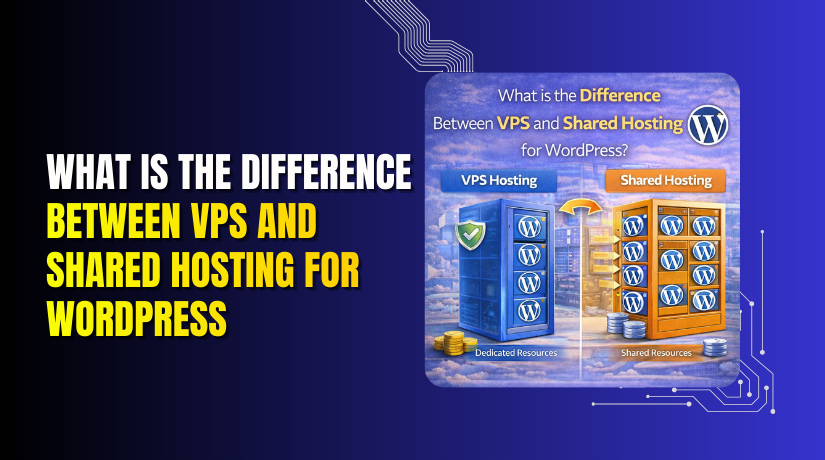
What is the difference between VPS and shared hosting for WordPress?
Table of Contents
- Introduction
- What is Shared Hosting?
- What is VPS Hosting?
- Key Differences Between VPS and Shared Hosting for WordPress
- Which is Better for WordPress: VPS or Shared Hosting?
- Cost Comparison: VPS vs Shared Hosting
- Which is better for WordPress?
- Conclusion
Introduction
When building a WordPress website, choosing the right hosting is crucial. Your website’s performance, speed, and security depend largely on the hosting provider you select. There are several types of WordPress hosting available, each with its benefits and drawbacks. VPS hosting and shared hosting are two popular options.
The difference between VPS and shared hosting for WordPress is essential to understand when making this decision. The hosting type you choose can impact everything from speed to support. This post will dive into these two hosting options, helping you decide which one works best for your website’s needs.
What is Shared Hosting?
Shared hosting is the most affordable option for WordPress hosting. It’s called “shared” because your website shares a server with other websites. In this setup, the hosting company allocates a portion of its server resources to many users, making it cost-effective for individuals or small businesses.
Shared hosting is perfect for websites with low to moderate traffic, like blogs, portfolios, or small business sites. Since resources such as CPU, RAM, and bandwidth are shared with other users, you may experience slower performance during high traffic periods.
Pros of Shared Hosting:
- Affordable: Shared hosting is budget-friendly, with prices as low as $3 to $10 per month.
- User-Friendly: Ideal for beginners, shared hosting often comes with a one-click WordPress installation.
- Maintenance-Free: The hosting provider manages the server’s maintenance, making it hassle-free for you.
Cons of Shared Hosting:
- Limited Resources: Because resources are shared, performance can suffer if other websites on the same server use too much.
- Less Control: You have little control over the server, meaning you can’t make certain customizations.
- Security Risks: Sharing a server with other websites means a potential security threat if another site gets compromised.
How Shared Hosting Works for WordPress
Shared hosting providers often offer easy-to-use control panels like cPanel, where you can manage your WordPress site. Setting up WordPress on shared hosting is straightforward, and many hosts provide one-click WordPress installation, which makes it easy even for beginners.
However, the shared nature of the hosting means you have limited access to server settings. You can install plugins and themes, but you might face restrictions on making advanced customizations.
For example, during peak times, if another website on your server experiences a traffic surge, your site may slow down or become temporarily unavailable. This is one of the primary drawbacks of shared hosting.
Why Choose Shared Hosting for WordPress?
Choosing shared hosting is often the best decision for certain types of websites:
- Small Business Websites: If you are starting a small business and expect minimal traffic, shared hosting is a good, budget-friendly option.
- Personal Blogs: For bloggers just starting out, shared hosting provides the resources they need at a low cost.
- Portfolios: If you’re showcasing your work or building a personal portfolio, shared hosting is enough for a simple site.
If you are just getting started and don’t anticipate heavy traffic, shared hosting offers an affordable solution to get your WordPress website up and running.
What is VPS Hosting?
VPS (Virtual Private Server) hosting is a type of hosting that provides you with more control, dedicated resources, and better performance compared to shared hosting. With VPS hosting, you don’t share your server’s resources with other websites. Instead, the server is divided into multiple virtual servers, each having its own operating system and resources.
VPS hosting allows you to have a private space on the server, ensuring that your website’s performance is not affected by the traffic or activities of other websites. This means your website will run faster, with fewer slowdowns or crashes. VPS hosting is an excellent choice for websites that need more power, security, and customization.
How VPS Hosting Works for WordPress:
When you choose VPS hosting, your hosting provider will allocate a certain amount of resources (like CPU, RAM, and storage) just for your website. Unlike shared hosting, where resources are shared among many websites, VPS hosting gives you a more stable and isolated environment. You can install custom software, configure your server, and handle more traffic without affecting other websites.
In most cases, VPS hosting is fully customizable. You can install the version of Linux or Windows that best fits your needs. You also get root access, which means full control over the server environment. This level of customization is perfect for businesses or developers who need more flexibility than shared hosting can provide.
Pros of VPS Hosting for WordPress
- Better Performance: VPS provides dedicated resources, making your WordPress site faster and more reliable.
- More Control: With root access, you can configure your server to suit your specific needs.
- Scalability: VPS hosting allows you to scale up resources easily as your website grows.
- Isolation: Your website is isolated from others on the same server, improving security.
- Customizability: You can install custom software and manage server settings.
Cons of VPS Hosting:
- Higher Cost: VPS hosting is more expensive than shared hosting.
- Technical Knowledge Required: You may need some technical expertise to manage the server properly.
- Management Responsibility: You are responsible for server updates, backups, and security (unless you opt for managed VPS hosting).
Key Differences Between VPS and Shared Hosting for WordPress
Now that we’ve looked at VPS hosting in detail, let’s compare it to shared hosting. Understanding these key differences will help you choose the right hosting for your website.
- Performance and Resources
- VPS Hosting: With VPS hosting, you get dedicated resources like CPU, RAM, and disk space. Your site’s performance will not be affected by other websites. This is crucial if your website experiences high traffic or needs to run resource-heavy applications.
- Shared Hosting: In shared hosting, your website shares resources with other sites. This can cause slowdowns during traffic spikes or if another website on the same server uses a lot of resources.
Which one is better for WordPress? If you have a growing website or expect traffic spikes, VPS is the better option for performance. If your site is small and doesn’t have high resource demands, shared hosting may suffice.
- Control and Customization
- VPS Hosting: You have full control over your server. You can install custom software, configure your server environment, and make adjustments as needed. This is ideal for businesses or developers who need a high level of customization.
- Shared Hosting: In shared hosting, you don’t have much control over the server. The hosting provider takes care of all configurations, leaving you with limited customization options.
Which one is better for WordPress? If you want to manage your server and have more flexibility, VPS hosting is the clear winner. Shared hosting is great if you prefer simplicity and don’t need much customization.
- Security
- VPS Hosting: VPS hosting is more secure because you have your own isolated environment. Even if another website on the same server is compromised, your site won’t be affected.
- Shared Hosting: Since websites share resources, if one site gets hacked, it can potentially affect all others on the server.
Which one is better for WordPress? VPS hosting offers better security because of its isolated environment. If security is a top priority, VPS is the better choice.
- Scalability
- VPS Hosting: VPS hosting is scalable, meaning you can easily add more resources (CPU, RAM, storage) as your website grows. This flexibility is crucial for businesses that need to adjust their resources over time.
- Shared Hosting: Shared hosting has limited scalability. If your website outgrows the resources provided, you will likely need to upgrade to VPS or another hosting type.
Which one is better for WordPress? VPS hosting is the better option if you expect growth. Shared hosting works well for small sites but may not scale effectively for larger sites.
- Support
- VPS Hosting: VPS hosting typically offers more technical support because it requires more server management. However, if you choose unmanaged VPS hosting, you are responsible for troubleshooting and maintaining the server.
- Shared Hosting: Shared hosting usually comes with basic support. Hosting providers handle most of the server management, making it easier for beginners.
Which one is better for WordPress? If you are new to WordPress or don’t want to manage the server, shared hosting offers easier support. However, if you need more advanced support and can handle the technical aspects, VPS hosting is better.
Which is Better for WordPress: VPS or Shared Hosting?
Choosing between VPS and shared hosting depends on your website’s needs. If you have a small WordPress site with minimal traffic, shared hosting is a good option. It’s affordable and easy to use, making it perfect for blogs, portfolios, and small business sites.
However, if you have a growing business or expect higher traffic, VPS hosting is the better choice. VPS offers better performance, more control, enhanced security, and the ability to scale. It is ideal for e-commerce sites, larger blogs, and websites that need a high level of customization.
Performance Comparison: VPS vs Shared Hosting
When it comes to performance, the difference between VPS hosting and shared hosting is significant. Choosing the right hosting can greatly affect the speed and reliability of your WordPress website. Let’s explore how both options perform under different circumstances.


- Load Time and Speed
- VPS Hosting:
VPS hosting offers dedicated resources, which means your site has exclusive access to a portion of the server’s CPU, RAM, and storage. This allows your site to load faster and handle higher traffic without slowing down. VPS hosting is perfect for websites that require high performance and cannot afford delays. - Shared Hosting:
Shared hosting, on the other hand, means you are sharing resources with other websites. If another website on the same server experiences high traffic, it can slow down your site. This can lead to longer load times, especially during peak hours.
Which one is better for WordPress?
If speed is important for your WordPress website, VPS hosting is the better choice. It ensures faster load times by dedicating resources solely to your site.
- Traffic Spikes and Handling High Volume
- VPS Hosting:
One of the biggest advantages of VPS hosting is its ability to handle traffic spikes. Because your site has dedicated resources, it can manage sudden increases in visitors without crashing or slowing down. This is particularly useful for websites with e-commerce stores or large content-heavy sites. - Shared Hosting:
With shared hosting, if another site on your server gets a traffic surge, your website may be affected. High traffic periods or sudden surges can cause your site to lag or even crash. Shared hosting is not equipped to manage large spikes in traffic.
Which one is better for WordPress?
For high traffic websites or if you expect sudden growth, VPS hosting is the ideal choice. It offers better stability and can handle traffic surges without affecting your site’s performance.
- Uptime and Reliability
- VPS Hosting:
VPS hosting provides a more reliable environment for your website. Since your site runs on dedicated resources, it is less likely to experience downtime. Your site is isolated from others on the same server, which means that even if another website experiences issues, your site will remain unaffected. - Shared Hosting:
Shared hosting is less reliable when it comes to uptime. Since multiple websites are sharing the same server, any issues with one site can affect all others on that server. This makes shared hosting prone to downtime during server outages or maintenance.
Which one is better for WordPress?
For better uptime and reliability, VPS hosting is the superior option. If your website needs to be available 24/7, VPS hosting offers more stability and consistency.
- Scalability and Growth
- VPS Hosting:
VPS hosting is highly scalable. As your website grows, you can upgrade your resources like CPU, RAM, and storage without affecting your site’s performance. This flexibility ensures your website can grow without needing to switch hosting providers. VPS is perfect for expanding websites that anticipate increasing traffic and resource demands. - Shared Hosting:
Shared hosting has limited scalability. As your site grows, you may quickly outgrow the shared resources available. If your website exceeds the limits of shared hosting, you will need to upgrade to a VPS or another hosting type.
Which one is better for WordPress?
If you plan to grow your website and need scalable resources, VPS hosting is the better option. Shared hosting is suitable for small sites but lacks the scalability you may need in the future.
- Resource Allocation
- VPS Hosting:
With VPS hosting, you get a guaranteed allocation of resources. This ensures that you have the full amount of CPU, RAM, and bandwidth that you’ve paid for, and your site won’t suffer due to other websites using too many resources. - Shared Hosting:
Shared hosting means your website shares all resources with other sites on the server. This can cause performance issues when other sites use more than their fair share of resources, leaving your website with limited processing power.
Which one is better for WordPress?
VPS hosting is the best choice for websites that need reliable and guaranteed resources. Shared hosting is suitable for small, low-traffic websites but offers fewer guarantees in terms of performance.
Cost Comparison: VPS vs Shared Hosting
When deciding between VPS hosting and shared hosting for WordPress, the cost is a major factor. Both options offer different price points based on the features and resources they provide. Understanding the costs associated with each type of hosting can help you choose the best option for your budget and website needs.
- Shared Hosting Pricing
Shared hosting is the most affordable hosting option. It’s designed for small websites or personal blogs with low to moderate traffic. The pricing for shared hosting typically ranges from $3 to $10 per month. This low price makes it a popular choice for beginners or websites that don’t expect high traffic volumes.
What’s included in shared hosting plans?
- Limited resources: Since you share a server with other websites, the resources (CPU, RAM, and storage) are limited.
- Basic support: Shared hosting plans generally come with basic customer support, and the host manages the server’s maintenance.
- User-friendly: Shared hosting often includes one-click WordPress installation and simple control panels, making it easy for beginners.
Which websites are best for shared hosting?
- Personal blogs
- Small business websites
- Portfolio sites
While shared hosting is budget-friendly, it’s important to note that as your website grows, shared hosting may not be sufficient to meet your needs.
- VPS Hosting Pricing
VPS hosting is more expensive than shared hosting due to its dedicated resources and greater control over the server. VPS plans typically start at $20 to $80 per month, depending on the provider and the resources allocated. For high-performance websites or those expecting growth, this is an investment that can pay off.
What’s included in VPS hosting plans?
- Dedicated resources: VPS hosting provides guaranteed CPU, RAM, and storage, making it suitable for websites with higher traffic demands.
- Greater control: With root access, you can customize your server to meet your specific needs.
- Scalability: VPS hosting allows you to easily upgrade your resources as your website grows.
- Better support: Many VPS plans include advanced support to help manage the server.
Which websites are best for VPS hosting?
- Growing business websites
- E-commerce sites
- Websites with high traffic
Although VPS hosting offers better performance and more resources, the higher cost may not be necessary for small websites with low traffic.
- When Should You Upgrade from Shared Hosting to VPS?
As your website grows, you might reach a point where shared hosting no longer meets your needs. Here are some signs it may be time to consider upgrading to VPS hosting:
- Traffic increase: If your website is experiencing higher traffic and shared hosting can no longer handle it.
- Slow site speed: When your website starts to load slowly due to the limitations of shared hosting, it’s a sign to move to VPS.
- Security concerns: If you need better security to protect sensitive data, VPS offers a more secure environment.
- Custom requirements: If you need custom software or configurations that shared hosting can’t support, VPS hosting will give you more flexibility.
Upgrading to VPS hosting allows your website to continue growing without compromising on performance, security, or speed.
- Value for Money
Although VPS hosting is more expensive than shared hosting, it offers better value for websites that need more resources. For websites with high traffic or e-commerce sites, VPS hosting is worth the investment as it provides better performance, security, and scalability.
On the other hand, shared hosting is ideal for smaller websites that do not require much server customization or resources. If you are just starting out, shared hosting is an affordable option. However, as your website grows, you may need to upgrade to VPS to ensure smooth performance.
Which is better for WordPress?
If you’re just starting and need an affordable hosting solution, shared hosting is the way to go. But for websites that need more control, faster performance, and better resources, VPS hosting provides better value over time.
Which is Better for WordPress: VPS or Shared Hosting?
Choosing between VPS and shared hosting depends largely on your website’s needs. Let’s break down when VPS hosting or shared hosting is the better choice for your WordPress website.
- When Should You Choose Shared Hosting for WordPress?
Shared hosting is ideal for small websites or blogs that don’t expect high traffic. If you are just starting and have a limited budget, shared hosting is the most cost-effective option. Here are the main scenarios where shared hosting works best:
- Personal Blogs: If you’re blogging for fun or sharing a personal website, shared hosting is more than enough.
- Small Business Websites: For small businesses just getting started, shared hosting offers a low-cost solution for hosting a simple website.
- Low Traffic Sites: If you don’t anticipate heavy traffic, shared hosting provides adequate performance at an affordable price.
While shared hosting is cheaper, it has limitations. Limited resources and less flexibility might cause issues as your site grows.
- When Should You Choose VPS Hosting for WordPress?
If you need better performance, more control, and the ability to scale your website, VPS hosting is the better choice. VPS hosting is perfect for growing websites and businesses that need dedicated resources. Here are key scenarios where VPS hosting works best:
- Growing Websites: If your site is expanding and expecting more traffic, VPS hosting offers dedicated resources and faster performance.
- E-commerce Sites: If you’re running an online store or processing customer transactions, VPS hosting offers better security, speed, and reliability.
- Resource-Heavy Sites: Websites with a lot of media, videos, or complex applications need more server resources than shared hosting can provide.
- Customization Needs: If you need to install custom software or configure the server, VPS hosting gives you full control over the environment.
VPS hosting might cost more, but it gives you better flexibility, performance, and security as your website grows.
- Key Factors to Consider When Choosing the Right Hosting for Your Website
When deciding between VPS and shared hosting, several factors should influence your decision. These factors include your website’s size, expected traffic, budget, and specific performance needs.
- Budget:
- Shared Hosting: If you’re just starting out or need to keep costs low, shared hosting is the most affordable option. Prices typically range from $3 to $10 per month.
- VPS Hosting: While VPS hosting is more expensive, it provides better value for websites that need more resources. Prices for VPS hosting start at around $20 per month.
- Website Size and Traffic:
- Shared Hosting: Works best for smaller websites or those with low to moderate traffic. If you expect low traffic, shared hosting will handle it fine.
- VPS Hosting: Ideal for larger websites or those with growing traffic needs. VPS hosting provides dedicated resources, ensuring your site performs well even during traffic spikes.
- Scalability:
- Shared Hosting: Shared hosting has limited scalability. Once your site outgrows the resources available, you will need to upgrade to a higher plan or switch to VPS hosting.
- VPS Hosting: VPS hosting is highly scalable. You can easily increase resources (CPU, RAM, storage) as your website grows, without needing to switch to a different server.
- Control and Customization:
- Shared Hosting: Shared hosting offers limited control over the server. You have access to basic settings but can’t install custom software or make server-level configurations.
- VPS Hosting: VPS hosting gives you full root access to the server. You can install any software and make custom configurations to suit your needs.
Conclusion
In conclusion, the choice between VPS hosting and shared hosting for WordPress depends on your website’s needs. Shared hosting is a cost-effective option for small sites or blogs with low traffic. However, if you’re running a growing business or an e-commerce site, VPS hosting provides the performance, security, and flexibility needed to support higher traffic and more demanding applications. Assessing your website’s size, traffic, budget, and scalability requirements will help you make the right decision.
If you’re unsure which hosting option is best for your WordPress site, WooHelpDesk is here to help. Contact us for expert advice and support in choosing the right hosting solution for your business. Call us toll-free at +1 888 602 0119 or visit WooHelpDesk today!