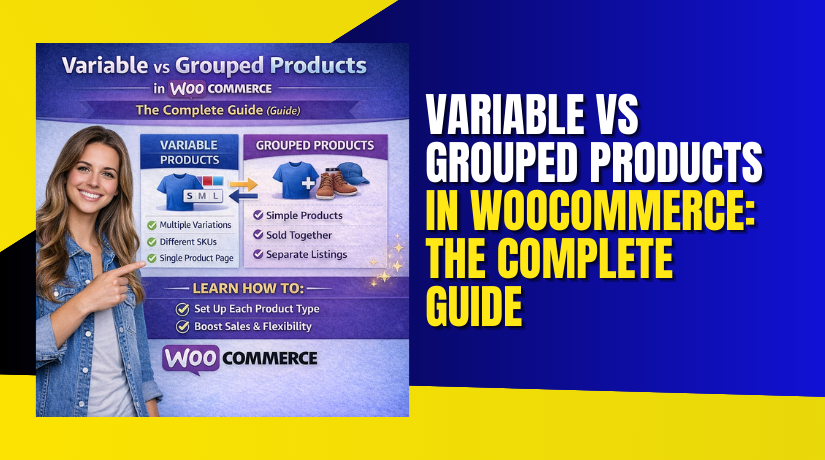
Variable vs Grouped Products in WooCommerce: The Complete Guide
Table of Contents
- Introduction
- What are the Variable Products in WooCommerce?
- What are the Key Features, Pros and Cons of Variable Products?
- What are the Grouped Products in WooCommerce?
- What are the Key Features, Pros and Cons of Grouped Products?
- What is the Difference Between Variable Product and Grouped Product in WooCommerce?
- Final Verdict
Introduction
Your WooCommerce store offers multiple ways to sell products. Two options create the most confusion. Variable products and grouped products.
They look similar at first glance. Both display multiple options on one page. Both help customers find what they need without navigating away. Both can increase your sales. But they work completely differently under the surface.
Choose wrong and you create inventory headaches. Choose right and you build a seamless shopping experience that drives revenue.
Variable products are single products with multiple options. One t-shirt available in small, medium, and large. Each size has its own price, SKU, and stock level. Customers choose their preferred combination on one page .
Grouped products are collections of separate products displayed together. A furniture set with sofa, chair, and table. Each item is its own product with independent pricing and inventory. Customers buy any combination they want .
This comprehensive guide explains every difference. You will learn exactly what variable products are and when to use them. You will understand grouped products completely. You will see direct comparisons with real examples.
By the end, you will never wonder which product type fits your needs again.
What are the Variable Products in WooCommerce?
Variable products are a powerful WooCommerce product type that lets you offer multiple versions of the same item within a single product listing . Instead of creating ten separate product pages for a t-shirt available in five sizes and two colors, you create one variable product that handles all combinations.
How Variable Products Work?
A variable product starts with attributes. Attributes are the building blocks that define your product options. Size, color, material, or any other characteristic that differentiates one version from another .
You create attributes globally or per product. Global attributes are reusable across multiple products. Size attributes for clothing work across your entire catalog. Custom attributes work for one-time product-specific options .
Once attributes are defined, WooCommerce generates variations. Variations are the actual product combinations customers can purchase. For a shirt with size small, medium, large and color red, blue, green, WooCommerce creates nine variations .
Each variation functions like its own mini-product. It has its own price, SKU, stock level, and even its own image. When a customer selects “Small Red,” WooCommerce displays the correct price, checks inventory for that specific combination, and shows the appropriate image .
Why Variable Products Matter?
- Variable products simplify your catalog dramatically.
- One product page replaces dozens of individual listings.
- Customers find everything in one place. Inventory management becomes centralized yet precise .
- Studies show products with variations can increase conversion rates by 20% and organic traffic by 25% .
- The consolidated experience reduces bounce rates and helps customers find exactly what they want.
When to Choose Variable Products?
Choose variable products when:
- You sell one product that comes in multiple versions. T-shirts in different sizes. Laptops with different configurations. Books in multiple formats.
- You need to track inventory separately for each version. Knowing exactly how many small red shirts remain is essential for your business.
- You want customers to choose one option from a set. The purchase is for a single item, just with customer-selected attributes.
- You have fewer than 30 total variations. Beyond this threshold, performance degrades without custom coding.
- You want dynamic product pages that update as customers select options. Price changes, images swap, availability updates in real-time.
- Your products have attributes that combine in predictable ways. Size and color combinations work perfectly with variations.
What are the Key Features, Pros and Cons of Variable Products?
Understanding variable products fully requires examining their features, advantages, and limitations.
Key Features of Variable Products
- Attribute-based variation system: Variable products rely on attributes to define available options. You create attributes like size, color, or material. Each attribute contains terms like small, medium, large or red, blue, green.
- Automatic variation generation: WooCommerce can generate all possible attribute combinations automatically. For two attributes with three terms each, the system creates nine variations instantly. This saves enormous setup time.
- Individual variation pricing: Each variation can have its own regular price and sale price. Small sizes might cost less than extra-large. Premium colors might carry surcharges. You control pricing at the most granular level.
- Per-variation SKU management: Every variation receives its own SKU for inventory tracking. This enables precise stock control across your entire product range.
- Variation-specific images: Upload different images for each variation. When customers select “Red,” they see the red product. Select “Blue,” the image changes. This visual feedback reduces uncertainty and returns.
- Stock management per variation: Track inventory separately for each variation. Know exactly how many small red shirts versus medium blue shirts you have. Enable low stock notifications for each.
- Variation weight and dimensions: Set different shipping weights for different variations. Hardcover books weigh more than paperbacks. This ensures accurate shipping calculations.
- Downloadable and virtual variations: Mark specific variations as downloadable for digital products or virtual for services. One product can combine physical and digital variations.
- Default variation selection: Set a default variation that pre-selects on page load. Customers see a choice already made, reducing decision friction.
- Bulk editing capabilities: Update multiple variations simultaneously. Set all prices to the same value. Apply the same image to all variations of a specific color. This streamlines management.
Pros of Variable Products
- Simplified catalog management: One product page replaces dozens of individual listings. Your product list stays clean and organized. Customers navigate one page instead of hunting through multiple.
- Better customer experience: Shoppers explore all options without leaving the page. They compare choices side by side. Dynamic updates show exactly what they are selecting.
- Precise inventory control: Track stock at the variation level. Never oversell a specific size or color while others remain in stock. This precision reduces customer disappointment.
- Enhanced merchandising opportunities: Feature variable products in category pages. Customers see the main product and can explore variations after clicking. This maintains catalog visibility while offering depth.
- Improved site performance: One variable product loads faster than dozens of individual simple products. Fewer database queries, less page weight, better user experience.
- Flexible pricing strategies: Charge more for premium variations. Offer sales on specific combinations. Clear excess inventory of particular sizes without discounting everything.
- SEO benefits: Consolidate product authority into one page. All reviews and backlinks point to a single URL. This strengthens search rankings for your core product.
- Cross-selling within the product: Show related variations naturally. Customers considering one option see others alongside, encouraging larger purchases.
- Easy duplication for similar products: Create one variable product, then duplicate it for similar items. Adjust attributes and variations as needed. This saves time across your catalog.
- Plugin ecosystem support: Dozens of plugins enhance variable products with swatches, bulk order forms, and advanced pricing. The ecosystem is mature and reliable.
Cons of Variable Products
- Complexity for beginners: Setting up attributes correctly requires understanding. New users often confuse attributes with variations. Mistakes require rework.
- Performance issues with too many variations: WooCommerce preloads variation data for up to 30 variations by default. Beyond that, each customer click triggers a server request. This creates noticeable delays.
- Variation explosion risk: Products with three attributes each having five terms create 125 variations. This database bloat slows everything. Admin screens become sluggish. Page load times suffer.
- Limited default display options: WooCommerce shows variations as dropdowns by default. This works but lacks visual appeal. Swatches require additional plugins.
- No support for complex option logic: Native variations cannot show or hide options based on previous selections. Conditional logic requires add-on plugins.
- Inventory management complexity: With hundreds of variations, updating stock becomes tedious. Bulk editing helps but does not eliminate the workload.
- Price display limitations: Category pages show “From $X” when variations have different prices. This is legally required but can confuse customers who expect the lowest price.
- Theme compatibility concerns: Some themes handle variations poorly. Testing required to ensure dropdowns, swatches, and dynamic updates work correctly.
- Variation threshold issues: Stores exceeding the 30-variation threshold face performance degradation without custom coding. Raising the limit requires developer intervention.
- Legal compliance complexity: Stores in regulated regions like Germany must display base prices correctly per variation. This requires additional plugins and careful configuration.
What are the Grouped Products in WooCommerce?
Grouped products are a native WooCommerce product type that displays multiple related products together on one page . Unlike variable products that offer variations of the same item, grouped products showcase completely separate products that customers might want to buy together.


How Grouped Products Work?
You first create individual products. These are typically simple products, each with its own price, SKU, and inventory tracking. You might create a sofa, a matching armchair, and a coffee table as three separate simple products.
Then you create a grouped product that acts as a parent container. In the Linked Products tab, you select which existing products belong to this group. The grouped product itself has no price, no SKU, and no inventory. It exists purely as an organizational tool.
On the frontend, customers see all linked products displayed together. Each product shows its own price and quantity selector. Customers choose exactly which items they want and how many of each.
What Grouped Products Can Include?
- Grouped products typically contain only simple products.
- You can technically add variable products, but they appear with “Read more” buttons linking to their own pages rather than direct add to cart options. This creates a less smooth experience.
- The child products remain individually purchasable through their own product pages, category listings, and search results. Grouping does not hide them elsewhere.
Why Grouped Products Matter?
- Grouped products improve product discovery without forcing purchases.
- They show customers what else they might want while preserving complete choice.
- Unlike bundles that require buying everything, grouped products let customers decide. This flexibility reduces purchase hesitation and cart abandonment.
- Grouped products are native to WooCommerce. No plugins required. This makes them accessible to every store instantly.
When to Choose Grouped Products?
Choose grouped products when:
- You sell multiple distinct products that customers might want together. Sofa and matching chair. Camera body and lenses. Skincare routine products.
- Customers should have complete flexibility in what they buy. Some want just the sofa. Others want the whole living room set. Both are valid.
- You already have simple products in your catalog. Grouping them requires no new product creation, just linking existing items.
- You want to encourage discovery of related products without forcing purchases. Gentle suggestion works better than pressure.
- Your products work well together but also stand alone perfectly. Each item has its own purpose and customer base.
- You prefer native functionality without additional plugins. Grouped products work immediately with no cost or complexity.
- You want simple returns and inventory management. Each product maintains its own data. No complex relationships to unwind.
What are the Key Features, Pros and Cons of Grouped Products?
Key Features of Grouped Products
- Collection of simple products: Grouped products consist entirely of child products, typically simple products, that you have already created.
- No own price or inventory: The grouped product itself has no price field, no SKU, and no stock management. All financial and inventory data comes from child products.
- Native WooCommerce functionality: Grouped products require no plugins. They work out of the box with every WooCommerce installation.
- Linked Products section for grouping: Within the grouped product edit screen, you navigate to the Linked Products tab. A search box lets you find and add existing products.
- Individual quantity selectors: On the frontend, each child product displays its own quantity field. Customers decide how many of each item they want.
- Separate add to cart buttons: Each product typically has its own add button. Some themes display a single button that adds all selected quantities.
- Child products remain individually purchasable: Items in a grouped product are still available through their own product pages, category listings, and search results. Grouping does not hide them elsewhere.
- Reorderable display: In the product edit screen, you can drag and drop child products to control their order on the frontend page.
- Stock status display: Each product shows its availability. Out of stock items can be hidden or displayed with clear messaging.
- Theme-dependent appearance: The exact layout of grouped products varies by theme, but typically appears as a grid or list with product names, images, prices, and quantity fields.
Pros of Grouped Products
- No plugins required: Grouped products work immediately with WooCommerce core. No additional cost or installation complexity.
- Customer choice and flexibility: Unlike bundles, grouped products let customers decide exactly what they want. This removes purchase friction.
- Perfect for product families: When you sell items that naturally go together but also sell separately, grouped products create the ideal shopping experience.
- Improve product discovery: Customers browsing for one item discover complementary products they might not have found otherwise.
- Simple inventory management: Since child products maintain their own stock, you update inventory in one place. The grouped product automatically reflects current availability.
- Works with existing products: You can create grouped products from items already in your catalog without recreating anything. This makes testing collections quick and risk-free.
- Clear pricing transparency: Customers see exactly what each item costs. No confusion about bundle discounts or hidden fees.
- Easy to modify: Add or remove products from a group anytime. The frontend updates automatically without reconfiguring each child product.
- Performance efficient: Showing several simple products together loads faster than complex bundle pages with many options.
- Mobile responsive: Grouped products typically display well on mobile devices, though testing is recommended.
Cons of Grouped Products
- No automatic bundle pricing: Grouped products do not offer discount functionality natively. If you want “buy the set and save,” you need additional plugins.
- Limited to simple products primarily: Variable products in groups link to their own pages rather than offering direct add to cart. This creates friction for customers wanting variations.
- Can overwhelm customers: Too many products in one group creates decision paralysis. Keep collections focused.
- No forced purchase: If your goal is to sell a complete kit where all items are required, grouped products will not work. Customers can skip items they do not want.
- Requires pre-existing products: You cannot create grouped products without first creating individual simple products. This adds an extra setup step.
- Theme compatibility variations. Some themes display grouped products poorly. Always test appearance before committing.
- No built-in upsell hierarchy: Grouped products treat all child items equally. You cannot designate a main product with accessories visually without custom coding.
- Inventory complexity at scale: For stores with thousands of products, managing which items belong to which groups becomes administratively heavy.
- Limited marketing appeal: Grouped products lack the “special offer” perception that discounted bundles create.
- No savings incentive: Without discounts, customers have less motivation to buy multiple items.
What is the Difference Between Variable Product and Grouped Product in WooCommerce?
Understanding the distinction between variable and grouped products is essential for every store owner. While both display multiple options on one page, they serve completely different purposes and create vastly different customer experiences.
| Comparison Factor | Variable Product | Grouped Product |
| Definition | One product with multiple versions (variations) based on attributes like size or color . | Collection of separate, independent products displayed together on one page . |
| Product Identity | Single product ID with multiple variation IDs underneath . | Multiple distinct product IDs, each its own simple product . |
| Pricing Structure | Each variation has its own price. Parent product has no price . | Each child product has its own price. The grouped parent has no price . |
| SKU Assignment | Each variation receives its own SKU for inventory tracking . | Each child product has its own SKU. The grouped parent has no SKU . |
| Inventory Management | Track stock separately for every variation combination . | Track stock separately for each child product . |
| Customer Choice | Customers select one variation to purchase (e.g., small red shirt) . | Customers choose any combination of child products with individual quantities . |
| Add to Cart Behavior | One add to cart button adds the selected variation . | Multiple add buttons or quantity selectors for each child product . |
| Page Purpose | Sell different versions of the same core product . | Sell related products that work well together but are purchased separately . |
| Catalog Appearance | Appears as one product in category pages. Variations selected after clicking . | Appears as one product in category pages. Child products displayed inside . |
| Setup Complexity | Higher complexity. Requires attributes, variation generation, and per-variation configuration . | Moderate complexity. Create child simple products, then link them to grouped parent . |
| Best Use Case | T-shirts in multiple sizes and colors. Laptops with different configurations . | Furniture collections. Book series. Camera body with accessory options . |
| Image Handling | Each variation can have its own image that displays when selected . | Each child product has its own image. All images visible on the grouped page . |
| Performance Impact | Can slow down with over 30 variations due to AJAX threshold . | Consistent performance regardless of group size. Simple product queries . |
| Plugin Ecosystem | Extensive plugins for swatches, bulk editing, and AI guidance . | Fewer specialized plugins. Functionality is simpler and native . |
| Returns Complexity | Straightforward. Return the specific variation purchased . | Simple. Return individual child products like any standard item . |
| Real-World Example | Nike Air Max shoe available in sizes 7-12 and colors black/white/red . | IKEA living room collection with sofa, armchair, coffee table sold separately . |
Final Verdict
Variable and grouped products serve fundamentally different purposes in your WooCommerce store. Neither is inherently better. The right choice depends entirely on your products and your customers.
Choose variable products when you sell one item that comes in multiple versions requiring separate inventory tracking. T-shirts with sizes and colors. Laptops with different configurations. Books in multiple formats.
Variable products consolidate your catalog, improve customer experience with dynamic selection, and give you precise control over pricing and stock at the variation level. They work best when customers choose exactly one option and you need to know which specific version is sold. The performance threshold of 30 variations matters, but for most products this works perfectly.
Choose grouped products when you sell multiple distinct items that customers might want together but also buy separately. Furniture collections where every piece stands alone. Camera accessories where photographers pick exactly what they need. Book series where readers buy at their own pace. Grouped products improve discovery without forcing purchases. They keep inventory simple and returns straightforward. They work natively without plugins and maintain consistent performance regardless of group size.
The smartest stores use both product types strategically throughout their catalogs. Variable products handle your core merchandise with options. Grouped products showcase complementary items and encourage larger orders. Together they create a complete merchandising strategy that serves every customer segment.
Test both with your specific products. Monitor which drives better results for different customer groups. Your perfect mix will emerge from real data.
Have questions before starting with WooCommerce & WordPress? Get support here at WooHelpDesk.