URL vs Permalink in WordPress: What’s the Difference?
Table of Contents
- Why People Get Confused Between URL and Permalink
- What Is a URL?
- What Is a Permalink in WordPress?
- URL vs Permalink: The Core Difference Explained Clearly
- How URLs and Permalinks Work Together in WordPress
- Why Permalinks Matter More Than Most Beginners Think
- Common Mistakes People Make When Understanding URL and Permalink
- When Should You Pay Attention to Permalink Settings in WordPress?
- Conclusion
Why People Get Confused Between URL and Permalink
Many WordPress users mix up these two web terms. That happens often because both point to page addresses online. At first glance, they look almost the same thing. This is why URL vs permalink becomes a common question. Many beginners also ask about the difference between URL and permalink when setting up posts, pages, or blog links.
The confusion grows more inside the WordPress dashboard. You may see page links, post links, and permalink settings. Because of that, users start asking, what is the difference between a URL and a permalink? The simple answer is that both are related, but they are not fully the same. A URL is a broader term. A permalink is more specific in WordPress.
This topic matters because link structure affects user understanding. It also affects site organization, sharing, and search visibility. If you understand the basic idea early, WordPress becomes easier to manage. It also helps you avoid mistakes when editing links later.
In this article, the goal is very clear. We will explain the meaning of a URL first. Then the next parts will explain how permalinks fit inside WordPress. This makes permalink vs URL in WordPress much easier to understand.
What Is a URL?
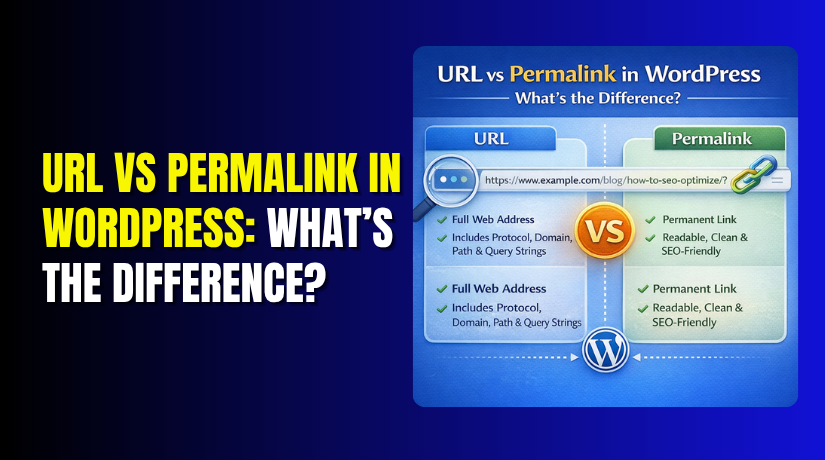
A URL is the full address of a resource online. URL stands for Uniform Resource Locator. It tells the browser where something is located on the internet. That “something” can be a page, image, file, product, or post.
A simple WordPress page URL may look like this:
https://example.com/blog/wordpress-tips
This full address helps the browser open the exact page. A URL usually contains a few basic parts:
- Protocol – such as https://
- Domain name – such as example.com
- Path – such as /blog/wordpress-tips
Each part has a clear job. The protocol tells the browser how to connect. The domain shows the website name. The path points to the exact content location.
So, when someone asks what is a permalink in WordPress, it helps to first understand what a URL is. A permalink belongs inside this bigger address system. That is why every permalink is connected to a URL, but the full URL idea is much wider.
Before learning the full difference, remember one simple point. A URL is the complete web address used to reach content online. That basic meaning builds the foundation for the rest of this topic.
What Is a Permalink in WordPress?
To understand this topic well, first know the permalink meaning. Many beginners ask, what is a permalink in WordPress? In simple words, a permalink is the permanent web address of published content. It is the fixed link for a post, page, category, or tag.
In WordPress, each published item gets its own permalink. This link helps visitors open that exact content directly. It also helps search engines understand the page better. That is why permalinks matter more than many users think.
You can usually see a permalink in these places:
- Post editor when writing or editing a blog post
- Page editor when creating or changing a page
- Permalink Settings under the WordPress settings area
The word “permalink” means permanent link. It is called permanent because it should stay stable over time. Once a page is published, its permalink should not change often. Frequent changes can confuse users and harm search visibility.
A good permalink should be:
- short
- clear
- readable
- related to the page topic
For example, this looks clean and helpful:
https://example.com/url-vs-permalink-wordpress
This type of link is easy to read and share. It also gives users a quick idea of the page topic. In WordPress, permalink settings help control how these links are created.
URL vs Permalink: The Core Difference Explained Clearly
Now let us come to the main question. Many users ask about the difference between URL and permalink because both seem similar. They are related, but they are not exactly the same.
A URL is the full address used to access anything online. It can point to a page, image, file, admin section, or search result. A permalink is more specific. It is the permanent link for a published content item in WordPress.
This is the easiest way to understand URL vs permalink:
- URL is the broader term
- Permalink is a specific type of URL
- Not every URL is a permalink
So, when people ask what is the difference between a URL and a permalink, the answer is simple. A permalink is usually the stable address of content. A URL can be any web address on a site or across the internet.
This also explains permalink vs URL in WordPress more clearly. A post link is a permalink. But a login page link, search result link, or filtered link may only be a URL.
| Point | URL | Permalink |
| Meaning | Full web address | Permanent content link |
| Scope | Broad | Specific |
| Used for | Any online resource | Published WordPress content |
| WordPress role | General address | Fixed post or page address |
So, the next time someone compares URL vs permalink, remember this simple idea. Every permalink is a URL, but not every URL is a permalink. That is the real core difference.
How URLs and Permalinks Work Together in WordPress
After understanding both terms, the next step is connection. Many users understand each term separately first. But they still get confused about how both work together. This is where permalink vs URL in WordPress becomes easier to understand.


A WordPress website has one main domain name. That domain is part of the full site address. The permalink adds the unique path for each content page. When both join together, they form the complete address users visit.
Here is a simple example:
- Domain: https://example.com
- Permalink path: /url-vs-permalink-wordpress/
- Full URL: https://example.com/url-vs-permalink-wordpress/
This shows the relationship very clearly. The domain gives the website identity. The permalink gives the exact content location. Together, they create the full page address. That is why many people asking about URL vs permalink need to understand both as connected parts.
In WordPress, the system creates permalinks using your selected structure. This structure decides how post and page links appear. Common permalink styles include:
- Post name only
- Date and post name
- Category and post name
So, if someone asks about the difference between URL and permalink, this practical view helps a lot. The URL is the complete address. The permalink is the content-specific part that stays consistent.
Why Permalinks Matter More Than Most Beginners Think
Many new site owners ignore permalink settings at first. Later, they realize those settings affect many important things. If you ask, what is a permalink in WordPress, you should also ask why it matters so much.
A good permalink improves readability. Visitors can understand the page topic faster. A clean link also looks more professional when shared. This helps users trust the page before clicking it.
Permalinks also support better site structure. Clear links make your content easier to organize. They help keep pages simple, neat, and easy to follow. This matters on small blogs and large websites alike.
Permalinks also matter for SEO and user experience. Search engines read page addresses to understand page topics better. Clean links can support stronger page clarity. This is one reason users search for what is the difference between a URL and a permalink while learning WordPress basics.
Here are the main benefits of strong permalinks:
- Better readability for visitors
- Cleaner sharing across web pages and platforms
- Stronger content structure inside WordPress
- Better topic clarity for search engines
- More trust when users see the page link
So, the difference between URL and permalink is not only technical. It also affects how your site looks and performs. When comparing URL vs permalink, remember this key point. A permalink is the part that gives each page its lasting identity.
Common Mistakes People Make When Understanding URL and Permalink
Many WordPress users understand these terms only partly at first. That is why they often make small but important mistakes. These mistakes can create confusion during setup and content publishing. They can also affect SEO, sharing, and site structure later.
One common mistake is thinking both terms mean exactly the same. This is not fully correct. The difference between URL and permalink is simple but important. A URL is any full web address. A permalink is the fixed address of published content.
Another mistake is thinking every WordPress link is a permalink. That also causes confusion. For example, these links may be URLs but not permalinks:
- login page links
- search result links
- filtered product links
- admin page links
This is why permalink vs URL in WordPress should be understood clearly. A permalink usually belongs to content meant to stay public and stable.
A third mistake is changing permalinks without proper planning. Many users edit links after pages are already live. That can break old links and confuse search engines. If redirects are not added, visitors may land on error pages.
Some users also ignore permalink settings during the early setup stage. That often leads to weak link structure later. WordPress may use a plain format by default. That format is not ideal for readability or SEO.
When Should You Pay Attention to Permalink Settings in WordPress?
You should review permalink settings at the right time. This helps avoid problems later and keeps your links clean.
Pay attention to permalink settings in these situations:
- when launching a new WordPress site
- before publishing many posts or pages
- when improving site structure for SEO
- before changing old live page links
If you understand what is a permalink in WordPress, you can manage links more wisely from the beginning.
Conclusion
The easiest way to remember this topic is very simple. A URL is the full web address. A permalink is the permanent content link inside that address. That explains URL vs permalink in a practical way.
So, if someone asks, what is the difference between a URL and a permalink, you can answer with confidence. The URL is the broader web address. The permalink is the stable content path used in WordPress.
Understanding this small difference helps you build cleaner links. It also helps your site stay organized, readable, and easier to manage. If you need expert help with WordPress setup, permalink structure, or site optimization, WooHelpDesk can help you keep your website clean, user-friendly, and SEO-ready.