Upsell vs Cross-Sell in WooCommerce: The Complete Guide
Table of Contents
- Introduction
- What is Upsell in WooCommerce?
- What are the Benefits of Upselling in WooCommerce?
- What is Cross-Sell in WooCommerce?
- What are the Benefits of Cross-Selling in WooCommerce?
- What is the Difference Between Upsell and Cross-Sell in WooCommerce?
- Final Verdict
Introduction
Making sales is good. Making bigger sales is better. That simple truth drives every successful online store.
WooCommerce gives you powerful tools to increase each transaction. Two strategies stand above the rest. Upselling and cross-selling.
These terms get mixed up constantly. Store owners use them interchangeably. But they are fundamentally different techniques.
Understanding the difference changes everything. You will recommend the right products at the right time. Your customers will feel understood, not pushed. Your revenue will grow without extra traffic.
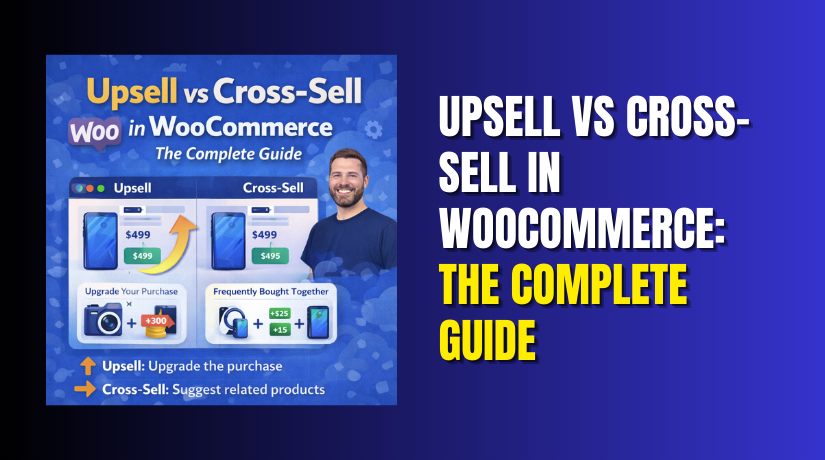
Upselling means encouraging customers to buy a more expensive version of what they are considering. A better model. A larger size. A premium upgrade.
Cross-selling means suggesting complementary products that go well with the main item. Accessories. Add-ons. Related items that enhance the original purchase.
Think of fast food. “Would you like to supersize that meal?” is an upsell. “Would you like fries with your burger?” is a cross-sell.
This guide covers everything. You will learn exactly what each strategy is. You will understand their unique benefits. You will see real examples. You will know when to use each one.
By the end, you will never confuse upsells and cross-sells again.
What is Upsell in WooCommerce?
Upselling is the art of convincing customers to choose a higher-value option than they originally intended . You are not selling something different. You are selling something better.
How Upsells Work in WooCommerce?
- When a customer views a product page, WooCommerce can display recommended alternatives. These are your upsells . They appear underneath the product description, often with a heading like “You may also like…” .
- Upsells are products you recommend instead of the currently viewed product . They are typically more profitable, better quality, or more expensive .
- Behind the scenes, you set up upsells manually. Navigate to any product in your WooCommerce admin. Scroll to the Product Data panel. Click the Linked Products tab. Search for and select products you want to offer as upgrades . Save and you are done.
What are Upsell Examples?
- Electronics store: A customer looks at a basic laptop. Your upsell shows a model with more RAM, faster processor, and larger hard drive. The price difference is $200. But the value difference feels huge.
- Clothing store: Someone adds a standard cotton t-shirt to the cart. Your upsell offers a premium version made from organic pima cotton. Softer fabric. Better stitching. Longer lasting.
- Software store: A shopper considers the basic plan at $9 monthly. Your upsell highlights the pro plan at $19. Unlimited features. Priority support. Advanced analytics .
- Food store: The customer selects a 12-ounce bag of coffee beans. Your upsell suggests the 2-pound bulk bag. Better value per ounce. Fewer deliveries. Never run out.
- Service business: Someone books a 30-minute consultation. Your upsell offers a 60-minute deep dive. More time. More insights. Better results.
What are the Benefits of Upselling in WooCommerce?
Upselling delivers measurable advantages for every store. These benefits compound over time, transforming your business performance.
1. Higher Average Order Value
- The most obvious benefit is increased revenue per transaction . You make the same number of sales, but each is worth more.
- If only five percent of customers accept your upsell, that five percent immediately spends more . Multiply this across thousands of orders, and the impact is substantial.
- A customer buying a $50 item might accept a $20 upgrade. That single interaction increases revenue by forty percent on that transaction .
2. Improved Customer Experience
- Customers actually appreciate good upsells . They feel guided toward better choices. They discover options they might have missed.
- When someone buys a basic product and later realizes a premium version existed, disappointment follows. Upsells prevent this regret.
- Customers feel understood when you show relevant upgrades. They think, “This store knows what I need.” Satisfaction increases.
3. Increased Customer Lifetime Value
- Customers who make larger initial purchases are more invested . They chose premium options. They received more value. They are more likely to return.
- A first-time buyer who chooses the full package often comes back for refills, renewals, or related products . Their lifetime value rises significantly.
4. Builds on Existing Trust
- Returning customers are especially receptive to upsells . You already delivered once. They trust your recommendations.
- Use order history to suggest upgrades one to two weeks after delivery . The product is still top of mind. The timing feels helpful, not pushy.
5. Smart Use of Customer Data
- Upselling puts your customer data to work. Browsing history reveals interests. Purchase patterns show preferences.
- Data-informed upsells convert better because they feel personal. They address actual needs rather than random guesses.
6. Grows Revenue Without Extra Marketing Spend
- Acquiring new customers costs money. Upselling costs nothing. You are simply increasing the value of traffic you already paid for.
- No ads. No campaigns. No discount codes. Just smart product recommendations within your existing store.
7. Fewer Discounts, More Value Sales
- Discounting trains customers to wait for sales. Upselling shifts focus to value. Instead of slashing prices, you emphasize better options.
- Customers still feel they are getting a deal. But your margins remain healthy because you are selling up, not selling cheap.
8. Scales Across Your Entire Catalog
- Upselling works for every product type. Simple products. Variable products. Digital goods. Physical items. Services. Subscriptions.
- Once you set up upsells, they work automatically. Each product page shows relevant upgrades without ongoing effort.
9. Boosts Vendor Performance in Marketplaces
- If you run a multi-vendor marketplace, upselling empowers your sellers. Every vendor can create their own upsell offers.
- The effect multiplies across your entire platform. More vendors using upselling means more revenue for everyone.
10. Competitive Advantage
- Many stores neglect upselling. They rely on basic product pages and hope customers choose the best option.
- By implementing strategic upsells, you differentiate your store. You provide guidance competitors do not. Customers notice the difference.
What is Cross-Sell in WooCommerce?
Cross-selling is the practice of suggesting complementary products that enhance or complete the customer’s main purchase . You are not replacing their choice. You are adding to it.


How Cross-Sells Work in WooCommerce?
- Cross-sells appear primarily on the cart page. They sit underneath the cart items table, often with thumbnail images. This placement is strategic. Customers have already committed to purchase. They are reviewing their choices before checkout.
- You set up cross-sells the same way as upsells. Edit any product. Navigate to the Linked Products tab. Search for and select products you want to recommend alongside this item.
- Unlike upsells which suggest alternatives, cross-sells suggest additions. The customer keeps their original item and adds more.
What are Cross-Sell Examples?
- Electronics store: The customer buys a camera. Your cross-sells show memory cards, extra batteries, camera bag, and lens cleaning kit . Without these, the camera cannot function fully.
- Clothing store: Someone adds a dress to the cart. Cross-sells suggest matching shoes, a handbag, and jewelry . The complete outfit creates more value than the dress alone.
- Bookstore: The customer purchases a novel. Cross-sells show other books by the same author, similar titles, and a bookmark .
- Furniture store: Someone buys a sofa. Cross-sells display matching armchairs, coffee tables, and throw pillows . The coordinated look sells more pieces.
- Food store: The customer orders pasta. Cross-sells offer pasta sauce, grated cheese, and garlic bread . Complete meal solutions drive bigger orders.
What are the Different Locations for Cross-Sells?
While cart pages are standard, cross-sells can appear elsewhere.
- Product pages: Some themes show cross-sells as “Frequently Bought Together” sections. Customers see what others typically add.
- Checkout pages: Premium plugins allow cross-sells during checkout. The customer is one step from completing, yet still open to suggestions.
- Post-purchase pages: After checkout, one-click cross-sells appear. Customers add items without re-entering payment details.
- Mini-cart popups: When customers add items, a popup shows relevant cross-sells. Quick one-click additions feel effortless.
What are the Benefits of Cross-Selling in WooCommerce?
Cross-selling delivers distinct advantages that complement and extend beyond upselling benefits.
1. Increases Average Order Value
- Like upsells, cross-sells raise transaction values. But they do so by adding items rather than upgrading existing ones.
- A customer buying a $500 camera might add a $50 memory card and $30 bag. Total becomes $580 without changing the main purchase.
2. Enhances Product Discovery
- Customers cannot buy what they cannot find. Cross-sells surface products buried in your catalog.
- Someone shopping for yoga mats might discover blocks, straps, and towels they never knew you carried. These items would otherwise remain hidden.
3. Moves Slow Inventory
- Cross-selling helps clear overstock. Pair slow-moving items with popular products. The bestseller pulls the laggard along.
- If you have excess inventory of certain accessories, feature them as cross-sells with your top products. They will move faster.
4. Improves Customer Satisfaction
- Complete purchases satisfy more than partial ones. A customer who buys a grill with tools, cover, and seasoning has everything needed. They start grilling immediately.
- Without cross-sells, they might realize later they need additional items. Now they pay separate shipping. Wait additional days. The experience suffers.
5. Creates Bundling Opportunities
- Cross-sells naturally lead to product bundles. When you notice certain items frequently bought together, create a bundle with a slight discount.
- The bundle feels like a deal. Customers save money. You move more units. Everyone wins.
6. Provides Social Proof
- Showing “Customers also bought” sections leverages social proof. When shoppers see others purchasing certain combinations, they trust those choices.
- This validation reduces hesitation. If many people bought the camera with that specific lens, the combination must be good.
7. Maximizes Existing Traffic
- Cross-selling generates additional revenue without acquiring new visitors. Every customer who lands on your site becomes multiple potential sales.
- You already paid to attract them. Cross-selling ensures you maximize that investment.
8. Reduces Cart Abandonment
- Complete carts convert better. When customers see relevant add-ons, their cart feels more comprehensive. They are less likely to abandon their competitors.
- A cart with just a phone might get abandoned. A cart with phone, case, screen protector, and charger feels like a complete solution.
9. Supports Subscription Growth
- Cross-sells work exceptionally well with subscriptions. Offer a membership program as a cross-sell during checkout.
- The subscription itself becomes the add-on. Customers buy their product and join your membership in one transaction.
10. Scales Without Extra Work
- Once configured, cross-sells operate automatically. Each product displays its linked recommendations without ongoing effort.
- Set up once. Benefit forever. This efficiency makes cross-selling one of the highest-ROI activities in your store.
What is the Difference Between Upsell and Cross-Sell in WooCommerce?
Understanding the distinction between upsells and cross-sells is essential for every store owner. While both increase order value, they work completely differently and serve unique purposes in the customer journey.
| Comparison Factor | Upsell | Cross-Sell |
| Definition | Encouraging customers to buy a more expensive version of the product they are considering . | Suggesting complementary products that enhance or complete the main purchase . |
| Core Goal | Upgrade the current item to a higher-value option . | Add additional items alongside the current purchase . |
| Customer Choice | Replaces the original item with a better version . | Keeps the original item and adds new products . |
| Typical Location | Product page, often above or below add to cart button . | Cart page, underneath cart items table . |
| Secondary Locations | Post-purchase pages, checkout (with plugins) . | Product pages, checkout, mini-cart popups . |
| Timing | Before the purchase decision is finalized . | After purchase decision but before checkout . |
| Product Relationship | Alternative to current product (better version) . | Complementary to current product (add-on) . |
| Price Relationship | Higher price than the original item . | Varies from low-cost accessories to premium add-ons . |
| Inventory Impact | Replaces one inventory item with another . | Adds entirely new inventory items . |
| Customer Psychology | “I want the best version for myself.” | “I need these extras to complete my purchase.” |
| Common Examples | Basic laptop → Premium laptop. Small coffee → Large coffee. Economy seat → Business class . | Camera → Memory card, bag, lens. Dress → Shoes, handbag, jewelry . |
| Placement in WooCommerce | Linked Products tab under “Upsells” section . | Linked Products tab under “Cross-sells” section . |
| Display Default | Shows on a single product page automatically . | Shows on the cart page automatically . |
| Revenue Impact | Increases per-transaction value through upgrades . | Increases per-transaction value through additions . |
| Conversion Psychology | Appeals to desire for quality and status . | Appeals to practicality and completeness . |
| Margin Impact | Often higher margins on premium versions . | Margins vary by accessory type . |
| Mobile Experience | Works well with dropdowns and selectors . | Works well with grid or list displays . |
Final Verdict
Upsells and cross-sells are not interchangeable. They are complementary tools that work best when used together strategically throughout your customer journey.
Upselling is about encouraging customers to choose a better version of what they are already considering. It works on product pages where comparison happens naturally. Upsells tap into aspiration and quality-seeking behavior. They replace the original item with something more valuable. Use upsells when you have clear product tiers, premium options with genuine advantages, and customers who want the best .
Cross-selling is about suggesting complementary products that enhance the main purchase. It works best on cart pages after commitment but before checkout. Cross-sells tap into practicality and completeness-seeking behavior. They add new items alongside the original purchase. Use cross-sells when products naturally require accessories, when customers need complete solutions, and when you want to increase items per transaction .
The smartest stores implement both strategies throughout their catalogs. A product page shows upsells as alternatives. The same page might show cross-sells as frequently bought together. The cart page reinforces cross-sells with additional reminders. This layered approach captures every opportunity .
Your specific products determine which strategy dominates. A laptop store likely focuses on upsells since configurations drive value. A camera store focuses on cross-sells since accessories complete the system. Most stores benefit from healthy doses of both .
Test different approaches with your products. Monitor which generates more revenue. Adjust based on real data. Your perfect balance will emerge over time.
Have questions before starting with WooCommerce & WordPress? Get support here at WooHelpDesk.