What is the Difference Between a Customer and a Subscriber in WooCommerce?
Table of Contents
- Introduction
- What is a Customer in WooCommerce?
- What is a Subscriber in WooCommerce?
- What is the Difference Between a Customer and a Subscriber in WooCommerce?
- Final Verdict
Introduction
In WooCommerce, user roles control what people can access inside. This is why role setup impacts sales, support, and store safety. Many store owners confuse customer and subscriber roles in WooCommerce. That confusion can break reports, email lists, and access rules.
guide explains customer vs subscriber WooCommerce in simple terms. You will learn the difference between customer and subscriber in WooCommerce. You will also learn WooCommerce user roles customer vs subscriber clearly.
We will cover WooCommerce customer role vs subscriber role stepwise. You will understand WooCommerce subscriber vs WooCommerce customer behavior patterns. You will avoid mistakes that cause login issues and support tickets. You will also learn when to switch roles for better workflows.
What is a Customer in WooCommerce?
A customer in WooCommerce is a user role created by WooCommerce. It is meant for people who buy products from your store. This role focuses on shopping actions and account management features. A customer can log in and use the My Account page.
They can view orders, addresses, and downloads when available. They can also edit account details like name and password. This role does not grant admin access to store settings. It keeps customers inside a safe shopping-only account area.
Most stores use the customer role as the default buyer account. It helps store owners track purchase behavior and order history. It also supports coupons, loyalty tools, and customer based pricing rules. When people say WooCommerce customer role vs subscriber role, this is key. The customer role fits ecommerce workflows better than subscriber accounts.
What is a Subscriber in WooCommerce?
A subscriber in WooCommerce is actually a WordPress user role. WooCommerce does not create the Subscriber role by default. WordPress includes Subscriber as the most basic logged-in role. This role is designed for simple website accounts and reader access.
Subscribers can log in and manage their own profile details. They can change passwords and update basic account information. They usually cannot access any admin menus or store settings. They also cannot manage other users or edit website content. In many WooCommerce stores, subscribers come from newsletter signups. They can also come from account creation without checkout purchases.


Some membership and community sites use subscribers as free users. They may access limited content behind a login wall. Subscribers are useful for lead capture before the first purchase. This is why customer vs subscriber WooCommerce matters for marketing funnels. It impacts how you track buyers versus non-buyers in your store.
What is the Difference Between a Customer and a Subscriber in WooCommerce?
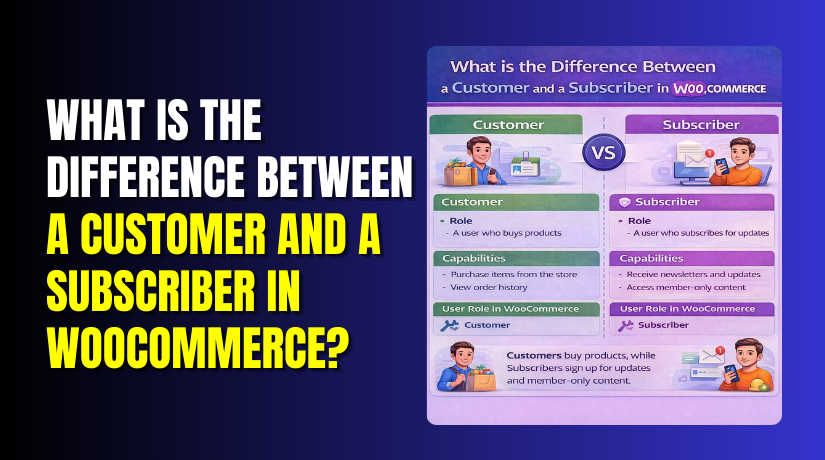
Understanding the difference between customer and subscriber in WooCommerce is essential for store management. Although both are user roles in WooCommerce, they serve very different functions and have distinct capabilities. In this section, we’ll compare the WooCommerce customer role vs subscriber role, explaining their core differences, use cases, and how they fit into the overall customer experience.
Key Differences Between Customer and Subscriber in WooCommerce:
| Feature | Customer Role | Subscriber Role |
| Primary Function | A customer is a buyer who purchases products in the store. | A subscriber is a user who registers to access basic site content. |
| Order History | Customers can view their order history, manage downloads, and track purchases. | Subscribers do not have access to order history. |
| Profile Management | Customers can manage their billing and shipping addresses, view past orders, and manage their details. | Subscribers can manage basic profile information (name, email, password) but not addresses or order data. |
| Product Access | Customers can purchase products and access additional product features. | Subscribers can access gated content but are not entitled to purchase anything by default. |
| Permissions | Customers have permissions to interact with orders, downloads, and payment gateways. | Subscribers are limited to basic access (profile management, basic content viewing). |
| Ability to Make Purchases | A customer can make purchases directly on the WooCommerce store. | A subscriber cannot purchase products unless they are upgraded to a customer role. |
| Email Marketing Segmentation | Customers are often targeted for post-purchase emails, loyalty programs, and order reminders. | Subscribers can be targeted for email campaigns but are usually not part of post-purchase funnels. |
| Role Change | Customers can be upgraded or downgraded to other roles based on purchase or membership. | Subscribers may be upgraded to customers once they make a purchase. |
Final Verdict
The customer role in WooCommerce is designed for active buyers, giving them access to order management, product purchases, and customer-specific services. This role is essential for driving sales, engaging with customers post-purchase, and building customer loyalty. WooCommerce customers are your store’s core revenue generators, making it vital to understand their role and how to engage them effectively.
The subscriber role, on the other hand, is designed for users who are not yet buyers but may have signed up to receive content, newsletters, or information. While subscribers do not have the ability to make purchases, they play an important role in building your store’s audience and collecting potential leads. Subscribers can be converted into customers with the right marketing strategy, such as offering discounts or incentives to make their first purchase.
In conclusion, understanding the difference between customers vs subscribers in WooCommerce helps you manage your users and tailor your marketing campaigns more effectively. The customer role should be prioritized for sales-driven activities, while the subscriber role is valuable for nurturing potential customers and growing your store’s email list. Depending on your store’s needs, you may want to use both roles strategically to maximize sales and customer engagement.
Have questions before starting with WooCommerce & WordPress? Get support here at WooHelpDesk.