Bundled vs Grouped Products in WooCommerce: The Complete Guide
Table of Contents
- Introduction
- What are the Bundled Products in WooCommerce?
- What are the Key Features, Pros and Cons of Bundled Products?
- What are the Grouped Products in WooCommerce?
- What are the Key Features, Pros and Cons of Grouped Products?
- What is the Difference Between Bundled Product and Grouped Product in WooCommerce?
- Final Verdict
Introduction
Your WooCommerce store offers multiple ways to sell products together. Two options cause the most confusion. Bundled products and grouped products.
They look similar at first glance. Both display multiple items on one page. Both help customers find related products. Both can increase your average order value. But they work completely differently under the surface.
Choose wrong and you create customer frustration. Choose right and you build a seamless shopping experience that drives revenue.
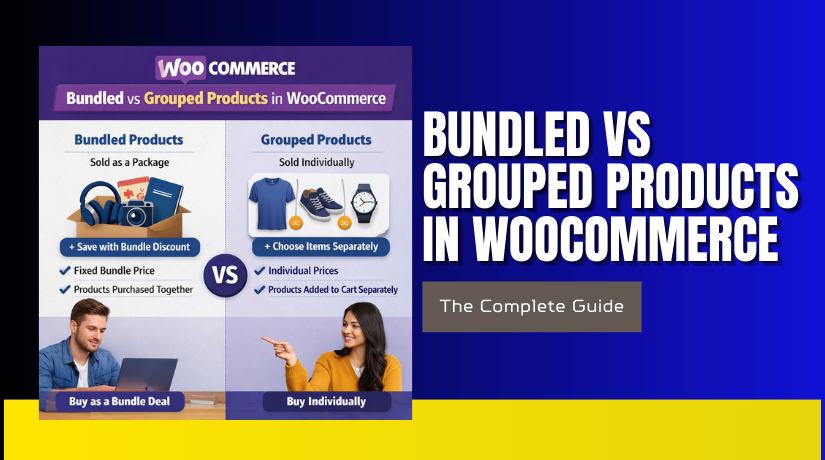
Bundled products are pre-packed collections sold as a single unit. Customers buy the entire package at once. Think gift sets, starter kits, or complete camera bundles with lens and case included.
Grouped products are collections of simple products displayed together. Customers pick and choose which items they want. Think furniture ranges where customers buy just the couch or add the matching chair.
This comprehensive guide explains every difference. You will learn exactly what bundled products are and when to use them. You will understand grouped products completely. You will see direct comparisons with real examples.
By the end, you will never wonder which product type fits your needs again.
What are the Bundled Products in WooCommerce?
Bundled products are a specialized product type that groups multiple items together and sells them as a single package. Unlike simple products that stand alone, bundled products create a new entity that contains other products.
When you create a bundled product, you are essentially building a container. This container holds several individual products. Customers purchase the entire container contents in one transaction.
How do bundled products work?
- The bundled product itself has its own price, SKU, and inventory settings. But these settings often work differently than simple products.
- The bundle price can be a fixed amount, a discounted total, or even calculated from the combined prices of included items.
- Behind the scenes, the bundled product maintains relationships with its child products.
- When a customer buys the bundle, WooCommerce processes it as a single order line. But inventory decreases separately for each included product.
What makes bundles special?
Bundled products are not native to WooCommerce core. You need a dedicated plugin to create them. Popular options include Product Bundles extension, Chained Products, and various third-party solutions.
Why do stores use bundles?
- Product bundles increase average order value significantly. Studies show a 20% increase in transaction value when products are bundled together.
- Customers perceive greater value and convenience.
- Bundles also help clear slow-moving inventory. Pairing popular items with slower sellers moves stock efficiently.
What are the Key Features, Pros and Cons of Bundled Products?
Key Features of Bundled Products
- Single package purchase: Customers buy the entire bundle as one unit. They cannot pick and choose individual items. This creates a complete solution feeling.
- Discounted pricing capability: Bundles almost always include pricing incentives. You can offer a fixed discount, percentage off, or set a custom bundle price lower than individual item totals.
- Supports multiple product types: Bundles can include simple products, variable products, virtual products, downloadable items, and even subscriptions . This flexibility exceeds what grouped products offer.
- Plugin required: WooCommerce does not include native bundle functionality. You must install extensions like Product Bundles, Chained Products, or WebToffee FBT.
- Individual inventory tracking: Each product in the bundle maintains its own stock levels. If any item goes out of stock, the entire bundle becomes unavailable.
- Customizable display options: Bundle pages can show items in lists, galleries, or tables. Customers see exactly what they get.
- Add all to cart functionality: Many bundle plugins include one-click buttons that add the complete set instantly.
- Price display flexibility: Bundle prices can show as a range, combined total, or single custom amount.
- Shipping integration: Bundles ship together or separately based on your configuration. You control fulfillment logic.
- Discount transparency: Customers see how much they save compared to buying items individually.
Pros of Bundled Products
- Increase average order value significantly: Customers naturally spend more when buying packages. The convenience and savings encourage larger purchases.
- Create perceived value: Bundles make customers feel they are getting a deal. Even modest discounts appear more valuable when packaged together.
- Simplify customer decision-making: Instead of choosing multiple items separately, customers evaluate one bundle. This reduces decision fatigue.
- Perfect for gift giving: Shoppers love pre-packaged gift sets. They eliminate guesswork about what items belong together.
- Clear slow-moving inventory: Bundle less popular items with bestsellers. This moves stock efficiently without deep discounts.
- Support complex product combinations: Bundles can include variations, subscriptions, and digital products. This flexibility handles sophisticated merchandising.
- Enhance marketing campaigns: Holiday specials, limited editions, and starter kits all become possible with bundles.
- Improve customer experience: Shoppers appreciate curated collections that save them research time.
- Reduce distribution costs: Shipping one bundle package costs less than shipping multiple individual items.
- Encourage repeat purchases: Satisfied bundle buyers often return to explore other collections.
Cons of Bundled Products
- Require additional plugins: You cannot create bundles without purchasing and installing extensions. This adds cost and complexity.
- More complex setup: Building bundles takes more time than simple products. You must configure relationships, pricing, and inventory carefully.
- Inventory management challenges: Tracking stock across multiple bundle components requires diligence. One out-of-stock item breaks the entire bundle.
- Limited customer choice: Some shoppers want to customize selections. Bundles force complete package purchases
- Risk of overwhelming customers: Too many bundle options create decision paralysis. Keep collections focused.
- Potential margin erosion: Discounted bundles reduce per-item profit margins. Volume must compensate for lower unit profits.
- Compatibility concerns: Not all themes display bundles attractively. Testing required before committing.
- Support complexity: When customers have issues with bundled items, troubleshooting involves multiple products.
- Return complications: Partial returns of bundle items require careful refund policies. Full returns often make more sense.
- Performance considerations: Bundle pages with many items load slower than simple product pages.
What are the Grouped Products in WooCommerce?
Grouped products are a native WooCommerce product type that displays multiple simple products together on one page. Unlike bundles, grouped products do not force customers to buy everything. They simply present related items conveniently.
How do grouped products work?


- You first create individual simple products. Each has its own price, SKU, and inventory tracking.
- Then you create a grouped product that acts as a parent container.
- You link the simple products to this parent.
The grouped product itself has no price, no SKU, and no inventory. It exists purely as an organizational tool.
On the frontend, customers see all linked items displayed together. Each product shows its own price and quantity selector. Customers choose exactly which items they want and how many.
What grouped products can include?
Grouped products typically contain only simple products. While you can technically add variable products, they appear with “Read more” buttons rather than direct add to cart options.
Why do grouped products matter?
- Grouped products improve product discovery without forcing purchases. They show customers what else they might want while preserving choice.
- Grouped products are native. No plugins required. This makes them accessible to every WooCommerce store instantly.
What are the Key Features, Pros and Cons of Grouped Products?
Key Features of Grouped Products
- Collection of simple products: Grouped products consist entirely of child products, typically simple products, that you have already created.
- No own price or inventory: The grouped product itself has no price field, no SKU, and no stock management. All financial and inventory data comes from child products.
- Native WooCommerce functionality: Grouped products require no plugins. They work out of the box with every WooCommerce installation.
- Linked Products section for grouping: Within the grouped product edit screen, you navigate to the Linked Products tab. A search box lets you find and add existing products.
- Individual quantity selectors: On the frontend, each child product displays its own quantity field. Customers decide how many of each item they want.
- Separate add to cart buttons: Each product typically has its own add button. Some themes display a single button that adds all selected quantities.
- Child products remain individually purchasable: Items in a grouped product are still available through their own product pages, category listings, and search results. Grouping does not hide them elsewhere.
- Reorderable display: In the product edit screen, you can drag and drop child products to control their order on the frontend page.
- Stock status display: Each product shows its availability. Out of stock items can be hidden or displayed with clear messaging.
- Theme-dependent appearance: The exact layout of grouped products varies by theme, but typically appears as a grid or list with product names, images, prices, and quantity fields.
Pros of Grouped Products
- No plugins required: Grouped products work immediately with WooCommerce core. No additional cost or installation complexity.
- Customer choice and flexibility: Unlike bundles, grouped products let customers decide exactly what they want. This removes purchase friction.
- Perfect for product families: When you sell items that naturally go together but also sell separately, grouped products create the ideal shopping experience.
- Improve product discovery: Customers browsing for one item discover complementary products they might not have found otherwise.
- Simple inventory management: Since child products maintain their own stock, you update inventory in one place. The grouped product automatically reflects current availability.
- Works with existing products: You can create grouped products from items already in your catalog without recreating anything. This makes testing collections quick and risk-free.
- Clear pricing transparency: Customers see exactly what each item costs. No confusion about bundle discounts or hidden fees.
- Easy to modify: Add or remove products from a group anytime. The frontend updates automatically without reconfiguring each child product.
- Performance efficient: Showing several simple products together loads faster than complex bundle pages with many options.
- Mobile responsive: Grouped products typically display well on mobile devices, though testing is recommended.
Cons of Grouped Products
- No automatic bundle pricing: Grouped products do not offer discount functionality natively. If you want “buy the set and save,” you need additional plugins.
- Limited to simple products primarily: Variable products in groups link to their own pages rather than offering direct add to cart. This creates friction for customers wanting variations.
- Can overwhelm customers: Too many products in one group creates decision paralysis. Keep collections focused.
- No forced purchase: If your goal is to sell a complete kit where all items are required, grouped products will not work. Customers can skip items they do not want.
- Requires pre-existing products: You cannot create grouped products without first creating individual simple products. This adds an extra setup step.
- Theme compatibility variations. Some themes display grouped products poorly. Always test appearance before committing.
- No built-in upsell hierarchy: Grouped products treat all child items equally. You cannot designate a main product with accessories visually without custom coding.
- Inventory complexity at scale: For stores with thousands of products, managing which items belong to which groups becomes administratively heavy.
- Limited marketing appeal: Grouped products lack the “special offer” perception that discounted bundles create.
- No savings incentive: Without discounts, customers have less motivation to buy multiple items.
What is the Difference Between Bundled Product and Grouped Product in WooCommerce?
Understanding the distinction between bundled and grouped products is essential for every store owner. While both display multiple items together, they serve completely different purposes and create vastly different customer experiences.
| Comparison Factor | Bundled Product | Grouped Product |
| Definition | A pre-packed collection sold as a single unit. Customers buy the entire package at once. | A collection of simple products displayed together. Customers pick and choose individual items. |
| Purchase Behavior | One transaction for the complete set. All items added together automatically. | Customers select exactly which items they want and how many of each. |
| Pricing Model | The bundle has its own price. Can be fixed, discounted total, or calculated from components. | No price of its own. Each child product displays its individual price. |
| Discount Capability | Native discount functionality. Bundle plugins include built-in savings options. | No automatic discounts. Requires plugins or coupons for “buy set and save” offers. |
| Customer Choice | No choice. Customers accept the entire package or nothing. | Full choice. Customers buy any combination including single items. |
| Plugin Requirement | Requires dedicated bundle plugin. Not native to WooCommerce core. | Native WooCommerce functionality. Works out of the box. |
| SKU Assignment | Bundle has its own SKU. Child products retain their individual SKUs. | No SKU for grouped parent. Only child products have SKUs. |
| Inventory Tracking | Bundle tracks its own stock optionally. Child products maintain separate inventory. | The grouped product has no inventory. Child products track their own stock. |
| Product Types Included | Supports simple, variable, virtual, downloadable, and subscription products. | Primarily simple products. Variable products link to separate pages. |
| Setup Complexity | Higher complexity. Requires configuring relationships, pricing rules, and inventory. | Moderate complexity. Create child products, then group them together. |
| Use Case | Gift sets, starter kits, complete packages, holiday bundles. | Product families, furniture ranges, book series, accessory collections. |
| Marketing Appeal | Strong “special offer” perception. Customers feel they are getting a deal. | Convenience-focused. Helps discovery without pressure to buy everything. |
| Return Handling | Complex. Partial returns require careful policy. Full returns simpler. | Simple. Return individual items like any standard product. |
| Order Processing | Appears as a single line item in orders. Child products fulfill separately. | Multiple line items. Each selected product appears individually. |
| Shipping Logic | Can ship as a single package or individually based on configuration. | Ships according to each product’s settings. Typically ships separately. |
| Minimum Purchase | Customers must buy the complete bundle. No option to purchase fewer items. | No minimum. Customers can buy one item or many. |
| Price Display | Shows bundle price, often with “you save” comparison to individual prices. | Shows each product price separately. No combined price. |
| Mobile Experience | Bundle plugins typically optimize for mobile. Varies by plugin. | Native WooCommerce grouped displays work well on mobile with most themes. |
| Extension Compatibility | Varies by plugin. Some extensions may not recognize bundle relationships. | Excellent compatibility. Works with virtually all WooCommerce extensions. |
| Example | Camera body + lens + memory card + bag sold as one complete kit. | Couch, armchair, and ottoman displayed together. Buy any combination. |
Final Verdict
Bundled and grouped products serve fundamentally different purposes in your WooCommerce store. Neither is inherently better. The right choice depends entirely on your products and your customers.
Choose bundled products when you want to sell complete packages with discount incentives. Bundles work best for gift sets, starter kits, and curated collections where customers benefit from buying everything together. They create strong perceived value and can significantly increase average order value.
The trade-off is reduced customer choice and additional complexity through required plugins. Bundles also complicate returns and require careful inventory management across components. Use them strategically for marketing campaigns, holiday promotions, and slow-moving inventory clearance.
Choose grouped products when you want to display related items while preserving customer freedom. Grouped products excel for product families, furniture ranges, and accessory collections where shoppers should choose exactly what they want. They improve discovery without pressure and work natively without plugins. The trade-off is no built-in discount functionality and limited ability to include variable products. Grouped products keep inventory simple and returns straightforward. Use them as your standard approach for any product family where customers might buy multiple related items over time.
The smartest stores use both product types strategically. Bundles drive initial purchases and increase order values. Grouped products support ongoing relationships and repeat business. Together they create a complete merchandising strategy that serves every customer segment. Test both with your specific products. Monitor which drives better results for different customer groups. Your perfect mix will emerge from real data.
Have questions before starting with WooCommerce & WordPress? Get support here at WooHelpDesk.