Attributes vs Variations in WooCommerce: The Complete Guide
Table of Contents
- Introduction
- What are Attributes in WooCommerce?
- What are Variations in WooCommerce?
- What is the Difference Between Attributes and Variations in WooCommerce?
- Final Verdict
Introduction
Selling products online often means offering choices. Customers want different sizes. Different colors. Different materials.
WooCommerce gives you powerful tools to handle these options. Two terms cause the most confusion. Attributes and variations.
Many store owners use these words interchangeably. They are not the same thing. Understanding the difference changes how you build your store.
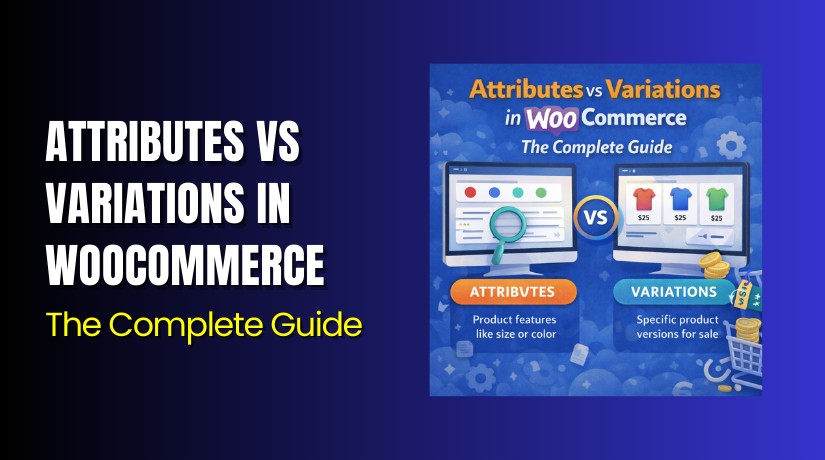
Attributes are the characteristics of a product. Size. Color. Material. They describe what options exist. Attributes alone do not let customers choose anything.
Variations are the actual product combinations customers can buy. A small red shirt. A large blue shirt. Each variation has its own price, SKU, and inventory.
Think of attributes as the building blocks. Think of variations as the finished products built from those blocks.
This guide covers everything. You will learn exactly what attributes are and how to create them. You will understand variations completely. You will see how they work together.
By the end, you will never confuse attributes and variations again.
What are Attributes in WooCommerce?
Attributes are the building blocks of product options. They define the characteristics that make one version of a product different from another.
An attribute is a descriptor for a product. Size is an attribute. Color is an attribute. Material is an attribute. Each attribute represents one dimension of choice.
Attributes alone do not let customers select anything. They simply provide information. Think of them as labels that describe possible options.
WooCommerce provides two distinct types of attributes:
Global attributes are created centrally under Products → Attributes. You define the attribute name once. You add all possible values. Then you can apply this attribute to any product in your catalog.
Use global attributes when many products share the same options. Clothing stores need size and color across their entire catalog. Creating these globally saves enormous time.
Custom attributes are created directly inside an individual product’s edit screen. They exist only for that specific product. They are ideal for one-off details that do not repeat across your catalog.
Use custom attributes for product-specific information. A limited edition number. A special feature unique to one item. These do not need to exist globally.
What are Variations in WooCommerce?
Variations are the actual product combinations customers can purchase. Each variation represents one specific version of a product.
A variation is a distinct product version defined by its attribute values. For a t-shirt with Size and Color attributes, each combination creates one variation.


Small Red. Medium Blue. Large Green. These are all variations. Each has its own price, SKU, stock level, and image.
How Variations Work?
Variations depend entirely on attributes. You cannot create variations without first defining attributes.
The process follows a clear sequence :
- Create attributes (Size, Color)
- Add attribute terms (Small, Medium, Large and Red, Blue, Green)
- Create a variable product
- Assign attributes to the product
- Generate variations from all attribute combinations
WooCommerce creates every possible combination automatically. Two attributes with three terms each generate nine variations.
What are Variation Properties?
Each variation can have its own settings :
- Regular Price is required. Each variation must have its own price.
- Sale Price is optional. Put specific variations on sale while others remain at regular price.
- SKU gives each variation a unique identifier for inventory tracking.
- Stock Management lets you track inventory separately for each variation. Know exactly how many small red shirts you have versus medium blue.
- Images can be variation-specific. When customers select Red, they see the red product image. Select Blue, the image changes.
- Weight and Dimensions can vary. Large items weigh more than small ones. Variations handle this automatically.
- Downloadable and Virtual settings work per variation. Sell physical and digital versions of the same product.
What is the Difference Between Attributes and Variations in WooCommerce?
Understanding the distinction between attributes and variations is essential for every store owner. While they work together closely, they serve completely different purposes in your product configuration.
| Comparison Factor | Attributes | Variations |
| Definition | Characteristics that describe product options (size, color, material). | Specific product versions created from attribute combinations. |
| Purpose | Define what options are available for customers to choose from. | Create actual purchasable products with unique pricing and inventory. |
| Customer Interaction | Displayed as dropdowns, swatches, or text on product pages. | Selected by customers to determine which version they buy. |
| Pricing | Attributes have no pricing. They are just descriptors. | Each variation has its own price, sale price, and pricing rules. |
| SKU Assignment | Attributes do not have SKUs. | Each variation gets its own unique SKU for inventory tracking. |
| Inventory Management | Attributes do not track stock. | Each variation tracks its own stock levels independently. |
| Creation Process | Created under Products → Attributes or directly on product pages. | Generated from attributes on variable products only. |
| Storage Location | Global attributes stored in taxonomy tables. Custom attributes stored in post meta. | Stored as distinct product IDs in a database with parent-child relationship. |
| Relationship | Attributes are the building blocks. | Variations are the finished products built from those blocks. |
| Existence Without the Other | Can exist alone without variations. | Cannot exist without attributes. |
| Number of Options | Each attribute can have multiple terms (values). | Each combination of attribute terms creates one variation. |
| Display Location | Appear in the Additional Information tab and as selection dropdowns. | Appear as selectable options within those dropdowns. |
| SEO Impact | Attributes help with filtering and navigation SEO. | Each variation can have its own URL, title, and description for SEO. |
| Plugin Enhancement | Plugins can turn attributes into swatches, buttons, or color pickers. | Plugins can add bulk editing, advanced pricing, and stock management. |
| Real-World Example | Color attribute with terms: Red, Blue, Green. | Variation: Small Red Shirt with its own price and stock. |
| Database Impact | Minimal. Attributes are lightweight. | Significant. Each variation adds database rows. |
| Filtering Capability | Attributes power layered navigation filters. | Variations are the results shown when filters are applied. |
Final Verdict
Attributes and variations are not interchangeable. They are two distinct tools that work together in a specific sequence. Understanding this relationship is fundamental to building a successful WooCommerce store.
Attributes are the blueprint. They define what options exist and provide the vocabulary for describing product choices. Attributes alone are informational. They appear in product descriptions and power your catalog filters. Use global attributes for options that repeat across products. Use custom attributes for one-off details. Attributes can exist perfectly well without variations whenever you need descriptive information without customer selection.
Variations are the finished products built from those blueprints. Each variation represents a specific combination of attribute values that customers can actually purchase. Variations have their own prices, SKUs, inventory levels, and images. They are what customers select when they make choices. Variations cannot exist without attributes because they are mathematically derived from attribute combinations.
The relationship is hierarchical. Attributes come first. You define them globally or per product. Then you generate variations from them. This sequence is fixed and logical.
Many store owners make the mistake of thinking attributes alone will let customers choose options. They add size and color attributes but forget to create variations. Customers see the options but cannot select them. The Add to Cart button never appears.
Other store owners create variations without properly understanding attributes. They wonder why prices do not show correctly or why inventory tracks poorly. The answer always traces back to attribute configuration.
The smartest approach is to master both tools. Use global attributes for consistency across your catalog. Create variations for every purchasable combination. Set default variations to improve customer experience. Monitor performance and adjust based on real data.
Test different configurations with your products. Watch how customers interact with your variable products. Your perfect setup will emerge from understanding these fundamental differences.
Have questions before starting with WooCommerce & WordPress? Get support here at WooHelpDesk.