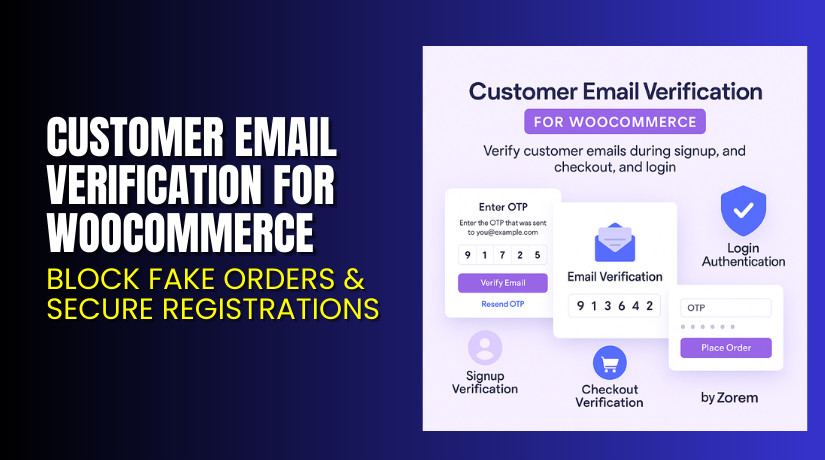
Customer Email Verification for WooCommerce – Block Fake Orders & Secure Registrations
Table of Contents
- Introduction
- What is Customer Email Verification for WooCommerce?
- Key Features of Customer Email Verification
- How to Install and Configure CEV Plugin?
- Pricing & Plans
- My Experience with CEV Plugin
- Who Should Use This Plugin?
- Final Verdict
- FAQ
Introduction
Running a WooCommerce store involves managing a lot more than just product listings and payments. Security is one of the most overlooked challenges. Many store owners face issues like fake registrations, spam orders, and email delivery failures due to invalid addresses.
Customers signing up with fake or mistyped email addresses can cause bounced emails, fake trial access, and fraud. These issues affect not just security but also deliverability and customer trust.
Customer Email Verification for WooCommerce solves this problem by adding a secure OTP-based email verification layer. It ensures that users must verify their identity before registering, checking out, or logging in.
In this article, we’ll explore what this plugin offers, how it works, its features, pricing, pros and cons, and why it’s an essential addition to any WooCommerce store.
Need help with setup? Try our Installation & Troubleshooting Services.
What is Customer Email Verification for WooCommerce?
Customer Email Verification (CEV) for WooCommerce, developed by Zorem, adds an email verification step to your WooCommerce site.
Whether it’s a new registration, guest checkout, or suspicious login, users are prompted to verify their email through a secure OTP (One-Time Password). Until verified, they can’t place orders or access the store’s account area.
This ensures that only valid, active, and real users can use your store, reducing fraud and spam.
- Official Plugin Page: Customer Email Verification for WooCommerce
- Documentation: Official Plugin Docs
- Support: Plugin Support
- Developer Contact: Contact Zorem
Key Features of Customer Email Verification
| Feature | Description | Why It Matters |
| Signup Email Verification | Sends OTP during account registration | Blocks fake accounts and stops bots |
| Guest Checkout Verification | Verifies email before completing guest purchases | Reduces fake or spam orders |
| OTP-based Secure Access | Uses One-Time Password for verification | Adds a reliable security layer |
| Optional Free-Order Restriction | Require verification only for free products | Stops users from abusing free samples or trials |
| Login Authentication | OTP verification on new device or browser login | Protects existing accounts from misuse |
| Suspicious Login Alerts | Sends email notification for login attempts | Keeps users informed about account activity |
| Fully Customizable Popup | Modify layout, color, text of OTP prompt | Match design with your store’s branding |
| Email Template Customization | Customize verification emails with your logo and messaging | Deliver a branded, professional experience |
| Delayed New Account Emails | Sends welcome email only after successful verification | Prevents bounced or undelivered emails |
| Manage Unverified Users | Automatically restrict access to users who haven’t verified | Keeps your customer base clean and valid |
How to Install and Configure CEV Plugin?
Installing the plugin is quick and simple. Follow the steps below:
- Download the plugin from the official page.
- In your WordPress Dashboard, go to Plugins → Add New.
- Upload the ZIP file and click Install Now.
- Activate the plugin once installed.
- Navigate to WooCommerce → Email Verification to set up verification workflows.
- Choose whether to enable it for registrations, guest checkouts, or both.
- Customize the verification popup and emails in the settings tab.
- Test with a new account to ensure the process works as expected.
If you face compatibility issues or need help, we offer Installation & Troubleshooting Services.
Pricing & Plans
Pricing is billed yearly in USD:
| Plan | Price/year | Use Limit |
| One Site | $119 | Use on 1 site |
| Five Sites | $299 | Use on 5 WooCommerce sites |
| Ten Sites | $499 | Use on 10 WooCommerce sites |
Each plan includes:
- One year of updates
- Priority support
- Access to all premium features
Choose the plan based on the number of stores you manage.
Buy Customer Email Verification for WooCommerce
Want to protect your store from fake users and spam orders?
Buy Customer Email Verification Plugin Now
Your purchase supports the developers and allows us to keep offering expert content and setup support.
My Experience with CEV Plugin
We used this plugin on a store offering free digital products. Before installation, nearly 30% of free trial signups were from invalid email addresses. Many were spam bots or throwaway emails.
Pros
- OTP system works reliably with instant delivery
- Easy setup with no coding required
- Flexible customization for both popup and email
- Reduced bounce rates for new account emails
- Improved data quality in CRM tools
- Login alerts help users feel more secure
Cons
- No SMS-based verification (email-only)
- Limited design options for email layout
- Some users may find verification one step too many
Overall, the plugin worked as expected and helped us clean up registrations.
Who Should Use This Plugin?
This plugin is perfect for:


- Stores offering free products or trials
- Membership-based WooCommerce stores
- Stores with frequent guest checkout usage
- Admins dealing with high spam or fake signups
- Digital product sellers who want verified users only
- Anyone concerned about security and data accuracy
If you face spam orders or invalid emails, this plugin is for you.
Useful Resources
Here are key resources to help you get started:
Use them to configure, troubleshoot, or learn more about the plugin.
Final Verdict
Customer Email Verification for WooCommerce is a reliable plugin to secure your store and improve email deliverability. Whether you sell digital goods, offer free content, or simply want to block fake accounts, it adds a vital layer of protection.
It does exactly what it promises — verify customer emails and stop unverified actions like order placement or account access.
For stores where data accuracy, deliverability, and customer trust matter, this plugin is a must-have.
Buy it today and stop dealing with fake users.
Need help setting it up? Try our Installation & Troubleshooting Services.
FAQ
Q1. Why is email verification important for WooCommerce?
It prevents fake signups, reduces fraud, and improves email deliverability.
Q2. What happens if users don’t verify their email?
Their account isn’t created, and they can’t place orders or log in.
Q3. Can guest checkout require verification?
Yes. Guests must verify their email before completing a purchase.
Q4. Can I enforce verification only for free orders?
Yes. You can limit verification to orders with free products or trials.
Q5. How is login authentication handled?
Users must verify OTP if logging in from a new device or browser.
Q6. Do customers get login alerts?
Yes. They’ll receive an email with device and location info on login.
Q7. Can I customize the verification email and popup?
Yes. Both can be fully styled to match your store design.
Q8. Do I need coding skills to use it?
No. The plugin is easy to use and doesn’t require technical knowledge.
Q9. Are updates and support included?
Yes. All plans come with plugin updates and priority support.



