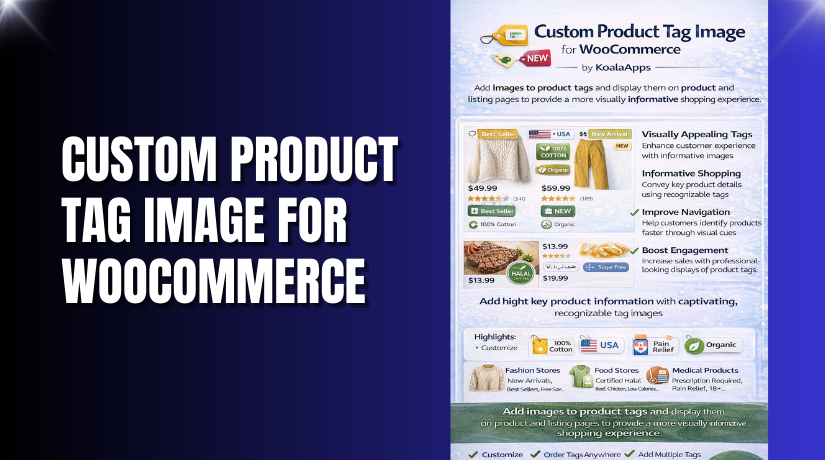
Custom Product Tag Image for WooCommerce
Table of Contents
- Introduction
- What is Custom Product Tag Image for WooCommerce?
- Key Features of Custom Product Tag Image for WooCommerce
- How to Install and Configure Custom Product Tag Image for WooCommerce
- Pricing & Plans
- My Experience with Custom Product Tag Image for WooCommerce
- Who Should Use This Plugin?
- Final Verdict
- FAQ
Introduction
Running a WooCommerce store means dealing with dozens of plugins and customizations. With so many visual elements competing for attention, it’s difficult to make key product details stand out.
Customers often ignore long product descriptions. They look for quick visual clues. Tags like “Limited Time Offer,” “New Arrival,” or “Vegan” can be important—but plain text does little to catch the eye.
This is where the Custom Product Tag Image for WooCommerce plugin comes in.
It lets you display images, icons, or styled text tags on your product and archive pages. These custom visuals make product information more engaging and easier to process.
In this article, we’ll break down what this plugin does, its features, how to install it, pricing, pros and cons, and who it’s best suited for.
Need expert help setting up this plugin? Try our Installation & Troubleshooting Services.
What is Custom Product Tag Image for WooCommerce?
Custom Product Tag Image for WooCommerce is a plugin that lets you add images, icons, or styled text to product tags.
Developed by KoalaApps, the plugin helps merchants highlight important product features visually—right on the product and archive pages.
Whether you’re promoting a discount, highlighting a product’s benefit, or just organizing your catalog more clearly, visual tags can make a big difference in user experience.
You can choose to show tag images before or after the price, description, or Add to Cart button. You can customize the layout, shapes, text styles, and even use shortcodes to place tag images anywhere in your store.
This plugin supports both text-only tags and image-based tags, or a combination of both. It works across all industries—fashion, food, medical, or electronics.
Official Plugin Page: Custom Product Tag Image for WooCommerce
Support Page: KoalaApps Contact Support
Documentation: Plugin Official Documentation
Key Features of Custom Product Tag Image for WooCommerce
| Feature | Description | Why It Matters |
| Image-based Product Tags | Add custom images to product tags | Makes important details more visible |
| Multiple Placement Options | Show tags before/after price, cart button, description | Fits your design layout |
| Tag Format Options | Display tags as text, icon, or both | Flexible for all use cases |
| Custom Layouts | Grid or no-grid tag layouts | Matches store aesthetics |
| Tag Shape Options | Square or round tag shapes | Adds style and uniqueness |
| Custom Font Styling | Set font size and family for each tag | Better readability and branding |
| Shortcode Support | Add tags to any page or section | Full control over placement |
How to Install and Configure Custom Product Tag Image for WooCommerce
Follow these simple steps to install the plugin:
- Download the plugin from the official product page.
- Go to WordPress Dashboard > Plugins > Add New > Upload Plugin.
- Upload the plugin zip file and click Install Now.
- After installation, click Activate Plugin.
- Navigate to Settings > Custom Product Tag Image.
- Set your preferred tag layout, image positions, font styles, and shape.
Test your settings to ensure compatibility with your store’s theme and other plugins.
Need help setting it up? Try our Installation & Troubleshooting Services.
Pricing & Plans
| Plan | Price (USD) | Includes |
| Premium | $29/year | Free installation, 1 year support, 30-day money-back guarantee |
This plugin does not offer a free version. It’s a one-time investment that pays off in increased conversions and user engagement.
You can purchase the plugin directly from KoalaApps.
Buy Custom Product Tag Image for WooCommerce Now


✅ Purchase here → Buy Custom Product Tag Image for WooCommerce Premium Now
Your purchase supports the plugin development and helps us create more tutorials and guides.
My Experience with Custom Product Tag Image for WooCommerce
After testing this plugin on a live WooCommerce site, here are my takeaways:
Pros
- Easy to install and configure
- Multiple placement options for tag display
- Flexible tag formats (text, icon, both)
- Customization for shape, layout, and fonts
- Shortcode support for advanced placement
- Lightweight and does not slow down the site
Cons
- No free version
- Limited styling options in basic UI (needs CSS for advanced tweaks)
- Works best with modern WooCommerce themes
Who Should Use This Plugin?
This plugin is ideal for:
- WooCommerce store owners who want to boost product visibility
- Agencies managing client sites with frequent product updates
- Fashion and food stores using rich labels and ingredient tags
- Medical and nutrition stores needing to highlight product warnings or features
- New store owners who want a simple way to stand out
Useful Resources
- Official Plugin Page – KoalaApps
- Support Contact Page
- Plugin Documentation
- WooHelpDesk Installation & Troubleshooting Services
Final Verdict
If you’re looking for a plugin that makes your product features stand out, Custom Product Tag Image for WooCommerce is a strong choice.
It’s simple to set up, flexible in design, and improves the customer browsing experience. With visual tags, users are more likely to notice deals, benefits, or features—leading to more clicks and conversions.
Buy it from the official site here, and if you need setup help, we’ve got you covered with our Installation Services.
FAQ
Q1. Is Custom Product Tag Image for WooCommerce compatible with all themes?
Yes. It works with most standard WooCommerce-compatible themes. Test it on staging first.
Q2. Can I use custom icons and images together?
Yes. You can choose to display only icons, only text, or both.
Q3. Can I customize the placement of tag images?
Absolutely. The plugin supports several placement options on both product and archive pages.
Q4. Does this plugin support shortcodes?
Yes. You can place custom tag images on any page using a shortcode.
Q5. How do I get help if I run into issues?
Contact the developers via the official support page, or use our Installation & Troubleshooting Services.



