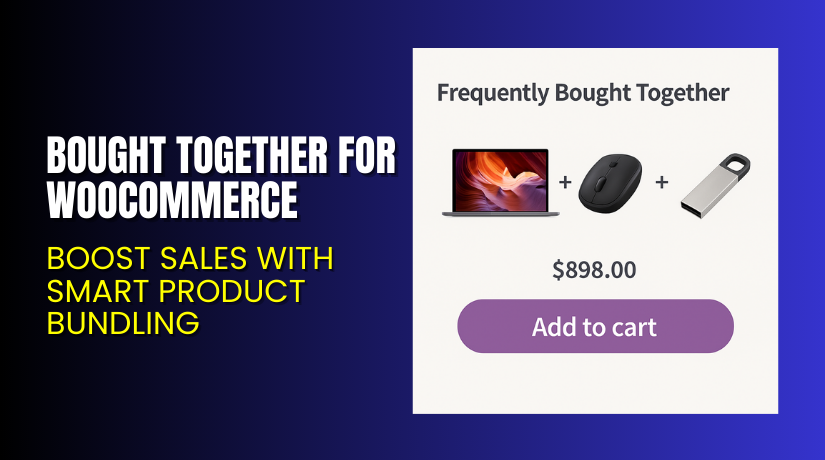
Bought Together for WooCommerce – Boost Sales with Smart Product Bundling
Table of Contents
- Introduction
- What is Bought Together for WooCommerce?
- Key Features of Bought Together for WooCommerce
- How to Install and Configure Bought Together Plugin?
- Pricing & Plans
- My Experience with Bought Together for WooCommerce
- Who Should Use This Plugin?
- Final Verdict
- FAQ
Introduction
Every store owner wants higher order value and better conversion rates. But convincing users to buy more than one item at a time is tricky. You can’t always rely on users to browse your catalog or search for matching products.
Bought Together for WooCommerce solves this by suggesting relevant items as product bundles. These bundles appear on product pages as “frequently bought together” suggestions.
With just one click, customers can add multiple products to their cart. This not only improves the shopping experience but also increases average order value.
In this guide, we’ll explain what the plugin does, how it works, its key features, how to install it, pricing, and who should use it. You’ll also find pros, cons, documentation, and support links.
Need help with setup or theme compatibility? Use our Installation & Troubleshooting Services for fast and professional support.
What is Bought Together for WooCommerce?
Bought Together for WooCommerce is a plugin developed by WP1 that lets you create custom product bundles based on customer behavior or product relevance.
It adds a “Frequently Bought Together” section to your product pages. This section displays a curated bundle of items that complement the product the customer is currently viewing.
For example, if a shopper is looking at a laptop, the plugin can display a wireless mouse, laptop bag, and pen drive as a recommended bundle.
Customers can:
- Add all suggested products to the cart with one click
- Select individual products from the bundle
- View bundles in either table or row format
It only takes a few seconds to configure each product bundle, and once done, the plugin automatically adds them to the right pages.
Official Plugin Page: Buy Bought Together for WooCommerce Plugin
Documentation: View Official Documentation
Support: WooCommerce Contact Page
Key Features of Bought Together for WooCommerce
| Feature | Description | Why It Matters |
| Product Bundling | Suggest related products as a bundle. | Increases cart size and sales. |
| One-Click Add to Cart | Add multiple products in one click. | Faster checkout improves conversions. |
| Row or Table Layout | Choose display style for bundle. | Adapts to your store’s design. |
| Unlimited Recommendations | Add as many related products as needed. | Personalizes shopping experience. |
| Custom Titles and Buttons | Set your own section title and button text. | Matches your brand tone. |
| Easy Position Control | Place the bundle section where it fits best. | Improves page layout and visibility. |
| Enable or Disable Per Product | Control bundle visibility at product level. | Flexibility across different product types. |
How to Install and Configure Bought Together Plugin?
Installation is quick and easy. Here’s how to do it:
- Purchase the plugin from the Bought Together product page
- Download the ZIP file from your WooCommerce account.
- Go to WordPress Admin → Plugins → Add New → Upload Plugin.
- Upload the ZIP file, click Install Now, then activate it.
- Go to any product edit screen in your WooCommerce dashboard.
- Scroll down to the Product Data → Bought Together tab.
- Add one or more related products to show as a bundle.
- Choose between Row or Table display layout.
- Customize title, button text, and widget placement.
- Save the product and test on the front end.
Your bundle is now live and ready to boost your sales.
Need hands-on help? Use our Installation & Troubleshooting Services
Pricing & Plans
The plugin is offered in a simple annual plan.
| Plan | Price (USD) | Includes |
| Annual | $29/year | Full features + updates + support |
- Price per month: ~$2.42 (billed annually)
- Includes updates and product improvements
- 30-day money-back guarantee
- No free version
You can buy the plugin here
Buy Bought Together for WooCommerce Now
If you want to increase average order value without being pushy, this plugin works like magic.


✅ Get the Bought Together Plugin Now
Your purchase includes:
- All features
- 1-year updates
- WooCommerce-backed support
- 30-day refund guarantee
Need help installing or configuring it? Use our Installation & Troubleshooting Services
My Experience with Bought Together for WooCommerce
We tested the plugin on a store that sells tech accessories. Bundles like phone + case + screen guard were configured easily. Customers interacted with them and order values increased within a week.
Pros:
- Easy to configure product bundles
- Increases average order value
- One-click add-to-cart is user-friendly
- Works well on mobile and desktop
- Low-cost and offers good value
- Customizable layout and titles
Cons:
- No advanced bundling logic (e.g. based on cart behavior)
- Limited design flexibility for advanced custom themes
- Requires manual bundle configuration for each product
Who Should Use This Plugin?
This plugin is ideal for:
- Store owners who want to increase order value
- WooCommerce users looking for upsell tools
- Retailers selling accessories or add-ons
- Digital and physical product sellers
- Beginners looking for simple upsell features
If your store sells items that pair well with others, this plugin will help your customers and your revenue.
Useful Resources
- Plugin Purchase Page
- Documentation & Setup Guide
- Contact Support
- Installation & Troubleshooting Help
Final Verdict
Bought Together for WooCommerce is a smart, cost-effective plugin for anyone looking to boost order value through relevant product recommendations.
It’s easy to use, fast to install, and works well with most themes. The ability to add multiple products to cart in a single click is a great conversion booster.
If you’re not already using upsell or bundle tools, this plugin is a great place to start.
Buy the Plugin Here and start increasing sales today.
Need help? Try our WooHelpDesk Services for Bought Together
FAQ
Q1. Can I customize the bundle section title and button?
Yes. You can edit the section heading and add-to-cart button text.
Q2. How many products can I add to a bundle?
There is no limit. You can recommend as many products as needed.
Q3. Does the plugin support variable products?
Yes, it works with both simple and variable products.
Q4. Can I choose where the bundle appears on the page?
Yes. You can control the placement via plugin settings.
Q5. Is it compatible with the latest WooCommerce?
Yes. The plugin is tested with WooCommerce 10.3.5 and WordPress 6.7.



