Best Permalink Structure for WordPress: Which One Should You Use?
Table of Contents
- Introduction: Why Permalink Structure Matters in WordPress
- What a Permalink Structure Means in WordPress
- Why Your Choice of Permalink Structure Is Important
- The Main Permalink Structure Options Available in WordPress
- Which Permalink Structure Is Best for Most WordPress Websites
- Should You Use a Custom Permalink Structure Instead
- Permalink Structures You Should Usually Avoid
- What to Do Before Changing Permalink Structure on an Existing Site
- Conclusion
Introduction: Why Permalink Structure Matters in WordPress
Choosing the best permalink structure for WordPress is more important than many users think. Your permalink is the web address for each post or page. It helps visitors understand the topic before they click. It also makes your links look clean, clear, and easy to trust. A poor URL can look messy and confusing. A better one can improve user experience from the start. That is why permalink choices matter for every WordPress website. Many beginners open WordPress permalink settings and feel unsure about which option to pick. They often ask the same thing. Which structure is best for my site? Will it help readers? Will it keep URLs simple? These are smart questions. A good permalink structure supports both users and website goals.
What a Permalink Structure Means in WordPress
A permalink is the full URL of a page or post. A permalink structure is the format WordPress uses to build that URL. This format decides whether your link shows a post name, date, number, or custom path. In simple words, it controls how your content links look across the website. WordPress gives you several built-in choices inside the settings area. This is where you choose the format that fits your site.
A strong structure should do three things well:
- Keep the URL short and clear
- Show what the page is about
- Stay stable over time
Many site owners want an SEO friendly permalink structure WordPress can handle with ease. Others ask, should I use post name permalink in WordPress for better clarity? These questions matter because the right format helps create better links from the beginning.
Why Your Choice of Permalink Structure Is Important
Your URL structure does more than shape your links. It affects how users read, trust, and remember your pages. It also helps you keep your site clean over time. That is why choosing the right format matters from the start.
- Easy for Users to Read
A clear URL tells users what the page covers. They can understand the topic before opening the link. Short and readable links feel safer and more useful. This improves the browsing experience across your website.
- Better for Sharing and Trust
Clean links look more professional in search results and messages. They are easier to copy, paste, and share. A messy URL with numbers or dates looks less helpful. A simple URL creates better trust with visitors.
- Helpful for Site Organization
Good URLs make your content easier to manage later. You can keep posts, pages, and categories more organized. This becomes very useful as your website grows. Strong WordPress permalink settings support better structure from the beginning.
- Safer for Long-Term Content Planning
A stable URL format saves you trouble in the future. Frequent URL changes can break links and confuse users. That is why many site owners choose a format once. Then they keep it consistent across all published content.
The Main Permalink Structure Options Available in WordPress
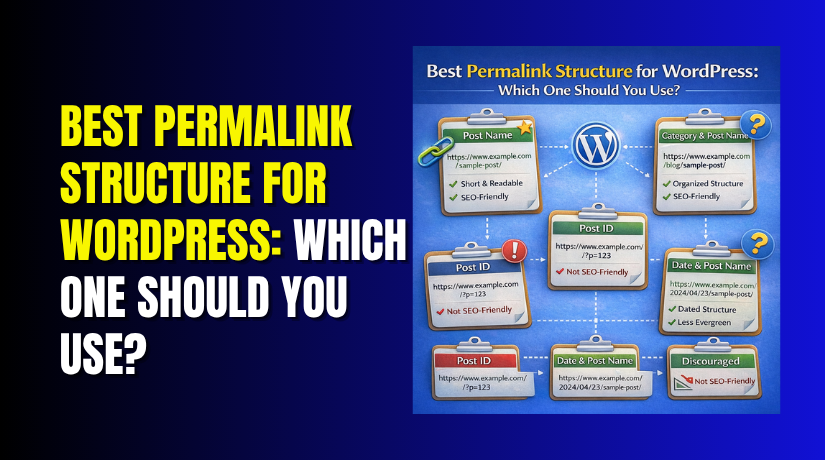
WordPress gives several built-in permalink options. Each one creates a different kind of URL. Some are simple and useful. Others are not ideal for most websites.
| Permalink Option | How It Looks | Best Use |
| Plain | ?p=123 | Rarely useful for normal websites |
| Day and Name | /2026/03/24/post-title/ | News or date-based publishing |
| Month and Name | /2026/03/post-title/ | Blogs that want date context |
| Numeric | /archives/123 | Not very clear for users |
| Post Name | /post-title/ | Best for most WordPress sites |
| Custom Structure | Your chosen format | Useful for planned site structures |
The SEO friendly permalink structure WordPress users usually prefer is the Post Name option. It keeps links short and easy to understand. Some websites may still need a custom permalink structure WordPress can support. That choice works best when the site has a clear content plan.
Which Permalink Structure Is Best for Most WordPress Websites
For most websites, the best choice is the Post Name structure. It creates short, clean, and readable URLs. This format removes extra dates, numbers, and other parts that do not help users. In most cases, it is the best permalink structure for WordPress because it keeps links simple from the start.
- Why Post Name Works Best
The Post Name format uses the page or post title in the URL. This makes the link easy to read and easy to understand. A visitor can often guess the page topic before opening it. That is helpful for users and better for daily site management.
It also works well because it keeps URLs focused. You do not add dates that may look old later. You do not add ID numbers that tell users nothing. You only keep the part that matters most, which is the topic name.
Many site owners ask, should I use post name permalink in WordPress when setting up a new site. For most blogs, business websites, and service pages, the answer is yes. It is the safest and most practical option for long-term use.
- Why It Fits Most WordPress Websites
The Post Name format works well for many common website types, such as:
- Personal and business blogs
- Company websites
- Service-based websites
- Portfolio websites
- Small stores with content pages
This format also supports a clean and SEO friendly permalink structure WordPress users often want. It makes links easier to scan in browsers, search results, and shared messages.
- A Smart Default for Long-Term Use
If you are checking WordPress permalink settings and want the best starting point, choose Post Name in most cases. It is simple, clear, and easy to manage. A custom permalink structure WordPress site owners create may help in some special cases, but most websites do not need that extra step. For general use, Post Name remains the best and most reliable choice.


Should You Use a Custom Permalink Structure Instead
A custom format can work well in some WordPress cases. It is not the best choice for every website. Still, it can help when your site needs better content grouping. A custom permalink structure WordPress users choose should always serve a clear purpose. It should not be used only because it looks different.
- When a Custom Structure Makes Sense
A custom format can be useful for large content websites. It may also help websites with strong category planning. For example, a news site may want category names in links. A learning site may want course sections inside the URL. In these cases, the structure supports navigation and content flow. It can make the site easier to organize over time.
- How to Use It the Right Way
Keep the structure short, clean, and easy to read. Do not add extra words that give no value. Avoid deep paths with many folders in one URL. Make sure the format stays useful for future content too. Good planning matters before changing WordPress permalink settings. Without a plan, custom URLs can become hard to manage later.
Permalink Structures You Should Usually Avoid
Some permalink formats create more problems than value. They may look weak, long, or outdated over time. That is why most site owners avoid them.
- Date-Based Structures for Evergreen Content
Date-based URLs may work for news websites with daily updates. They are less useful for guides or service pages. Dates can make helpful content look old too soon. This weakens a clean and SEO friendly permalink structure WordPress users often want.
- Plain and Numeric Structures
Plain and numeric links do not explain the page topic. They look weak in browsers, messages, and search results. Users cannot understand the page from the URL alone.
- Long Custom URLs
Some users ask, should I use post name permalink in WordPress or longer custom paths. In most cases, shorter URLs work better. For most sites, the best permalink structure for WordPress stays simple, clear, and easy to manage.
What to Do Before Changing Permalink Structure on an Existing Site
Changing your URL format on a live website needs care. A quick change can create broken links and lost page access. That is why you should review a few things first. Even the best permalink structure for WordPress should be applied safely.
- Check Whether the Site Is Already Live
If your website already has published pages, old URLs may exist. Visitors may have saved them in browsers or shared them online. Search engines may also know those older links already. Changing them without planning can cause problems fast.
- Plan Redirects for Old URLs
Redirects send visitors from the old URL to the new one. This helps users reach the correct page after changes. It also keeps your website more stable during updates. Before changing WordPress permalink settings, make sure redirects are part of the plan.
- Update Internal Links If Needed
Some links inside posts, pages, or menus may need updates. This is important if your old structure was very different. Clean internal links improve the site experience after the change.
- Test the New Structure Carefully
Open key pages after saving the new permalink format. Test blog posts, service pages, and important categories. Make sure nothing shows errors or broken paths. This step matters whether you use Post Name or a custom permalink structure WordPress websites need.
Final Recommendation: Which One Should You Use
For most websites, Post Name is still the smartest option. It is clean, simple, and easy to manage long term. If you ask, should I use post name permalink in WordPress, the answer is yes for most sites. It remains the most practical and SEO friendly permalink structure WordPress users can choose. Use a custom format only when your content plan truly needs it.
Conclusion
The right permalink choice should stay simple and useful. For most sites, Post Name gives the best result. It keeps links clean and easy to understand. If you need help choosing, changing, or fixing permalink issues, WooHelpDesk can help you do it safely.