How to Automate WooCommerce Birthday Emails with AutomateWoo Birthdays Add-on
Table of Contents
- What is the AutomateWoo Birthdays Add-on?
- Why Are Birthday Emails Important for WooCommerce Stores?
- How AutomateWoo Birthdays Add-on Boosts Customer Loyalty
- How WooCommerce Stores Can Benefit from Birthday Emails
- Features & Capabilities of AutomateWoo Birthdays Add-on
- How to Set Up AutomateWoo Birthdays Add-on
- AutomateWoo Integrations
- Conclusion
What is the AutomateWoo Birthdays Add-on?
The AutomateWoo Birthdays Add-on is a WooCommerce extension designed to send personalized birthday emails to customers. It works with the WooCommerce AutomateWoo Plugin, allowing store owners to automate birthday greetings and special offers. Businesses can create customized birthday emails and include discount coupons to encourage purchases.
Automating birthday emails helps store owners increase engagement and boost sales. Customers appreciate personal messages, making them more likely to return and shop again. The add-on ensures that businesses can celebrate customer birthdays without manual effort.
Why Are Birthday Emails Important for WooCommerce Stores?
In eCommerce, one of the best-performing marketing emails is the birthday email. Customers enjoy receiving special messages and exclusive discounts on their birthdays. These emails have a more intimate feel, which improves the relationship between the brand and its customers.
Statistics show that birthday emails perform much better than regular promotional emails. Birthday emails, as opposed to regular marketing emails, have:
- Transaction rates increased by 481%.
- Revenue per email increased by 342%.
- 179% more unique clicks
These numbers prove that customers respond well to personalized WooCommerce birthday emails. Giving them a special discount or gift together with a simple birthday greeting will motivate them to buy anything.
How AutomateWoo Birthdays Add-on Boosts Customer Loyalty
Customers like to feel valued. A personalized birthday email shows that a brand cares about them. This small gesture helps build trust and improves brand loyalty.
When customers receive a birthday message with a WooCommerce birthday discount plugin offer, they feel encouraged to shop. Many people make impulse purchases on special occasions, especially when given a discount.
Businesses may build enduring relationships with clients by utilizing the WooCommerce Birthday Marketing Add-on. Positive encounters increase the likelihood that individuals will come again.
How WooCommerce Stores Can Benefit from Birthday Emails
WooCommerce stores can use birthday emails to reconnect with inactive customers. A birthday message can bring back shoppers who haven’t purchased in months. It serves as a reminder about the brand and its products.
A well-designed WooCommerce birthday reminder add-on can also increase word-of-mouth marketing. Happy customers may share their birthday offers with friends, bringing in new potential buyers.
Features & Capabilities of AutomateWoo Birthdays Add-on
Automated Birthday Emails for WooCommerce
The AutomateWoo Birthdays Add-on allows store owners to automate birthday emails. Once a customer’s birthday is recorded, the system sends emails automatically. This saves time and ensures every customer gets a birthday message.
Before, on, or after the customer’s birthday, emails can be sent. This flexibility helps businesses decide the best time to engage customers. A well-timed birthday email reminds shoppers about the store and encourages them to return and make a purchase.
WooCommerce Birthday Coupons Extension for Special Discounts
Birthday emails perform better when they include a discount or special offer. With the WooCommerce Birthday Coupons Extension, businesses can offer:
- Percentage-based discounts (e.g., 10% off)
- Fixed amount discounts (e.g., $5 off)
- Free shipping offers
- Exclusive birthday-only deals
Customers feel more excited to shop when they receive a personalized birthday discount. They are more inclined to make an impulsive purchase because they perceive it as a reward. Coupons can have expiration dates added by store owners to generate urgency and motivate quick action.
Customizable WooCommerce Birthday Emails
The AutomateWoo Birthdays Add-on allows full customization of birthday emails. Businesses can match the emails to their brand’s design and style. Emails can be customized by store owners using:
- To add a personal touch, including customer names in the subject line.
- Eye-catching images or GIFs for a celebratory feel
- Engaging birthday messages that feel warm and genuine
A birthday email that is well-designed fosters an emotional bond with the recipient. They are more likely to open the email, click through, and buy anything as a result.
WooCommerce Birthday Reminder Add-on for Collecting Birthdates
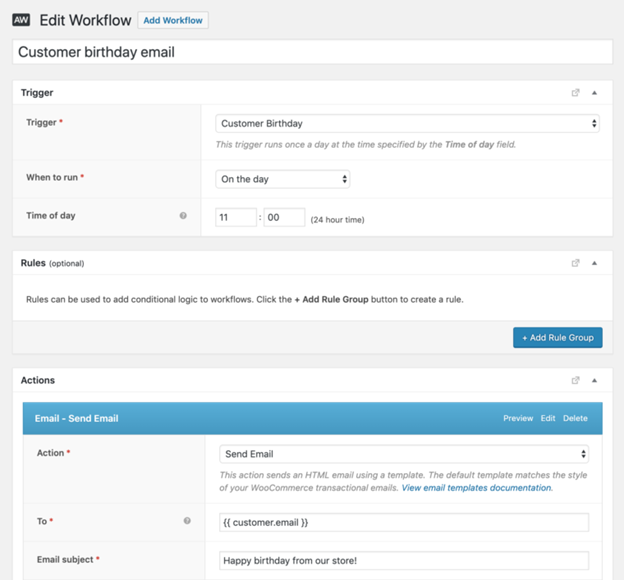
To send birthday emails, businesses need to collect customer birthdates. The WooCommerce Birthday Reminder Add-on makes this easy by:
- Adding a birthday field at checkout
- Enabling users to update their account settings with their birthdate
- Giving an incentive for sharing their birthday, such as a future discount
With an automated system, businesses no longer need to manually track birthdays. This makes it easier to send timely and relevant birthday offers.

Ensuring GDPR Compliance for Customer Privacy
Customer data privacy is important. The AutomateWoo Birthdays Add-on complies with GDPR regulations, guaranteeing the secure handling of user data.
Customers must give explicit consent before sharing their birthdate. They can also opt out of birthday emails anytime. This maintains legal compliance while fostering consumer and company trust.
How to Set Up AutomateWoo Birthdays Add-on
Setting up the AutomateWoo Birthdays Add-on is a simple process. It requires WooCommerce and AutomateWoo to be installed first. To set up the plugin and begin sending birthday emails automatically, follow these instructions.
Step 1: Install AutomateWoo and the Birthdays Add-on
Before using the WooCommerce Birthday Emails Plugin, you need to install both AutomateWoo and its Birthdays Add-on.
- Open your WordPress dashboard and log in.
- Go to Plugins > Add New from there.
- Search for AutomateWoo and install it if not already installed.
- Activate AutomateWoo to enable automation features.
- Purchase and download the AutomateWoo – Birthdays Add-on from WooCommerce.
- After downloading the file, select Plugins > Add New > Upload Plugin.
- Click Activate to enable the add-on in WooCommerce.
After installation, the add-on will show up in WooCommerce’s AutomateWoo settings.


Step 2: Enable the Birthday Field at Checkout
You must gather customer birthdates in order to send birthday emails. Adding a birthday field to the checkout page is the simplest method to accomplish this.
- Navigate to WooCommerce > AutomateWoo > Settings.
- Click on the Birthdays tab.
- Turn on the “Ask for Birthdays” feature during checkout.
- Customize the field label, such as “Enter your birthdate for a special treat!”.
- To alter the checkout form, save your modifications.
Customers will now see a birthdate field when completing their purchase. This guarantees that you have the information required to send birthday emails in WooCommerce.
Step 3: Create an Automated Birthday Workflow
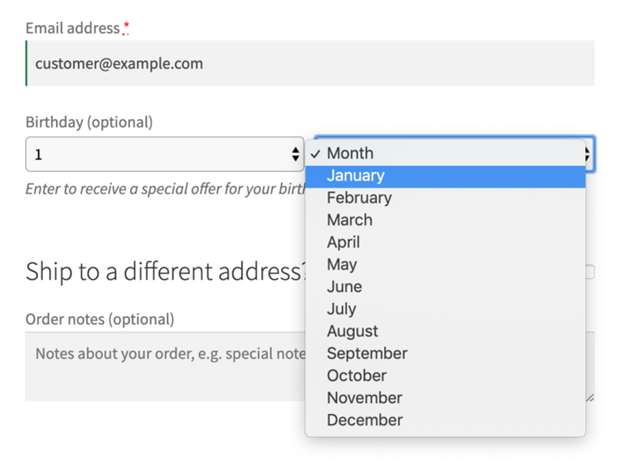
The AutomateWoo Birthday Triggers allow you to send birthday emails automatically. You can create a workflow to schedule email delivery on, before, or after the birthday.
To create a birthday email workflow:
- Go to WooCommerce > AutomateWoo > Workflows.
- Click Add Workflow and enter a name like “Birthday Email Campaign”.
- Under Triggers, select Customer Birthday.
- Choose when the email should be sent:
- Before the birthday (to build excitement).
- On the birthday (to celebrate the occasion).
- After the birthday (to offer a follow-up deal).
- After clicking “Add Action,” choose “Send Email.”
- For example, “Happy Birthday, [First Name] – A Gift for You!” could be used as the subject line.
- Customize the email body with a personalized message and a WooCommerce birthday discount plugin offer.
- Attach a coupon code using the WooCommerce Birthday Coupons Extension.
- Save the workflow and set it to Active.
Your WooCommerce store will now send birthday emails automatically based on the workflow settings.
Step 4: Test and Optimize the Setup
Before launching the campaign, test the WooCommerce Birthday Reminder Add-on to ensure it works correctly.
How to test the birthday email workflow:
- Manually add a test birthdate to a customer account.
- Trigger the workflow using the Run Now option.
- Check if the birthday email is received correctly.
- Click the coupon link to confirm it applies the discount.
Optimizing your WooCommerce birthday emails:
- Use A/B testing to check which subject lines perform best.
- Add images or GIFs to make emails more engaging.
- Provide discounts with a time limit to motivate prompt action.
- Keep an eye on AutomateWoo’s email open and click-through rates.
AutomateWoo Integrations
The AutomateWoo Birthdays Add-on works seamlessly with other WooCommerce tools and CRM platforms. By combining it with marketing tools and customer relationship management (CRM) systems, businesses can increase its capabilities. These integrations help in better customer engagement and sales growth.
AutomateWoo AgileCRM Integration for Customer Management
The AutomateWoo AgileCRM Integration allows store owners to sync customer data between WooCommerce and AgileCRM. This integration facilitates better customer relationship management for enterprises.
With AgileCRM, store owners can:
- Track customer birthdays in their CRM dashboard.
- After birthday promotions, send follow-up emails automatically.
- Divide up your clientele according to their engagement and purchasing patterns.
- Send additional WooCommerce birthday discount plugin offers to high-value customers.
This integration helps businesses build stronger customer relationships and increase repeat purchases.
Other WooCommerce AutomateWoo Plugin Integrations
AutomateWoo supports several WooCommerce extensions that enhance its functionality. Some useful integrations include:
- WooCommerce Subscriptions – Send birthday discounts to subscribers.
- WooCommerce Memberships – Offer special birthday perks to members.
- WooCommerce Points and Rewards – Reward customers with bonus points on their birthdays.
These integrations allow store owners to create personalized experiences and boost customer loyalty.
How Birthday Marketing Improves Customer Retention
Birthday emails are more than just a marketing tool. They support companies in keeping clients and promoting recurring business. Customers appreciate personalized offers, making them more likely to engage with the brand.
A well-timed WooCommerce birthday reminder add-on can bring back inactive customers. Even if they haven’t shopped in months, a birthday email reminds them why they love the brand. Offering a small incentive encourages them to make a new purchase.
Conclusion
Owners of WooCommerce stores can benefit greatly from the AutomateWoo Birthdays Add-on. It helps automate birthday emails, offer discounts, and build long-term customer relationships. With powerful CRM and WooCommerce integrations, businesses can enhance their marketing strategy and increase repeat sales.
If users need assistance with setup or troubleshooting, they can contact WooCommerce support through:
- The WooCommerce Help Center for official documentation and guides.
- The WooCommerce support ticket system for direct assistance.
- The AutomateWoo community forums to get advice from other users.
If you still face issues or need expert WooCommerce support, WooHelpDesk is here to help. Our team specializes in WooCommerce automation, plugin configuration, and issue resolution. We ensure that your AutomateWoo Birthdays Add-on runs smoothly, helping you maximize its potential for customer engagement and sales growth.
Start using the WooCommerce Birthday Marketing Add-on today, and if you need assistance, WooHelpDesk is ready to support you.



