What are the advantages of using Docker with WordPress?
Table of Contents
- Introduction: What Is Docker?
- Docker and WordPress: A Perfect Match
- Why Docker Matters for WordPress Development
- Key Docker Benefits for WordPress
- Docker’s Role in WordPress Development
- Advantages of Using Docker for WordPress Development
- Docker for WordPress Deployment Advantages
- Conclusion
Introduction: What Is Docker?
Docker is an open platform. It lets developers build, ship, and run applications inside lightweight containers.
Containers package your code with all its dependencies. This includes libraries, tools, and settings.
The result? Your app runs the same way everywhere. It works on your laptop, a colleague’s machine, or a live server.
No more “it works on my machine” problems.
Docker uses containers instead of full virtual machines. Containers share the host OS kernel instead of virtualizing hardware like traditional VMs. This eliminates overhead, making them faster to start and more resource-efficient.
In today’s tech world, Docker leads containerization. Over 90% of IT teams use containers. It powers modern development, microservices, and cloud setups. Developers love it for speed and reliability.
Docker and WordPress: A Perfect Match
WordPress powers millions of websites. It needs PHP, a web server like Apache or Nginx, and a database like MySQL.
Setting up these pieces locally takes time. Different developers face version conflicts or missing tools.
Docker changes that. You can run WordPress in isolated containers. One container holds WordPress and PHP. Another holds the database.
A simple docker-compose file starts everything with one command. No manual installs needed.
This approach grows popular in WordPress circles. Freelancers, agencies, and teams adopt it fast. It simplifies work on themes, plugins, and custom sites.
Why Docker Matters for WordPress Development
Docker brings real value to WordPress projects.
Here are the main reasons it stands out:
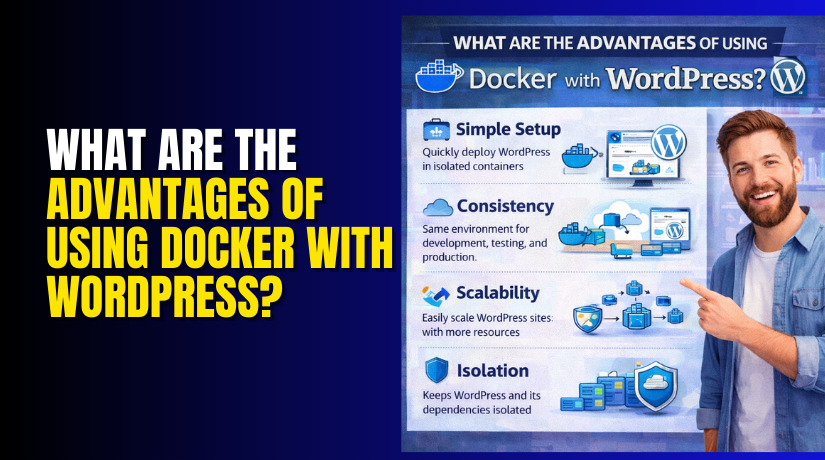
- Isolated environments — Each project lives alone. No conflicts with other sites or tools.
- Quick project starts — Spin up a full WordPress setup in minutes.
- Team-friendly workflow — Share your setup via a file. Everyone sees the same thing.
- Better testing — Switch PHP or WordPress versions easily. Test safely.
- Smooth path to production — What runs locally matches staging and live servers.
These perks cut setup time. They reduce bugs from mismatched setups. Developers focus on building features, not fixing environments.
In short, Docker makes WordPress development cleaner and faster. It fits today’s need for speed and consistency.
Key Docker Benefits for WordPress
Docker’s Flexibility
Docker gives you freedom in WordPress work. It creates isolated containers for every piece of your site.
One container runs WordPress and PHP. Another runs MySQL for the database. A third can handle Redis for caching if you need it.
Each container stays separate. Changes in one do not break the others.
This isolation stops version clashes. You can test a new plugin without risking your main setup. You can run multiple WordPress projects on the same laptop. Each lives in its own safe space.
Developers switch between client sites easily. No need to uninstall and reinstall tools. Docker keeps everything clean and ready.
Consistency Across Development Stages
One big pain in WordPress teams is mismatched setups. Your local site works fine. Then staging fails. Production crashes in a strange way.
Docker fixes this problem completely.
You define the entire environment in files. These files live with your code. Everyone pulls the same docker-compose.yml.
Local development matches staging. Staging matches production. The same PHP version runs everywhere. The same plugins load the same way.
This consistency cuts debugging time. Teams spend less time fixing “it works on my machine” issues. Deployments become predictable and calm.
Docker’s Speed and Efficiency
Time matters in WordPress projects. Docker makes setup lightning fast.
Without Docker, you install:
- Web server
- PHP
- MySQL
- Maybe Nginx or Apache
- Composer
- Node.js for frontend tools
This takes hours. You fight permission errors and version mismatches.
With Docker: One command starts everything.
docker-compose up -d
In under two minutes you have a fresh WordPress site. No manual configuration needed.
You focus on code, themes, and plugins. Not on server setup.
Docker images download once and reuse. Future projects start even faster.
Docker’s Role in WordPress Development
Docker changes how teams build WordPress sites.
Here are the biggest ways it helps:
- Faster testing — Spin up test sites in seconds. Try new themes or plugins safely.
- Easy version control — Change WordPress core version with one line in the file. Test upgrades without fear.
- Simplified development cycles — Local → commit → push → CI/CD → staging → live. Every step uses the same container setup.
- Better collaboration — New team member clones the repo and runs one command. They see the exact same environment.
These changes make daily work smoother. Bugs appear less often. Features ship quicker.
Docker turns chaotic WordPress setups into clean, repeatable processes. It fits perfectly with modern development habits.
Advantages of Using Docker for WordPress Development
Environment Consistency
Docker removes one of the biggest headaches in WordPress work. Different machines cause different results. Your laptop runs PHP 8.1. Your teammate’s uses 7.4. The site breaks in strange ways.
Docker solves this. You lock every setting in container files. PHP version, WordPress version, plugins, themes—all stay the same.
Everyone on the team pulls the same setup. Local development looks exactly like staging. Staging looks exactly like production.
No more surprise errors when you push code. Bugs show up early. You fix them before they reach live users.
This consistency saves hours of debugging. Teams work faster and with less stress.
Version Control and Dependency Management
WordPress projects use many moving parts. Core WordPress, PHP, MySQL, Redis, plugins, themes. Each has its own versions.
Mixing versions often breaks things. Docker makes version control simple and safe.


You write exact versions in your docker-compose.yml file. Example:
- WordPress: 6.6
- PHP: 8.2-fpm
- MySQL: 8.0
Need to test an older plugin? Change one line. Spin up a new container. Test without touching your main setup.
Switching WordPress versions takes seconds. No need to reinstall anything manually. Dependencies stay clean and predictable.
This freedom lets you experiment boldly. You upgrade or downgrade with confidence.
Portability and Scalability
Docker turns your WordPress project into a portable package. The entire setup travels with your code.
Move from your laptop to a colleague’s machine. It works the same. Push to Git. Clone on a staging server. It still works the same.
Deploy to any host that runs Docker. Shared hosting, VPS, AWS, DigitalOcean, Google Cloud—all support it.
Scaling becomes easy too. High-traffic site? Add more containers for PHP workers. Use Docker Swarm or Kubernetes later. Your setup grows without rewriting code.
Portability means freedom. You are not locked to one host or one way of working.
Faster Setup and Development Cycles
New project? Old-school setup takes half a day or more. Install tools. Configure servers. Fix permission issues. Match versions.
Docker flips this. Clone the repo. Run one command:
docker-compose up -d
In minutes you have:
- Running WordPress
- Fresh database
- Working PHP environment
You jump straight to coding. Build themes. Write plugins. Test features.
Development cycles shrink. From idea to live site happens quicker. Changes deploy faster. Feedback loops tighten.
Here’s a quick look at the speed gains:
- Setup time: Hours → Minutes
- New team member onboarding: Days → One command
- Testing new versions: Risky and slow → Safe and instant
- Switching projects: Painful → Effortless
Docker hands you back your time. You spend it on what matters—creating great WordPress sites.
These advantages make Docker a smart choice for any serious WordPress developer.
Docker for WordPress Deployment Advantages
This section looks at how Docker shines once your WordPress site moves to production. It focuses on deployment and scalability. These matter most when your site grows or faces high traffic.
Quick and Reliable WordPress Deployment
Docker makes deployment fast and trustworthy.
You already built a solid setup locally. Now push that exact setup to staging and production.
Docker ensures consistent deployment environments across all stages. The same containers run everywhere. No surprises from different server settings.
Deployment becomes simple. You commit your docker-compose file or Dockerfile. CI/CD tools like GitHub Actions or GitLab CI pull it. One pipeline command deploys to staging. Another pushes to live.
No manual server tweaks needed. No hunting for missing PHP modules. Your team deploys with confidence every time.
Performance Optimization During Deployment
Docker helps your WordPress site run faster in production.
Containers use far less resource overhead compared to virtual machines. They share the host kernel instead of running full OS copies. This means lower CPU and memory use. Your site responds quicker even on smaller servers.
You can fine-tune configurations to optimize performance. Adjust PHP worker limits inside the container. Set memory limits for MySQL. Add caching layers like Redis without extra host setup.
These tweaks happen in your Docker files. They apply the same way on every server. The result? Smoother page loads and better user experience.
Scalability and Cloud Integration
Docker makes growing your WordPress site easy.
You scale WordPress sites easily with container orchestration tools like Kubernetes. Kubernetes handles multiple containers automatically. It restarts failed ones. It spreads load across servers.
Start with a few PHP containers. Add more as visitors increase. No need to rebuild your whole setup.
Docker shows strong compatibility with cloud platforms. AWS, Azure, and Google Cloud all support it natively. Use AWS ECS for simple scaling. Run on Google Kubernetes Engine for advanced control. Azure Container Instances works for quick tests.
Move between clouds if needed. Your Docker setup travels with you. Scaling stays smooth and predictable.
Managing Traffic Surges and Site Growth
Traffic spikes happen to every growing site. Docker handles them without panic.
Seamlessly handle spikes in traffic by adjusting Docker container resources. Add extra PHP-FPM containers during a sale or viral post. A load balancer sends visitors to free containers.
When traffic drops, scale back down. You pay only for active resources.
For bigger growth, orchestration tools watch metrics. They auto-scale based on CPU or request count. Your site stays online and fast.
This flexibility supports long-term site growth. From a small blog to a busy membership platform. Docker grows with you.
Docker turns deployment from a risky step into a smooth advantage. Your WordPress site launches reliably. It performs well under load. It scales without breaking your workflow.
Conclusion
Docker transforms WordPress development and deployment in powerful ways. It delivers fast, consistent environments from your first local test to live production. You gain flexibility with isolated containers, rock-solid consistency across stages, and quick setup that saves hours. Version control becomes effortless, portability opens new hosting options, and performance stays optimized even under load. Scaling handles traffic surges smoothly, especially with cloud platforms and orchestration tools.
In short, Docker removes common pain points. It lets you focus on building great sites instead of fighting setups.
Ready to experience these benefits yourself? Start using Docker for your next WordPress project today.