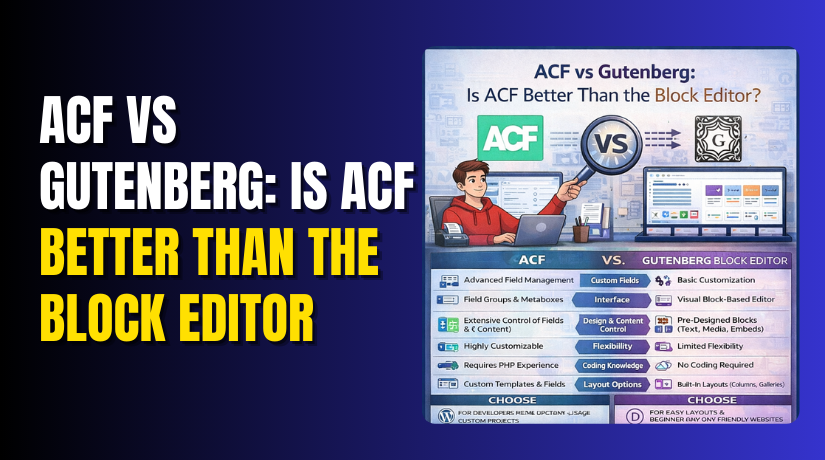
ACF vs Gutenberg: Is ACF Better Than the Block Editor?
Table of Contents
- Introduction
- Advanced Custom Fields vs Gutenberg editor
- Core Differences That Actually Matter
- Is ACF better than Gutenberg
- ACF blocks vs Gutenberg blocks
- Gutenberg custom fields vs ACF
- Should You Use ACF With Gutenberg?
- Quick checklist: When this hybrid setup is the right choice
- Do You Still Need ACF When Using Gutenberg?
- ACF vs Gutenberg for custom post types
- Conclusion
- FAQ
Introduction
WordPress editing changed fast after the block editor arrived. Many site owners now ask one simple question. ACF vs Gutenberg, which is the better choice today? The answer depends on your site goals and content needs. Some people want faster page building with blocks. Others want clean and structured content with custom fields. This guide compares both tools in a clear way. You will learn what each option does best. You will also see when both can work together. By the end, you will decide the right approach.
Quick takeaways before we start:
- Choose Gutenberg for fast page layouts and content editing.
- Choose ACF for structured fields and controlled admin input.
- Use both when you need design plus strong content structure.
- Pick based on content type, not based on trends.
Advanced Custom Fields vs Gutenberg editor
To compare both tools, you need simple definitions first. The Advanced Custom Fields vs Gutenberg editor debate is not about “good” or “bad.” It is about what problem you are trying to solve. Gutenberg is an editor that builds content using blocks. ACF is a system that adds custom fields to WordPress. Both can help you create better pages. But they work in different ways.
What Gutenberg is and what it solves
Gutenberg is WordPress’s default block editor. It replaces the old classic editor with a block system. Each part of a page becomes a block. You can add and arrange blocks quickly. You can also style content with simple settings. Gutenberg is great when your main job is content creation. It is also helpful when you want flexible page layouts.
Gutenberg commonly helps with these tasks:
- Writing blog posts with clean spacing and better layout control
- Creating landing pages using columns, buttons, images, and covers
- Reusing layouts using patterns and reusable blocks
- Keeping content editing simple for non-technical users
Gutenberg is built for visual editing and page structure. It shines when you want to build and publish quickly.
What ACF is and what it solves
ACF stands for Advanced Custom Fields. It helps you add extra fields to posts, pages, and custom post types. These fields can be text, numbers, images, links, repeaters, and more. ACF is great when you need structured data. It keeps important details in the right place. It also helps you avoid messy content editing.
ACF commonly helps with these tasks:
- Creating structured sections like hero text, buttons, and icons
- Adding repeatable items like FAQs, features, or team members
- Storing fields like price, rating, address, or phone number
- Building templates that pull data into design automatically
ACF is built for control and structure. It shines when content must stay consistent.
Where they overlap, and where they don’t
Both tools can help you publish better pages. But they do it differently. Gutenberg focuses on how content looks and flows on a page. ACF focuses on how content is stored and managed. Gutenberg blocks are easy to move and arrange. ACF fields are easy to fill and keep clean.
Here is the simplest way to see the difference:
- Gutenberg answers: “How should this content appear on the page?”
- ACF answers: “What data should this content store and reuse?”
This is why the comparison is important. Many users ask, Is ACF better than Gutenberg for modern sites? The real answer depends on content type. It also depends on who edits your site daily.
Simple example to make it clear
Imagine you run a site with a “Team Member” section. Each team member needs: name, role, photo, short bio, and social links. If you build it only in Gutenberg, you may create a layout manually. Editors might change spacing and formatting by mistake. The result can look different on each page.
If you build it using ACF fields, editors fill a clean form. The design stays stable because the template controls layout. This is where ACF becomes powerful. It also helps when you later reuse the same data. For example, you can show team members on many pages.
So in many real cases, the best approach is not “either-or.” People often ask, Should I use ACF with Gutenberg for best results? The answer is often yes. Gutenberg can handle page flow and content blocks. ACF can handle structured fields behind the scenes.
Core Differences That Actually Matter
Most comparisons sound technical and feel confusing for beginners. This section keeps it practical and easy to apply. The goal is to help you decide faster with real factors. You will see how each option behaves for daily content work. You will also understand where each tool gives better control.
Quick comparison table
| Factor | Gutenberg | ACF |
| Ease for daily editing | Very easy for most editors | Easy with clean field forms |
| Structure and consistency | Depends on how editors build pages | Strong structure with fixed fields |
| Design freedom | High with blocks and patterns | Depends on theme templates |
| Reusable components | Patterns and reusable blocks | Field groups and ACF Blocks |
| Data storage and reuse | Block content inside post content | Clean post meta fields |
| Long-term maintenance | Stable core editor updates | Stable plugin updates, needs setup |
| Best for scaling content types | Good for pages and posts | Great for structured content types |
This table shows one key truth about the workflow. Gutenberg focuses on flexible page building and layout. ACF focuses on clean data and controlled content entry.
Ease of use for non-technical editors
Gutenberg feels natural for most WordPress users today. You click a plus icon and add blocks fast. You can build a page without learning code. It works well for posts, pages, and simple layouts. But it can also become messy with many custom sections. Editors can move blocks into the wrong place easily. That can break spacing and layout flow.
ACF feels different because it uses fields, not layouts. Editors fill out a form-like screen with clear labels. This reduces mistakes when content must stay consistent. It is also faster for repeated content entry. For example, team profiles, testimonials, and service listings. The editor experience is less creative but more controlled.
Design freedom vs content structure
This is the biggest difference you should remember. Gutenberg gives design freedom inside the editor screen. You can build almost any page layout using blocks and patterns. This is why it is popular for landing pages. But the content is often mixed with layout decisions. That can make future changes harder.
ACF gives structure by separating content from layout. Content goes into fields and stays clean in the database. Design comes from theme templates or ACF Blocks. This helps when your site has repeatable content formats. It also helps when you redesign later. Your data stays safe and easy to reuse.
Reusable components and scaling
Gutenberg supports patterns and reusable blocks for reuse. Patterns are great for layout templates and repeated sections. Reusable blocks help when you reuse the same content many times. This works well for content marketing workflows. It also works for simple marketing sites.
ACF supports reuse through field groups and templates. You can attach field groups to many areas easily. You can also build ACF Blocks for reusable design sections. This becomes powerful for long-term scaling. It also reduces human errors across many pages.
Data storage and portability
Gutenberg stores most content inside the post content area. That means blocks are saved as block markup in the database. It works fine for normal posts and pages. But it can be harder to extract specific data later. For example, pulling a “price” or “rating” field for a listing grid.
ACF stores values as post meta fields in the database. That is easier to query, filter, and reuse. This is why many developers prefer ACF for structured data. This also helps when you use custom templates or loops. It matters even more for directories and listings.
Site performance and maintenance
Performance depends more on your theme and plugins. Gutenberg itself is part of WordPress core now. So it stays maintained and supported long term. Many block themes are also optimized around it.
ACF is also stable and widely used. But it adds another layer to manage. You must keep the plugin updated and configured well. You also need clean field group design and naming. When done well, ACF is very reliable. When done poorly, it can create confusion in admin screens.
Is ACF better than Gutenberg
Now let’s answer the question in a practical way. Many users search Is ACF better than Gutenberg because they want one winner. But both tools solve different problems. So the best answer depends on your content and workflow. The easiest way is to decide based on your goals.
When Gutenberg is the better choice
Gutenberg is usually better when your site is content-first. It helps when you publish posts often and need flexibility. It also fits when you want simple design control in the editor.
Gutenberg is a strong choice when you need:
- Blog posts with clean layouts and quick formatting
- Landing pages built using columns, buttons, and sections
- Simple pages with limited structured data
- Faster editing without custom field setup
In these cases, you usually do not need complex field forms. People often ask, Do I need ACF if I use Gutenberg for a blog site? For many blogs, the answer is no.
When ACF is the better choice
ACF is usually better when content must be structured and repeatable. It helps when pages share the same format and layout. It also helps when data must be reused across the site.
ACF becomes a strong choice when you need:
- Structured listings like services, locations, and team members
- Fields like price, rating, address, phone, and map links
- Consistent layout rules that editors should not break
- Better control for custom templates and dynamic sections
This is where Gutenberg custom fields vs ACF becomes a real comparison. Gutenberg blocks can store content well, but not always as clean data. ACF stores clean fields that are easy to pull and display.
When using both is the best option
Many modern sites use both tools together for best results. This is often the most practical workflow today. You use Gutenberg for layout and rich content sections. You use ACF for structured fields and controlled content entry. This approach answers another common keyword question. Should I use ACF with Gutenberg for a modern WordPress site? In many cases, yes.
A smart hybrid setup looks like this:
- Gutenberg for page layout and normal content sections
- ACF fields for key data that must stay consistent
- ACF templates or blocks for repeatable design sections
This balance often gives you speed plus control. It also keeps the editor experience friendly and stable.
ACF blocks vs Gutenberg blocks
Blocks are now the main way people build modern WordPress pages. That is why many users compare ACF blocks vs Gutenberg blocks first. Both options let you create reusable sections for pages and posts. But they serve different needs and different editing styles. Gutenberg blocks focus on visual content building inside the editor. ACF Blocks focus on structured data with controlled output.
What Gutenberg blocks are best for
Gutenberg blocks work great for fast page building and editing. You can add blocks and adjust them with simple controls. You can also mix content types without extra setup. This feels natural for writers and marketing teams.
Gutenberg blocks work best when you need:
- Quick content sections like headings, text, images, and lists
- Flexible layouts using columns, groups, and covers
- Buttons, tables, galleries, and embeds without extra plugins
- A clean editing flow for blog posts and landing pages
- Reusable layouts with patterns for repeated page sections
Gutenberg also works well with block themes and full site editing. Many modern themes are built around this workflow now. If your site is content-heavy, this feels fast and simple.
What ACF Blocks are best for
ACF Blocks are best when you need strict design control. They are also great when you need dynamic data in blocks. With ACF Blocks, editors fill fields in a block form. The design stays locked in the template. This reduces layout mistakes and keeps every block consistent.
ACF Blocks work best when you need:
- Blocks with fixed layouts that must not break
- Dynamic sections that pull structured data from fields
- Complex blocks like pricing tables, sliders, or feature grids
- Reusable blocks that must match brand design each time
- Cleaner editing for clients who should not edit layouts
ACF Blocks feel more like “components” than free-form blocks. They are powerful when you want a website to look consistent across pages.
Client editing experience comparison
Editor experience matters more than most people think. A good editor experience reduces support requests later. Gutenberg feels like a page builder inside WordPress. Editors can drag blocks, move sections, and try layouts. This can be great for experienced editors. But it can confuse clients who edit rarely.
ACF Blocks feel like a simple form inside a block. Editors see labeled fields and fill them carefully. They do not need to worry about spacing or layout. This reduces errors and keeps pages clean.
Here is the simple difference in editing experience:
- Gutenberg blocks are flexible and easy to rearrange.
- ACF Blocks are guided and harder to break.
If your site has many editors, guided blocks help more.
Reuse and consistency differences
Gutenberg offers patterns and reusable blocks for reuse. Patterns are great for layout templates and repeated designs. Reusable blocks help when you repeat the same content on many pages. This works well for marketing content and repeated banners.
ACF Blocks create consistency through templates and field rules. You can reuse the same block with the same field structure. You can also control what fields appear and when. This keeps pages consistent over time.
A good way to decide is to ask this question:
Do you want editors to design pages or fill content forms?
- If you want design control, ACF Blocks work better.
- If you want creative freedom, Gutenberg blocks work better.
This is why the debate often leads back to the same topic. Is ACF better than Gutenberg for blocks? It depends on your editing needs and content rules.


Gutenberg custom fields vs ACF
Many people confuse blocks with custom fields. They are related but not identical. This is where Gutenberg custom fields vs ACF becomes important. Gutenberg can store content inside blocks. It can also store settings inside block attributes. But it does not replace structured field management for every use case.
What “custom fields” means in Gutenberg
In Gutenberg, a block can store content and settings together. For example, a button block stores its text and link. A cover block stores background image and overlay settings. This feels like “custom fields” because each block has settings. But the data lives inside the block content structure.
This works well for simple page sections. It works when you do not need to reuse data elsewhere. It also works when you do not need strict field rules.
Block data vs post meta basics
Here is the key difference in simple words. Gutenberg stores block data inside the post content area. ACF stores field data inside post meta fields in the database. That difference matters when you need to pull data dynamically.
Block data is fine when you display content only on that page. Post meta is better when you need to:
- Show content in listings, grids, or filters
- Reuse the same value in many places
- Build templates for custom post types
- Keep content structured across pages
This is why ACF is often used for structured site data.
Why ACF feels simpler for structured fields
ACF gives you clean control over structured content. You can create field groups with clear labels and instructions. You can make fields required and limit options. You can also show fields only for certain pages or post types. That makes admin editing easier and safer.
ACF helps you build structured fields like:
- Price, rating, and product highlights
- Address, map link, and contact details
- FAQs with repeatable question and answer fields
- Team member profiles with image and social links
- Service features with icons and short descriptions
When you need this kind of structure, ACF is hard to replace.
Where this matters most
This becomes critical for advanced websites with many content types. It also matters when you build listings or directories. For example, locations, services, or case studies. In those sites, you want clean data and easy templates. That is when ACF fits better than pure blocks.
This also connects to a common question. Do I need ACF if I use Gutenberg for all pages? If your site needs structured fields and templates, ACF helps a lot. If your site is mostly blogs and simple pages, Gutenberg may be enough.
Should You Use ACF With Gutenberg?
Many site owners do not want an “either-or” choice today. They want the best workflow for real content editing. That is why the question Should I use ACF with Gutenberg is so common. In many cases, using both gives the best balance. Gutenberg handles page layout and rich content sections. ACF handles structured data that must stay clean and stable. This setup keeps editing simple and reduces mistakes. It also helps when your site grows over time.
When using both is the best solution
A hybrid setup is best when your site has two needs. You need flexible page design and consistent structured data. Gutenberg gives flexibility with blocks and patterns. ACF gives structure with field groups and admin rules. Together, they reduce editing confusion and keep content organized.
Using both is usually the best choice when:
- You build landing pages but also need structured site data
- You have many editors with different skill levels
- You need repeatable sections that should look the same
- You want redesign freedom without losing structured content
- You want better control over what editors can change
This is also where many people find the true answer. Is ACF better than Gutenberg is not always the right question. The better question is what each tool should handle.
Quick checklist: When this hybrid setup is the right choice
Use this checklist before you decide your site workflow. It will help you avoid the wrong setup.
Choose ACF + Gutenberg together when:
- You need both layouts and structured content for the same pages.
- You want less editor mistakes and cleaner admin screens.
- You plan to scale content types and templates later.
- You want reusable sections that must stay consistent.
- You want clean data for lists, grids, and filters.
This checklist also helps answer another common question. Do I need ACF if I use Gutenberg for everything? If you check two or more points above, ACF will likely help.
Do You Still Need ACF When Using Gutenberg?
This question comes up for almost every WordPress site today. The answer depends on your content structure and scale. Gutenberg can handle many websites on its own. But it does not solve every structured content problem. ACF adds value when you need clean fields and templates. It also adds value when you want better admin control.
When you can skip ACF
You can often skip ACF if your site is simple. Simple means you mostly use pages and blog posts. Your content is written text with normal images and sections. Your layouts change often and do not follow strict templates. In these cases, Gutenberg is usually enough.
You can skip ACF when:
- You publish standard blog posts and basic pages
- You do not need repeatable field-based sections
- You do not need structured data for listings
- You want a simple setup with fewer moving parts
If your site fits these points, Gutenberg can do the job well.
When ACF becomes necessary
ACF becomes important when your content must stay structured. It also becomes important when your site uses templates and repeatable content types. This is where Gutenberg custom fields vs ACF matters most. Gutenberg stores content inside blocks, not as clean fields. ACF stores data in a way that is easy to reuse and display.
You likely need ACF when:
- You use custom post types with structured field needs
- You want consistent layouts editors should not break
- You build listings like services, locations, or team profiles
- You need repeaters for FAQs, features, and pricing items
- You want clean data that can be displayed in many places
This also ties to another keyword decision point. ACF vs Gutenberg for custom post types becomes important as soon as you add CPTs. Structured fields and templates become a daily need there.
Time, control, and future scaling
Gutenberg saves time at the start because it is ready to use. ACF can save time later because it keeps content organized. Gutenberg gives creative freedom, but editors can change layouts by mistake. ACF gives control, but it needs setup and planning. If your site will grow, ACF helps you scale cleanly. If your site will stay simple, Gutenberg may be enough.
ACF vs Gutenberg for custom post types
Custom post types help you manage content beyond pages and posts. They are used for structured site content that repeats often. This is where ACF vs Gutenberg for custom post types becomes a real decision. Gutenberg can edit the content area of a custom post type. But it does not automatically give you clean field structure. ACF is designed to add structured fields to any post type. It helps you control how content is added and displayed.
Why custom post types usually need structured fields
Most custom post types include repeating information across many entries. If editors enter that data in free-form blocks, it gets messy. One person may format it differently than another. That makes your site look inconsistent. It also makes data hard to reuse in templates.
Structured fields solve this problem by keeping data consistent. Each entry follows the same form. This helps both editors and the website layout.
Common custom post types that benefit from structured fields:
- Services
- Locations
- Team Members
- Testimonials
- Case Studies
- Events
- FAQs
- Portfolio Items
How Gutenberg fits custom post type content
Gutenberg works well when a custom post type needs rich content areas. For example, a case study might need story sections, images, and lists. Gutenberg blocks are great for that. Editors can build content sections and adjust layout quickly. Patterns can also help keep layouts similar.
Gutenberg is a good fit when:
- The CPT content is mostly text, images, and simple sections
- You do not need strict data fields for templates
- You want editors to design the content freely
- You only need basic consistency, not strict structure
But Gutenberg becomes harder when you must reuse data across the site. For example, showing location hours in a site header or listing. Block content is not always easy to pull cleanly.
How ACF supports custom post types cleanly
ACF is built for structured fields and consistent content entry. You create a field group and attach it to a custom post type. Editors then see a clean form with labels and instructions. This keeps your content organized and reduces errors. It also makes templates easier to build and maintain.
ACF is a strong fit when:
- Your CPT needs consistent fields like dates, prices, and labels
- You want templates to pull data into fixed design areas
- You need repeaters for lists like features or FAQ items
- You want required fields and admin rules for content quality
This is also where Gutenberg custom fields vs ACF becomes clear. Gutenberg stores content in blocks, not in clean meta fields. ACF stores clean meta fields that are easy to query and reuse.
Best approach for scaling CPT-based sites
For most CPT-based sites, the best setup is simple. Use Gutenberg for rich body content areas. Use ACF for structured fields that power templates and listings. This also answers another question people ask. Should I use ACF with Gutenberg for CPT sites? In most CPT builds, yes.
A scalable CPT setup usually looks like this:
- ACF fields for structured data like title, summary, and details
- A template that outputs those fields in a consistent layout
- Gutenberg editor area for long content, images, and sections
- Optional ACF Blocks for repeatable “locked design” sections
This mix keeps editors happy and keeps design consistent.
Performance, Maintenance, and Team Workflow
Performance is not only about speed tests and scores. It is also about how fast your team can publish safely. Gutenberg is part of WordPress core, so updates are steady. It also works well with modern block themes. ACF is also stable, but it adds a plugin layer. That is not bad, but it needs good setup. Poor field naming and messy groups can confuse editors. A clean field plan makes maintenance easy and reliable.
Key workflow points to remember:
- Gutenberg reduces setup time for content-heavy sites.
- ACF reduces editing mistakes for structured content sites.
- A hybrid setup often reduces long-term support requests.
Conclusion
Gutenberg is great for fast editing and flexible page building. ACF is great for structured fields and content consistency. For many sites, the best setup is a hybrid approach. Use blocks for layout and ACF for clean data. If you want help choosing the best setup, WooHelpDesk can guide you. We can build templates, fields, and blocks that stay easy to manage.
FAQ
1) Can beginners build pages faster with Gutenberg?
Yes, Gutenberg is simple and beginner-friendly for page layouts. You can add blocks quickly and publish without coding.
2) Does ACF slow down a WordPress site?
ACF is usually lightweight when used correctly and kept clean. Performance issues come more from heavy themes and extra plugins.
3) Can I use ACF without writing code?
You can create fields without code, using the ACF interface. But templates and advanced displays may need developer support.
4) Are ACF Blocks good for client websites?
Yes, ACF Blocks help keep layouts consistent and safer. Clients fill fields, so they do not break design sections.
5) What’s best for structured content like directories?
ACF is usually better for structured listings and directory content. Clean fields make templates and filters much easier to manage.
6) What should WooCommerce stores use for product-related fields?
Gutenberg works for product page content sections and layouts. ACF helps for extra structured details like specs and highlights.