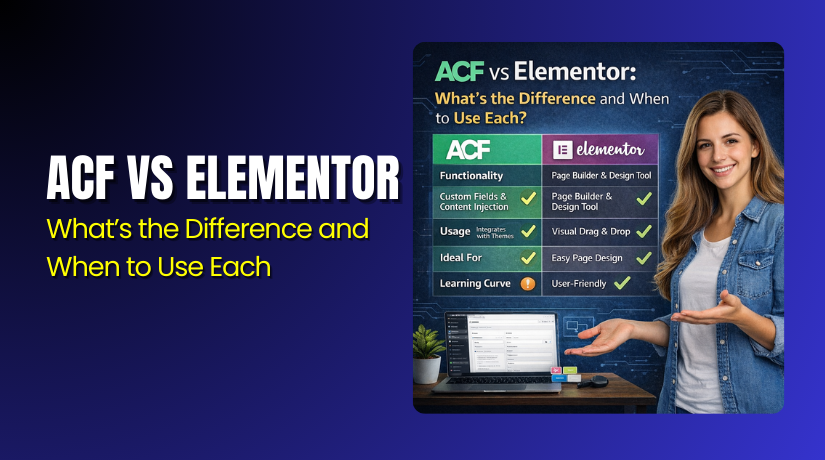
ACF vs Elementor: What’s the Difference and When to Use Each?
Table of Contents
- Introduction: Why this choice matters
- What ACF and Elementor actually do
- How they work behind the scenes
- Key differences that impact real websites
- When ACF is the better choice
- When Elementor is the better choice
- Conclusion
- FAQs
Introduction: Why this choice matters
Choosing the right tool saves time and reduces future problems. Many WordPress users want a site that looks great quickly. Others want clean content that stays organized for years. ACF and Elementor help in different ways. They are not direct replacements for each other. One focuses on structured content and data control. The other focuses on visual design and layout speed. If you pick the wrong tool, updates can feel confusing later. You may also face slow pages or messy editing screens. This guide helps you understand both tools clearly. You will know which one fits your website goals. You will also learn when using both makes sense.
What ACF and Elementor actually do
ACF in simple terms
ACF stands for Advanced Custom Fields in WordPress. It lets you add custom fields to your WordPress content. These fields store extra information in a clean way. Many users ask, what does acf do in wordpress in real terms. It helps you create a better content entry system. It also helps you avoid messy copy and paste layouts. You can create fields like text, images, links, and dropdowns. You can also create repeatable sections for similar pages.
ACF is useful when your site needs consistent content patterns. For example, a service page may need fixed sections always. A product page may need extra specs and highlights. A location page may need hours and a map link.
ACF is commonly used for structured content like these:
- Service details like pricing, features, and process steps
- Team member profiles with role, photo, and social links
- Testimonials with name, rating, and verified source
- WooCommerce product fields like materials, size, and warranty
- Directory style pages like locations, listings, or providers
ACF does not design the page by itself. It mainly creates clean fields for content entry. Then your theme or template displays that content nicely.
Elementor in simple terms
Elementor is a visual page builder for WordPress. It lets you design pages using a drag and drop editor. Many users ask, what is elementor used for on real websites. It is used for building layouts without coding. You can create sections, columns, and styled blocks fast. You can also add buttons, forms, images, and sliders.
Elementor is useful when design speed is the main goal. It helps when you want a landing page quickly. It also helps when you need flexible page layouts. Many marketers like it for quick page updates. Many small businesses like it for easy editing.
Elementor is commonly used for design tasks like these:
- Homepages with hero sections and feature blocks
- Landing pages for ads and special offers
- About pages with timelines and team sections
- Sales pages with pricing tables and FAQs
- Blog page templates with modern styling
Elementor focuses on how your content looks and feels. It helps you control spacing, colors, and page sections. It is best when you want visual control quickly.
How they work behind the scenes
ACF and Elementor work in very different ways. ACF focuses on storing structured content in the database. It adds fields to your WordPress editor screens. Those fields save clean values like text, numbers, links, and images. Then your theme or templates pull those values and show them. This keeps your content consistent across many pages. It also makes editing safer for non-technical users.
Elementor focuses on building the page layout visually. It saves design settings for sections and widgets. It stores styling, spacing, and layout structure for the page. You edit the page by moving blocks on screen. You see changes live while building the page. This makes design work faster for marketing teams.
This difference affects long-term site management. ACF keeps content separate from design decisions. Elementor blends content and layout inside page designs. Both approaches can work well with good planning.
Here is a simple behind-the-scenes view:
- ACF stores content as fields and keeps it organized.
- Elementor stores layout settings and controls page appearance.
- ACF works best with templates and reusable structures.
- Elementor works best with visual sections and quick changes.
Key differences that impact real websites
Content control vs design control
This is the biggest difference between acf and elementor. ACF gives you content control through structured fields. Elementor gives you design control through visual page building. If you need a clean editing experience, ACF helps more. If you need quick layout updates, Elementor helps more.
ACF is stronger when you want clear content rules. You can guide users with labels and field types. You can prevent errors with dropdown choices and toggles. You can also keep the same structure on every similar page. This helps when your site grows and adds many pages.
Elementor is stronger when you want design freedom. You can create unique sections for each page. You can adjust spacing and styles without code. You can also build pages faster than classic theme editing. This helps when marketing needs frequent updates.
ACF gives better content control in cases like these:
- Many service pages that must follow one fixed format
- Team profiles that need the same fields on each profile
- Product extra details that must stay consistent and clean
- Location pages with repeating items like hours and contacts
Elementor gives better design control in cases like these:
- Landing pages for ads with fast design changes
- Homepage redesigns without touching theme files
- Promo pages for sales, events, and product launches
- Custom layouts for brand storytelling and visuals
Long-term scalability
Scalability means how well your site handles growth over time. ACF scales well for content-heavy websites and large catalogs. It keeps editing simple even with hundreds of pages. It also supports repeatable content blocks and field groups. This helps you maintain the same layout and structure.
Elementor scales best for design-heavy sites and fast campaigns. It works well when pages are mostly unique. It also works well when the team edits pages weekly. But too many custom layouts can become hard to manage. It may also create style differences across similar pages.
A practical way to choose is simple:
- If content must stay uniform, choose ACF first.
- If design changes often, choose Elementor first.
- If both matter, use them together carefully.
Dynamic content handling
Dynamic content means showing changing data in a designed layout. ACF is built for dynamic content from day one. You create fields, then display them inside templates. This keeps the same layout across many similar pages. It also keeps every page consistent for visitors and editors.
Elementor can also show dynamic content in many setups. You can connect widgets to post fields and templates. This works well when your design needs quick changes. But the content structure must still be planned first. Otherwise, pages can become messy and inconsistent over time.
ACF works best for dynamic content like these:
- Service pages with fixed sections and repeatable field groups
- Product details that must stay consistent across categories
- Location pages with hours, maps, and contact details
Elementor works best for dynamic display like these:
- Blog templates with styled headings, images, and author boxes
- Landing pages that reuse the same blocks across campaigns
- Visual layouts that still pull data from existing content
Performance and page speed considerations
Page speed affects SEO and user trust in the USA market. ACF is usually light because it stores simple field data. The final speed depends on your theme and templates. Clean templates often load faster and stay stable.
Elementor adds extra design layers and front-end assets. This can increase page size and script loading. It does not mean Elementor is always slow. But heavy pages can happen without careful building choices.
To keep Elementor pages fast, focus on these basics:
- Use fewer widgets and avoid too many animations
- Reuse templates instead of building every page differently
- Compress images and avoid oversized background videos
- Use caching and a good CDN setup
Maintenance, handoff, and team workflow
ACF is great for teams that need clean editing screens. Editors fill fields and follow a clear structure. This reduces mistakes and keeps pages uniform. It also helps when many people manage content weekly.
Elementor is great for teams that manage design daily. Marketers can change layouts without developer help. This speeds up updates and testing. But it can also invite inconsistent styling choices.
ACF is easier to hand off when clients edit content often. Elementor is easier to hand off when clients edit layouts. The best workflow depends on who updates the site.
Theme dependence and portability


ACF content is stored as fields inside WordPress. Your templates decide how that content appears on pages. If you change themes, you may need new templates. But your field data still stays in the database.
Elementor designs are builder-based and saved as layouts. If you switch away, layouts may not carry perfectly. You may need to rebuild some pages after major changes. This is normal for most page builders today.
A smart rule helps most site owners:
- Use ACF for structured content that must survive redesigns
- Use Elementor for fast design control and visual page building
When ACF is the better choice
ACF shines when your website needs clean and repeatable content. It is built for structure, not free-style page building. This helps when your site grows with many similar pages. It also helps when multiple people edit content often. You avoid broken layouts and random formatting issues.
ACF is a strong fit when you need consistent page sections. You can guide editors with clear labels and field types. You can also limit mistakes using dropdowns and toggles. This makes content updates faster and safer over time.
Use ACF when you want these results:
- You need the same layout on many service pages.
- You manage directories, listings, or location-based pages.
- You need extra WooCommerce product details and attributes.
- You want cleaner SEO structure and better content consistency.
- You want easier long-term maintenance and fewer design surprises.
ACF is also great for agencies and developers building client sites. It creates a predictable editing system for every new page. It keeps data separate from design changes and redesigns. That is helpful for long-term growth and stability.
When Elementor is the better choice
Elementor is best when speed and design control matter most. It helps you build pages fast without touching code. You can design layouts in a visual editor and publish quickly. This is ideal for marketing pages and quick business updates.
Elementor also works well when you want unique page designs. You can build custom sections for different goals and audiences. You can test different layouts and adjust content fast. This is useful for USA businesses running ads and campaigns.
Use Elementor when you want these results:
- You need landing pages for ads and lead generation.
- You want fast page edits without developer help.
- You want full control over spacing, colors, and sections.
- You need quick promo pages for sales or seasonal offers.
- You want modern layouts for homepages and brand pages.
Elementor is also a great choice for small teams. It reduces the time needed for design updates. It helps you launch faster and keep pages looking polished. It works best when you follow a style system and stay consistent.
When using ACF + Elementor together is the smartest move
Many websites need both structure and design speed. In that case, using ACF and Elementor together works well. ACF can store clean and repeatable content fields. Elementor can display those fields in a polished layout. This gives you control without slowing your team down.
This combo is ideal when pages follow the same content pattern. It is also ideal when you want flexible design changes. You avoid messy editing screens and random formatting problems. You also keep your content ready for future redesigns.
Common examples where this combo works great:
- Service pages with fixed sections and clean layouts
- Location pages with hours, maps, and contact details
- Product highlight blocks showing specs and key benefits
- Blog templates pulling author, date, and custom review fields
A quick decision checklist to choose confidently
Many readers ask, acf or elementor which is better for their site. The best answer depends on your website goals. Use this checklist to decide in minutes. It keeps your choice clear and practical.
Choose ACF first if these are true:
- You have many similar pages with the same structure.
- You need clean editing screens for content updates.
- You want strong control over content consistency and SEO.
Choose Elementor first if these are true:
- You need fast page designs and quick layout changes.
- You run campaigns and want landing pages often.
- You want visual control without developer support.
Choose both if these are true:
- You need structured content plus fast design freedom.
- Your team edits content, and marketing edits design.
- You want long-term stability with modern page layouts.
Common mistakes to avoid
Both tools work best with a clear plan. Many problems happen due to rushed setup. Avoid these mistakes to keep your site clean and fast.
Common issues to avoid:
- Building every page with a totally different design style
- Adding too many widgets, effects, and heavy sections
- Creating ACF fields without a clear content structure plan
- Mixing content and design so editing becomes confusing later
Conclusion
ACF helps you build structured content that stays clean. Elementor helps you build pages fast with visual control. Use ACF for consistency and long-term growth. Use Elementor for quick layouts and marketing updates. Use both when you need structure and design together. If you want expert help with setup, speed, and clean templates, contact WooHelpDesk for professional WordPress support.
FAQs
1) Can ACF replace Elementor for design work?
ACF does not build layouts by itself. It creates fields and content structure. You still need templates or a builder for design.
2) Can Elementor replace ACF for structured content?
Elementor can show dynamic content in some cases. But it is not a full content structure system. ACF gives better control for repeatable content.
3) Which is better for WooCommerce product pages?
ACF is great for extra product fields and specs. Elementor is great for design and layout presentation. Many stores use both for best results.
4) Will these tools slow down my site?
ACF is usually lightweight and clean. Elementor can become heavy with too many widgets. Good hosting, caching, and clean builds reduce this risk.
5) Do I need coding to use ACF effectively?
Basic ACF use needs no coding for fields. But templates may need developer help. Many site owners still use ACF with minimal code support.
6) Can I switch away later without rebuilding everything?
ACF data stays stored inside WordPress fields. Elementor layouts may need rebuilding if you leave the builder. Planning early makes future changes easier.