How to Set Up Tax Exempt in woocommerce
Table of Contents
- Introduction & Overview
- What Is Tax Exempt for WooCommerce?
- Key Features of Tax Exempt for WooCommerce
- Step-by-Setup Process for Tax Exempt for WooCommerce
- Customer Experience with Tax Exemption
- Important Limitations to Keep in Mind
- Use Cases for U.S. Merchants
- Conclusion
Introduction & Overview
Running an online store in the U.S. often means collecting sales tax. But not every customer is required to pay it. For example, nonprofits, government agencies, and resellers may be exempt from sales tax. Handling these exemptions manually can be time-consuming and lead to mistakes.
That’s where Tax Exempt for WooCommerce comes in. This plugin lets store owners easily manage tax-exempt customers. Whether you’re running a B2B site or selling to nonprofit groups, this tool helps you stay compliant and save time.
The plugin makes it simple to allow certain users to skip tax charges at checkout. It also provides a full approval system for customer-submitted tax documents. If you’re looking for a way to automate tax exemption inside WooCommerce, this plugin is built for you.
What Is Tax Exempt for WooCommerce?
Tax Exempt for WooCommerce is a paid extension developed by Addify. It allows store owners to manage tax exemption by user roles or individual customers. You have two options: manually issue exemptions or allow them to fill out a form with their tax information.
Once approved, taxes are either removed automatically or through a checkbox at checkout. Both the customer and the store administrator benefit from this seamless experience.
The plugin includes key tools like:
- A tax exemption form in the customer’s My Account page.
- A system for approving submitted tax certificates.
- A checkbox for tax exemption on the payment page.
- Email alerts for customers and admins during the approval process.
- Compatibility with WooCommerce’s native features and checkout blocks.
It also supports different workflows. Admins can either approve exemptions manually or assign them directly without customer input.
For U.S.-based merchants, especially those working with wholesalers or non-taxable organizations, this plugin solves a real problem. It automates a process that would otherwise take time and increase errors. Most importantly, it keeps the shopping experience simple and professional for your customers.
Key Features of Tax Exempt for WooCommerce
WooCommerce’s Tax Exempt is designed to manage tax exemption effectively. It gives store admins control while keeping things easy for customers. Below are the most important features the plugin offers.
Customer-Specific and Role-Based Tax Exemption
The plugin allows you to exempt taxes for:
- Specific customers
- Entire user roles like “wholesale” or “nonprofit”
This is helpful if you know who qualifies in advance. You can grant tax exemption manually without needing form submissions. These customers won’t have to pay taxes when they check out.
Customizable Tax Exemption Form
Some stores may want customers to submit proof before removing taxes. Tax Exempt for WooCommerce adds a tax form under the My Account page.
You can:
- Customize the field labels
- Collect two text inputs (like business name or ID)
- Allow file uploads for tax certificates
- Set accepted file formats like PDF or JPG
Customers fill out the form and upload required documents. This is ideal for stores needing legal proof before removing tax.
Admin Approval System
Once a customer submits their form, it goes to the admin. You get an email alert to review the request. From the user’s profile in the backend, you can:
- Approve or reject the request
- Set an expiry date for approved exemptions
Customers can see the status in their account. It will appear as rejected, approved, or pending.
Checkout Tax Removal (Manual or Auto)
After approval, customers can remove tax at checkout. A checkbox will appear labeled something like “Claim Tax Exemption.”
You can also turn this off and auto-remove taxes for approved users. When a customer’s orders are all tax-exempt, this setting is useful.
Guest Checkout Notice
If a guest visits the checkout page, you can show a message. Example:
“Want to claim tax exemption? Click here.”
This message can link to:
- A login or register page
- A page with tax exemption details
This helps alert users that tax exemption is available.
Exemption Status Visibility
Once a customer is approved, their exemption status is visible:
- In the My Account section
- On the checkout page (via checkbox)
- In order confirmation emails
- In order details (admin and customer views)
- On the thank you page
This makes the process clear and professional for all users.
Email Notifications
Email updates are sent automatically at every step:
- When a customer submits the form
- When a request is approved or rejected
- When an exemption expires
Both admin and customer receive updates. Email templates are customizable in WooCommerce settings.
AvaTax Compatibility
The plugin is partially compatible with the WooCommerce AvaTax extension. However, the checkout checkbox won’t work with AvaTax. If using AvaTax, you must enable automatic tax removal in the plugin settings.
Step-by-Setup Process for Tax Exempt for WooCommerce
Setting up Tax Exempt for WooCommerce is simple. The plugin is designed to blend into your existing WooCommerce setup. This step-by-step guide will help you configure the plugin correctly and start offering tax exemption.
- Activate the Plugin
First, install and activate Tax Exempt for WooCommerce from your WooCommerce account. Once activated, you’ll see a new menu item:
WooCommerce > Tax Exemption
This is where you’ll manage all plugin settings.
- Access Tax Exemption Settings
Click on WooCommerce > Tax Exemption in your dashboard. This opens the settings page. You’ll find several tabs here to manage:


- General settings
- User roles
- Customer lists
- Form customization
- Email notifications
You’ll use these tabs to configure how tax exemption works on your site.
- Configure the Exemption Form
Under the General tab, you can set up the customer-facing form.
This form appears in the My Account section for eligible users. You can:
- Add two text input fields (e.g., Company Name, Tax ID)
- Enable one file upload field
- Choose which file types to accept (e.g., PDF, JPG)
This form allows customers to upload tax certificates and submit a request for exemption.
- Set Up Checkout Behavior
The plugin gives two ways to handle tax at checkout:
- Show a checkbox labeled “Claim Tax Exemption”
- Or automatically remove tax from all orders
To choose, go to WooCommerce > Tax Exemption > General and enable or disable the checkbox. If disabled, tax will be removed automatically for approved customers.
- Assign Tax Exemption to Customers or Roles
You can grant tax exemption without needing form submission.
To do this:
- Go to the Customers tab under plugin settings
- Select individual users and mark them as tax exempt
You can also allow entire user roles to bypass tax. Simply select the roles from the User Roles tab’s dropdown menu.
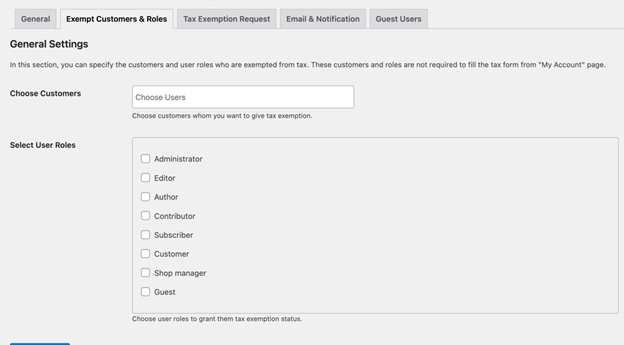
This is helpful for wholesale or nonprofit roles that always qualify.
- Enable Form Submission by User Roles
Not all roles should see the form. You can limit who can submit tax info.
In the settings, select which user roles can access the exemption form. Only those roles will see the Tax Exemption tab in their My Account section.
- Customize Email Notifications
Go to WooCommerce > Settings > Emails to manage email templates.
The plugin sends alerts for:
- Form submission
- Approval or rejection
- Expiry of tax exemption
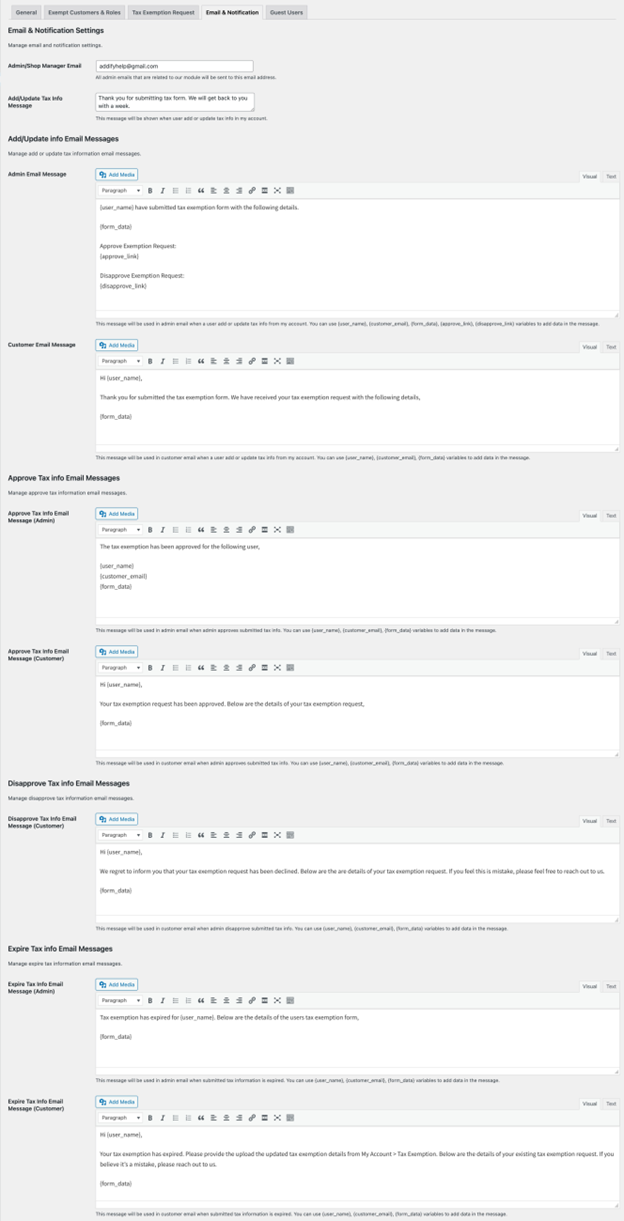
You can customize the content, subject line, and who receives them. Variables like {username} or {form_date} can be added to personalize emails.
- Add a Guest Checkout Notice
Inform visitors that there is a tax exemption available.
Enable a message like:
“Want to claim tax exemption? Click here.”
This message can link to your login or registration page. It helps turn guests into registered users who can apply for exemption.

- Test the Full Workflow
After setup, test the system end-to-end:
- Log in as a test user
- Submit a tax exemption form
- Approve the request from admin
- Place a test order and verify tax removal
- Check emails and account status
Testing ensures your exemption process works smoothly for real customers.
Customer Experience with Tax Exemption
Tax Exempt for WooCommerce not only simplifies admin work but also improves the customer journey. When set up correctly, the tax exemption process is smooth and easy for shoppers. Here are some things you should know before using the plugin and what customers can anticipate.
The plugin is made to function in a manner that customers are accustomed to. Here’s what the process looks like from the customer’s side:
- Customers log in and go to My Account > Tax Exemption
- They fill out the form and upload required documents
- The system shows their status as Pending, Approved, or Rejected
- If approved, a checkbox appears at checkout: “Claim Tax Exemption”
- When selected, the tax is removed from their order total
- All exemption info is shown on:
- Order confirmation email
- Thank You page
- Customer order detail page
This clear visibility keeps customers informed at every step.
Important Limitations to Keep in Mind
While powerful, the plugin has a few limits you should know.
- No partial exemptions: It removes all tax or none. You can’t apply half rates.
- No split tax exemption: If your store uses both federal and state taxes, both are removed. You can’t keep one and remove the other.
- Limited AvaTax support: The Manual checkbox doesn’t work with AvaTax. You must use the auto-remove option.
Knowing these limits helps avoid confusion during setup or support.
Use Cases for U.S. Merchants
Many U.S.-based stores benefit from offering tax exemption. Here are some common examples:
- Wholesale stores selling to resellers with valid tax IDs
- Nonprofits and government agencies with exemption certificates
- Educational institutions or other tax-free organizations
- Stores operating in tax-free U.S. states or local regions
- B2B operations with pre-approved accounts by role
By using Tax Exempt for WooCommerce, you streamline orders for these groups. You also avoid manual tax adjustments or refunding tax later.
Conclusion
Tax Exempt for WooCommerce is a complete solution for managing tax-exempt sales. It helps store owners automate approvals, improve customer experience, and stay compliant with tax laws. Whether you’re selling to nonprofits, resellers, or other tax-exempt customers, this plugin takes the manual work out of the process.
If you’re looking to simplify your tax setup, now is the time to install and configure Tax Exempt for WooCommerce. It saves hours of admin time and helps your business run smoother.
Need help setting it up or customizing it for your store?
👉 Contact WooHelpDesk today for expert WooCommerce and WordPress support.
📞 Call us at +1 888 602 0119 (US & Canada)— we’re here to help your store grow faster and smarter.



