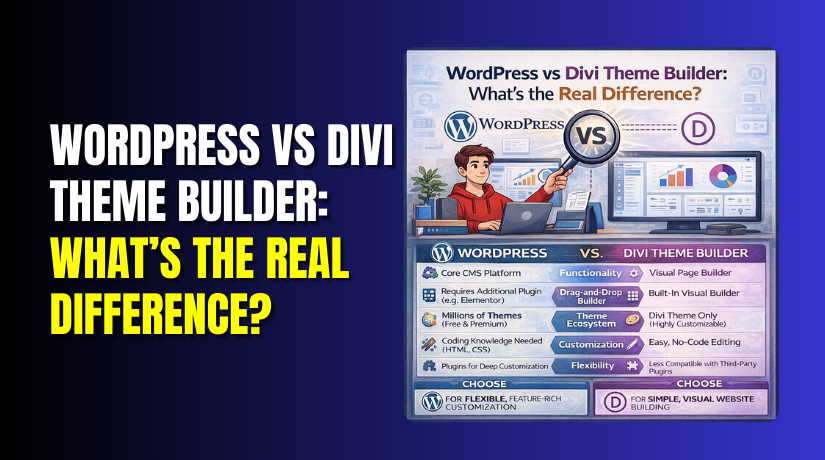
WordPress vs Divi Theme Builder: What’s the Real Difference?
Table of Contents
- Introduction
- What Is WordPress and Why It Powers Most Websites Today
- What Is Divi Theme Builder and Why Many WordPress Users Choose It
- What is the Difference Between WordPress and Divi?
- Which Is Better to Choose: WordPress or Divi Theme Builder for Your Website Goals
- Conclusion
Introduction
Many people search WordPress vs Divi when building a new website. They want a clear answer before spending time and money. This topic is confusing because both names feel similar. But they are not the same type of tool at all. WordPress is a website platform you install and manage. Divi is a theme builder you use inside WordPress. That is the real reason this debate exists online. When you understand this, everything becomes much easier.
This guide will explain the difference between WordPress and Divi clearly. It will also help you choose the right setup for your goals. You will learn what WordPress does behind the scenes. You will also learn what Divi changes on the front end. So you can decide based on real needs, not hype. By the end, the WordPress vs Divi theme confusion will be gone. You will know when to use WordPress alone. You will know when to add Divi for design control. This is the best way to choose a smart website path.
What Is WordPress and Why It Powers Most Websites Today
WordPress is a content management system used for websites. Many people call it a website platform or a CMS. In simple words, WordPress helps you create and manage pages. It also helps you publish blog posts in a clean way. When people say WordPress CMS vs Divi, they compare a platform to a tool. WordPress is the base system that runs the website. It stores your content and manages your site settings. It also controls users, menus, and media uploads.
WordPress is not only for blogs anymore. It is used for business sites and online stores too. You can build landing pages, portfolios, and service websites. You can also build WooCommerce stores and sell products online. This is why WordPress is so popular worldwide. It gives freedom with themes and plugins for features.
What Is Divi Theme Builder and Why Many WordPress Users Choose It
Divi Theme Builder is a visual website building system for WordPress. It helps you design pages without writing custom code. Divi is not a separate platform like WordPress itself. It works inside WordPress as a theme and builder. That is why people compare WordPress vs Divi online so often. The truth is simple and very important here.
WordPress runs the website and stores the real content. Divi controls how that content looks on the front end. This is the core difference between WordPress and Divi for most users. If you want design freedom, Divi can be helpful. If you want only content publishing, Divi may be optional.
What is the Difference Between WordPress and Divi?
This section clears the difference between WordPress and Divi in practice. Think of WordPress as the engine and control panel. Think of Divi as the design tool you add on top. This is why WordPress vs Divi comparisons often feel confusing. Now let’s break it down in simple, real-world points.
WordPress
- 1) WordPress is the base system that runs your whole website. WordPress is the base system that runs your whole website. It stores pages, posts, users, and settings in a database. This is the real foundation behind WordPress CMS vs Divi comparisons.
- 2) WordPress manages content first, before design and layout choices. WordPress is built for publishing content in a clean way. Posts, pages, categories, and tags are core features here. Divi changes how content looks, not how WordPress stores it.
- 3) WordPress works with any theme, not just one builder. You can switch themes without changing the platform itself. Your content stays, even when the design changes fully. This matters when comparing Divi theme vs WordPress theme choices.
- 4) WordPress supports many editors, including Gutenberg and builders. You can use the Block Editor for simple page layouts. You can also add builders like Divi for visual control. That flexibility makes WordPress vs Divi builder searches very common.
- 5) WordPress has a huge plugin ecosystem for extra features. Plugins add SEO, security, forms, backups, and caching tools. You can build stores, courses, and memberships using plugins. Divi can reduce design plugins, but not feature plugins.
- 6) WordPress gives better portability when you change designs later. You can change themes and still keep your core content intact. WordPress keeps your posts readable inside the editor and database. This is a key point in WordPress vs Divi theme decisions.
- 7) WordPress performance depends on hosting, theme, and plugin choices. A light theme and fewer plugins often load much faster. Good caching and images also improve speed a lot. WordPress gives you control to tune performance your way.
- 8) WordPress offers strong user roles for teams and site management. You can assign roles like admin, editor, and author. This keeps access safe and tasks clearly separated. It helps businesses manage content without constant developer help.
- 9) WordPress scales from small blogs to large business websites. You can start with five pages and grow to thousands. You can add features gradually as your needs expand. This long-term growth is a big WordPress advantage.
- 10) WordPress supports custom development when you need advanced changes. Developers can use hooks, custom themes, and custom plugins. You can build unique features without changing your platform. This freedom is why WordPress fits many project types.
- 11) WordPress handles core maintenance like updates and site health checks. You update WordPress core, themes, and plugins on schedule. You can also monitor errors, security, and performance issues. This keeps the website stable and predictable long term.
- 12) WordPress gives you many pricing paths, from free to premium. You can start cheap with free themes and basic plugins. You can scale into premium tools only when required. This flexibility fits new and growing businesses well.
Divi
- 1) Divi is a theme and builder that runs inside WordPress. Divi is a theme and builder that runs inside WordPress. It is not a replacement for the WordPress platform. This is the core truth behind Divi vs WordPress website builder debates.
- 2) Divi gives drag-and-drop design control for pages and sections. You build layouts using sections, rows, and content modules. You edit on the front end and see changes instantly. This makes WordPress vs Divi builder a popular choice for designers.
- 3) Divi offers ready layout packs to speed up page creation. You can import full pages and replace content quickly. This saves time when launching new service pages fast. It also helps beginners avoid blank page design struggles.
- 4) Divi Theme Builder creates site templates like headers and footers. You can design headers, footers, and post templates visually. You apply templates using rules for pages, posts, or categories. This adds strong design control beyond standard themes.
- 5) Divi includes global design tools for consistent branding everywhere. You can set global fonts, colors, and button styles. You can reuse modules and sections across many pages. This keeps the site consistent with less repeated work.
- 6) Divi is great for landing pages and marketing-style layouts. You can add sliders, CTAs, and feature sections quickly. You can create long pages with clear visual sections. This is why many compare WordPress vs Divi theme for marketing sites.
- 7) Divi can reduce the need for extra design plugins. Many styling needs are built into Divi modules already. You may not need extra layout or slider plugins. But you may still need feature plugins for advanced tools.
- 8) Divi content structure depends on the builder layout system. Divi stores page layouts using its own builder settings. If you remove Divi, layouts may not display the same. This is important when planning long-term portability.
- 9) Divi performance depends on how heavy your page design is. Large animations and many modules can slow pages down. Clean layouts, fewer effects, and caching can help a lot. Smart building keeps WordPress vs Divi sites fast and smooth.
- 10) Divi works well with WooCommerce for visual store design. You can design product pages using Divi Woo modules. You can customize shop pages and category layouts visually. This helps stores look modern without custom code work.
- 11) Divi is easier for non-technical users who need quick edits. Clients can update sections without touching theme files. Teams can build new pages using saved layouts and presets. This makes Divi popular for agency workflows and support teams.
- 12) Divi updates and licensing are tied to the Divi product. You must keep Divi updated for security and compatibility. License access helps you receive updates and support features. This is different from many free WordPress themes.
Which Is Better to Choose: WordPress or Divi Theme Builder for Your Website Goals
The best choice depends on what you want to build. WordPress is the base platform for your full website. Divi is a design builder that works inside WordPress. So the real choice is about your workflow and needs. Many searches for WordPress vs Divi miss this key point. You are not replacing WordPress when you use Divi. You are adding a builder to WordPress for design control. Now let’s choose the right option based on goals.
Choose WordPress First When You Want Simple and Strong Content Publishing


Choose WordPress first when content is your main focus. This works best for blogs, news sites, and learning sites. You get a clean writing workflow using the WordPress editor. You also keep your site lighter with fewer design layers. This helps speed, stability, and easier long-term maintenance. It also keeps your site more portable if you rebrand later. This is a smart path for many beginners and small teams. It also fits sites that publish weekly content and guides. If you want a simple structure, WordPress wins here. This is why WordPress CMS vs Divi is not a fair comparison. WordPress runs the system and holds all content safely.
Choose WordPress Plus Divi When You Want Fast Design and Full Visual Control
Choose WordPress plus Divi when design is a top priority. Divi helps you build pages using visual drag and drop. It is great for service pages, landing pages, and portfolios. It also helps agencies build client sites faster with templates. You can create global headers, footers, and post templates too. This keeps branding consistent across the whole website. Divi can be very helpful for non-technical teams. They can update layouts without touching code or theme files. This is the key value behind WordPress vs Divi builder searches. If you want quick visual changes, Divi is a strong choice.
Choose WordPress Plus Divi for WooCommerce When You Need Better Store Page Design
WooCommerce stores often need strong design and trust elements. Divi can help design product pages and shop layouts visually. You can add sections for shipping, reviews, and trust badges. You can also create category templates for product groups. This can improve the store look and help conversions too. But WooCommerce features still come from WordPress plugins. Divi mainly helps with layout and design presentation. This makes WordPress vs Divi theme a common question for stores. The right answer is WordPress for features, Divi for design.
Choose WordPress Without Divi When Speed and Clean Performance Matter Most
If speed is your top goal, keep the setup simple. Use a lightweight WordPress theme and avoid heavy effects. Use fewer plugins and strong caching for faster load times. This approach reduces code output and layout complexity. Divi can still be fast if built carefully and clean. But many sites use too many modules and animations. That can increase page size and slow performance. If you want the safest speed path, WordPress alone is easier. This decision also matters in Divi theme vs WordPress theme comparisons. Some themes are built only for speed and simplicity.
Conclusion
The real answer is simple and easy to remember. WordPress is the platform that runs your whole website. Divi is a builder that designs pages inside WordPress. That is the true difference between WordPress and Divi today. WordPress controls content, users, and site structure always. Divi controls layouts, templates, and visual styling on pages. So the real decision is about your workflow and goals. If content and speed matter, keep WordPress simple. If design and templates matter, add Divi for control. This is the most practical answer for WordPress vs Divi.
If your site is slow, broken, or hard to manage, get help. WooHelpDesk can help you choose the right setup fast. We can help with WordPress vs Divi theme decisions too. We can also fix layout issues, speed problems, and plugin conflicts. If you want a clean and fast website, contact WooHelpDesk today.



