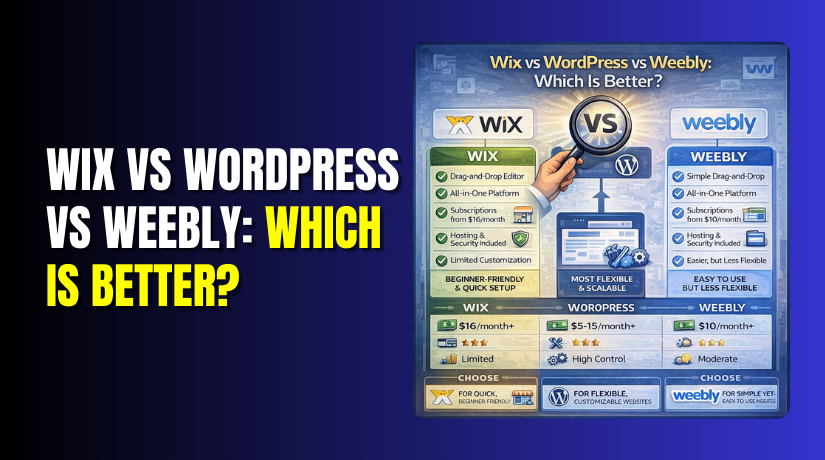
Wix vs WordPress vs Weebly: Which Is Better?
Table of Contents
- Introduction: Why This Comparison Matters
- Quick Verdict: Best Platform for Different User Types
- Wix vs WordPress vs Weebly — Key Comparison Criteria and Ease of Use
- Conclusion
Introduction: Why This Comparison Matters
Choosing a website platform feels simple, until real needs show up. Many USA users start with a quick site goal. They want a clean design, fast setup, and easy editing. They also want better Google visibility and steady traffic growth. Some need a blog for content and long-term search results. Others need a small store to sell products or services. That is why Wix vs WordPress vs Weebly is a common question. Each platform can build a site, but not equally. The best option depends on your control needs and growth plans. It also depends on how much time you can invest weekly. This guide helps you pick the right platform with clear reasons. You will see what fits your goals, skills, and budget. You will also avoid moving platforms later due to limits.
Quick Verdict: Best Platform for Different User Types
If you want the fastest start, Wix is usually simplest. If you want full control and long-term growth, choose WordPress. If you want a basic site with fewer choices, Weebly works.
Here is the easiest way to decide today:
- Best for growth and control: WordPress gives the most flexibility.
- Best for fastest setup: Wix helps you publish quickly.
- Best for simple basic websites: Weebly fits small, simple needs.
Pick based on your main use case:
- Small business website: Wix works fast for service pages and leads.
- Blogger and content creator: WordPress is strongest for blogging and SEO.
- Ecommerce starter: WordPress with WooCommerce scales better over time.
- Portfolio or one-page site: Wix and Weebly are quick options.
If you plan to expand later, think long-term today. WordPress can grow with your content, pages, and features. Wix can still grow, but some changes feel limited later. Weebly is fine for simple sites, but can feel basic sooner.
Wix vs WordPress vs Weebly — Key Comparison Criteria and Ease of Use
-
Ease of Use: Setup, Editor, and Learning Curve
Ease of use matters more than most people admit. If editing feels hard, content stops quickly. If setup feels confusing, your site launch gets delayed. So let’s compare how each platform feels day to day.
Wix Ease of Use
Wix is built for speed and simple editing. You can start without any tech skills. The editor is visual and feels like moving blocks. You can publish a basic site very quickly.
Wix is usually best when you want these benefits:
- Fast setup with guided steps and ready templates
- Simple drag-and-drop editing for pages and sections
- Built-in tools for forms, bookings, and basic marketing
- Easy updates without touching code or files
Wix is great for service businesses and simple sites. It fits salons, local services, and basic portfolios. It also works well for quick landing pages and promo sites. But heavy customization can feel limited later. Some layout choices can become harder to change at scale.
WordPress Ease of Use
WordPress has a learning curve, but it pays off. You get more control over design, SEO, and features. WordPress also gives you many theme and plugin options. This is why it remains a top choice for growth.
WordPress is usually best when you want these benefits:
- More control over pages, content, and site structure
- More design freedom using themes and page builders
- Strong blogging tools for long content and SEO growth
- Easy scaling for ecommerce, memberships, and advanced features
WordPress can feel complex at the start for beginners. You must choose hosting, a theme, and plugins carefully. Updates and security also need attention over time. Still, if you want long-term growth, WordPress wins often. Many businesses prefer it because it can adapt.
Weebly Ease of Use
Weebly is simple and easy for basic sites. The editor is clean and beginner-friendly. You can build a small site with limited choices fast. It is often used for simple business pages and basic online stores.
Weebly works best for these situations:
- Small websites with fewer pages and basic content
- Users who want a simple builder with fewer options
- Basic edits without learning new tools every week
Weebly can feel limited when your site grows. The app ecosystem is smaller than Wix and WordPress. Custom design and deeper SEO control can also feel restricted. If you want simple and steady, Weebly fits. If you want more growth, it may feel small later.
-
Design and Customization: Templates, Flexibility, Control
Design is not only about looking good on day one. It also decides how easily you can grow later. Many USA users start with a template and launch fast. Later they want new pages, new sections, and better conversions. So design flexibility matters in this Wix vs WordPress vs Weebly comparison.
A good platform should help you do these things easily:
- Build pages that match your brand style
- Keep the layout clean on mobile devices
- Add new sections without breaking older pages
- Improve your site layout based on user behavior
- Support growth without forcing a full redesign later
Now let’s compare each platform for real customization needs.
Wix Design Options
Wix gives you many modern templates and design styles. The editor is visual and easy to control. You can place elements where you want in many cases. This makes Wix feel flexible during early design work.
Wix design strengths include:
- Large template library for many industries
- Visual editor that feels simple and fast
- Easy section edits like hero, services, and testimonials
- Built-in design tools like animations and galleries
Wix is great when you want fast design without hiring help. You can create a good looking site in one weekend. It also supports mobile views with separate editing controls. That helps when your layout needs small mobile fixes.
But Wix also has design limits at scale. Some templates are not easy to switch later. If you want a full redesign, you may rebuild pages again. So Wix works best when your layout plan is clear early.
WordPress Design Options
WordPress gives deep design control and long-term flexibility. You can choose from thousands of themes for any style. You can also use page builders if you want visual editing. This makes WordPress strong for custom branding and growth.
WordPress design strengths include:
- Huge theme choices for business, blogs, and ecommerce
- Full control over layouts, headers, and page templates
- Page builders for visual editing without writing code
- Easy redesign later by switching themes and styles
WordPress also supports custom design work very well. Developers can create custom themes and templates as needed. That is useful for agencies and growing businesses. It also helps when you want unique landing pages for marketing.
The main point is simple. WordPress gives more freedom than builders. It can handle small sites and large sites equally well. That is why many brands pick WordPress for long-term plans.
Weebly Design Options
Weebly offers simple templates and basic editing features. The builder is easy to understand and use daily. It works well for small websites with limited design needs. Many users like it because it feels less complex.
Weebly design strengths include:
- Simple template setup for quick launches
- Easy edits for text, images, and sections
- Clean layouts that work for basic business sites
Weebly can feel limited for advanced design work. Template options are fewer than Wix and WordPress. Layout control is also more basic in many cases. If you want a unique brand layout, you may outgrow it.
Best Choice for Branding and Unique Layouts
If branding matters a lot, WordPress often fits best. It supports deeper customization without platform limits. Wix is strong for fast design and modern templates. Weebly is best for basic sites with fewer custom needs.
-
Blogging and Content Publishing: Best Pick for Content Creators
Blogging is a key growth tool for many USA businesses. It drives traffic, builds trust, and supports SEO goals. But blogging tools are not equal across platforms. This section helps you pick the best option for content growth.
WordPress Strengths for Blogging Growth
WordPress is built for publishing and content management. It offers strong control over categories and site structure. It also supports long posts and content planning easily. This is why many creators trust WordPress for SEO.
WordPress blogging advantages include:
- Better control over categories, tags, and internal links
- Cleaner content structure for long posts and topic clusters
- More plugin options for SEO, schema, and editorial workflows
- Easier scaling from ten posts to thousands of posts
If content is your main growth plan, WordPress is hard to beat.
Wix Blogging Tools and Common Limits
Wix blogging has improved, and it works for many users. You can publish posts and manage basic content easily. It also offers nice design blocks for blog layouts. This helps if you want a blog that looks modern fast.
Wix blogging works well for:
- Small business updates and short blog posts
- Simple content plans with basic categories
- People who want quick publishing without setup
But advanced blogging needs can feel limited later. Some SEO controls and site structure options are tighter. For heavy content growth, WordPress usually performs better.
Weebly Blogging Basics and Who It Suits
Weebly supports basic blogging, but it is simple. It fits small blogs and light publishing needs. If you only need occasional posts, it can work fine. But it is not ideal for serious content growth.
Weebly blogging fits best for:
- Small sites with occasional updates
- Simple blogs without complex structure
- Users who want fewer tools and fewer settings
If blogging is a major goal, WordPress is the best choice. If blogging is secondary, Wix can still work well. If blogging is minimal, Weebly can be enough.
-
Ecommerce and Payments in the USA: Selling Products and Services
Many people choose a platform because they want sales. Some want to sell products online quickly. Others want to sell services, bookings, or digital files. Ecommerce needs can change fast after your first launch. That is why ecommerce matters in Wix vs WordPress vs Weebly. The right choice depends on what you sell and how fast you plan to grow.
A good ecommerce platform should help you do these things:
- Add products and manage inventory with less effort
- Offer smooth checkout and trusted payment options
- Support taxes and shipping rules for USA buyers
- Improve conversions with upsells and clean product pages
- Scale without forcing a full platform change later
Now let’s compare ecommerce tools in each platform.
WordPress + WooCommerce: Strong for Scaling Stores
WordPress becomes a full ecommerce system with WooCommerce. It gives deep control over product pages and checkout flow. It also offers huge flexibility through extensions and plugins. This is why many USA store owners choose WooCommerce for growth.
WordPress + WooCommerce is great for these ecommerce needs:
- Physical products with complex shipping and tax rules
- Large catalogs with variants and custom product fields
- Custom checkout fields and advanced payment workflows
- Memberships, subscriptions, and customer accounts
- SEO-driven product pages and category structure
WooCommerce also works well for service businesses. You can sell service packages, consultations, and digital downloads. You can also connect bookings and appointment tools as needed. That makes WordPress a strong pick for business owners. It supports both content and sales under one roof.
The main tradeoff is setup and maintenance. You must choose hosting and keep plugins updated. You also need good security and backups for safe selling. Still, the control and growth value is hard to match.
Wix Ecommerce: Best for Quick Stores and Simple Selling
Wix ecommerce is easier to start than WooCommerce. You can launch a small store fast with built-in tools. It also offers smooth product setup and clean design templates. Many small businesses like Wix for quick selling.
Wix ecommerce works best for:
- Small to mid stores with a limited product range
- Simple shipping rules and basic tax settings
- Quick setup without dealing with hosting choices
- Service businesses selling packages or bookings
Wix also offers app add-ons for extra features. That can help with marketing and basic store growth. But deeper customization can become harder later. Some advanced checkout changes may be restricted. If you want full control, WordPress often wins.
Weebly Ecommerce: Basic Stores With Fewer Advanced Options
Weebly offers ecommerce, but it is more basic. It works for small catalogs and simple selling needs. The editor is easy, and store setup is quick. Many users choose it for a simple store and simple pages.


Weebly ecommerce is best for:
- Very small stores with basic products
- Simple checkout and limited customization needs
- Users who want fewer settings and fewer add-ons
Weebly can feel limited if your store grows quickly. Advanced SEO, custom product layouts, and scaling options may not match others. So Weebly is fine for basic ecommerce. But it may not be the best long-term option.
Best Choice for Digital Products, Services, and Physical Products
Use this simple selection guide for ecommerce:
- Choose WordPress + WooCommerce for serious growth and flexibility.
- Choose Wix for quick selling with clean, simple store setup.
- Choose Weebly for basic selling and small catalogs only.
Match the platform to what you sell:
- Digital products: WordPress is best for flexible delivery and control.
- Services and packages: Wix and WordPress both work very well.
- Physical products: WordPress scales better with shipping and rules.
- Large catalogs: WordPress is usually the safest long-term choice.
-
Pricing and Long-Term Cost: What You Pay Over Time
Pricing can look simple at first, but it changes later. Many people compare monthly plans only and decide fast. But long-term cost includes add-ons, upgrades, and growth needs. So cost matters in Wix vs WordPress vs Weebly.
Here is how the cost models work in real life.
Hosted Builders vs WordPress Hosting Model
Wix and Weebly usually work on monthly plans. The plan often includes hosting and basic features. You pay regularly and the platform handles the tech side.
WordPress works differently and gives more choices. You pay for hosting and a domain separately. You may also pay for premium themes or plugins later. But you can control what you buy and when.
Common Hidden Costs to Watch
No matter what platform you choose, extra costs show up later. These usually come from apps, add-ons, and growth features.
Watch for these long-term costs:
- Extra apps for forms, email, SEO, and marketing tools
- Ecommerce upgrades for better checkout and advanced selling features
- Premium templates, premium themes, or design add-ons
- Paid extensions for shipping, subscriptions, and automation
- Growth costs when you need better speed and performance
Long-Term Value Comparison
If you want the simplest predictable monthly cost, Wix can feel easier. If you want basic low-complexity setup, Weebly may feel affordable. If you want long-term control and scaling value, WordPress often wins. WordPress may cost more to set up, but it can pay off later. It also gives more freedom when your business grows.
SEO Comparison: Control, Content, and Ranking Potential
SEO is the biggest deciding factor for many USA businesses. If you want traffic from Google, you need control. You also need a platform that supports clean structure and content growth. That is why SEO matters so much in Wix vs WordPress vs Weebly. All three can rank, but the level of control is different.
A platform helps SEO when it supports these basics well:
- Clean page titles and meta descriptions for each important page
- Proper heading structure that stays consistent across templates
- SEO-friendly URLs that you can edit and keep stable
- Easy internal linking between posts, pages, and categories
- Fast loading pages that improve user experience
- Proper redirects when you change pages or move content
- Room to scale content without breaking structure later
Now let’s compare the SEO experience on each platform.
On-Page Control: Titles, Meta, Headings, and URLs
On-page SEO is where your ranking signals start. You need clear control over titles and descriptions. You also need clean headings and readable URL paths.
WordPress SEO control is usually the strongest. You can set titles and meta using SEO plugins. You can also manage headings and content layouts easily. WordPress also supports custom URLs and category structures.
Wix SEO control is solid for many small business sites. You can edit page titles and descriptions with ease. You can also change many URL settings and basic page SEO. Wix has improved a lot in recent years.
Weebly SEO control is more limited than the other two. It covers the basics, but advanced control is smaller. For many simple sites, it can still be enough.
For on-page SEO, focus on these best practices:
- Use one clear primary keyword per page or post
- Write simple titles that match real search intent
- Keep headings clean and easy to scan
- Use short URLs that describe the page topic
- Add internal links to helpful related pages
Blog Structure: Internal Linking, Indexing, and Content Growth
SEO growth depends on content depth over time. A platform should help you publish often and organize content. It should also help Google understand your site structure.
WordPress is built for publishing and structured content. You can organize posts with categories and tags easily. You can also build topic clusters and internal linking plans. This supports long-term rankings for competitive keywords.
Wix supports blogging and can rank for many topics. It works well for smaller content plans and simple site structures. If you publish weekly and keep content clean, Wix can perform well.
Weebly supports basic blogs, but scaling is harder. Content organization feels limited as the site grows. This can reduce long-term SEO potential for large content sites.
If SEO is your main traffic plan, you need consistency. Use a content plan that supports growth across months. Keep internal links strong and natural.
Redirects, Schema Basics, and Image Optimization
Technical SEO is not only for developers. It often comes down to a few key controls. These controls help prevent ranking drops during edits and updates.
Redirect control matters when you change URLs. If redirects are hard, rankings can drop quickly. WordPress gives more options for redirect handling using tools. Wix also supports redirects and makes them fairly easy. Weebly can be more limited depending on your setup.
Schema basics help search engines understand your content. WordPress offers many options through SEO plugins and schema tools. Wix includes some structured data features and supports basics. Weebly typically has fewer options without extra work.
Image optimization is vital for page speed and SEO. Large images slow pages and raise bounce rates. All three platforms need good image practices.
Use these image tips for better SEO and speed:
- Resize images before uploading them to your site
- Use clear file names that match the image topic
- Add helpful alt text for accessibility and SEO context
- Compress images to reduce file size and load time
Which Platform Gives the Best SEO Control Long-Term
For long-term SEO control, WordPress often ranks as the best choice. It offers deeper control and better content scaling options. Wix is strong for smaller sites and fast business launches. It can also rank well with good content and structure. Weebly works for basic SEO needs, but it can feel limited later.
-
Ownership and Portability: Can You Move Your Site Later?
Website ownership is a hidden factor in platform choice. Many users ignore it until they need a move. If you want full control over your site assets, portability matters. This includes content, design, and future platform options.
WordPress gives the strongest ownership and portability. You control hosting, files, and database content. You can move hosts, redesign, or rebuild without losing everything. This makes WordPress a safer long-term asset for growing businesses.
Wix and Weebly are hosted builders, so portability is limited. You can often export some content, but not everything. Design and structure migration can be hard. Many moves require rebuilding the site on a new platform.
If you think you may outgrow your platform later, plan now. Choosing the right platform early saves time and cost later.
-
Performance and Website Speed: What Impacts Load Time
Speed affects SEO, user trust, and conversion rates in the USA. A slow site loses visitors within a few seconds. This matters in every Wix vs WordPress vs Weebly decision. The good news is that all three can load fast. The difference is how much control you get over speed.
Here are the biggest factors that impact website speed:
- Image size and compression before uploading
- Extra apps, widgets, or plugins loading on each page
- Heavy animations, sliders, and video backgrounds
- Theme or template code that adds extra scripts
- Hosting quality and server resources for WordPress sites
- Too many fonts, icons, and tracking scripts
Hosting Control vs Hosted Platform Limits
Wix and Weebly are hosted platforms with managed infrastructure. You do not pick hosting or server settings. That keeps setup simple and reduces technical work. But it also limits deeper performance tuning.
WordPress gives you more performance control through hosting choices. You can choose faster hosting and better server resources. You can also use caching and performance plugins for speed gains. This is helpful when your site grows and traffic increases.
Apps, Plugins, Images, and Scripts Can Slow Any Site
Most speed problems come from extra features and heavy files. Wix users often add many apps to get more functions. Weebly users may add widgets that load external scripts. WordPress users may install too many plugins at once.
Use these simple speed habits on any platform:
- Keep only the apps and plugins you truly need
- Remove unused tools that load code on every page
- Compress images before upload and avoid huge PNG files
- Limit animations and avoid heavy background videos
- Use fewer fonts and keep design clean and simple
-
Security, Updates, and Maintenance: Who Handles What?
Security is not only about hacks and malware. It is also about updates and safe site management. This is another key part of Wix vs WordPress vs Weebly.
Wix and Weebly: Managed Security and Updates
Wix and Weebly handle core updates and platform security for you. You do not manage server updates or core patches. This reduces maintenance and lowers beginner mistakes. It is a good fit for busy owners who want simplicity.
Wix and Weebly are strong for:
- Users who want fewer technical tasks
- Small sites that need stable, managed updates
- Owners who prefer built-in platform security handling
WordPress: Shared Responsibility With More Control
WordPress gives more control, but needs more care. You must update themes and plugins regularly. You also need backups and security protection on your site. The work is not hard, but it must be consistent.
WordPress security best practices include:
- Keep WordPress core, themes, and plugins updated
- Use strong passwords and limit admin access
- Use security tools and regular backups
- Choose reliable hosting with good protections
If you want full control, WordPress is still worth it. You just need a simple maintenance routine.
Conclusion
Wix, WordPress, and Weebly can all build a solid website today. The best choice depends on your real business plan. Wix fits users who want quick setup and easy edits. WordPress fits users who want control and long-term SEO growth. Weebly fits users who want a simple site with fewer options. Think about future needs before you launch your site. A smart choice now saves time, money, and stress later. Focus on speed, clean design, and helpful content for users. That is how you earn trust and steady traffic over time.
Need Help Choosing or Fixing Your Site? Contact WooHelpDesk and get expert help from real WordPress pros.



