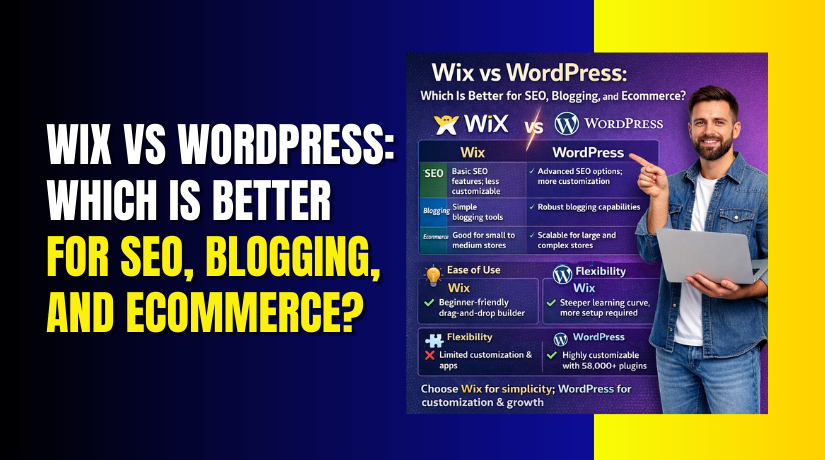
Wix vs WordPress: Which Is Better for SEO, Blogging, and Ecommerce?
Table of Contents
- Introduction
- Wix vs WordPress: Quick Overview for SEO, Blogging, and Ecommerce
- Wix or WordPress Which Is Better? A Simple Decision Framework
- Wix vs WordPress Pros and Cons
- Wix vs WordPress pros and cons for developers and SEO teams
- Best for Ecommerce SEO Wix or WordPress?
- Costs That Affect Your Decision (Wix vs WordPress)
- Conclusion
Introduction
Choosing the right platform can shape your online success. Many USA business owners start with one tool, then feel stuck later. This guide compares Wix vs WordPress with a clear, practical approach. You will learn how each platform supports SEO, blogging growth, and ecommerce sales. You will also see which platform fits your budget and time. If you want steady traffic, smart content, and better sales, keep reading. We will focus on real needs, not marketing claims. By the end, you will know Wix or WordPress which is better for your goals.
Wix vs WordPress: Quick Overview for SEO, Blogging, and Ecommerce
Wix and WordPress can both build modern, attractive websites. But they work in very different ways. Those differences affect control, growth, and long-term results. If you understand the basics first, the later choice becomes easier.
What Wix is (and who it fits best)
Wix is an all-in-one website builder with hosting included. You sign up, pick a design, and start building fast. You do not need to buy hosting separately. You also do not need to manage server settings. Wix is built for simplicity and speed.
Wix is often a good fit when you want:
- A quick site launch with minimal setup time.
- A simple editor that works with drag-and-drop blocks.
- Built-in tools for basic SEO and site settings.
- One dashboard for design, hosting, and updates.
Wix can work well for USA users like:
- Local service providers with a small website.
- New bloggers who want easy publishing.
- Small shops with a limited product catalog.
- People who do not want technical maintenance tasks.
Wix gives you a smooth start. But some advanced control can be limited. This matters more when traffic and content start growing.
What WordPress is (and who it fits best)
WordPress is a content management system you install on hosting. You choose your hosting provider and set up WordPress. After that, you can build almost any type of website. WordPress gives more control, more options, and more flexibility.
WordPress is often a good fit when you want:
- Strong control over structure, content, and site features.
- More choices for themes, plugins, and custom upgrades.
- Better long-term scaling for content and ecommerce.
- Full ownership of your site setup and data.
WordPress can work well for USA users like:
- Bloggers who want to grow traffic using content strategy.
- Businesses that need lead pages and SEO landing pages.
- Ecommerce stores planning to scale product pages.
- Teams that want deeper customization as they grow.
WordPress takes more setup time. But it rewards you with better control later.
The core difference that impacts SEO, blogging, and ecommerce
The biggest difference is control versus convenience. Wix is a hosted platform with guided options. WordPress is flexible and open with many possible setups. This difference affects your daily work and your long-term growth.
Here is the simplest way to see it:
- Wix is like renting a finished space with rules.
- WordPress is like owning a space you can redesign.
That matters for SEO, content growth, and ecommerce features. It also impacts how easily you can adjust things later.
Key areas affected by this difference:
- Site speed tuning and performance improvements.
- Page structure and how you organize content.
- Ecommerce features like checkout and product SEO.
- Blog growth tools like categories and internal linking.
This is why Wix vs WordPress is not only about design. It is about what you can control as your site grows.
Wix or WordPress Which Is Better? A Simple Decision Framework
People ask Wix or WordPress which is better for many reasons. The best answer depends on your main goal. Use this framework to decide based on outcomes, not opinions.
If your main goal is SEO growth
SEO growth needs steady content and strong site structure. You also need clean pages that load fast. Both platforms can rank, but the path can feel different.
Choose Wix when you need:
- A quick launch with basic SEO settings.
- Simple page edits without technical work.
- A smaller site with fewer pages to manage.
Choose WordPress when you need:
- More control over SEO structure and content expansion.
- Better options for SEO-focused plugins and tools.
- Stronger long-term scaling for content and pages.
If you plan to publish many pages, WordPress often fits better. If your site is small and stable, Wix can be enough.
If your main goal is blogging traffic
Blogging traffic grows from consistent publishing and smart internal linking. You also need a clear category structure and clean navigation. Content should be easy to update as you learn what works.
Choose Wix when you want:
- Easy writing and publishing with simple tools.
- A blog that supports a smaller content plan.
- Minimal setup and fewer moving parts.
Choose WordPress when you want:
- Better control over blog structure and growth strategy.
- More tools for content planning and optimization.
- Easier scaling when you publish many articles.
If blogging is a serious traffic channel, WordPress usually wins. If blogging is occasional, Wix can still work well.
If your main goal is ecommerce revenue
Ecommerce needs more than a pretty product page. You need SEO-ready categories, strong checkout, and smooth site speed. You also need tools for upsells, email flows, and product management.
Choose Wix when you need:
- A simple store with a smaller product catalog.
- Easy setup for basic products and payments.
- A lightweight store without complex features.
Choose WordPress with WooCommerce when you need:
- More control over store SEO and product structure.
- More advanced store features and integrations.
- Better scaling as sales and products increase.
For store owners focused on search traffic, you should think long-term. The question becomes best for ecommerce SEO Wix or WordPress. In most growth cases, WordPress gives more flexibility for ecommerce SEO.
Wix vs WordPress Pros and Cons
This section compares Wix vs WordPress pros and cons in real use. Many guides stay vague and skip daily problems. Here, you will see how each platform feels for actual site work. The goal is to help you choose with more confidence.
Wix vs WordPress pros and cons for beginners
Wix is built for beginners who want fast results. WordPress gives more freedom, but needs more setup. If you are new, the learning curve matters a lot.
Wix pros for beginners
- Setup feels simple and takes very little time.
- Hosting, security, and updates are handled for you.
- The editor is visual and easy to understand.
- You can publish pages quickly without technical steps.
- Most site features are in one clean dashboard.
Wix cons for beginners
- Advanced changes can feel limited as your site grows.
- Some design choices can slow down pages if overused.
- You may hit limits with deeper SEO and structure control.
- You depend on Wix rules for certain site settings.
- Moving away later can take extra effort.
WordPress pros for beginners
- You can start simple and grow step by step.
- Many beginner themes make setup easier.
- You can add features later using plugins.
- You can choose budget hosting to start small.
- You own the setup and can switch hosts anytime.
WordPress cons for beginners
- Setup takes longer than Wix for most users.
- You must manage updates, backups, and security basics.
- Some themes and plugins can create conflicts.
- Speed depends on hosting quality and site setup.
- You may need support when issues appear.
If you want the easiest start, Wix feels smoother. If you want future control, WordPress is stronger.
Wix vs WordPress pros and cons for growing businesses
Growing businesses need flexibility and stable performance. They also need better lead capture and content scaling. This is where platform limits become more important.
Wix pros for growing businesses
- You can manage site, hosting, and tools in one place.
- Built-in features reduce the need for many add-ons.
- You can build landing pages quickly for campaigns.
- Support is centralized, which can save time.
- Basic ecommerce tools can work for small catalogs.
Wix cons for growing businesses


- Advanced SEO needs can feel harder to scale.
- Complex site structures can become difficult to manage.
- Ecommerce features may feel limited for larger stores.
- Some integrations may not match your exact workflow.
- Custom changes often depend on Wix capabilities.
WordPress pros for growing businesses
- You can build a strong content engine for SEO growth.
- You can create custom landing pages and funnels easily.
- WooCommerce supports many store types and features.
- Integrations are wide, especially for marketing tools.
- You can scale performance with better hosting and caching.
WordPress cons for growing businesses
- You must keep your site maintained and updated.
- You may need paid plugins for advanced features.
- A bad plugin choice can slow your site down.
- You must pick reliable hosting for best results.
- Setup takes planning if you want strong performance.
For long-term growth, WordPress usually gives more room. Wix can still work if your needs stay simple.
Wix vs WordPress pros and cons for developers and SEO teams
Developers and SEO teams care about control and flexibility. They want clean structure and strong performance tuning. They also want deeper access to technical improvements.
Wix pros for developers and SEO teams
- Quick setup for small marketing sites.
- Built-in tools cover basic SEO needs.
- Hosted environment reduces server management work.
- Simple changes can be done fast for small sites.
Wix cons for developers and SEO teams
- Deeper technical SEO control can feel restricted.
- Advanced performance tuning options may be limited.
- Large content scaling can be harder to manage.
- Some custom workflows may not fit Wix limitations.
WordPress pros for developers and SEO teams
- Strong control over site structure and content planning.
- Many SEO tools support advanced workflows and audits.
- Better options for structured content and internal linking.
- More control over performance, caching, and hosting stack.
- Easier to build custom features for marketing and sales.
WordPress cons for developers and SEO teams
- Too many plugins can create bloat and slowdowns.
- Security requires active monitoring and good practices.
- Hosting choices can impact speed and stability heavily.
- Custom work may increase cost if done poorly.
This is why teams often compare Wix vs WordPress SEO in depth. SEO teams usually prefer WordPress for control and scaling.
Best for Ecommerce SEO Wix or WordPress?
For stores, SEO is not only about keywords. It is also about clean pages and fast loading. It also depends on how your store is structured. That is why people ask, best for ecommerce SEO Wix or WordPress. The answer depends on store size and growth plans.
Ecommerce SEO fundamentals
Ecommerce SEO starts with strong store structure and clear pages. Google needs to find, read, and trust your pages. Customers also need simple paths to buy fast.
Focus on these ecommerce SEO basics first:
- Write clear product titles with real buyer terms.
- Use clean product descriptions with benefits and details.
- Add strong category pages with short, helpful copy.
- Use good internal links between products and categories.
- Keep images small and add clear image alt text.
- Avoid thin pages with very little content.
Also keep your store easy to navigate every day. Simple menus help users and help Google crawl pages. Good structure supports Wix vs WordPress SEO work for ecommerce.
Wix Stores vs WooCommerce (WordPress) for SEO control
Wix Stores gives you a simple, guided store setup. You get basic SEO fields and store settings in one place. This helps beginners move faster with fewer steps.
WooCommerce on WordPress gives deeper control for store SEO. You can shape categories, pages, and content in more ways. You can also build content around products with ease.
Here is a practical SEO control comparison:
- Product and category structure: WordPress gives more flexibility.
- Content expansion: WordPress supports long content plans better.
- Store customization: WooCommerce supports many store layouts.
- SEO workflows: WordPress supports more advanced SEO setups.
If your store will grow, control becomes more important. That is where Wix vs WordPress can feel very different.
Ecommerce features that affect sales
SEO brings traffic, but sales need trust and speed. USA shoppers expect fast checkout and clear shipping details. They also expect flexible payment choices and clean product pages.
These store features affect sales and also affect SEO:
- Fast loading pages on mobile devices.
- Clear category filters that do not break SEO pages.
- Strong product reviews and trust signals.
- Simple checkout with fewer steps and fewer fields.
- Easy returns, shipping details, and support visibility.
Also think about content marketing for store growth. Helpful guides can support product pages and categories. Many stores also build blogs for long-term traffic. Some owners compare wix vs WordPress for blogging for this reason. A strong blog can lift store SEO over time.
When Wix ecommerce makes sense
Wix ecommerce is a good fit for simple store needs. It works well when you want a store live quickly. It also fits when you do not need complex features.
Wix can be a smart choice when:
- You have a small catalog with basic product types.
- You want a simple store without heavy customization.
- You want one platform for hosting and store tools.
- You do not plan advanced SEO or complex scaling.
When WordPress ecommerce wins long-term
WooCommerce is built for flexible store growth. It works well when your store will expand over time. It also fits when you want stronger SEO scaling.
WordPress with WooCommerce is best when:
- You want to scale product SEO and category SEO.
- You need advanced store features and integrations.
- You want content plus store pages working together.
- You want deeper control over structure and performance.
If ecommerce is your main business, WordPress is stronger. It supports long-term growth with more control and options.
Costs That Affect Your Decision (Wix vs WordPress)
Cost is not only the monthly price you see first. It also includes growth costs and support costs later. A clear cost view helps you pick the right platform.
Wix cost structure
Wix has plans that include hosting and core features. You pay a monthly or yearly fee for your plan. Your cost is predictable and easy to track.
Common Wix costs include:
- Your website plan and hosting in one bill.
- Extra apps if you add special features later.
- Ecommerce plan upgrades for store features.
WordPress cost structure
WordPress itself is free to use on your hosting. But you pay for hosting and other needed tools. Your cost can start low, then grow with needs.
Common WordPress costs include:
- Hosting cost based on speed and traffic needs.
- Theme and plugin costs for advanced features.
- Maintenance help if you want hands-off updates.
The cost most people miss
The biggest hidden cost is long-term scaling. Limits can cost time, missed traffic, or lost sales. Support can also cost more as complexity grows.
Before you choose, ask these questions:
- Will this platform still fit after 12 months?
- Can I expand content and products without limits?
- Will I need paid help to fix issues often?
If you want simple and stable, Wix can fit well. If you want growth control, WordPress often wins long-term.
Conclusion
Choosing Wix vs WordPress depends on your growth goals and budget. Wix works well for quick sites and simple business needs. WordPress gives more control for long-term traffic and scaling. If you care about rankings, is WordPress better than Wix for SEO is common. In most growth cases, WordPress gives stronger control and flexibility. If you sell online, ask best for ecommerce SEO Wix or WordPress early. For most expanding stores, WooCommerce on WordPress fits better long-term. Use this guide and decide what supports your next 12 months.
Still unsure Wix or WordPress, which is better for your website? WooHelpDesk can help you choose with a clear plan. We help you build, fix, and optimize WordPress sites for growth. We also improve store SEO and performance for WooCommerce.



